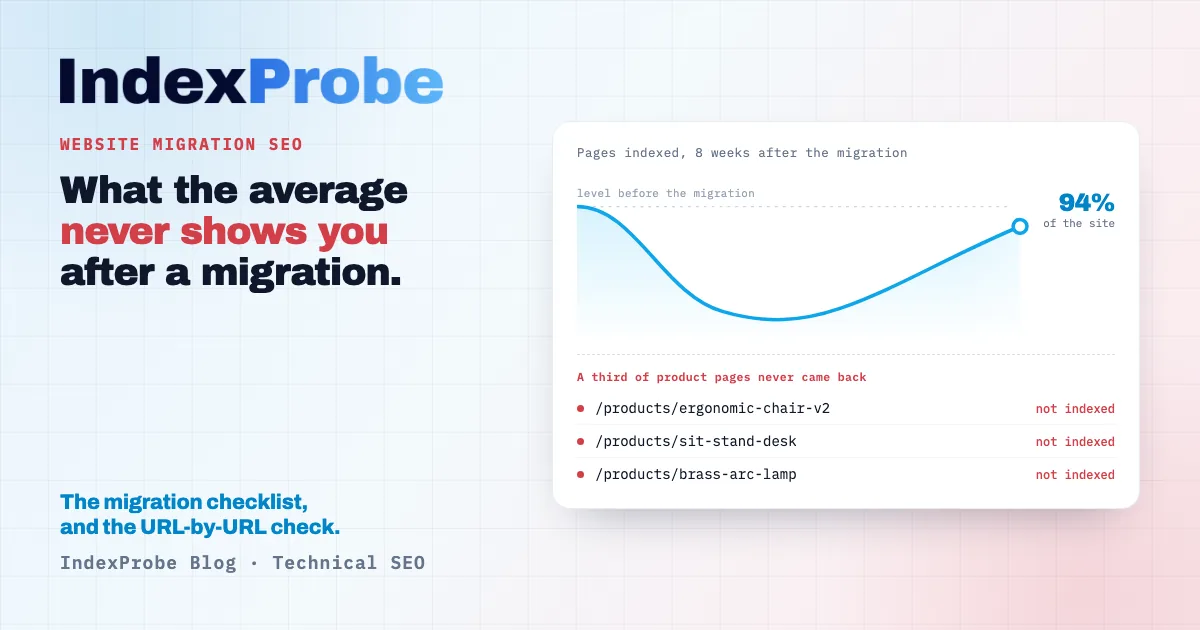
Traffic drops after launch, and the team waits. That is the right call for the first few days: Google needs time to recrawl the new URLs, reassess them and reindex them. The Page Indexing report in Google Search Console shows a line moving, you watch it climb back, and you feel reassured.
An aggregate line never tells you which pages were left behind, though. How many old URLs actually found their replacement? How many new pages are indexed three weeks after launch? And among those that are not, which ones did Google set aside, and for what reason?
That is usually where the best-prepared migrations lose the most ground.
What a successful website migration looks like
A successful website migration keeps the rankings and organic traffic of the previous site, then grows past them. It rests on three pillars: a complete inventory of the existing URLs, a redirect plan with no gaps and no chains, and a post-launch verification, page by page, of what Google actually kept from the new site.
Most checklists cover the third pillar in a single line, even though it is the only one that can confirm the first two worked.
Migration or redesign: the distinction Google makes
Google documents two separate operations in two separate pages: site moves with URL changes, and site moves without URL changes. The risks and the checks have almost nothing in common.
Without URL changes, the site gets a new design, new templates, sometimes new hosting, but the addresses stay the same. No redirect plan is required. The risk moves elsewhere: content trimmed when templates were rebuilt, tags lost along the way, internal linking reworked in a way that buries pages that used to sit two clicks from the homepage, staging blocks left in production. Google also documents an effect specific to hosting changes: a temporary drop in Googlebot's crawl rate right after launch, followed by a steady increase, sometimes past the previous level.
With URL changes, everything hinges on the mapping between old and new. The redirect plan becomes the centrepiece, and a new question appears: will Google keep your redirect target as the canonical address, or pick a different one? The two cases often combine, since a replatforming usually ships with a redesign.
Knowing which case you are in decides which checklist you run. A purely visual redesign that keeps its URLs does not need a three-hundred-line redirect plan; it needs proof that the content did not shrink and that crawling picked back up.
Why migrations lose traffic
A migration loses traffic when Google no longer finds, at the new addresses, what earned the old ones their rankings: the content, the links pointing at them, and the ability to crawl them quickly. The causes repeat from project to project, and they rank in a fairly stable order.
URLs missing from the redirect plan lead by a wide margin. Migrations are usually prepared from the sitemap or from a crawl of the site. Neither source is complete: old pages detached from internal linking, landing pages managed outside the CMS, parameter variants that still earned clicks. Those addresses appear on no list, and nobody notices they are gone until the traffic line dips.
Redirect chains come next. An old URL points at an intermediate address, which points at the new one. Every hop dilutes the signal and slows processing, and chains grow quietly when one migration follows another.
Trimmed content is subtler. The new page exists, it returns a 200, everything looks fine. But the rebuilt template dropped a section of copy, replaced a paragraph with an image, or moved the answers into an accordion loaded after the fact. Google recrawls, finds less substance, and the page slips. In extreme cases it flips to Soft 404: the server answers correctly, but Google judges the page empty.
A flattened or rebuilt architecture changes how deep pages sit. A product page that used to be two clicks from the homepage and now sits four clicks deep receives fewer internal links, so less attention. That change is invisible in a traffic report and very visible in a crawl report.
The recrawl delay itself explains part of the initial dip, and that part is normal. The difficulty is telling that expected dip apart from a real problem, which is exactly what the last part of this checklist is for.
Before launch: the URL inventory
The inventory is the complete list of addresses that exist today and deserve to be preserved. Three sources stack, and the third is the one teams forget.
The XML sitemap gives you what the site declares. It is the starting point, rarely the real perimeter: a sitemap reflects what the CMS knows how to generate, not what Google knows about.
A crawl of the site adds everything reachable through links. It picks up pages that exist without being declared, and it records the current depth of each page, which is useful later to confirm the new architecture did not bury anything.
The Search Console export delivers what the other two cannot: the URLs that actually earn clicks and impressions, including those in no sitemap and no longer served by any internal link. That is the list that matters. A page missing from the redirect plan only hurts if it was earning something, and Search Console is the only source that knows.
So the addresses to protect first are the ones earning clicks, not only the ones the sitemap declares. The two lists overlap heavily, and the gap between them holds most of the unpleasant surprises a migration produces.
Add the pages that receive external links, even without traffic: they carry value that disappears with them.
The redirect plan
The redirect plan maps every old URL to the address that best replaces it on the new site. One mapping per line, no intermediate hops, and an explicit decision for every page that will not be replaced.
Permanent redirects, not temporary ones. Google treats a 301 as a strong canonicalization signal: it says the address changed for good and the signal should transfer. A 302 says the opposite, a temporary move, and leaves the old address eligible for indexing. On a migration, 301 is the rule; 302 belongs to genuinely temporary switches. The old addresses will then show up under the Page with redirect status in the Page Indexing report, which is the expected behaviour.
To the closest equivalent, never to the homepage. Bulk-redirecting removed pages to the homepage is the most common shortcut and one of the most expensive. Google treats those redirects as soft 404s, since the destination does not answer the original intent. A page with no equivalent is better served by an honest 404, or a 410 if the removal is permanent.
No chains. If the old site already carried redirects, flatten them: the oldest address should point straight at the final destination, not at a hop that is itself redirected.
Include the assets. Images, PDFs, feeds and old sitemaps all have addresses. They are routinely missing from redirect plans even though some of them rank on their own.
💡 On a few hundred URLs, this work is manageable by hand. Past that, the question is no longer writing the plan but confirming it produced the intended result, address by address. That is exactly what a bulk index check is for.
Launch day
The order of operations matters as much as the operations themselves. Four things get checked within the hour that follows.
Remove the staging blocks. The robots.txt that disallowed everything, the noindex tag sitting on the whole template, the HTTP authentication protecting the staging site: all three exist to prevent indexing, and all three routinely survive into production. A migration blocked by its own robots.txt for a week costs far more than the migration itself. The Blocked by robots.txt status then shows up in the Page Indexing report, usually several days late.
Submit two sitemaps. This is Google's explicit recommendation and it is rarely applied: keep the old-URL sitemap alongside the new one for a while. The first should see its indexed count fall to zero, the second should see it rise. That crossover is the clearest measure of how the transfer is going. Redirect warnings on the old sitemap are normal and can be ignored.
Test a sample of redirects live, following the full chain and checking the status code actually returned, not just the page that renders.
Update internal links rather than relying on redirects. A redirect works, but an internal link pointing straight at the right address works better, and will not depend on how long the redirect plan survives.
After launch: verify what Google decided about your new URLs
This is the most decisive step in the checklist, and the one most guides cover in a line. The reason is simple: everything up to here can be checked from your own site. From here on, the only answer that counts comes from Google.
Are your new URLs indexed, and which ones are not?
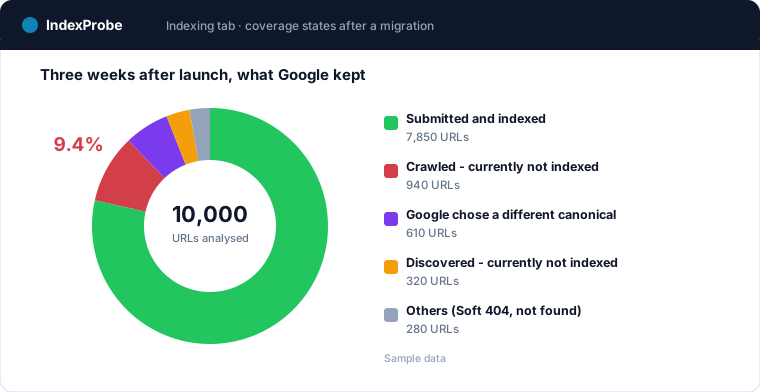
The Page Indexing report in Search Console gives aggregate counters, several days behind. It shows that the number of indexed pages moved. It does not tell you which of your new addresses failed, or why.
The URL Inspection tool does give the full official verdict: the exact status, the reason when the page is not indexed, the canonical Google selected, the date of Googlebot's last visit. It gives it one URL at a time. On a three-hundred-page migration, that verification gets tedious; on several thousand, it simply does not happen.
That gap is why a migration can be declared a success while part of the catalogue never came back into the index. The statuses that show up after a launch vary — among the most common, Crawled - currently not indexed on pages Google saw but did not keep, and the canonical statuses covered below.
This is precisely the work IndexProbe automates: Google's official verdict, for your entire list of new URLs, in a single analysis.
Did Google keep your redirect target as the canonical?
A 301 is a strong canonicalization signal, without guaranteeing the outcome. Google weighs several signals together — the redirect, declared canonical tags, internal and external links, content similarity — and settles on the address it considers most representative. That is not always the one you aimed for.
It happens in two configurations above all. When several old addresses redirect to the same new page, Google has to arbitrate between competing signals. And when the new page closely resembles another page on the new site — a product and its variant, a category and its filtered version — it may consolidate both under a single address that is not the one you planned.
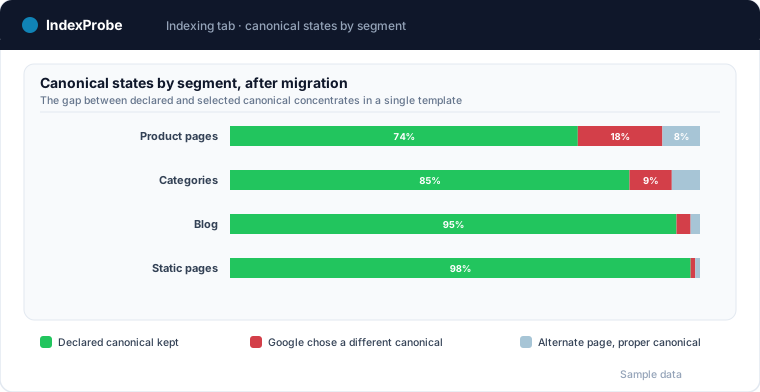
The outcome has a name in Search Console: Duplicate, Google chose different canonical than user. The redirected page lands somewhere, just not where you expected, and rankings follow the real destination rather than the intended one.
Checking it means comparing, for every new URL, the canonical you declare against the one Google actually kept. The gap between those two columns is the signal. Read segment by segment, it usually exposes a structural problem rather than a string of isolated cases: one template, one family of pages, one URL generation rule.
The crawl dip: normal, but for how long?
Google documents this explicitly for hosting changes: it is normal to see a temporary drop in crawl rate right after launch, followed by a steady increase over the following days, potentially to rates higher than before the move. The explanation lies in how crawl rate is determined: it rests on signals tied to the serving infrastructure, and those signals change when the hosting changes.
The practical consequence is that a crawl dip after a launch is not alarming in itself. What should raise a flag is the absence of a recovery in the days that follow, and spotting that requires having measured crawl rate both before and after.
Google's recommended method for this is reading server logs and looking for Googlebot. It is the most complete approach, and it assumes log access, infrastructure to process them and someone to read them — three conditions rarely met right when a team is coming out of a migration.
There is a shorter route: the crawl data Google exposes for every inspected URL, namely the date of Googlebot's last visit. Aggregated across a list of addresses, it gives a 30-day crawl rate, an average frequency and a distribution of gaps between visits. Tracked by segment, it shows whether the recovery is happening everywhere, or whether one family of pages is lagging. It is the same reasoning as crawl budget, applied at the moment it matters most.
Measuring the recovery: comparing before and after
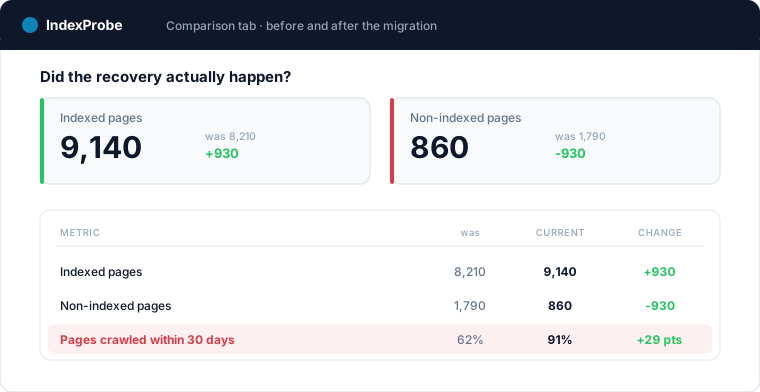
The only way to know whether a migration came back to its previous level is to compare two states of the same perimeter a few weeks apart. A traffic line will not do, since it mixes indexing, rankings and seasonality. What you need to compare are two indexing snapshots taken over the same list of URLs.
The comparison answers three questions a traffic chart leaves open. Is the number of indexed pages back to its pre-launch level? Did statuses move in the right direction, or did some pages go from indexed to not indexed? And is the recovery even, or concentrated in certain segments?
That segmented reading is often what unlocks a diagnosis. A site whose overall indexing is back to 94% can still have left a third of its product pages behind, and the average hides the gap until you look at it family by family.
The mistakes that cost the most
Redirecting every removed page to the homepage. The destination does not answer the original intent, Google treats the redirect as a soft 404, and the old page's signal is lost instead of transferred. An honest 404 is better, or a 410 for a permanent removal.
Cutting redirects too early. A redirect plan is not a few-week operation. Google keeps requesting old addresses long after launch, and external links pointing at them will never be updated. One year is a reasonable minimum; on pages that receive links, keeping them indefinitely is the safer choice.
Letting chains build up. Every hop adds a step, dilutes the signal and raises the odds that one link in the chain breaks.
Ignoring the 404s that appear after launch. A migration always produces a batch of unexpected missing addresses: stale internal links, badly rewritten URLs, moved assets. They surface in the Page Indexing report and are handled like any other 404 error in Search Console, except that after a migration they arrive by the hundred.
Waiting for traffic to return before checking indexing. Traffic is a lagging indicator: by the time the drop is clear in the reports, the pages involved have been out of the index for weeks, and fixing them adds to that delay. Each page's indexing status, by contrast, can be read within days of the launch.
Frequently asked questions
How long does traffic drop after a website migration?
A dip lasting a few days to a few weeks is normal while Google recrawls the new addresses, processes the redirects and reassesses the pages. The size of it depends on the site and on how many URLs changed. Past six to eight weeks with no recovery, this is no longer the normal delay but a problem to diagnose, and the first thing to check is whether the new pages are indexed, not where they rank.
Should I use 301 or 302 redirects for a migration?
Use 301s. Google treats a permanent redirect as a strong canonicalization signal, which is exactly the intent during a migration: the address changed for good. A 302 signals a temporary move and leaves the old address eligible for indexing. It is only justified for a genuinely temporary switch, such as a test.
Can I redirect all old pages to the homepage?
No, and it is one of the most expensive shortcuts. When the destination does not match the intent of the original page, Google treats the redirect as a soft 404 and the old page's signal does not transfer. Each old address is better pointed at its closest equivalent, and the ones without an equivalent are better served by a 404, or a 410 if the removal is permanent.
How long should redirects be kept?
At least a year. Google keeps requesting old addresses well after the move, and the external links pointing at them will never be updated by whoever published them. On pages that receive valuable inbound links, keeping the redirects indefinitely is the better call: the technical cost is negligible next to the signal they carry.
Should I keep the old URLs when I can?
Yes, when the redesign is visual or functional and nothing serious requires changing the URL structure. A migration without URL changes removes the single biggest risk, the incomplete redirect plan. The checks then focus on content, internal linking and crawl recovery.
How do I know whether a migration worked?
By comparing indexing before and after across the same set of URLs, rather than watching the traffic line. Three indicators are enough: whether the number of indexed pages is back to its previous level, whether statuses moved in the right direction, and whether the recovery is even across site segments. A comfortable average can hide an entire family of pages still out of the index.
Check your migration page by page
A migration takes weeks of work, and its outcome depends on what Google kept from the new site. IndexProbe queries the official Search Console API for the list of URLs you provide and returns, for every page, the indexing status, the non-indexing reason, the canonical Google actually selected and the date of Googlebot's last visit. The Comparison view then measures the gap between two analyses, so you know whether the recovery happened, and where it did not.
Check your new site's indexing — free 10-day trial, no credit card.