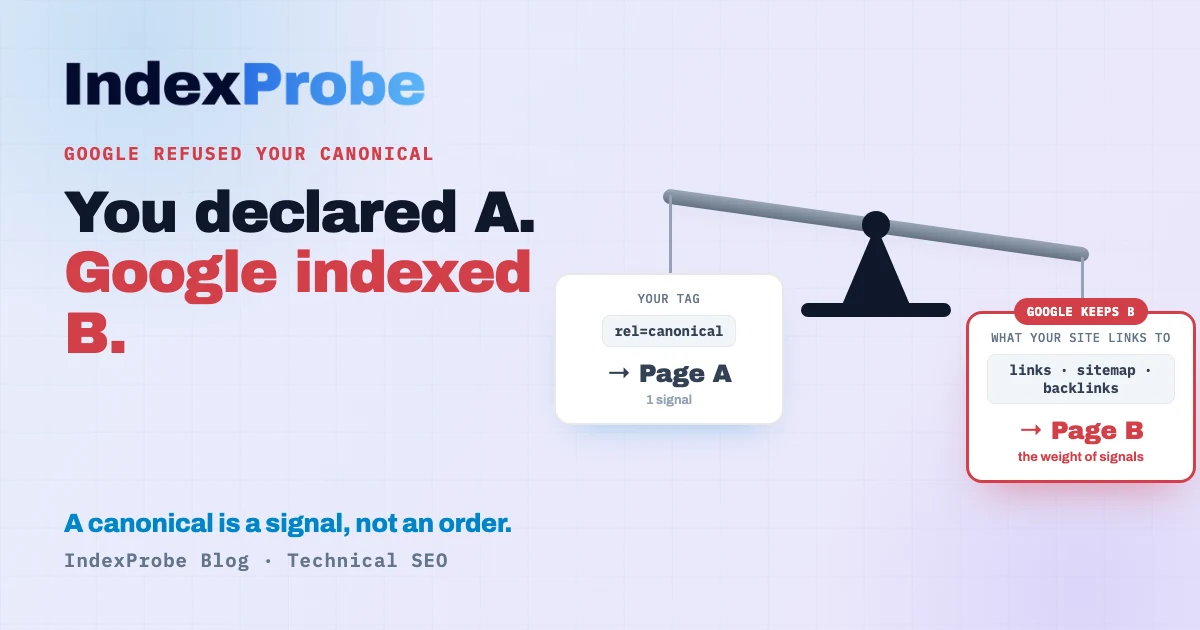
You open the Page Indexing report in Search Console and one line stops you: Duplicate, Google chose different canonical than user. You declared a canonical tag, by the book. Google read it, then overrode it, and indexed a different page instead.
The instinct is to figure out how to force yours through. That's rarely the right first move.
This status means one specific thing: you declared URL A as canonical, but Google picked URL B and indexed that instead. So the real first question isn't "how do I force A?" It's "is Google right?" Sometimes its canonical is better than yours, and you're better off adopting it. Sometimes it's wrong, and that tells you your own signals contradict each other. We'll cover how to decide, how to realign, and above all how to find the affected pages without inspecting them one by one.
What this status actually means
When Google crawls a page, it decides which URL best represents a given piece of content. That's its chosen canonical. On your side, you state your preference with a <link rel="canonical" href="…"> tag. That's your declared canonical.
This status appears when the two disagree. You declare A, Google picks B. In practice:
- Page A, the one you wanted indexed, is not indexed under its own URL.
- Page B, the one Google picked, is what shows up in the results.
- Page A's signals (including its links) are consolidated toward B, not toward the URL you designated.
That's exactly what sets it apart from the neighboring status "Alternate page with proper canonical tag," where Google follows your tag. Here, it rejects it. This isn't a display glitch or a Search Console error: it's a disagreement. Google weighed your signals and concluded a different page was the better canonical.
Which leads to the only question worth starting with.
The first question: is Google right?
We almost always skip this step. We assume from the outset that Google is wrong and that we need to force our choice through. That's a mistake, because in a good share of cases, Google's canonical is the correct one.
Case 1: Google's canonical is better, so adopt it
Google picks B because its signals converge on B: it's the page your visitors share, the one your internal links point to, the one earning external links. If B really is the better version (cleaner URL, more complete content, the most-linked page), the right move isn't to fight it. It's to align with Google: make B your declared canonical, update your internal links and sitemap to point to B, and the disagreement disappears.
Forcing A against Google's judgment, in this case, means rowing against your own signals. You'll spend time on it for a fragile result.
Case 2: Google is wrong, your signals contradict each other
The other case is real: A genuinely is the page that should rank, but Google picked B because your site is sending it mixed messages. You declare A as canonical, yet most of your internal links point to B, your sitemap lists B, your redirects lead to B. Google is simply following the majority of the signals. Your tag says "A," everything else on your site says "B," so it settles on B.
Here, the fix isn't to shout louder with the canonical tag. It's to realign every signal onto A. We'll get there once you understand why Google weighs them the way it does.
Why Google ignores your canonical: the signal hierarchy
The root misunderstanding is treating a canonical tag as an order. It isn't one. Google is explicit: rel="canonical" is one signal among several, not a binding directive. Google weighs the whole set of clues, and your tag is just one vote in the tally.
The most common cause: the chosen page holds more PageRank
This is the part almost nobody explains. Very often, Google picks B because B receives more links than A, so it concentrates more PageRank. Your internal links, your sitemap, your backlinks all "vote" for B. To Google, a heavily linked page is a stronger canonical candidate than a page only a tag points to.
The logic is the same as PageRank in general: the PageRank a page passes on is split, in a weighted way, across its outbound links. The more internal links B receives, the more it weighs. If your internal linking sends most of its strength to B while your tag declares A, you have a strong signal against a weak one. Google follows the strong one.
There is no documented numeric threshold from Google: you don't reason in percentage of links, but in the relative weight of signals. The takeaway is simple: your declared canonical has to be consistent with the page your site actually links to most. This often plays out on faceted pages: the canonical declared on a filter combination gets ignored in favor of the parent category.
The other documented causes
Google's documentation lists several other triggers:
- Misconfigured
hreflangannotations. On a multilingual site, poorly linked language versions blur the relationship between pages and skew the canonical choice. - Canonical tag mishandled by the CMS or a plugin. Some themes or extensions auto-generate canonicals pointing to an unwanted URL (the homepage, a parent template…).
- Inconsistent redirects. A redirect chain that leads to B contradicts a tag that declares A.
- Misconfigured servers. Hosting that answers for several domains, or multiple servers serving identical pages, confuses canonicalization.
- Syndicated or copied content. If your content is republished elsewhere without an indexing block, Google may keep the external version.
The common thread across all these causes: somewhere on your site, something says the opposite of your canonical tag. The job is to find where.
This status versus the two other canonical statuses in GSC
Three Search Console statuses talk about canonicals, and people mix them up constantly. The difference comes down to two questions: did you declare a canonical, and did Google follow it?
| GSC status | Did you declare a canonical? | Did Google follow it? | Worth watching? |
|---|---|---|---|
| Duplicate without user-selected canonical | No | Google picked one for you | Yes, sometimes |
| Alternate page with proper canonical tag | Yes | Yes, it respected it | Rarely |
| Duplicate, Google chose a different canonical | Yes | No, it rejected it | Yes, most often |
The status in this article is the most active of the three. In the first, you let Google decide on its own: see our article on duplicate without a user-selected canonical. In the second, Google agrees with you and there's almost nothing to do: that's alternate page with proper canonical tag. Here, you designated a canonical and Google overruled it: it's the only one of the three with a genuine disagreement to settle.
How to fix it: realign your signals onto your canonical
You've settled case 2: A really is the right page, and Google got it wrong because your signals contradict it. The fix is to get them all to agree on A, in this order:
- Check page A's canonical tag. It should be self-referencing: A declares A as canonical, with no mismatch in protocol (
https), domain (wwwor not), or trailing slash. - Audit your internal links. Count the ones pointing to A versus B. If B gets far more, that's your main signal leak. Point your internal links to A.
- Fix the sitemap. It should list A, not B. One version per piece of content.
- Trace your redirects. No chain should lead to B if A is the page to index.
- Check
hreflangif the site is multilingual: each version must reference itself correctly. - Request reindexing in Search Console, then give Google time to reprocess. The status won't change instantly: it takes a fresh Googlebot crawl.
The logic is always the same: your tag and your internal linking have to say the same thing. As long as they contradict each other, Google will keep following the strongest signal.
The real problem: finding the affected pages at scale
Understanding the status takes five minutes. Finding it on the right pages is another matter, and this is where Search Console hits its limit. Its URL Inspection tool handles one URL at a time: to learn, for a given page, which canonical you declared and which one Google picked, you inspect it, read it, move to the next. On a handful of pages, that's workable. On hundreds, a regular audit becomes impractical, and that's exactly what stops you from catching swallowed pages in time.
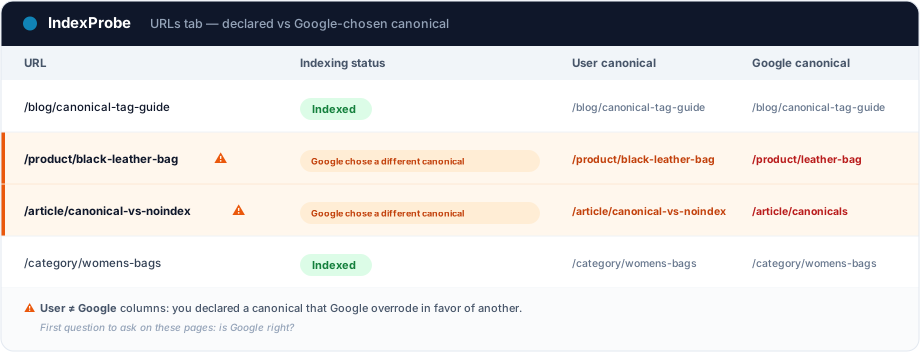
That's the wall IndexProbe breaks down. IndexProbe is the bulk version of Google's URL Inspection tool: it queries the official Search Console API to inspect, in a single analysis, the list of URLs you give it (CSV import, sitemap, paste). For each page, it shows its indexing status, your declared canonical against the canonical Google chose, the URL segment, and the internal links it receives.
What you get out of it depends on the list you bring in. IndexProbe doesn't crawl your site to discover URLs: it inspects the ones you give it, and only those.
- A selection of strategic pages (your key pages, your sitemap of pages meant to be indexed). The reading that matters: the user canonical vs Google canonical column. Any page you wanted indexed that Google canonicalized elsewhere surfaces immediately, without assuming anything about the rest of the site.
- A full export of your URLs (your entire sitemap, a crawl export…). Two more readings open up: the segmentation by page type, showing which URL patterns concentrate the disagreement (provided those URLs are in your export), and the inbound internal links, revealing which page your linking actually "votes" for.
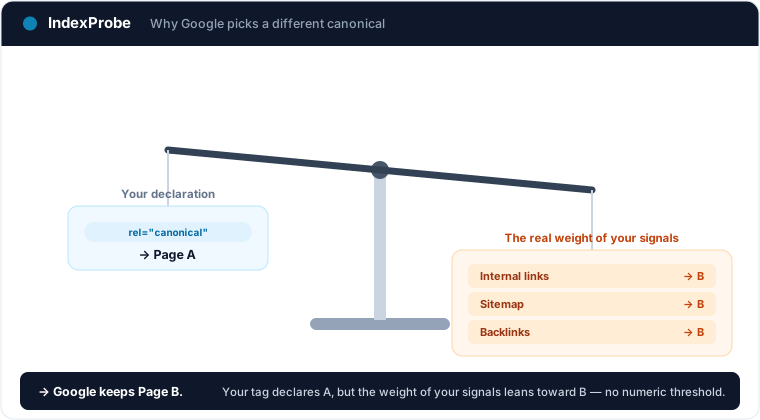
That's exactly the triage IndexProbe is built to make possible: seeing at a glance which pages disagree with Google, and which ones your own linking contradicts.
💡 Want to know which URLs Google overrode your canonical on, and which page your internal links point to? IndexProbe inspects your URL list and gives you the answer in one analysis. Try IndexProbe in early access →
Confirm the fix worked
After realigning your signals, you need to confirm Google changed its mind. Re-inspect the affected URLs and compare two analyses over time: the pages you wanted to recover should flip to indexed under their own URL, and the canonical Google chose should now match the one you declared.
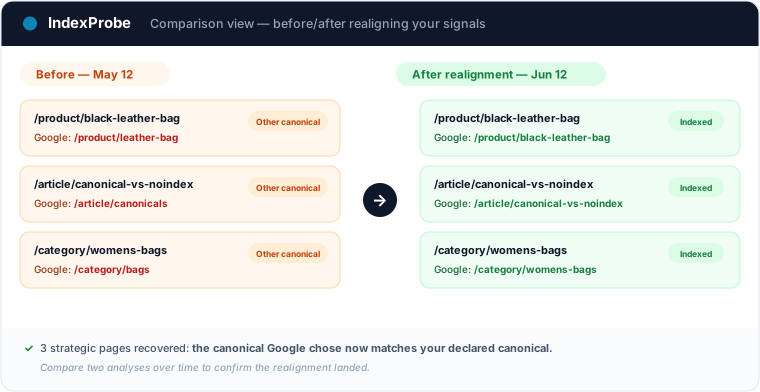
That's the full loop: spot the pages in disagreement, understand which signal contradicts your tag, realign, confirm.
This status's favorite playground is the catalog: sizes, colors, variations — Google picks one canonical per variant group, not always yours. The e-commerce indexing page shows how to isolate those arbitrations in one filter, across the whole catalog.
Frequently asked questions
Is "Duplicate, Google chose different canonical than user" an error? Not necessarily. It's a disagreement: you declared a canonical, Google picked another. The first question is whether Google is right. Often its canonical is the better one and you're better off adopting it. It's only a problem to fix when the page you wanted indexed is swallowed by mistake.
Why does Google ignore my canonical tag? Because a canonical tag is a signal, not an order. If your other signals (internal links, sitemap, redirects, backlinks) point mostly to another page, Google follows that majority. The most common cause: the page it picks receives more links, so it holds more PageRank than the one you declared.
How long before Google reconsiders its canonical? There's no guaranteed timeframe. The status only changes on Googlebot's next crawl of the affected URLs, once your signals are realigned. It can take anywhere from a few days to several weeks depending on how often your site is crawled. A reindexing request in Search Console can speed things up.
Should I delete the page Google overruled? Not necessarily. If it's a legitimate duplicate, let it canonicalize to the right version. If it's a strategic page you wanted indexed, don't delete it: realign your signals so Google keeps your canonical. Our guide on why duplicate content is an SEO issue sets this case in the wider duplicate picture.
What's the difference with "Duplicate without user-selected canonical"? In this status, you declared a canonical and Google rejected it. In duplicate without user-selected canonical, you declared nothing and Google chose on its own. The first reflects a disagreement; the second, the absence of any instruction from you.
How do I check this status across a large number of URLs? Search Console's inspection tool handles one URL at a time. To triage at scale, a tool like IndexProbe inspects the URL list you provide (CSV, sitemap) and shows, for each one, the official status, the canonical you declared, the canonical Google chose, and the internal links it receives.
Stop inspecting your canonicals one URL at a time. IndexProbe plugs into the official Search Console API and inspects your URL list in a single analysis: indexing status, user canonical against Google's canonical, segment, internal links. Enough to spot in minutes the pages where Google overrode your choice, understand which signal contradicts it, and confirm your fix landed.