Duplicate Without User-Selected Canonical: Causes, Fixes, and What Google Does Next
You open Google Search Console's indexing report, filter by "Not indexed," and find it: "Duplicate without user-selected canonical." Dozens of URLs. Maybe hundreds.
The name tells you what happened — but not what to do about it.
What this error actually means
"Duplicate without user-selected canonical" means Google found two or more URLs with similar enough content to group them as duplicates — and you hadn't told it which one to index. So it chose one itself.
That's the whole error in one sentence. Google picked a canonical because you didn't.
This isn't necessarily a disaster. Google usually picks the right URL. But "usually" isn't good enough when it matters: when the wrong version gets indexed, when link equity splits across variants, or when you're running a large site with hundreds of affected pages and no visibility into what Google actually chose.
The error you're probably confusing this with
GSC has a near-identical error name that means something very different:
| Error | What happened |
|---|---|
| Duplicate without user-selected canonical | No canonical tag declared. Google chose for you. |
| Duplicate, Google chose different canonical than user | You declared a canonical. Google ignored it and indexed a different URL. |
The first is fixed by adding a canonical. The second signals a deeper conflict — Google has a reason it disagrees with your signal, and adding another canonical won't help until you find that reason. Most SEO articles treat these as the same problem. They're not.
How Google detects duplicate pages
Google doesn't compare URLs character by character. It builds a semantic fingerprint of each page's content. Two URLs with different paths but identical (or near-identical) content get grouped as duplicates.
The signals it weighs:
- Text content — the primary signal. Same product descriptions, same article body, same headings = duplicates.
- Internal links — if your own site links inconsistently to
/product/and/product(no trailing slash), you're reinforcing the duplicate signal. - XML sitemap — listing both versions in your sitemap explicitly tells Google both exist. It will crawl both.
- Missing redirects — a site accessible on both HTTP and HTTPS without a redirect creates two indexable versions of every page.
Once Google groups URLs into a duplicate cluster, it picks one as canonical. The others show up in GSC under the status we're talking about.
The 6 most common causes
This error appears when Google finds two URLs with the same content and no canonical tag to guide it. In most cases, it's a technical configuration issue — trailing slashes, protocol variants, tracking parameters — not intentional duplicate content. Multiple causes can coexist on the same site.
1. Trailing slash: /page/ vs /page
The most common cause on WordPress sites. /about/ and /about are technically different URLs. If your server responds to both without redirecting one to the other, Google sees two pages with the same content.
Fix: pick a convention (with or without trailing slash), redirect the other consistently, and audit your internal links for mixed usage.
2. HTTP vs HTTPS
If your site is HTTPS but the HTTP version still returns a 200, Google may crawl both. A 301 redirect from all HTTP to HTTPS should exist. If you migrated recently, check for residual HTTP URLs in your sitemap or internal links that bypass the redirect.
Quick check: type http://yoursite.com in a browser with redirects disabled. If you get a page instead of a redirect, fix it.
3. www vs non-www
www.yoursite.com and yoursite.com are different domains from Google's perspective. One must permanently redirect to the other — at the server or CDN level, before any other processing.
4. URL parameters
UTM parameters (?utm_source=newsletter), session IDs (?sessionid=abc123), sort and filter parameters (?sort=price&order=asc) — all create unique URLs with identical content.
An e-commerce site with 500 products and 10 filter combinations generates 5,000 distinct URLs pointing to the same pages. Google will crawl a significant portion before recognizing they're duplicates.
The standard fix: canonical tags pointing to the clean URL (without parameters). On some CMS platforms, you can also configure parameter handling directly — though Google's URL Parameters tool was deprecated and only applies to older accounts.
5. Pagination
/blog/page/2/, /blog/?page=2, /blog/2/ — three common pagination patterns. If your site changed its structure at some point, or if multiple plugins handle pagination differently, you can end up with both formats accessible simultaneously.
Note: paginated pages should not all point to page 1 as canonical — that's a common mistake. Each paginated page is a distinct URL with unique content. What matters is consistency in how those URLs are formed.
6. Session and tracking variants
Legacy e-commerce platforms often append session identifiers automatically: ?PHPSESSID=... or ?sid=... added to every URL for unauthenticated users. Every session creates a unique URL. Google can index thousands of these variants before you notice.
How to identify all affected URLs — not one by one
GSC's indexing report tells you pages have this status, but extracting a complete list — and knowing which canonical Google chose for each one — isn't straightforward from the interface.
Two options.
Google's URL Inspection API lets you query the exact indexation status of a specific URL: what Google has indexed, which canonical it chose, when it last crawled the page. It's the most accurate source because it returns the same data you'd see typing a URL into GSC manually. The catch: 2,000 requests per day per GSC property. On a 50,000-URL site, that's 25 days of analysis.
IndexProbe solves the quota problem. It connects to your GSC property, distributes requests automatically across multiple days, and gives you — for every URL — its indexation status, the canonical Google chose, and the last crawl date. Filter by status and export all "duplicate without user-selected canonical" URLs at once, then fix them in bulk.
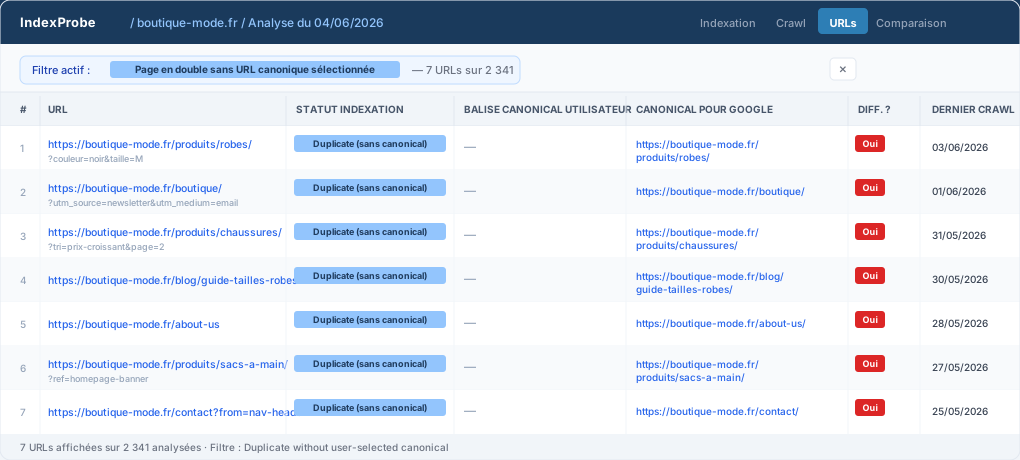
IndexProbe — URLs tab, filtered on "Duplicate without user-selected canonical." The "User Canonical Tag" column is empty (no canonical declared on the page), while "Google Canonical" shows what Googlebot picked.
For a handful of URLs, GSC's URL Inspection tool is fine. For anything beyond that, manual inspection isn't a strategy.
Which fix to use
The right fix depends on the nature of the duplicate. If the duplicate URL shouldn't exist at all (HTTP version of an HTTPS site, URL with a session parameter), use a 301 redirect. If both URLs are legitimate but you prefer one, use a canonical tag. If the page shouldn't be indexed but needs to stay accessible, use noindex — never both noindex and canonical on the same page.
| Situation | Recommended fix |
|---|---|
| Two identical URLs, one is a technical artifact | 301 redirect from the artifact to the real URL |
Two URL formats for the same paginated page (e.g., /page/2/ vs /?page=2) |
301 redirect to the canonical format, or self-referencing canonical to that format — never point to page 1 |
| Page that should stay accessible but not appear in search | noindex attribute |
| Two low-value pages with near-identical content | Consolidate — merge content, redirect one to the other |
| URL parameters that don't change page content | Canonical pointing to the parameter-free URL |
Option 1 — rel="canonical"
Google's recommended fix in most cases. Add it to the <head> of every duplicate page:
<link rel="canonical" href="https://www.yoursite.com/the-right-url/" />
Rules that matter:
- Always use absolute URLs (not relative paths)
- One canonical tag per page
- The canonical must point to a URL that returns a 200 (not a redirect, not a 404)
- It must be in
<head>, not<body>
The canonical is a signal, not a directive. Google can ignore it if it considers the signal incorrect or contradicted by other signals. If yours gets ignored, look for conflicting signals: internal links pointing to both versions, both in the sitemap, mixed HTTP/HTTPS references.
Option 2 — 301 redirect
Use this when the duplicate URL has no reason to exist at all. It's cleaner than a canonical: it consolidates PageRank, eliminates the duplicate permanently, and gives Google nothing to choose between.
The one caveat: if external links point to the redirected version, a tiny fraction of link value is lost at each hop. In practice, for simple A → B redirects, this is negligible.
Option 3 — noindex
Use sparingly. noindex removes the page from Google's index but Googlebot still crawls it to follow outbound links. It's appropriate for filter and sort pages you want users to access but don't want appearing in search results.
Don't combine noindex with canonical. They contradict each other. The canonical says "this page is a duplicate of X, index X." The noindex says "don't index this page." Google tends to honor the noindex — which may leave neither version indexed as intended. Pick one.
Option 4 — Content consolidation
Sometimes the right move is merging two pages into one. If you have two articles on overlapping topics, or two product pages for near-identical variants, consolidating into a single, stronger page typically beats maintaining two thin ones.
When NOT to add a canonical
This gets skipped in most guides. Internal search results pages, cart pages, order confirmation pages showing up in this report — don't add a canonical pointing to the homepage or any other page. These should have noindex. A canonical to the homepage creates confusion, not clarity.
Same for multilingual sites: don't point /fr/page/ to /en/page/ as canonical thinking it's "the real one." If your hreflang is set up correctly, each language version should self-reference as canonical.
Common mistakes after you fix it
Canonical pointing to a redirect
The most common post-migration mistake. You set a canonical to http://yoursite.com/page/, but that URL now redirects to https://www.yoursite.com/page/. Google follows the redirect, finds the right page, but your signal is diluted. Always update canonicals to point to the final destination URL.
Canonical chains
Page A canonicals to Page B. Page B canonicals to Page C. Google follows the chain but with less confidence. If you find chains when auditing, flatten them: A should point directly to C.
noindex + canonical on the same page
Covered above, but worth repeating because it's that common: these two signals fight each other. Noindex wins — and may leave your intended canonical page's authority in limbo. Use one or the other.
Canonical in the <body>
Ignored by Google. It must be in <head>. Some page builders and themes move head elements to the body during rendering — verify with View Source, not just your CMS settings.
Relative URL instead of absolute
<!-- Wrong -->
<link rel="canonical" href="/page/" />

<!-- Right -->
<link rel="canonical" href="https://www.yoursite.com/page/" />
Relative URLs can be interpreted differently depending on context. Always use the full URL with protocol and domain.
Special cases
E-commerce: filters, sorting, faceted navigation
This is the most complex scenario. A category page with color, size, and brand filters can generate thousands of unique URLs: /shoes/?color=black&size=42&brand=nike. Each combination is a distinct URL.
Standard approach: every filtered URL declares a canonical pointing to the clean category URL (/shoes/). For this to work, filtered pages should also be excluded from your sitemap and their pagination links should use nofollow where appropriate.
Shopify automatically adds canonicals on filtered collection pages — but UTM parameters added by your marketing campaigns aren't covered. WooCommerce requires plugin-level configuration (Yoast SEO or Rank Math) to handle this correctly. Webflow handles parameter filtering through site settings but requires testing per implementation.
Multilingual sites: canonical and hreflang do different things
A common source of confusion. Hreflang tells Google what language versions exist for a page. Canonical tells it which one to index among duplicates.
On a multilingual site, each language version should self-reference as canonical (/fr/page/ canonicals to /fr/page/), while its hreflang tags point to all other language versions. If you point /fr/page/ canonical to /en/page/ thinking English is "the real version," you're telling Google the French page is a duplicate of the English one — and French-speaking users will stop seeing it in search results.
Next.js and headless frameworks
On Next.js (App Router), set the canonical in generateMetadata:
export const metadata: Metadata = {
  alternates: {
    canonical: 'https://www.yoursite.com/page/',
  },
}
Modern frameworks let you generate canonicals dynamically from the URL itself, which eliminates manual errors at scale. The risk: if your app appends query strings for internal state management (sort order, UI state, A/B test variants), those parameters can end up in the canonical if not explicitly stripped. Audit your rendered HTML — not just your code.
Also check that next.config.js doesn't create unintended route prefixes or language variants that generate duplicate routes without matching canonicals.
WordPress
Yoast SEO and Rank Math both auto-generate canonicals per page, and they're usually correct. Problems surface when:
- Multiple SEO plugins are active simultaneously (each may output its own canonical)
- Your theme hardcodes a canonical in its template, overriding the plugin
- You changed permalink structure without redirecting old URLs
Always verify what Google actually receives with View Source, not your plugin dashboard. Search for rel="canonical" — if you find more than one, fix it.
How long until Google processes your fix
This is the question everyone has and no article answers. The honest answer: it depends.
Well-crawled sites (established domain, solid backlink profile, updated XML sitemap): fixes typically show up in GSC 1–4 weeks after implementation. Google recrawls the affected pages, updates its index, and the report reflects it.
Lightly crawled sites (new domain, few backlinks, low crawl frequency): expect 4–8 weeks, sometimes longer. You can accelerate this by submitting corrected URLs via GSC's URL Inspection tool ("Request indexing") — up to 10 URLs per day, so prioritize your most important pages.
What not to expect: errors disappearing from the report in a few days. GSC has its own display lag — even after Google has recrawled and updated its index, the report can take additional days to reflect the real state.
How to verify it worked:
- In GSC, go to URL Inspection and enter a corrected URL
- Check "User-declared canonical" and "Google-selected canonical" — they should match
- If they don't match yet and the last crawl predates your fix, wait and re-check after the next crawl
If Google is still ignoring your canonical after 6 weeks, look for contradicting signals: both URL versions in the sitemap, internal links pointing to both, mixed HTTP/HTTPS references, or a redirect chain between the canonical and the destination.
Frequently asked questions
What is a canonical URL?
A canonical tag (rel="canonical") is an HTML element you place in a page's <head> to tell Google which version to index when multiple URLs share similar content. For example, /product/, /product, and /product?ref=newsletter are three distinct URLs — the canonical designates which is "the real one" and concentrates SEO value on it. Without it, Google decides. That's exactly what this error reports.
Does this error directly hurt my rankings?
Not directly — it's not a manual penalty. The real impact is indirect: Google may index a URL variant you didn't intend, link equity can split across multiple versions of the same URL, and on sites with hundreds of affected pages, the cumulative effect can suppress rankings meaningfully. The bigger the site, the more this matters.
Should I fix all affected URLs at once?
No. Prioritize high-traffic and high-value pages first: pages generating organic traffic, landing pages linked from paid campaigns, pages with external backlinks. Low-value pages (date archives, tag pages, UTM variants) can be handled in bulk through server-level redirects or programmatic canonicals.
Can Google ignore my canonical tag?
Yes. Google treats the canonical as a strong signal, not an absolute directive (unlike noindex). If it judges your canonical incorrect — because it points to a redirected URL, or because the two pages' content is too different to be duplicates — it may override it. That's what "Duplicate, Google chose different canonical than user" means. If you're seeing that error after adding a canonical, you have a different problem to solve.
Is there a normal number of pages with this status?
On a well-managed site, you should aim for zero on important pages. A few URLs with this status on secondary pages isn't alarming. If 20% or more of your site appears in this report, you have a structural issue — not a page-by-page problem — and fixing it at the source (parameter handling, redirect rules, CMS configuration) will be far more efficient than adding canonicals one by one.
Audit your full site, not just one URL at a time
GSC surfaces this error but doesn't make it easy to extract the complete list — or to see, at a glance, what Google chose as the canonical for each affected URL.
That's what IndexProbe is for. It connects to your GSC property, runs the URL Inspection API across your entire site while respecting the 2,000 URLs/day/GSC property quota, and surfaces a filterable table of every URL with its actual indexation status, Google's chosen canonical, last crawl date, and whether Google's canonical differs from yours.
Filter to "duplicate without user-selected canonical," export the list, fix in bulk. Then track the change when you run the next analysis.