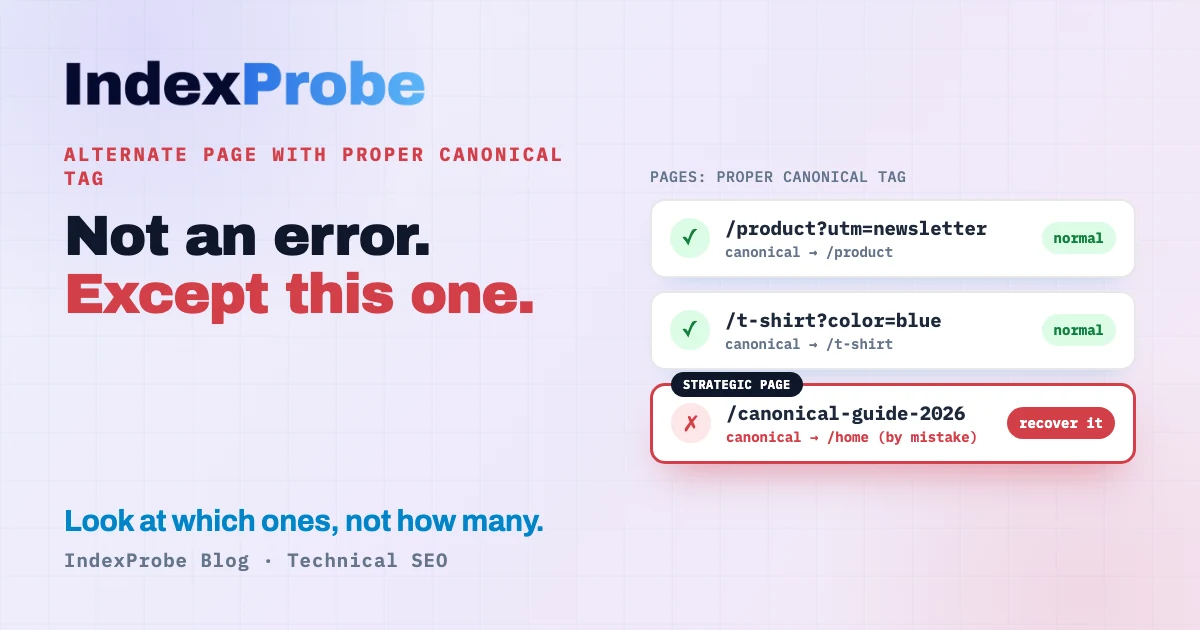
Your page got crawled. Google chose not to index it under its own URL, because the page points somewhere else as canonical. That's all alternate page with proper canonical tag means. Most of the time, it's working exactly as intended. Once in a while, it's quietly hiding a page you wanted ranked.
The instinct is to fix it. That's rarely the right first move.
In the vast majority of cases, this status is good news: Google is confirming it followed your canonical tag. Occasionally it hides a real problem, an important page swallowed by mistake. And beyond those two, it raises a question almost nobody asks: do these pages even need to exist on your site?
We'll cover all three. And, more importantly, how to tell which of your URLs are actually affected, because that's the hard part, not understanding the status.
What does "alternate page with proper canonical tag" mean?
It means Google crawled the URL, saw that it names another page as canonical through its rel="canonical" tag, and honored that choice. The page isn't indexed under its own URL; its canonical version is indexed in its place. In nearly every case, this is not an error.
Quick refresher. A canonical tag (<link rel="canonical" href="…">) tells Google: among several URLs with identical or near-identical content, this is the one I consider the main version. When Google agrees with you, it indexes the canonical version and marks the others "alternate page with proper canonical tag."
The key word is proper. Google is telling you the tag is there, understood, and followed. The signals from these pages, including links, are then consolidated onto the canonical version: per Google's own documentation, the signals from duplicate URLs are consolidated into the preferred URL. So this isn't a "lost" page, it's a page whose role was correctly handed to another.
That's the opposite of an error. And yet you'll read everywhere that you need to "fix the error." In most cases that's wrong, and it's the source of nearly every bad decision made about this status.
Why this status shows up: the normal causes
This status appears whenever several URLs serve the same content and point, through their canonical tag, to a single version. That's how a well-configured site behaves. In nearly all cases these alternate URLs are generated automatically, and it's entirely expected.
The most common cases:
- URL parameters and UTMs.
/trail-running-shoesand/trail-running-shoes?utm_source=newsletterserve the same page. The clean version is canonical; the tagged one is an "alternate." - E-commerce variants. A product in several colors or sizes:
/tshirt?color=blue,/tshirt?color=redpoint to/tshirt. On a catalog, that adds up to thousands of URLs fast. - Filters and sorting. Faceted navigation URLs (
?sort=price,?filter=brand) are variants of a category page. - HTTP/HTTPS, www, trailing slash.
http://,https://, with or withoutwww, with or without a trailing/: each is a version that canonicalizes to one. - AMP, print versions, RSS feeds. Every alternate format points to the main page.
- Pagination. Depending on your setup, paginated pages may name a main URL.
What they all share: the canonical is doing its job, Google respects it, and you have nothing to do. The real question is never how to clear this status in bulk. It's whether any of these URLs shouldn't be there.
Is it a problem? Look at which, not how many
There's no published threshold from Google. The official guidance is qualitative: it's normal, act only if a page you wanted indexed is affected, or if the canonical Google kept is the wrong one. No percentage makes this status a problem on its own.
You'll still read that a "growing number" of these pages is worrying. Nobody ever says above what number. For good reason: there is no number.
The count isn't the right lens anyway. A large store can show thousands of pages in this status and be perfectly healthy, those are its product variants, legitimate duplicates. On the other hand, a single affected page can be a real problem, if it's a page you wanted indexed. This status belongs to the duplicate family, which our guide on why duplicate content is an SEO issue covers as a whole.
So what matters isn't how many pages carry the status, but which ones. Two questions:
- Is a page you wanted indexed in the list? That's the case to fix: Google canonicalized it elsewhere, so it won't show up on its own in results.
- Do these pages even need to exist and be linked? That's the architecture question, for the ones that are genuine duplicates.
Let's take them in order.
The case to fix: an important page swallowed by mistake
The real problem is when a unique, important page ends up marked "alternate page with proper canonical tag." It names another page as canonical, Google followed it, so it's never indexed under its own URL. You lose all of its ranking potential, often without noticing.
How does it happen? Almost always a technical accident:
- A canonical tag hardcoded in a template that always points to the homepage or a parent category.
- A CMS or theme misconfigured to auto-canonicalize distinct pages onto a shared template.
- Conflicting signals (internal links, sitemap) that push Google to keep a different version as canonical than the one you wanted.
Symptoms: an important page missing from the index, a traffic drop on one specific URL, a page you just published that "won't stick."
The fix is simple once you've diagnosed it: point the page's canonical tag at itself (self-referencing canonical), make sure your internal links and sitemap name that URL, then give Google time to reprocess it. Google specifically recommends linking internally to the URL you consider canonical, to help it understand your preference.
The whole challenge, of course, is finding these pages among hundreds of perfectly normal duplicates. We'll get to that below.
The real question: do these pages need to exist?
This question is about a whole type of pages, not a single page: to decide the fate of a family of URLs (facets, sorting, tags…), you have to look at it as a whole, not one URL at a time. For the ones that are genuine duplicates (the canonical is correct, nothing to "fix"), the question becomes: do these URLs need to exist, and should your internal links still point to them? If an entire family of non-strategic pages carries a lot of weight, you may be better off taking it out of your structure.
Two angles to decide.
Crawl budget
Let's be honest, because a lot of articles overstate this. Google is clear: if your site doesn't have a large number of rapidly changing pages, or if your pages tend to get crawled the same day they're published, you don't need to worry about crawl budget. In practice it becomes a concern for sites with 10,000+ rapidly changing pages, or very large sites (1M+ pages).
For those sites, it's real: Google notes that when many of these URLs are duplicates, it "wastes a lot of Google crawling time on your site." Its recommendation is to consolidate duplicate content so crawling focuses on unique content, and even to block some URLs via robots.txt.
The opportunity cost of your internal links
Here's the point almost nobody gets right. You'll often read that linking to these pages "dilutes PageRank." Strictly speaking, that's inaccurate: Google consolidates link signals onto the canonical, so you don't lose them into the void.
But the instinct behind it is sound. In the same document, Google explicitly recommends linking internally to the canonical URL, not the duplicate. Why? Because the PageRank a page distributes is finite and splits, in a weighted way, across its outbound links. Every link to a non-strategic page spends a share of that budget, a share that doesn't go to a page that actually needs to rank. You're also betting on a consolidation that's neither instant nor guaranteed.
So the real question, in your site's context, becomes: can I afford not to link this page? If the answer is yes, and it's an entire family (facets, sorting, tags) that serves neither users nor SEO, it's a candidate to pull from your internal links, and maybe your architecture. This isn't an "error to fix." It's an architecture decision.
This is exactly the kind of call IndexProbe is built to inform.
💡 Want to see which of your URLs sit in this status, and which ones still receive internal links? IndexProbe inspects your list of URLs and answers in a single run. Try IndexProbe in early access →
Find the pages it affects, in the list you analyze
This is where it all happens, and where Search Console hits its limits. To triage, you have to inspect each URL: its official index status, the canonical you declared, the one Google kept, its segment, and the internal links it receives. That's exactly what IndexProbe does, on the list of URLs you give it (CSV import, sitemap, etc.) — and only that list: it doesn't crawl your site to discover other URLs.
What you get out of it depends on the list you bring:
- A selection of strategic pages (your sitemap of pages-to-index, your key pages). The read that matters: the declared canonical vs Google-selected canonical columns. Any page you wanted indexed that names a foreign canonical stands out immediately. It's the fastest way to isolate pages swallowed by mistake, without assuming anything about the rest of the site.
- A complete export of your URLs (your full sitemap, a crawl export…). Two more reads open up: segmentation by page type, which shows which patterns concentrate the status — only if those URLs are in your export, IndexProbe doesn't invent them; and internal inlinks (
Referring URLs), which reveal the alternate pages still being linked, the ones where you're spending PageRank for nothing.
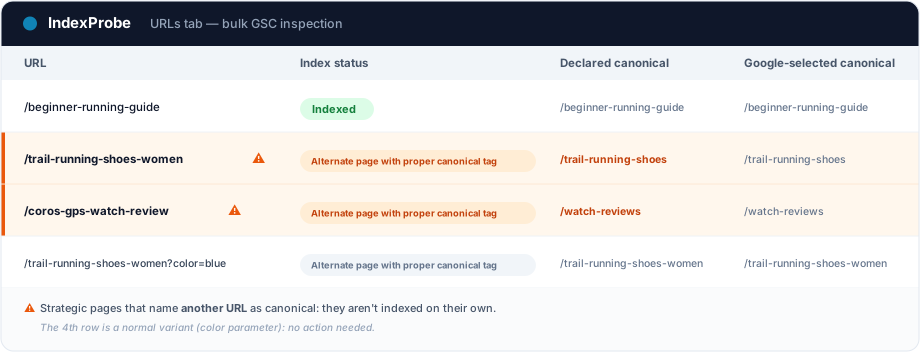
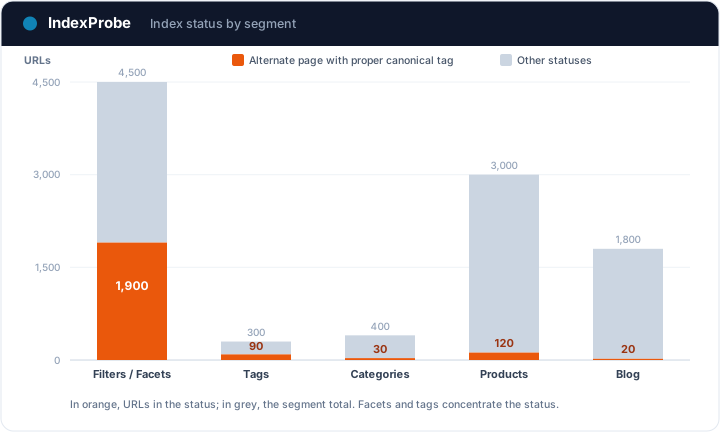
The difference with Search Console is the same whatever the scope: GSC makes you inspect URLs one at a time and caps its reports at 1,000 URLs per status. That's exactly the wall IndexProbe breaks, on whichever scope you choose: a selection of key pages, or your whole set of URLs.
How it differs from the neighboring canonical statuses
Three Search Console statuses talk about canonicals, and they get confused all the time. The difference comes down to one thing: did you declare a canonical, and did Google follow it?
| GSC status | Did you declare a canonical? | Did Google follow it? | Worth watching? |
|---|---|---|---|
| Duplicate without user-selected canonical | No | Google picked one for you | Yes, sometimes |
| Alternate page with proper canonical tag | Yes | Yes, it honored it | Rarely |
| Duplicate, Google chose different canonical than user | Yes | No, it overrode it | Yes, usually |
The status in this article is the most reassuring of the three: Google agrees with you. The first means you let Google decide on its own; see our article on duplicate without user-selected canonical. The third is the real warning sign: you named a canonical and Google overrode it, a signal it considers another page more relevant, which we cover in duplicate, Google chose a different canonical.
Check that the fix worked
After any action (a self-referencing canonical on a page to recover, or removing a family of non-strategic URLs), confirm it. Re-inspect the URLs and compare two analyses: the pages you recovered should flip to indexed, and the status count should drop on the patterns you cleaned up.
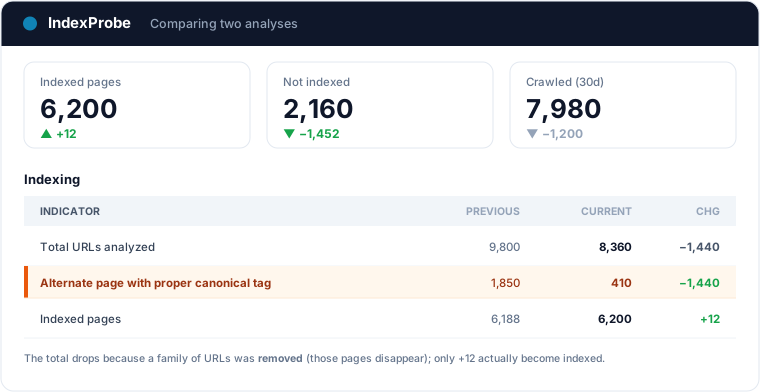
That's the full loop: see which ones, understand the pattern, decide, act, verify.
It is the textbook legitimate exclusion: in e-commerce, a variant properly canonicalized to its main product page should stay excluded. The e-commerce indexing page explains how to separate those normal consolidations from real losses, at catalog scale.
Frequently asked questions
Is "alternate page with proper canonical tag" an error? No. In the vast majority of cases, Google is confirming it followed your canonical tag. The page isn't indexed under its own URL because its canonical version is indexed in its place. It's only a problem if a strategic page gets swallowed by mistake.
Should you fix this status? Only in two cases. If a page you wanted indexed is affected, fix its canonical so it points to itself. If a family of non-strategic pages weighs on your crawl or your internal links (especially on a large site), consider pulling it from your structure. Otherwise, leave it alone.
Why isn't my page indexed because of this status? Because its canonical tag names another page. Google indexes that other page instead and consolidates the signals onto it. If that's intended, all good. If the page was meant to be indexed on its own, its canonical is misconfigured.
How do I fix it on WordPress or Shopify? On WordPress, the canonical field in Yoast or Rank Math lets you force a self-referencing canonical on the affected page. On Shopify, check the theme's canonical tag and avoid linking variant URLs: point each distinct page's canonical at itself.
What's the difference from "duplicate without user-selected canonical"? With "alternate page with proper canonical tag," you declared a canonical and Google followed it. With duplicate without user-selected canonical, you declared nothing and Google chose on its own. The second one deserves your attention more often.
How do I check canonicals across a large number of URLs? Search Console inspects them one at a time and caps each status report at 1,000 URLs. To triage at scale, a tool like IndexProbe inspects the list of URLs you give it (CSV, sitemap) and shows, for each one, the official status, the declared canonical, the canonical Google kept, and the internal links it receives.
Stop inspecting your canonicals one URL at a time. IndexProbe plugs into the official Search Console API and inspects your list of URLs in one run: index status, declared vs Google-selected canonical, segment, internal links. Enough to tell normal duplicates from pages to recover in minutes, and to decide which patterns belong in your structure.