"Crawled - Currently Not Indexed": Causes and 6 Fixes [GSC Status]
Your page got crawled. Google read it, analyzed it — and decided not to index it. No technical error. No noindex tag. Just "Crawled - Currently Not Indexed" sitting in your GSC coverage report.
This status doesn't mean the page is lost forever. But it won't fix itself. This guide covers the 5 real causes — and the 6 steps to get your pages into Google's index.
What does "crawled currently not indexed" mean in GSC?
Google visited your page and fully read its content. It then decided not to add it to its index — not because of a technical block or a noindex directive, but because it judged the page wasn't useful enough for its users right now. The page can still be indexed in the future. Without action, nothing guarantees that will happen.
This matches Google Search Central's official definition: "The page has been crawled by Google, but not indexed. It may or may not be indexed in the future; there is no need to resubmit this URL for crawling."
Crawling and indexing: two separate steps
Googlebot visits your site and downloads your pages — that's crawling. Separately, an algorithm decides whether those pages deserve to appear in search results — that's indexing. The two steps are independent. A page can be crawled dozens of times and never indexed.
"Crawled - Currently Not Indexed" means the crawl went fine — Googlebot came, read the page. It's at the indexing decision stage that something blocked it.
Difference with "Discovered - Currently Not Indexed"
These two statuses often appear together in GSC but mean different things. A page that is discovered but not indexed means Google found the URL (via your sitemap or internal links) but hasn't crawled it yet — it's in the queue. A page that is crawled but not indexed means Google actually read it and chose not to index it. That's a stronger signal, requiring more targeted action. The distinction is detailed in the comparison section below.
5 causes of "crawled currently not indexed"
1. Thin or duplicate content
This is the most common cause. Google constantly evaluates whether each page on your site adds something useful and original. A page that's too short, too generic, or too similar to another page on the same site will consistently be deprioritized.
It's not always obvious. A product page with a two-line description, a category page with no editorial content, a blog post covering the same topic as another post with different words — Google sees all of this. Since the Helpful Content updates (2022–2024), sites with significant volumes of low-value content are particularly exposed.
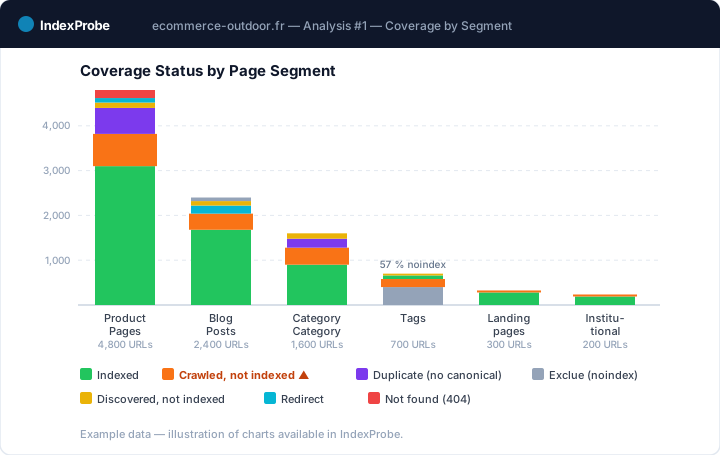
Watch for this signal: if the pages with this status are concentrated in a specific segment (product pages, tag pages, pagination), the problem is structural, not page-by-page.
WordPress: tag archives, author pages, and category pages with thin content are the most common culprits. Set these archive types to noindex if they add no value — this frees crawl budget for your actual content.
Shopify: filtered collection pages (size, color, material), product variants, and /collections/ + /products/ duplicates generate thousands of near-identical URLs. Use canonical tags carefully and submit a clean sitemap listing only the pages you want indexed.
2. Orphaned pages — no internal links pointing to them
Google discovers and revisits pages through links. A page with no internal links is nearly invisible to Googlebot between crawls. Even if it was crawled once, Google may deprioritize it for indexing because your own site doesn't reference it.
This is more common than it looks: a page created directly in the CMS without being added to navigation, a landing page for a paid campaign never linked from organic content, a blog post never mentioned from another article.
Watch for this signal: in IndexProbe, the "Referring URLs" column shows the number of internal inbound links per URL. Pages with 0 or 1 inbound link showing "Crawled - Currently Not Indexed" are the first to fix.
3. Search intent mismatch
Google wants to know whether your page actually answers what users are looking for when they search a specific query. If the format (text, video, list, interactive tool) or depth doesn't match user expectations, the page will struggle to rank — and Google may decide it doesn't deserve to be indexed.
Example: if the top 10 results for a query are detailed how-to guides and your page is a 200-word definition, you're mismatched on format. It's not a quality problem intrinsically — it's an alignment problem with what the SERP expects.
4. Structured data errors
Structured data (schema.org) helps Google understand what type of content a page contains. But errors in the markup — missing required properties, inconsistent values, markup that doesn't match visible content — can create a trust signal issue. This isn't the most common cause of this status, but it's an aggravating factor on e-commerce sites with thousands of product pages.
Check your structured data in the GSC "Enhancements" report. If you see errors or warnings on the same page segments that show "Crawled - Currently Not Indexed," the connection is likely.
5. Expired content or out-of-stock products
Out-of-stock product pages, past event articles, expired job postings — Google learns to recognize this type of content. If a page was previously indexed and its content has since lost all relevance, Google may move it to "Crawled - Currently Not Indexed" on a recrawl.
This is often healthy behavior — you probably don't want 5,000 discontinued product pages indexed. The real question is: should you redirect these pages, update them, or let them deindex?
Now that you know the likely causes, find out exactly which pages on your site are affected — before deciding what to fix and in what order.
How to find all pages with this status
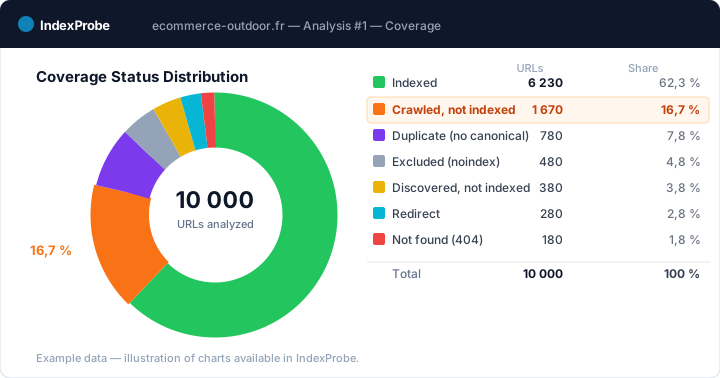
In native GSC, you can filter the coverage report on this status. The limit: it shows a maximum of 1,000 URLs, with no advanced export or segment filtering (blog, products, categories). On a site with thousands of pages, that's not enough for a complete picture.
That's exactly the problem IndexProbe solves: find every "Crawled - Currently Not Indexed" page in one analysis, without the 1,000-URL cap of native GSC.
IndexProbe connects to the official Google Search Console API and inspects up to 100,000 URLs in a single run. In the URLs tab, a single filter on "Crawled - currently not indexed" isolates all affected pages. You see their last crawl date, noindex status, inbound internal links — everything you need to prioritize.
How to fix "crawled currently not indexed" — 6 steps
Step 1 — Decide if the page deserves to be indexed
Before trying to force indexation, ask yourself: if this page were indexed and someone landed on it from Google, would they be satisfied? If the answer is no, the problem isn't indexation — it's the content.
Go through the affected pages and sort them into three buckets: pages worth indexing that need improvement, pages to consolidate with another page, and pages with no reason to be indexed at all. This segmentation determines the fix.
Step 2 — Improve content quality and originality
For pages worth indexing, the goal is to make them indisputably useful: more complete, more specific, more reliable than anything else on the topic.
In practice: add concrete data, real examples, explanations competitors don't provide. Remove generic filler that adds no value. Make sure the format (long-form, list, table, video) matches what Google is ranking at the top for the query you're targeting.
A 400-word article that precisely answers one question beats a 2,000-word article that goes in circles. Length isn't a quality signal — relevance is.
Step 3 — Build internal links to affected pages
Find indexed pages most thematically close to the affected pages and add links to them. The goal: signal to Google that these pages belong in your main content structure.
A link from the homepage or a well-indexed article carries far more weight than a link from a page that's rarely crawled itself. Prioritize links from your best-performing pages.
If some of your "Crawled - Currently Not Indexed" pages have zero inbound links, that's the first fix — before touching the content.
Step 4 — Fix duplicate content issues
If multiple pages on your site cover the same topic too similarly, Google has to choose which one to index. The others will often end up as "Crawled - Currently Not Indexed."
The fix depends on the situation: if pages genuinely have different angles, strengthen their differences. If content overlaps too much, consolidate them into one stronger page with a 301 redirect. If one is the canonical version, make sure the rel="canonical" tag correctly points to it.
For sites with thousands of potential duplicates (e-commerce with product variants, sites with URL parameters), this problem warrants a bulk analysis of canonical statuses — page-by-page auditing isn't feasible.
Step 5 — Request re-indexing in GSC
Once fixes are applied, use the URL Inspection tool in GSC to request re-indexing for the treated pages. Click "Request Indexing" after verifying the page is accessible and fixes are live.
Important: only request re-indexing after the fixes are in place. Submitting an unchanged page accomplishes nothing — Google will recrawl, find nothing has changed, and maintain its verdict.
For a handful of pages, this works well. For dozens or hundreds of pages, move to step 6.
Step 6 — Submit a temporary sitemap to force crawling
If you have a large volume of pages to recrawl, create a temporary sitemap.xml listing only the corrected URLs. Submit it in GSC (Sitemaps → Add a new sitemap). This explicitly signals to Google that these pages have been updated and deserve a new look.
This technique — recommended by Google itself — is particularly effective after migrations, bulk content fixes, or new site section launches. Remove the temporary sitemap once Google has recrawled the affected pages.
"Crawled - Currently Not Indexed" vs "Discovered - Currently Not Indexed" — what's the difference?
These two statuses often appear together in GSC and require different fixes:
| Crawled - Currently Not Indexed | Discovered - Currently Not Indexed | |
|---|---|---|
| What Google did | Crawled and read the page | Found the URL (sitemap or links) |
| What happens next | Decision not to index | Waiting to be crawled (queue) |
| Main cause | Content quality or relevance | Insufficient crawl budget or weak linking |
| Priority fix | Improve content, strengthen internal links | Reduce crawlable pages, improve site structure |
| Typical delay after fix | 1–4 weeks | 2–8 weeks |
"Discovered - Currently Not Indexed" is often a symptom of a crawl budget problem — Google found too many pages to crawl and is prioritizing those it considers most important. If you have many pages in this state, the solution isn't to improve content but to reduce the number of low-value pages Googlebot has to traverse to reach the right ones. (A dedicated article on this status is coming.)
How to verify the fix worked
There's no guaranteed timeline. Google revisiting a fixed page can take anywhere from a few days to several weeks, depending on your site's crawl frequency and authority.
Via GSC: in the coverage report, monitor the count of "Crawled - Currently Not Indexed" pages week over week. You can also use the URL Inspection tool to check individual pages — if a page has moved into the index, you'll see its status updated.
Via IndexProbe: the COMPARISON tab lets you compare two analyses of the same site. IndexProbe automatically compares both analyses to show you exactly how many pages changed status — how many moved from "Crawled - Currently Not Indexed" to "Indexed" between your pre-fix and post-fix audits. On a site with hundreds of corrected pages, it's the only way to get a reliable overview.
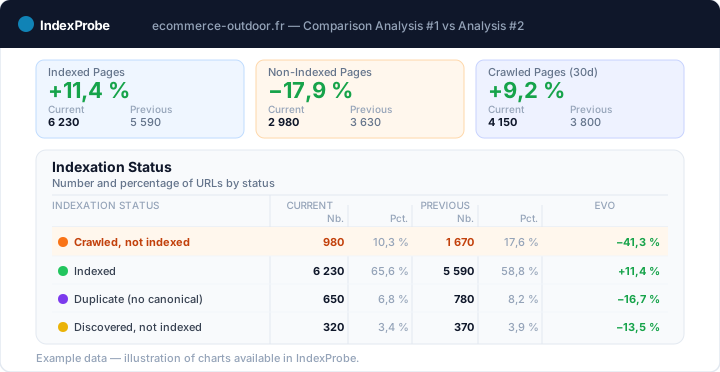
If after 4–6 weeks the treated pages haven't moved, that's a signal the fix wasn't sufficient — or another cause is compounding the initial problem.
Frequently asked questions
How long does it take Google to index a page after fixing "crawled currently not indexed"?
There's no fixed timeline. On a site with high crawl frequency (Googlebot visiting multiple times per week), a significant fix can be picked up in 1–2 weeks. On a less-crawled site, it can take 4–8 weeks. Requesting re-indexing via the URL Inspection tool speeds up the process for individual pages.
Does "crawled currently not indexed" mean the page will never be indexed?
No. Google states explicitly that the page can be indexed in the future. This status isn't permanent. But it won't resolve itself — you either improve the content, or the page stays unindexed.
Is it normal to have many pages with this status?
On large sites (e-commerce, media, classified ad sites), having a significant percentage of pages as "crawled, not indexed" is common. It's not always a problem — pagination pages, tag archives, product variants aren't all meant to be indexed. What's abnormal is when your strategic pages — the ones you've invested in — carry this status. That's where action is needed.
Does this status affect the SEO of my other pages?
Directly, no — a "Crawled - Currently Not Indexed" page doesn't penalize your indexed pages. Indirectly, yes: if Google is spending crawl budget revisiting low-value pages, there's less budget for your important ones. A high volume of non-indexed pages can slow down the pickup of your new publications.
Crawled currently not indexed on WordPress or Shopify — any specific advice?
On WordPress: the most common culprits are tag archives, author pages, and category pages with thin content. Use an SEO plugin (Yoast, Rank Math) to noindex these archive types if they add no value — this frees crawl budget for your actual content.
On Shopify: filtered collection pages, product variants, and duplicate /collections/ paths are the main sources. Shopify gives limited control over these — use canonical tags and robots meta tags carefully, and submit a clean sitemap that lists only the pages you actually want indexed.
How to check all pages with this status at once?
Native GSC shows up to 1,000 URLs per status, with no full export. For a complete audit, IndexProbe inspects all your URLs via the official Search Console API and lets you filter on "Crawled - Currently Not Indexed" across the entire site — whether you have 500 or 100,000 pages.
Conclusion
If you have pages stuck as "crawled currently not indexed," three priorities:
- Find all affected pages — not just the first 1,000 in GSC, but your entire site, segmented by zone (blog, products, landing pages).
- Sort before fixing — not all these pages deserve the same effort. Focus on those with real traffic or conversion potential.
- Measure the impact of your fixes — comparing two analyses before/after is the only reliable way to know whether your actions worked at scale.
These three steps are tedious to do manually in GSC. IndexProbe automates them: official API connection, analysis on 100K+ URLs, filter by status, COMPARISON view before/after.