You paste an address into the search bar at the top of Google Search Console, press Enter, and a few seconds later the URL Inspection Tool returns its verdict: "URL is on Google", or a reason why not. Below that verdict sit a dozen data fields: how the page was discovered, when Googlebot last came by, which canonical Google selected, what the rendered HTML looks like. It is the only place where Google tells you, URL by URL, exactly what it did with your page. Two questions follow naturally from there. What does each of those fields actually mean, and which ones should drive your decisions? And what do you do when the pages to check number in the hundreds, since the tool inspects exactly one URL at a time?
What Is the URL Inspection Tool (and What Is It For)?
The URL Inspection Tool is a feature of Google Search Console that returns Google's official indexing information for a single URL: whether it is indexed, why or why not, the canonical Google selected, the last crawl date, and the page as Googlebot rendered it. Its purpose is to diagnose, page by page, how Google sees your site, and to request indexing for a specific URL.
You reach it from the search bar at the top of any Search Console screen, or by clicking a URL in the Page indexing report. One prerequisite shapes everything else: the URL must belong to the property you have open ("the URL must be in the currently opened property"). You can inspect your own pages, not a competitor's.
The Two Modes: Indexed Version vs Live Test
The tool answers two different questions, and mixing them up is the most common reading mistake. By default, an inspection shows the state of the indexed version: the documentation is explicit that "the results shown are from the most recently indexed version of a page, not the live version on the web". If you fixed a noindex tag this morning, the default view still describes the page as Google saw it at its last crawl, fix not included.
The live test (the "Test live URL" button) answers the other question: it "fetches and examines the URL in real time" and tells you whether the current page could be indexed if Google crawled it now. It has its own blind spots: it "does not check for the presence of the URL in any sitemaps or any referring pages", and some checks that apply to the indexed version don't run at all. The practical rule: use the indexed view to understand what Google has done, and the live test to verify what Google would find today. A fix is only proven when both agree.
The two modes chain into a natural sequence after any correction. You deploy the fix, run a live test to confirm the page is now indexable as served, request indexing (or wait for the next crawl), and come back later to check that the default, indexed view has flipped as well. Skipping the first step means requesting indexing on a page that may still be broken; skipping the last means trusting a green live test that Google's index hasn't reflected yet. The gap between the two views is also a diagnostic in itself: a page that passes every live test but keeps failing in the indexed view points to something that changed since the last crawl, or to a crawl that simply hasn't happened.
Every Piece of Data the Tool Returns, Decoded
An inspection result packs most of its value into fields that many users never scroll to. Here is each block, and what to do with it.
The verdict: "URL is on Google" (and what it doesn't promise)
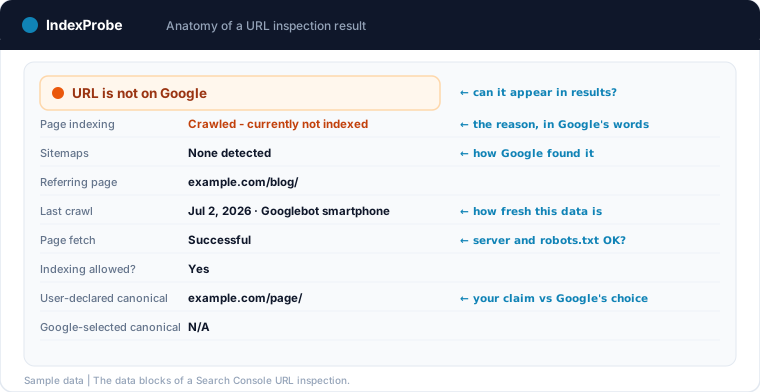
The top-level verdict says whether the URL can appear in Google results. "URL is on Google" means indexed; it does not mean visible, and it says nothing about rankings: an indexed page can sit beyond page five for every query. The negative verdicts ("URL is not on Google") always come with a reason, which is where the diagnosis really starts. If the tool reports that the URL is entirely absent, you are in the "URL is unknown to Google" case: never discovered, never crawled.
The coverage state: the reason, in Google's own words
Under "Page indexing", the tool names the exact state of the URL, with the same labels as the Page indexing report. These states are the heart of the diagnosis, and each of the most frequent ones has its own logic and fixes: "Crawled - currently not indexed" (read, then set aside), "Discovered - currently not indexed" (known, not yet crawled), "Excluded by 'noindex' tag", "Blocked by robots.txt" and its paradoxical sibling "Indexed, though blocked by robots.txt", the duplicate family ("Duplicate without user-selected canonical", "Duplicate, Google chose different canonical than user", "Alternate page with proper canonical tag"), "Soft 404", and "Page with redirect". Other states exist; these are the ones you will meet most often, and our full status directory covers each in depth. The duplicate family, in turn, is set in context in our guide on why duplicate content is an SEO issue.
A useful way to read any state is to ask which of three kinds of work it points to. Some states call for configuration work: a noindex to lift, a robots.txt rule to remove, a canonical to correct. Some call for content work: "Crawled - currently not indexed" on a page you care about is Google judging the page, not your settings. And some call for patience or discovery work: "Discovered - currently not indexed" on a three-day-old page is a queue, not a defect. Fixing the wrong family wastes weeks; the state label is what routes you to the right one.
Canonicals: what you declared vs what Google chose
Two fields sit side by side: User-declared canonical (what your page claims) and Google-selected canonical (what Google decided). When they differ, Google has overruled you, and that single comparison explains most duplicate statuses. No crawler can give you the right-hand field: your code shows the declaration, only Google knows the decision.
Two practical notes. When Google selects a different canonical, inspect that URL next: the selected canonical is the page actually carrying your content in the index, and its own state tells you whether the consolidation works in your favor. And a Google-selected canonical of "N/A" or an inspection that shows no canonical at all usually means the page hasn't been indexed yet, so there is nothing to consolidate; the coverage state above it explains why.
Discovery: sitemaps and referring page
The tool lists the sitemaps that declare the URL and a referring page through which Googlebot found it. An empty discovery block on an important page is an early warning: if no sitemap and no known link leads there, Google has no reliable path to the page. This is also where you check that your sitemap actually covers the pages you care about, a prerequisite this guide to submitting your website to Google walks through.
Crawl: last crawl, crawled as, page fetch
Last crawl dates Google's most recent visit; everything the inspection shows describes the page as of that date. Crawled as tells you which user agent came (mobile or desktop). Page fetch and Crawl allowed? report whether the server responded and whether robots.txt permitted the visit. A page whose last crawl is three months old will not reflect last week's fix anywhere in Search Console, and a failed page fetch reroutes the whole diagnosis toward the server rather than the content.
The rendered page: HTML, screenshot, and what Google executed
"View tested page" (or "View crawled page") opens the page as Googlebot built it: the rendered HTML, loaded resources, JavaScript console messages, and, in a live test only, a screenshot ("a screenshot is available only in a live test with a successful test result"). This is the ground truth for JavaScript sites: what your browser or your crawler renders is a simulation, while this tab shows what Google itself executed, a distinction our JavaScript SEO guide builds on. Content missing from the rendered HTML is content Google indexed without.
Enhancements and experience
The last blocks report structured data detected on the indexed version, along with HTTPS and experience signals. Useful for rich results debugging; rarely the reason a page is out of the index.
Request Indexing: What It Does and Doesn't Do
The "Request indexing" button queues the URL for a possible recrawl. Three facts from the documentation calibrate what to expect. It is not instant: a crawl "takes a day or so" to happen. It is not guaranteed: requesting "does not guarantee that the page will appear" in results. And it is rationed: "there is a daily limit to how many index requests you can submit" per property; the documentation gives no number, and in practice the button locks after roughly a dozen requests in a day. For anything beyond a handful of URLs, Google's own advice applies: submit a sitemap instead. The full method, and what to do when submitted pages still don't appear, is covered in our submission guide.
What the Tool Can't Do (Its Structural Limits)
Everything above describes a genuinely excellent diagnostic instrument. Its limits are just as structural, and worth naming plainly, because they define when the tool stops being the right instrument.
One URL at a time. The input is a single search bar; there is no batch mode. Checking 300 product pages means 300 manual inspections.
No export, no history. An inspection result cannot be downloaded, and the tool keeps no record of previous inspections: yesterday's verdict is gone once you inspect again. Tracking a fix over time means re-inspecting by hand and taking notes elsewhere.
The report doesn't filter on your URLs. The Page indexing report aggregates by reason, but you cannot feed it your list (a sitemap of money pages, a set of URLs from a migration) and ask how those are doing.
Owned properties only. The URL must belong to a property you have verified; there is no inspecting a page on a site you don't control.
Some things are never tested. The documentation lists what the tool doesn't evaluate: content quality, manual actions, security issues, legal removals and temporary blocks all live in other reports.
None of these limits is a flaw for the tool's design goal, which is spot-checking single URLs. They only become a problem when the question changes from "what happened to this page?" to "what happened to all my pages?".
💡 Checking 300 URLs by hand in the inspection bar takes an afternoon; the same list through the official API is one analysis. Discover our bulk Google index checker →
Going at Scale: The URL Inspection API
What almost nobody in this topic's search results mentions: the URL Inspection Tool has an official API. The URL Inspection API returns the same data blocks programmatically for any URL of a property you own: the verdict, the coverage state (same labels as the interface), the user-declared and Google-selected canonicals, the last crawl time and user agent, the robots.txt and page fetch states, the sitemaps and referring URLs Google knows for the page, plus mobile usability and rich results detections. In other words, everything this article has decoded so far, as structured data instead of a screen. Its limits are documented: 2,000 queries per day per property, and 600 per minute ("2000 QPD", "600 QPM" in Google's limits documentation). That figure is the real ceiling of Google-verified indexing data, and three properties of that quota, which we have verified through direct testing, matter in practice. Our complete guide to the Search Console API unpacks these quota mechanics and the point where handling them yourself stops scaling.
First, the daily quota behaves as a sliding 24-hour window, not a counter that resets at midnight: capacity frees up progressively as old requests age out. Second, the quota is attached to the property and shared by everyone who inspects it: connecting more Google accounts to the same property multiplies nothing. Third, a domain property and URL-prefix properties of the same site have independent quotas: verified prefix properties effectively add 2,000 daily inspections each, an option that changes the arithmetic for large sites.
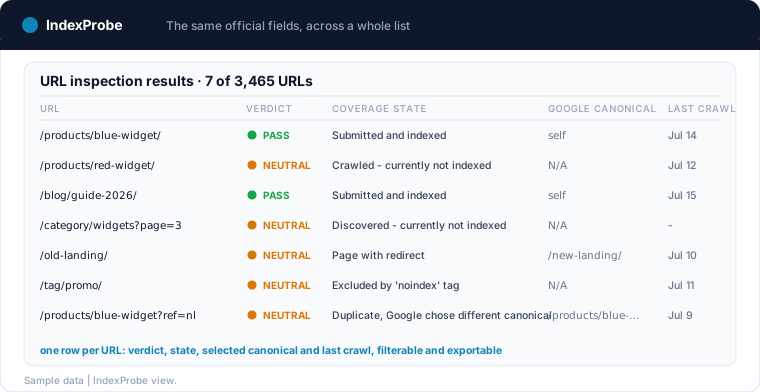
This API is exactly what IndexProbe industrializes: you provide your URL list, and it runs the official inspections at quota pace, stores the history, and lets you filter, segment, compare and export: the bulk version of the tool this article describes. On a multi-day analysis, pages already proven indexed (by a recent impression or a recent confirmed inspection) can be skipped rather than re-inspected, which shortens runs in proportion to how much of the list is already proven; a real 3,465-URL analysis recently completed 93% of its list in twelve minutes that way. The point is not that limits disappear, but that the 2,000-per-day budget gets spent only where it yields new information.
The complete loop this enables is the one the manual tool can't offer: inspect the whole list, read the distribution of coverage states, fix what they point at, then re-run the same list and verify the shift. Try IndexProbe in early access to run the URL Inspection Tool's data across all your URLs at once.
To see what this inspector yields once applied in bulk — monitoring, migrations, catalogs, traffic drops — browse IndexProbe's use cases: the same official data, at the scale of your site. And if you use Screaming Frog's integration, read our review of its URL Inspection API limits: the first 2,000 crawl-order URLs, and what to do beyond.
Frequently Asked Questions
What is the purpose of the URL Inspection Tool?
It returns Google's official indexing information for one URL of a property you own: whether the page is indexed and why or why not, the canonical Google selected, the last crawl date, and the page as Googlebot rendered it. It is Search Console's instrument for diagnosing a specific page and requesting its indexing.
How many URLs can I inspect per day?
In the Search Console interface, Google enforces a daily inspection limit per property without publishing the number. Through the official URL Inspection API, the limit is documented: 2,000 queries per day per property, and 600 per minute. The Request Indexing button has its own, much smaller daily allowance.
What's the difference between the default inspection and the live test?
The default view describes the most recently indexed version of the page, as of the last crawl; the live test fetches the page in real time and says whether it could be indexed as it stands now. A fix shows in the live test immediately, but only appears in the default view after Google recrawls.
Does Request Indexing guarantee my page gets indexed?
No. It queues the URL for a possible recrawl, which typically takes a day or so, and Google states that requesting indexing does not guarantee inclusion. Repeated requests for the same URL don't speed anything up. For many URLs, submit a sitemap rather than clicking through pages one by one.
Can I inspect a URL on a site I don't own?
No. The URL must belong to the currently opened property, and properties require verification. To assess someone else's page, the closest public signal is a site: search, which is approximate and carries no reason codes.
Is there a way to use the URL Inspection Tool in bulk?
Not in the Search Console interface, which handles one URL at a time with no export. The official route is the URL Inspection API (2,000 queries per day per property), either through your own scripts or through a tool built on it. IndexProbe is that bulk version: the same official verdicts, run across your whole URL list, with history and comparison built in.