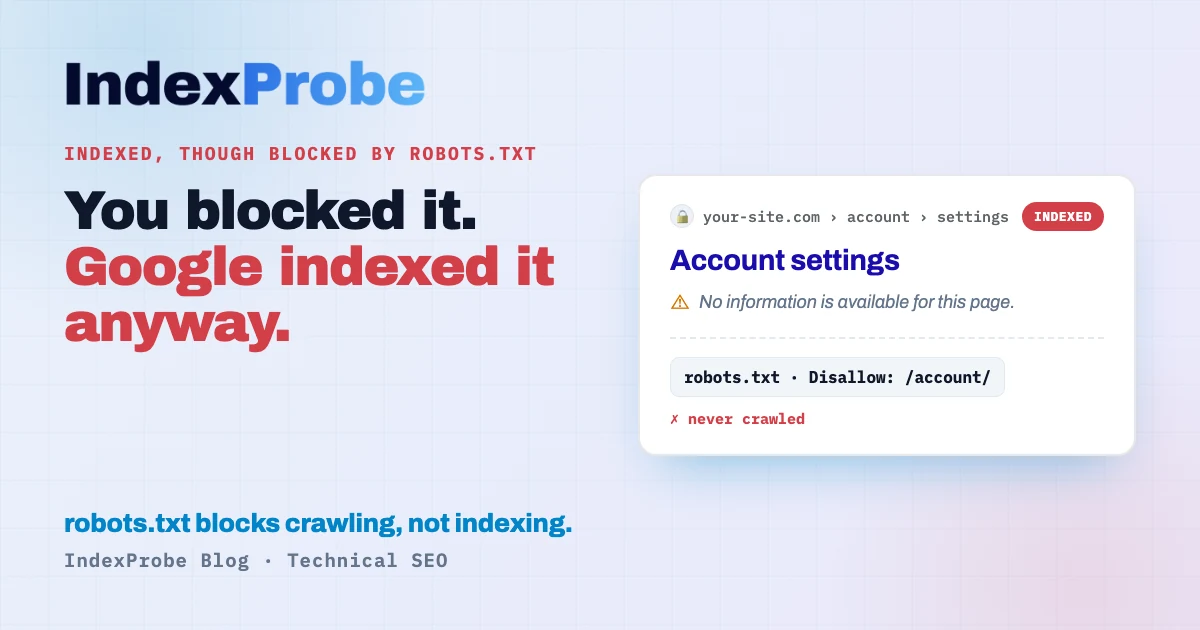
You blocked a page in robots.txt to keep it out of Google. It's indexed anyway, sitting in Search Console as "Indexed, though blocked by robots.txt." Google indexed it without ever reading it.
The instinct is to slap a noindex on the page. In this exact situation, that does nothing — and we'll see why.
This status isn't always a problem. It depends on what you wanted the page to do. But it almost always reveals a misunderstanding of what robots.txt actually does. Let's clear that up, look at the two cases, and sort your pages so you can fix each one the right way.
What does "Indexed, though blocked by robots.txt" mean?
It means Google indexed your URL without ever crawling it. A robots.txt file blocks crawling, not indexing: Google never reads the page's content, but it knows the URL exists, and it added it to the index. In plenty of cases, this isn't an error.
This is the part almost everyone gets wrong. Google spells it out in its documentation: "A robots.txt file tells search engine crawlers which URLs the crawler can access on your site… it is not a mechanism for keeping a web page out of Google." robots.txt tells Googlebot what to crawl, not what to index.
So a page can be disallowed from crawling and still show up in results — usually with no description, since Google never read the content. That's the empty snippet, or the "No information is available for this page" line you sometimes see.
This status sits right next to a close cousin, Indexed without content: in both, the URL is in the index without Google having read its content. The difference is the cause. Here, you prevent the read with a Disallow rule. There, Google is allowed to read the page but finds no usable content (a JavaScript render that fails, a page that's empty server-side).
Why does a blocked page get indexed?
Because Google found the URL somewhere other than the page itself. The most common cause: external links. If other sites link to your URL, Google discovers it, decides it's worth indexing, and adds it — even though it can't crawl it. Listing the URL in your sitemap has the same effect.
Again, straight from Google: "A page that's disallowed in robots.txt can still be indexed if linked to from other sites. While Google won't crawl or index the content blocked by a robots.txt file, we might still find and index a disallowed URL if it is linked from other places on the web."
In other words, the robots.txt block stops Google from reading the page, not from listing it if it hears about it elsewhere. That's exactly what creates this status. Faceted navigation filters blocked after the fact are a textbook case: already indexed when the block arrived, they stay in the index.
Is it a problem? It depends on what you wanted
There's no one-size answer: it comes down to your intent for the page. Two cases, two opposite fixes. Until you've decided which one you're in, you can't fix it correctly.
Case A: you wanted the page private. Cart, account, internal search, staging environments… You blocked it to hide it, and it's leaking into Google anyway, with an ugly empty snippet. Here, the goal is to get it out of the index for good.
Case B: you wanted the page indexed. A useful page got blocked by mistake — a Disallow rule that's too broad, or a leftover block from a staging site. It's in the index, but Google can't read its content, so it'll never rank properly. Here, the goal is the opposite: unblock it so Google can finally crawl it.
Sorting pages into A and B is the real work. And before you fix Case A, you need to know about one trap.
The trap: adding noindex isn't enough
To pull a page out of the index, the right tool is the noindex rule, not robots.txt. But here's the catch: if the page stays blocked in robots.txt, Google will never see your noindex. You have to allow crawling first, or your instruction is dead on arrival.
This is the single most common mistake on this status, and Google describes it precisely in its noindex docs: "For the noindex rule to be effective, the page or resource must not be blocked by a robots.txt file… If the page is blocked by a robots.txt file or the crawler can't access the page, the crawler will never see the noindex rule, and the page can still appear in search results."
The logic is airtight: robots.txt stops Google from reading the page; the noindex lives inside the page. As long as the block is there, Google can't see the very instruction it's meant to follow. You add a noindex, you wait, and nothing happens.
So the correct way to deindex (Case A) is counterintuitive:
- Remove the
Disallowrule from robots.txt (yes, you unblock the page). - Add the
noindex, either as a meta tag<meta name="robots" content="noindex">or as an HTTP headerX-Robots-Tag: noindex(both have the same effect). - Let Google recrawl the page, see the noindex, and drop it from the index.
- Once it's gone, you can re-block it in robots.txt if you want.
For genuinely sensitive pages, Google also recommends password protection, which is stronger than a noindex.
The real challenge is spotting which of your pages sit in this status — and which ones have a noindex that does nothing.
💡 Want to know which URLs are "indexed though blocked," and whether your noindex is even visible to Google? IndexProbe shows it in a single analysis. Try IndexProbe in early access →
Find the affected pages in the list you analyze
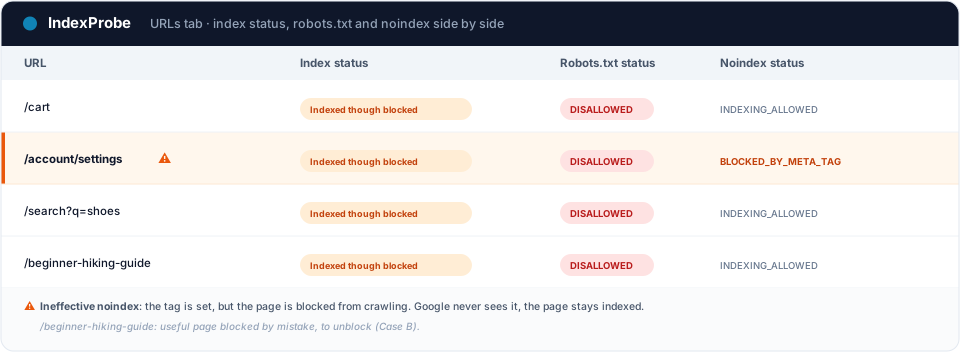
This is where Search Console hits its limit: it makes you inspect URLs one at a time. To triage fast, you need to cross-reference, for each URL, three signals: its index status, its robots.txt status (allowed or blocked), and its noindex status. That's exactly what IndexProbe does, on the list of URLs you give it (CSV import, sitemap, etc.) — and only that list: it doesn't crawl your site to discover other URLs.
Two reads, depending on the list you bring:
- A selection of strategic pages (your key pages, your sitemap). You check whether any of them is "indexed though blocked" — that's Case B, a useful page blocked by mistake, to unblock first.
- A complete export of your URLs (full sitemap, crawl export). Here you see every blocked-yet-indexed page, and you can cross-reference the noindex status to catch the ineffective noindex: a page with a
noindexset while robots.txt blocks it. Google never sees it, the page stays indexed. The trap from the previous section, visible at a glance.
That cross-reference of index status × robots.txt × noindex is something no other tool gives you at scale.
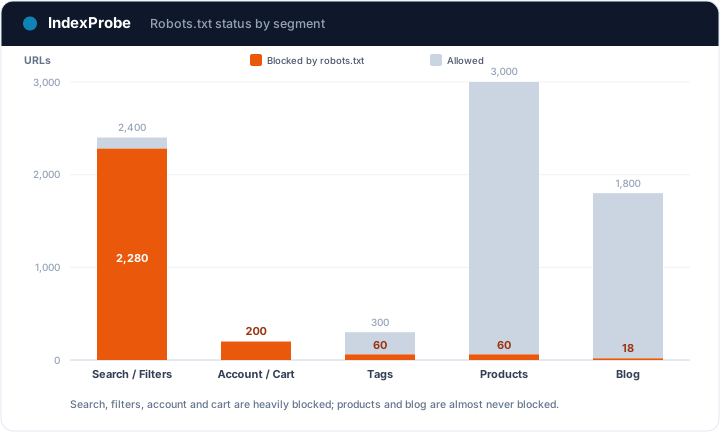
Search Console, by contrast, makes you open each status separately and caps its reports at 1,000 URLs. That's the wall IndexProbe breaks, on whichever scope you choose.
Fix it, by branch
Once your pages are sorted, the fix depends on the case. Don't mix them up: the right move for a private page is the exact opposite of the one for a useful page.
Get the page out of the index (Case A)
Follow the steps above: remove the Disallow, add a noindex, let Google recrawl, then re-block if you want once the page is gone. For very sensitive pages, prefer password protection. In an emergency (exposed data), Search Console's Removals tool hides the page within hours while the permanent deindexing takes effect.
Get the page indexed (Case B)
Simpler: remove the Disallow rule blocking the page in your robots.txt, and make sure no stray noindex is on it. Google can finally crawl it, read its content, and index it properly.
By CMS
- WordPress. First check Settings → Reading: the "Discourage search engines from indexing this site" box adds a site-wide block, untick it in production. For page-level noindex, use the dedicated field in Yoast SEO, Rank Math, or All in One SEO.
- Shopify. Shopify's robots.txt blocks
/cart,/account,/checkout, and/ordersby default (pages you genuinely don't want indexed). To adjust the rules, edit therobots.txt.liquidfile; for a page template's noindex, use the theme's meta tags.
How it differs from "Blocked by robots.txt"
These two Search Console statuses get confused constantly. The difference comes down to one thing: did Google end up indexing the URL despite the block?
| GSC status | Page crawled? | Page indexed? | What it means |
|---|---|---|---|
| Blocked by robots.txt | No | No | Google respects the block and doesn't index. The page doesn't appear in results. |
| Indexed, though blocked by robots.txt | No | Yes | Google found the URL elsewhere (links, sitemap) and indexed it without reading it. It appears, often with no description. |
The first status is the "clean" behavior of a deliberate block: see Blocked by robots.txt. The second means the block didn't keep the page out of the index — and that's the one that needs the steps in this article.
Check that the fix worked
After your fixes, confirm at scale. Re-inspect your URLs and compare two analyses: the pages you wanted gone should leave the "Indexed, though blocked" status (and the index), and the useful pages you unblocked should turn into normally indexed pages.
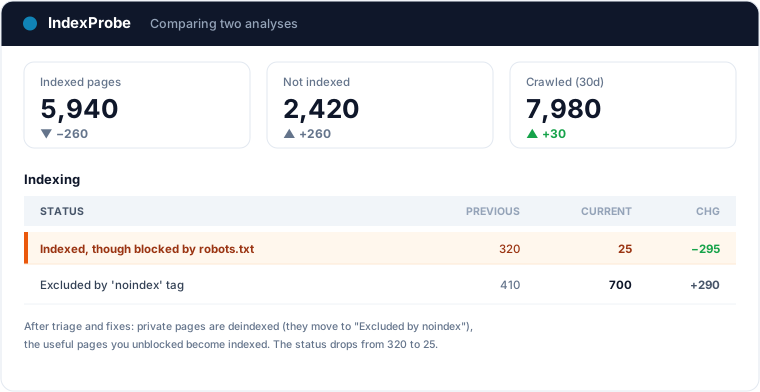
That's the full loop: understand it, sort A/B, fix without falling for the noindex trap, verify.
This status is an anomaly by nature: it shows up unannounced, often after a robots.txt change. Putting your pages under index monitoring means you get alerted the moment one flips, instead of finding out at the next audit.
Frequently asked questions
Is "Indexed, though blocked by robots.txt" bad? Not necessarily. If the page wasn't meant to be indexed and exposes nothing sensitive, it's just an unflattering snippet in Google. It becomes a problem in two cases: the page is private and leaking into results, or it's a useful page blocked by mistake that will never rank until it's crawled.
Why is a page blocked by robots.txt indexed anyway? Because robots.txt only blocks crawling, not indexing. If Google finds the URL via external links or your sitemap, it can index it without reading the content. Google documents this itself.
How do I deindex a page blocked by robots.txt?
Counterintuitive but necessary: first remove the block from robots.txt, add a noindex (meta tag or X-Robots-Tag header), let Google recrawl the page so it sees the noindex, and wait for deindexing. If you leave the block in place, Google will never see your noindex.
Why isn't my noindex working?
Most likely because the page is still blocked by robots.txt. The noindex lives in the page's code; if Google can't crawl the page, it can't read it. Unblock the page and the noindex will take effect on the next crawl.
How do I fix it on WordPress or Shopify?
On WordPress, untick "Discourage search engines from indexing" in Settings → Reading, and set noindex via Yoast or Rank Math. On Shopify, adjust the rules in robots.txt.liquid; the /cart, /account, and /checkout pages are blocked by default, which is normal.
What's the difference from "Blocked by robots.txt"? "Blocked by robots.txt" means the page is neither crawled nor indexed: the block worked. "Indexed, though blocked" means the page is indexed even though it's blocked from crawling: Google found it elsewhere. The second one needs action, the first usually doesn't.
Stop guessing which pages are leaking into Google. IndexProbe plugs into the official Search Console API and inspects your list of URLs: index status, robots.txt status, and noindex status side by side. In minutes you spot the blocked-yet-indexed pages, the ineffective noindex tags, and you verify your fixes from one analysis to the next.