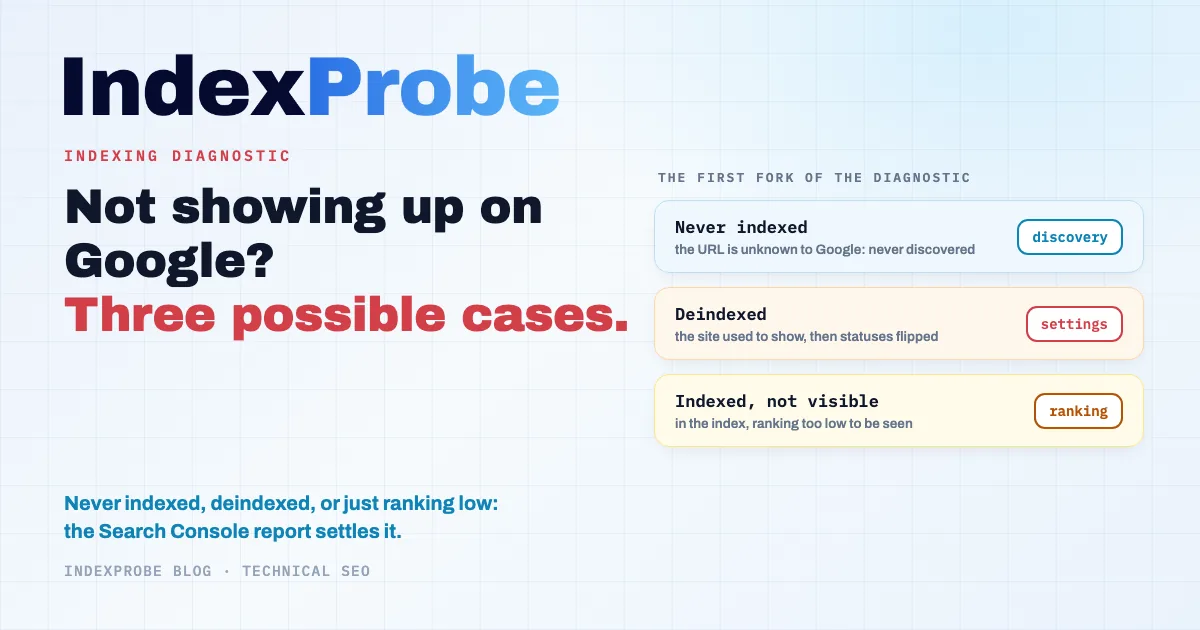
When a website doesn't show up on Google, the cause falls into one of three problems, and each one calls for a different treatment:
- the site has never been indexed by Google;
- the site was indexed, then removed from the index;
- the site is indexed, but ranking too low to be visible.
The first step of the diagnostic is to determine which of these situations applies to you, and Google Search Console provides the information you need: its Page indexing report and its URL Inspection tool tell you, for every URL, whether it is indexed and, if it isn't, for what reason. Because each problem leaves a different trace in that report, the reason lets you work back to the cause and apply the right fix. Two questions remain: which reason maps to which situation, and how to check an entire site without inspecting every URL one by one.
First, Confirm the Site Is Actually Missing
Before any diagnosis, confirm the absence. Search for site:yourdomain.com on Google, turn off SafeSearch, and make sure you're looking at the right property in Search Console. If results come up, the site is indexed: the problem is about ranking, not indexing. If nothing comes up, the indexing diagnostic starts here.
This step sounds trivial, yet it's where Google's own documentation begins its page "Why is my page missing from Google Search?". SafeSearch can filter out perfectly indexed results ("Turn off safe search, which might be filtering your results"). A wrong Search Console property (the http:// prefix instead of the domain, a missing www) shows empty reports for a healthy site. And a brand-name search can fail even though the site is indexed, simply because better-established namesakes outrank it.
Never Indexed, Deindexed, or Indexed but Invisible?
The test above leads to three situations, and this initial fork is the most important decision in the whole diagnostic, because each branch leads to opposite statuses and opposite fixes.
Never indexed: the site is new or has never been connected to the rest of the web, and Google hasn't taken it in yet. The work is about discovery and crawling. Deindexed: the site used to show up and has disappeared. Something changed, and the work is to identify that change, which almost always has a date. Indexed but invisible: the pages are in the index, but they don't surface for the queries you care about. The work is search engine optimization, and no indexing action will move it forward. Guides that merge the three cases into a single list of causes waste time on both ends: people resubmit sitemaps that were already fine, or rework the content of a site Google has simply never crawled.
Where Google Writes Its Verdict: The Page Indexing Report
Two steps separate a published URL from a visible one: crawling, where Googlebot fetches the page, and indexing, where Google decides whether to give it an entry in its index. Google's documentation sums up the two failure families in one line: "Google can't find the pages (crawl), or can't understand them properly when it does find them (index)".
The Page indexing report (Indexing > Pages in Search Console) splits every URL Google knows about between indexed and not indexed, with a reason for each exclusion. For a single URL, the URL Inspection tool provides the detail: the status, the canonical Google selected, and the date of Googlebot's last visit. These reasons are the raw material of the diagnostic; the most frequent ones cover the bulk of real situations, and each has its own logic. That's what the decision tree below is for.
The Decision Tree: Symptom, Status, Cause, Fix
The approach starts from the symptom you observe: read the status Search Console displays, infer the most likely cause, then apply the matching fix. The table summarizes the most frequent branches; a given URL can receive other statuses depending on configuration.
| Symptom | Most frequent status | Likely cause | Work area |
|---|---|---|---|
| The URL is unknown to Search Console | "URL is unknown to Google" | Never discovered (no links, no sitemap) | Discovery |
| Known but never crawled | "Discovered - currently not indexed" | Crawl queue, new or large site | Patience or crawl |
| Crawled then set aside | "Crawled - currently not indexed" | Perceived value, redundancy | Content |
| An explicit blocking instruction | "Excluded by 'noindex' tag", "Blocked by robots.txt" | Deliberate or inherited setting | Configuration |
| The page lives at another address | "Duplicate without user-selected canonical", "Page with redirect" | Duplication, consolidation | Canonicals |
| Indexed, but nowhere on your queries | Indexed | Ranking, not indexing | SEO |
Missing From Search Console: The URL Google Has Never Seen
If URL Inspection returns "URL is unknown to Google", Google has never discovered the page: no link points to it from any known page, and no sitemap declares it. This is the classic case of a brand-new site with no inbound links at all. Two fixes address it: declare a sitemap ("A sitemap is an important way for Google to discover URLs on your site", as the documentation puts it) and connect the site to the existing web, even through a few links from legitimate profiles or directories. The complete procedure, ownership verification included, is in our guide to submitting your website to Google.
The "Request Indexing" button deserves a clarification: the documentation states that requesting a crawl does not guarantee inclusion ("Requesting a crawl does not guarantee that inclusion in search results will happen instantly or even at all"), that the button has a quota, and that clicking repeatedly speeds nothing up. After submitting, Google asks you to allow at least a week before concluding something is wrong ("allow at least a week after submitting a sitemap or a submit to index request").
"Discovered - currently not indexed": The Crawl Queue
Google knows the URL and hasn't crawled it yet. On a recent site, this wait is normal: crawling can take from a few days to a few weeks ("Crawling can take anywhere from a few days to a few weeks"). On an established, high-volume site, a lasting buildup of "Discovered - currently not indexed" on important pages points to a priority problem instead: Googlebot is spending its crawl budget elsewhere, often on automatically generated URL families.
"Crawled - currently not indexed": The Page Google Read and Set Aside
Google fetched the page and chose not to keep it. This is neither a technical error nor a block: Google evaluated the page and decided not to index it. The documentation says as much: the web is immense and Google doesn't take every page ("The web is immense, and Google doesn't get to every page, though we try to!"). The "Crawled - currently not indexed" status raises a question of value: what does this page bring that another, already indexed, doesn't? The answer differs for strategic pages (worth strengthening) and pages generated in bulk (often normal operation).
Deliberate or Inherited Blocking: noindex and robots.txt
Two statuses signal an explicit instruction. "Excluded by 'noindex' tag": the page itself asks not to be indexed, a normal setting on utility pages, but a problem when it's inherited from a staging environment or a plugin setting. "Blocked by robots.txt": Googlebot isn't allowed to crawl the URL, which, counterintuitively, doesn't always prevent indexing. On WordPress, a single checkbox (Settings > Reading) puts a noindex on the whole site: that trap and the plugin settings around it are covered in our guide to WordPress indexing.
Duplicates and Redirects: The Page Exists, at Another Address
"Duplicate without user-selected canonical" and "Page with redirect" don't describe an absence but a consolidation: as far as Google is concerned, the content lives at another URL, one it chose or followed. The site does "show up", just not at the expected address: http instead of https, with or without www, or under a parameter variant. The work here is about canonicals and redirects, not indexing. Our guide on why duplicate content is an SEO issue covers the canonical side in depth.
Indexed, but Invisible: A Ranking Problem
The last branch is the most misunderstood: the page is indexed, and yet "the site doesn't show up". In reality it does, but beyond the page where you're looking, or for other queries than the ones you have in mind. Google's documentation sets this case apart: if the page is in the index but not performing as well as you think it should, its quality guidelines are the place to look, not the indexing tools. Add the false positives already mentioned (SafeSearch, wrong property) and one misleading special case, the page indexed but read as empty, covered in our article on "Indexed without content". For everything else, the work is SEO: relevance, internal links, authority. Indexing actions, like resubmitting a sitemap, have no effect on this case.
The Separate Case: The Site That Disappeared
A site that no longer shows up is a different diagnostic from a site that never did, and it comes with one advantage: the triggering event has a date. Something changed, and Search Console keeps the trace, in the indexed pages curve and in the shift of statuses.
The most frequent causes: a noindex deployed at scale during a redesign or a settings change (the whole family shifts to "Excluded by 'noindex' tag"); a flawed migration or redesign, URLs changed without redirects, with Google's documentation warning that previously well-performing pages can drop if the move contains mistakes; a prolonged server outage or an overzealous firewall, which ends up pulling pages from the index after weeks of errors; a removal request made through the dedicated tool, sometimes by an authorized third party, which Google explicitly asks you to check ("Check whether you (or someone else) successfully requested that the site or URL be removed"); and, rarer but real, a manual action or a security issue (hacked site), each with its own dedicated report in Search Console.
The order of checks follows the frequency: read the indexing report's reasons first, then the Manual Actions and Security Issues reports. A penalty is the explanation everyone thinks of first; it is nevertheless the rarest item on this list, and in most disappearances the indexing report points to a setting, not a sanction.
Breaking It Down by CMS
Every platform has its automatic behaviors, and those behaviors produce recognizable statuses: the "Discourage search engines from indexing this site" checkbox and plugin settings on WordPress, collection duplicates on Shopify, default-domain canonicals on Squarespace. If your site runs on a mainstream CMS, the generic diagnostic in this article continues in our section on CMS indexing pitfalls, which maps each automatic behavior to the verdict it most often triggers.
Diagnosing at Scale: The Status Breakdown Reveals the Case
URL Inspection returns one verdict at a time. That's ideal for checking a page and insufficient for qualifying a site: the "never indexed, deindexed or ranking low" question is answered much faster by the status distribution across all URLs than by three manual spot checks.
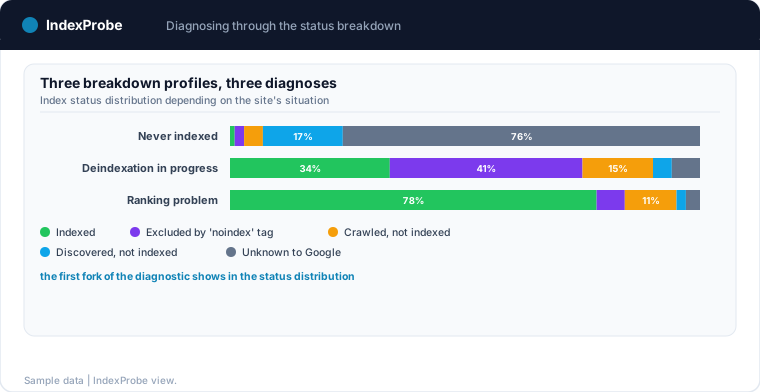
The method is to bulk-inspect a list of URLs you control: your sitemap, an export of your content, or a selection built from Search Console. That's exactly what IndexProbe does: you hand it that list, and it queries the official inspection API for every URL, status, selected canonical and last crawl included. The resulting breakdown is a diagnostic in itself, because each case of the initial fork has its own profile: an overwhelming majority of "URL is unknown to Google" marks a site never submitted or linked; a spike of "Excluded by 'noindex' tag" marks a global block, typically a CMS or plugin setting; a majority of indexed pages, on a site you believed absent, moves the work to ranking. These three profiles match the three branches of the tree, and they can be told apart at a glance.
💡 Three URLs inspected by hand can't tell you which case a 5,000-page site is in; the complete status breakdown shows it immediately. Discover IndexProbe in early access →
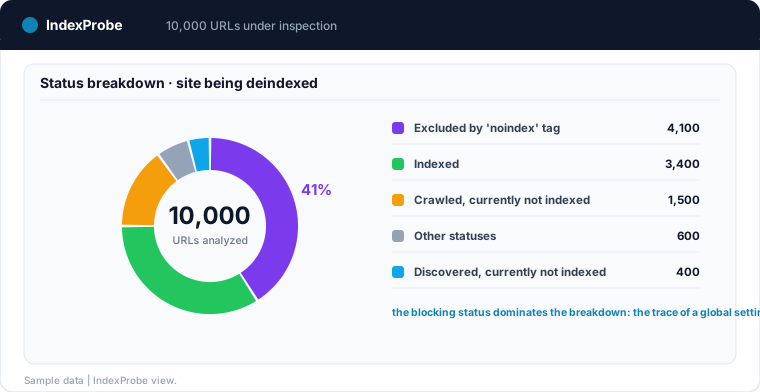
On a site being deindexed, this reading also shows the scale and speed of the problem: the offending status grows from one analysis to the next while indexed pages recede.
Verifying That the Site Is Back
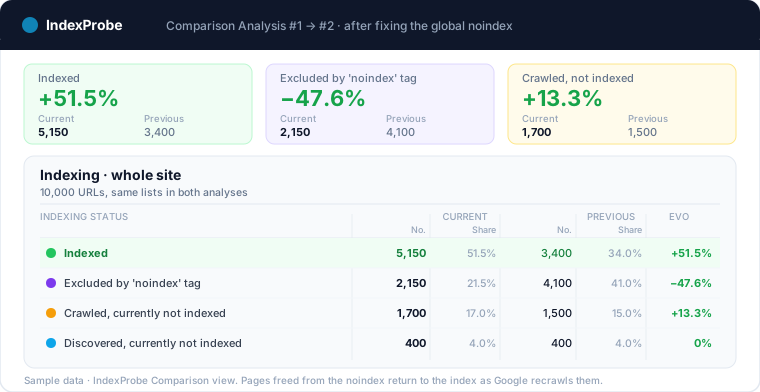
No indexing fix takes effect immediately: a URL's verdict only changes on Googlebot's next visit, within days for active pages and weeks for the rest. Verification therefore follows the same path as the diagnosis: rerun the same analysis on the same URL list, and compare.
After a submitted sitemap and restored internal links, "URL is unknown to Google" entries should move to "Discovered" and then into crawling; after a global noindex fix, the affected family should drain back into the index; after a repaired migration, redirects should consolidate. IndexProbe's Comparison view puts the two analyses side by side, status by status, and scheduled reruns with an email digest turn the verification into monitoring: the next status shift shows up before the traffic drop.
The complete procedure: confirm the absence is real, identify the situation, read the status of each affected page, fix what it points at, then confirm the return. Try IndexProbe in early access and read those verdicts across all your URLs, in a single analysis.
And rather than redoing this check by hand every week, put your strategic pages under index monitoring: IndexProbe re-runs the analysis on a schedule and emails you as soon as a page changes status.
And when visibility drops on an already established site, the same reflex applies at scale: the organic traffic drop page shows how to sort, in a single analysis, what belongs to indexing from what belongs to ranking.
Frequently Asked Questions
How long does it take for a site to appear on Google?
Crawling a new site can take from a few days to a few weeks, and Google asks you to allow at least a week after submitting a sitemap before concluding something is wrong. Indexing then fills in progressively: pages don't all enter the index at once, and some never will.
My site used to appear on Google and disappeared. Why?
A disappearance has a dated cause, and Search Console keeps the trace. The most frequent explanations: a noindex deployed at scale during a redesign, a migration without redirects, a prolonged server outage, a forgotten removal request. Manual actions and security issues exist too, but each has its own dedicated report, and they are far rarer than setting mistakes.
How do I know if my site has been penalized by Google?
The Manual Actions report in Search Console states it explicitly, as does the Security Issues report. If both are empty, the site is not penalized in the strict sense: the absence then comes down to an indexing reason or to ranking. Starting with those two reports avoids treating a checked box as a sanction.
A site: search shows nothing. Does that mean my site isn't indexed?
It's a strong signal, not a proof: the site: operator is approximate and can under-represent the pages actually indexed. Confirmation comes from Search Console, through the Page indexing report or the inspection of a specific URL, which return the official verdict.
What's the difference between a site that isn't indexed and one that ranks poorly?
A non-indexed site has no entry in Google's database: no query can surface it. A poorly ranking site is in the database, but other pages outrank it on the queries that matter. The work areas are opposite: the first is about discovery, crawling and settings; the second about relevance, content and authority.
Is requesting indexing in Search Console enough to get my site indexed?
No. The indexing request puts the URL in a queue, with no guarantee of inclusion, and the button has a quota: clicking it repeatedly speeds nothing up. What counts over time: a clean sitemap, internal links that lead to the pages, and fixed non-indexing reasons. The full method is in our guide to submitting your website to Google.