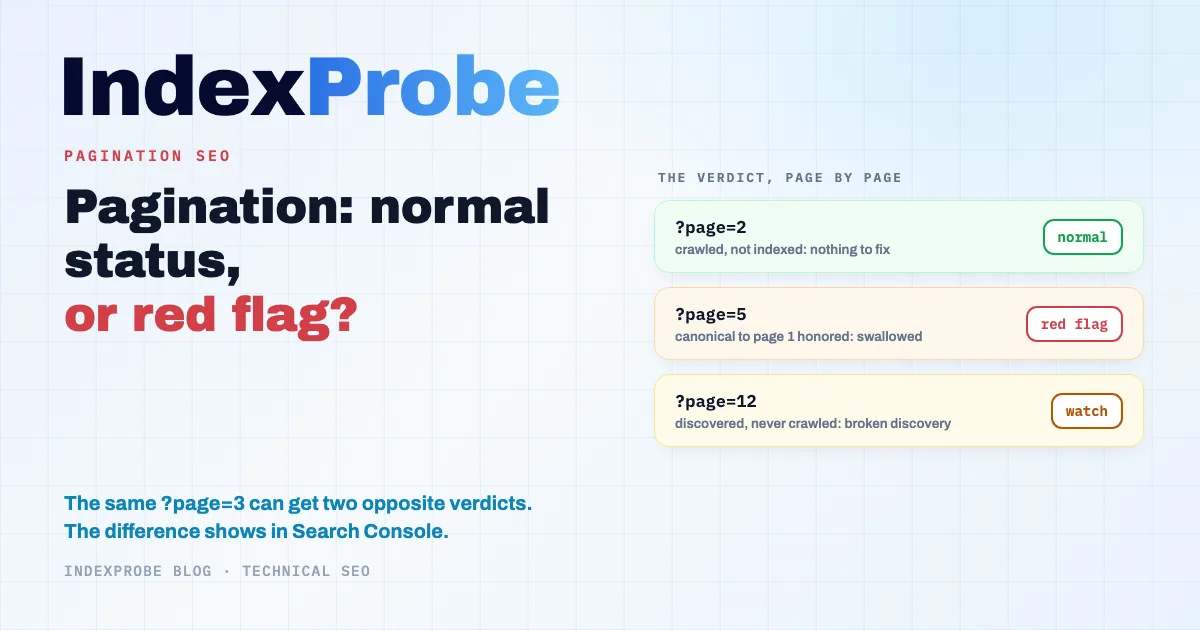
Every paginated URL on your site gets a verdict in Google Search Console's Page Indexing report. A category page 3 sitting under "Crawled – currently not indexed" is usually nothing to worry about. That same page 3 under "Alternate page with proper canonical tag" is a different problem entirely: Google has folded it into page 1, and the products that were only linked from it are no longer being discovered. The two verdicts look similar. They mean opposite things. The real question, once you manage dozens or hundreds of paginated URLs, is which ones fall on which side.
Pagination in SEO: What Google Actually Indexes
Pagination splits a long list (products in a category, blog posts, forum threads) into a numbered series of pages: /t-shirts, /t-shirts?page=2, /t-shirts?page=3. To Google, each of those addresses is a page in its own right, crawled, evaluated, and indexed (or not) individually. Google doesn't treat "your pagination" as one object: it hands down one verdict per URL.
Most guides work the problem backwards. They start from the tags you should put in place, then hope Google follows along. The safer path runs in the other direction: look at what Google has actually decided for each paginated page, right there in Search Console, then work back to the fix. A well-configured pagination leaves a recognizable footprint in the indexing report. A broken one does too. The whole job is telling them apart.
What Google Actually Recommends Since rel=next/prev Was Retired
The official position boils down to four rules, and they're simpler than the topic's messy history suggests. Every page in the sequence needs its own URL ("Give each page a unique URL"), pages must be connected with real <a href> links, each page keeps its own canonical, and page numbers must never live in a # fragment, which Google ignores.
The historical confusion comes from rel="next" and rel="prev". For years they were the default answer to every pagination question. Then Google announced in March 2019 that it had stopped using them, and the current documentation leaves no room for doubt: "Google no longer uses these tags," though other search engines may still read them. Leaving them in place costs nothing; implementing them today buys you nothing with Google. A number of guides, including some that rank well, still walk you through the syntax anyway.
Two official recommendations remain widely unknown. First: don't declare page 1 as the canonical for the whole sequence. The documentation is blunt about it: "Don't use the first page of a paginated sequence as the canonical page. Instead, give each page its own canonical URL." Every paginated page should point to itself. Second, and more surprising: pages in the same sequence are allowed to share a title and meta description ("You can use the same titles and descriptions for all pages in the sequence"). Adding "page 2 of 14" to the title is still good practice, but Google doesn't require it.
That leaves links. Googlebot doesn't click: "Google's crawlers don't 'click' buttons and generally don't trigger JavaScript functions." A "Next" button wired in pure JavaScript, with no <a href> pointing to the next page's URL, keeps Google from ever discovering the deeper pages, exactly like a React or Vue app whose views only exist behind fragments.
The Statuses of a Healthy Pagination, and the Ones That Should Worry You
A healthy pagination doesn't mean "every page indexed." In a correct setup, page 1 is indexed and a share of the deeper pages isn't: Google crawls them, sees they carry no search value of their own, and leaves them out. What matters sits elsewhere: the products and articles listed on those pages should be indexed under their own URLs. The statuses below are the most common ones on paginated pages; others remain possible depending on your setup.
In a pagination that works, two statuses dominate. "Crawled – currently not indexed" on pages 3, 5, or 8 is the most frequent behavior: Google read the page, understood its role as an intermediate table of contents, and decided indexing it wasn't worth it. As long as that status covers paginated pages and not your product pages, there's nothing to fix. "Discovered – currently not indexed" on a few very deep pages is unremarkable too: Google knows those URLs exist and simply hasn't prioritized crawling them yet.
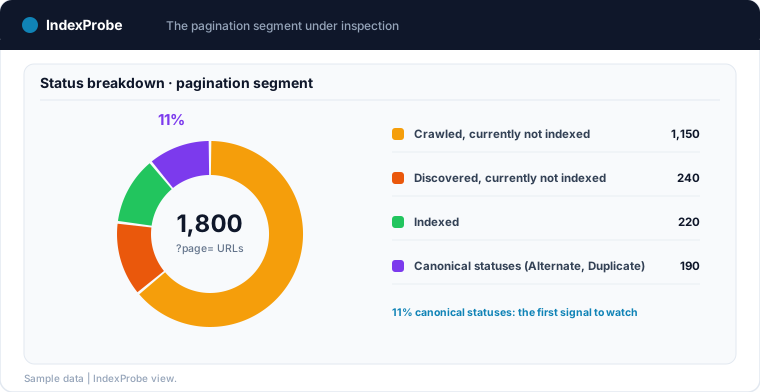
Three patterns should worry you. A massive volume of "Discovered – currently not indexed" across your whole pagination depth means Googlebot no longer reaches your pages: thin internal linking, or crawl budget running dry. "Duplicate without user-selected canonical" on paginated pages points to competing variants of the same list (sort orders, display parameters) with no declared canonical. And "Alternate page with proper canonical tag" on your pages 2 and beyond is the most misleading signal of all: the label sounds like a pass, when it actually means Google followed a canonical pointing somewhere else, almost always page 1. Your deeper pages get absorbed into the first one, and the products only linked from them slip out of Google's reach.
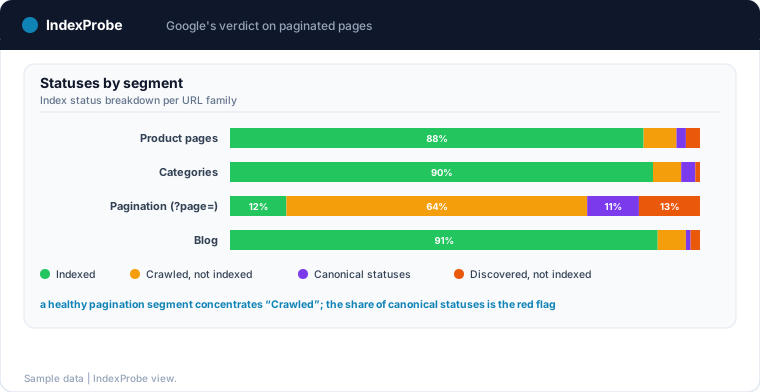
The reading grid is short: on a paginated page, a crawled-but-not-indexed status is usually normal; a canonical status usually means a configuration error is rewriting your pagination for you.
The Classic Mistakes and the Verdict Each One Triggers in Search Console
Every pagination mistake leaves its own mark in the Page Indexing report. Knowing them lets you run the diagnosis in the useful direction: from the verdict back to the cause.
Canonicalizing everything to page 1
The most widespread mistake, often inherited from a theme or plugin configured back in the rel=next/prev era: every page in the sequence declares page 1 as its canonical. Two verdicts can follow, depending on how Google reacts. If it honors your declaration, the deeper pages move to "Alternate page with proper canonical tag": they drop out of the index, and the links they carried stop working as paths to your products. If Google finds your declaration inconsistent, it overrides you and picks its own: the pages surface as "Duplicate, Google chose different canonical than user". Either way, the report shows you what Google did with your tag, which is something no crawler can tell you. Pagination and URL parameters are a common source of duplicate content.
Missing canonicals on list variants
The same page 2 reachable at ?page=2, ?page=2&sort=price, and ?page=2&view=48, with no canonical declared, ends up as "Duplicate without user-selected canonical": Google sees the duplicates and arbitrates alone. This is where pagination and sort parameters meet, and it's precisely where Google's documentation reserves noindex: for "variations of the same list of results," not for the paginated sequence itself. Most guides skip that nuance entirely.
Noindexing the whole sequence
Putting pages 2 and beyond in noindex looks like a reasonable precaution: they leave the alarming sections of the report and settle under "Excluded by 'noindex' tag". The cost shows up elsewhere: over time, Google crawls pages it isn't allowed to index less and less, and the links they carry stop surfacing your deeper products. A pagination noindex isn't a default setting: it's a decision you make with that trade-off in view.
Page numbers in fragments or behind buttons
/products#page=2 doesn't exist as far as Google is concerned: "Google ignores fragment identifiers." A "Load more" button without an <a href> link behaves the same way. Pages beyond the first are never discovered, and the products linked only from them pile up under "Discovered – currently not indexed," or even "URL is unknown to Google." The symptom shows up on product pages first, not on the pagination itself, which is what makes it hard to trace back until you look at both families of pages side by side.
💡 These verdicts are readable one URL at a time in Search Console's inspection tool. Across a 300-page pagination, nobody does that by hand. Get early access to IndexProbe →
Finding the Affected Paginated Pages at Scale
Search Console's URL Inspection tool gives you the exact verdict for one paginated page: its status, the canonical Google selected, the date of Googlebot's last visit. But it works one URL at a time, and the coverage report can't be filtered by URL pattern: there's no way to isolate "all my ?page= URLs" and see how they're distributed. On a store where every category runs 10 or 20 pages deep, manual checking hits its ceiling fast.
The workable method treats pagination as a list of URLs to inspect in bulk. You build that list from a crawl export or your sitemap, or straight from a pattern: every URL containing ?page= or /page/. That's exactly what IndexProbe does: hand it that list, or build it from your Search Console by URL pattern (regex), and it queries the official API for every page. For each paginated URL you get the index status, the canonical Google actually selected, and the last crawl date, in one filterable table.
The difference with a crawler deserves to be stated plainly: a crawler reads the canonical your code declares; the Search Console API shows the one Google decided to keep. That gap is exactly what tells you whether your page-1 canonical was honored or ignored. And with page-type segmentation (AI-generated or defined by hand, say a "pagination" segment built on the \?page= pattern), the status breakdown reads at a glance, segment by segment.
Fixing Each Status the Right Way
Once you know the breakdown, each verdict calls for its own fix, and some situations call for none at all.
Deep pages under "Crawled – currently not indexed" while product pages are properly indexed: nothing to fix. That's the equilibrium of a pagination doing its job as a table of contents. The only work worth doing is internal linking: bring important products closer to page 1 by featuring bestsellers or reducing depth (more items per page, tighter subcategories).
Pages under "Alternate page with proper canonical tag" or "Duplicate, Google chose different canonical than user": restore self-referencing canonicals. Each paginated page declares its own URL, ?page=3 points to ?page=3. On most CMSs (Shopify's ?page=, WordPress's /page/2/) this comes down to a theme or SEO plugin setting; the point to double-check after deployment is that the tag actually rendered in the HTML has changed, caches and redirects included.
Sort variants under "Duplicate without user-selected canonical": pick one rule and apply it everywhere. Either canonicalize variants to the default version of the same page, or noindex the variants, in line with the official recommendation on "variations of the same list of results." What matters is that the rule is systematic, not decided parameter by parameter.
A pile-up of "Discovered – currently not indexed" across your depth: restore discovery first. Confirm the pagination links are real <a href> tags, keep depth reasonable (a page that matters sitting 15 clicks from the homepage will almost never be prioritized), and make sure crawl budget isn't being burned elsewhere.
Facets, Infinite Scroll, and Crawl Budget: What Saturates Indexing
Pagination rarely causes trouble on its own. It becomes a serious problem when it combines with the other URL multipliers.
The first is faceted navigation: every filter combination spawns its own list, and every list paginates. ?color=red&page=2, ?color=red&size=m&page=3: the filter combinatorics, already huge, get multiplied by pagination depth. If facets haven't been triaged (indexable, blocked, or canonicalized based on search demand), pagination amplifies a problem that was already there.
The second is infinite scroll. Implemented without underlying paginated URLs, it makes your catalog depth invisible to Googlebot, which never triggers scroll-based loading. Google's documentation recommends backing any progressive loading with real paginated URLs connected by <a href> links: users keep the scrolling comfort, the crawler keeps a crawlable sequence.
The third is crawl budget. On a site above 10,000 URLs, thousands of paginated pages and variants consume Googlebot visits that no longer benefit the pages that matter. The signal sits in the crawl data: if the share of strategic pages crawled recently keeps shrinking while deep pagination keeps getting visits, Googlebot is spending its time in the wrong place.
Confirming the Fix Produced the Right Verdict
A pagination fix isn't validated the day the tag ships. It's validated the day the verdict changes in Search Console, which only happens after Googlebot revisits each page. On deep pages, rarely crawled by definition, that delay runs in weeks.
The method: re-run the same analysis on the same list of paginated URLs a few weeks after deployment, and compare. Pages under "Alternate page with proper canonical tag" should shift toward "Crawled – currently not indexed" or "Indexed" as Google re-reads the corrected canonicals; the "Discovered" volume should recede if discovery was restored. IndexProbe's Comparison view puts both analyses side by side, status by status, and automatic re-runs with an email digest turn the one-off check into ongoing monitoring: a pagination that breaks again after a theme update shows up as a changed verdict, before it shows up as lost traffic.
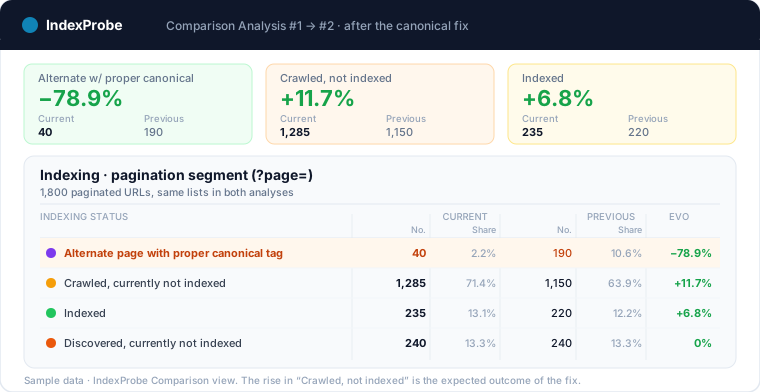
The full loop runs in three steps: read Google's current verdict on every paginated page, fix what the verdict points to, then confirm the verdict changed. Try IndexProbe in early access and read those verdicts across all your paginated pages, in a single analysis.
On an e-commerce site, the deep product pages pay the price of pagination: never crawled, with zero incoming links. The e-commerce indexing page details how to spot those pages segment by segment, with each one's count of incoming links.
Frequently Asked Questions
Should paginated pages be set to noindex?
Not by default. Google recommends noindex for variations of the same list (sort orders, display options), not for the paginated sequence. A blanket noindex gradually reduces crawling of those pages and cuts off the links that made your deeper products discoverable.
Is a paginated page under "Crawled – currently not indexed" a problem?
Usually not. It's the expected status for a page 3 or 5 that serves as a table of contents with no search value of its own. The check that matters is on the products and articles listed there: as long as they're indexed under their own URLs, the pagination is doing its job.
Should the canonical point to page 1?
No. Google's documentation explicitly says not to use the first page as the canonical of the sequence: each paginated page declares its own URL. Canonicalizing to page 1 is precisely the mistake that sends deep pages into "Alternate page with proper canonical tag" and pulls their content out of the index.
Do rel=next and rel=prev still matter?
Not to Google, which announced in 2019 that it no longer uses them. Other search engines may still read them, so leaving them in place costs nothing. Implementing them today for Google's sake, though, is wasted effort.
Does infinite scroll hurt indexing?
It does when it replaces pagination instead of complementing it. Googlebot doesn't trigger scroll-based loading: without paginated URLs connected by real <a href> links, deep items are never discovered and pile up under "Discovered – currently not indexed."
Does pagination create duplicate content?
Not by itself: each page lists different items, and Google treats the URLs in a sequence as separate pages. Duplicates come from variants of the same page (sort orders, display parameters), which you handle with canonicals or noindex, in line with the official recommendation.