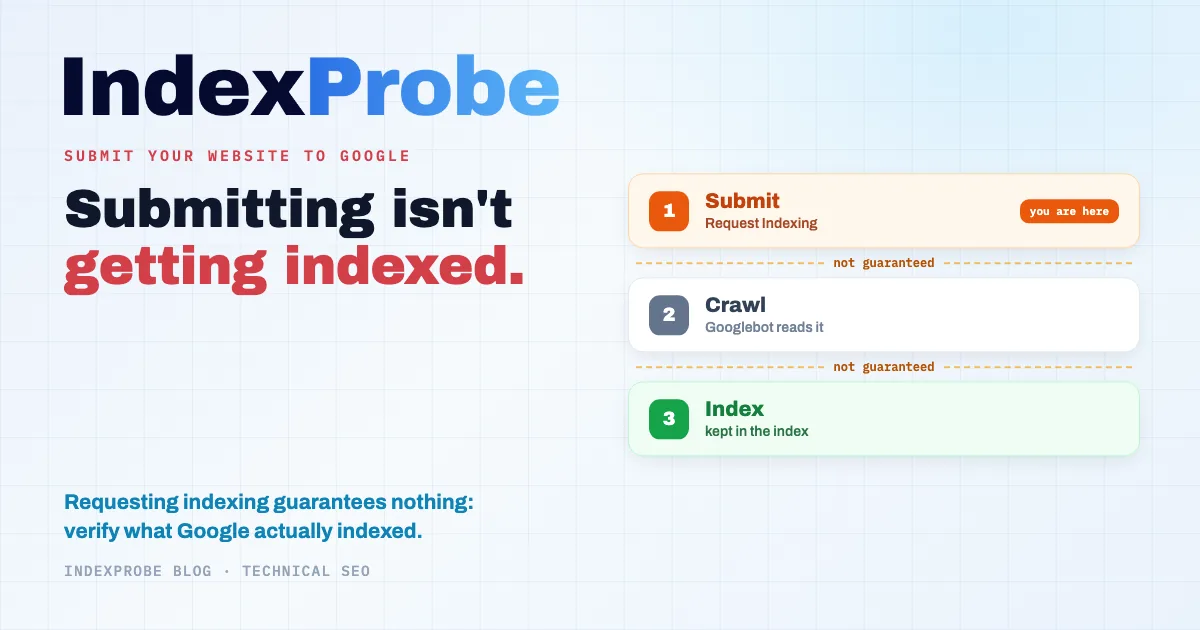
You publish a page, and the next move is almost automatic: open Google Search Console's URL Inspection tool, hit "Request Indexing", and move on, as if the job were done. But that click does nothing more than drop the URL into a queue. Google's own documentation is blunt about it: requesting a crawl "does not guarantee that inclusion in search results will happen instantly or even at all."
So does submitting your site actually accomplish anything? Once the request is in, how do you know what Google really indexed? And for the pages left out in the cold, what's holding them back?
Submitting isn't the finish line. It's the first mile.
Do You Even Need to Submit Your Site to Google?
Not strictly, no. Google finds sites by following links across the web, and its documentation says so plainly: "you usually don't even need to do anything except post your site on the web." Submitting speeds up discovery and hands you some control levers, but a properly linked site gets found without any intervention.
The distinction that changes everything lives in three words you should never conflate: discovery, crawling, indexing. Discovery is the moment Google learns your URL exists. Crawling is Googlebot's visit to actually read the page. Indexing is Google's decision to keep it in the index. Submitting mostly acts on that first step. The other two are never a given.
Google admits as much itself: even though it crawls billions of pages, "it's inevitable that some sites will be missed." Publishing isn't always enough, and neither is submitting. Which is exactly why you want to steer the process rather than sit through it, and that starts in Search Console.
Step 1: Add and Verify Your Property in Search Console
Everything begins here. Without a verified property in Google Search Console, neither a sitemap nor an indexing request is possible. The first decision is the property type.
A domain property covers the entire domain, across every subdomain and every protocol (https, http, www or not). You verify it with a DNS record, and it gives you the most complete picture. A URL-prefix property only covers the exact URL you declare: you can verify it several ways (an HTML file at the root, a <meta> tag, a Google Analytics or Tag Manager account), but it forces you to juggle multiple properties if your site mixes variants.
For most sites, the domain property is the right call: one entry, no variant left behind. Once verification goes through, the URL Inspection tool and the Sitemaps section open up, and the rest becomes possible.
Step 2: Submit Your Sitemap (and Why "Pinging" No Longer Works)
The XML sitemap is your bulk discovery channel. It lists the URLs you consider important and, through the lastmod tag, flags when each one last changed, provided that lastmod is honest. Stamping today's date across the whole sitemap on every deploy makes it worthless, and Google eventually learns to ignore it.
There are two ways to submit it, and only two. The first: the "Sitemaps" section in Search Console, where you enter the file's URL (for example https://yoursite.com/sitemap.xml). The second: the Sitemap: line in your robots.txt, which Google reads on every crawl.
What no longer works is the sitemap ping, that HTTP request to a google.com/ping?sitemap=… URL still recommended in plenty of tutorials. Google deprecated it on June 26, 2023 and retired it that same year, with a reason attached: "the vast majority of [these] submissions lead to spam." If a guide tells you to "ping Google" after every update, it's out of date. Declaring the sitemap in Search Console or in robots.txt is enough, and it keeps itself current.
Step 3: Request Indexing for a URL (and Its Real Limits)
The URL Inspection tool handles the one-off case: a fresh or recently updated page you want to flag without waiting for Googlebot's next pass. You enter the URL, Google tests it, then you click "Request Indexing" to drop it into the crawl queue.
Useful, but bounded, and Google doesn't hide it. Its documentation sets out three clear limits. First, a ceiling: "there's a quota for submitting individual URLs." Second, the futility of nagging: "requesting a recrawl multiple times for the same URL won't get it crawled any faster." Third, the absence of any guarantee, already quoted up top: requesting a crawl "does not guarantee that inclusion in search results will happen instantly or even at all."
So the division of labor is simple: URL Inspection for a handful of strategic pages, the sitemap for volume. Clicking "Request Indexing" ten times moves nothing forward except your quota, downward.
The Shortcut You've Heard About: The Indexing API
At this point a question usually comes up: "what about Google's Indexing API, doesn't it index faster?" The answer calls for a few caveats, because its real-world use is a long way from its reputation.
Its official scope is extremely narrow. The documentation is categorical: the Indexing API "can only be used to crawl pages with either JobPosting or BroadcastEvent embedded in a VideoObject." In other words: job postings and livestreams, nothing else. It was never designed for ordinary pages.
The credit-based "instant indexers" that promise to index any page bend it away from that intended use, and Google takes a dim view of it. On September 11, 2024, an anti-spam warning was added to the documentation: "any attempts to abuse the Indexing API […] may result in access being revoked." In May 2025, John Mueller (Google) put the position bluntly: "I'd just use it properly, or not use it. If we wanted to suggest that people could use it regardless, we'd document it as such."
And crucially, even within its legitimate scope, the Indexing API only triggers a crawl, it doesn't guarantee indexing. It schedules a faster crawl; the decision to index stays entirely on Google's side. So the "shortcut" lands right back on the original point: whatever channel you submit through, you still have to check what Google actually did.
Submitting Is Step One, Not the Finish Line
Let's take stock of what you've really got once you've submitted. A verified property, a declared sitemap, a few indexing requests sent: your URLs are now known to Google and sitting in a queue. Nothing more. Nothing says Googlebot has crawled them, let alone that Google has decided to index them.
That's the drop-off most guides quietly skip. They stop at the click, as if submitting and being indexed were one and the same. Between the two, though, sit two decisions Google makes on its own, on its own schedule, based on the quality and usefulness of each page.
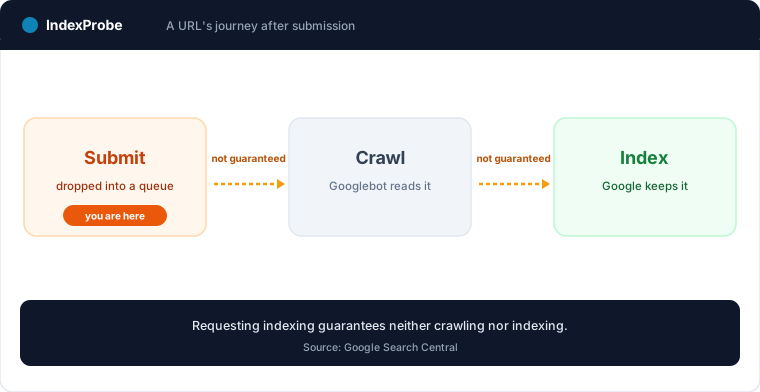
So the real question is no longer "how do I submit", but "how do I know it worked". And that's where Search Console shows both what it can do and where it falls short.
How to Know Whether Google Actually Indexed Your Pages
Three methods exist, from the roughest to the most reliable. The site:yoursite.com query in Google gives you a ballpark, but stays indicative: the count is rounded and doesn't reflect the exact state of the index. Keep it for a quick glance.
The URL Inspection tool, by contrast, gives you the official verdict, the one that counts: indexed or not, and if not, the reason Google assigned. It's the most precise data available. Its one drawback: you get it one URL at a time. Checking three hundred submitted pages means three hundred manual inspections, to be redone on every audit.
That leaves the "Page indexing" report, which aggregates every status site-wide. Valuable for the big picture, it carries a structural limit: it isn't filterable down to your URLs. To find out whether your strategic pages fall under a given status, you have to open each category, export its list, then cross-reference by hand. When a page is indexed by the book, it carries the Submitted and indexed status; the whole point is to verify which of your submitted pages actually reached it.
💡 After submitting, the real question is no longer "did I submit?" but "what's indexed?" Checking your submitted pages one by one in Search Console doesn't hold up at scale. Explore IndexProbe in early access →
Checking at Scale: The Blind Spot After Submission
This is where the real bottleneck sits. The moment you submit more than a handful of URLs, confirming they're indexed becomes the choke point: URL Inspection only handles one page at a time, and the coverage report won't filter down to your list. You end up inspecting by hand, or flying blind.
IndexProbe is the bulk version of that URL Inspection tool. You hand it the list of URLs you submitted, via sitemap, CSV, paste, or by building it straight from your Search Console (by clicks, impressions, or URL pattern), and it queries the official Search Console API for each one. In return, page by page: the exact indexing verdict Google assigned, the non-indexation reason where relevant, the canonical it chose, and the date of Googlebot's last visit. All in a filterable, exportable table you can re-run whenever you like.
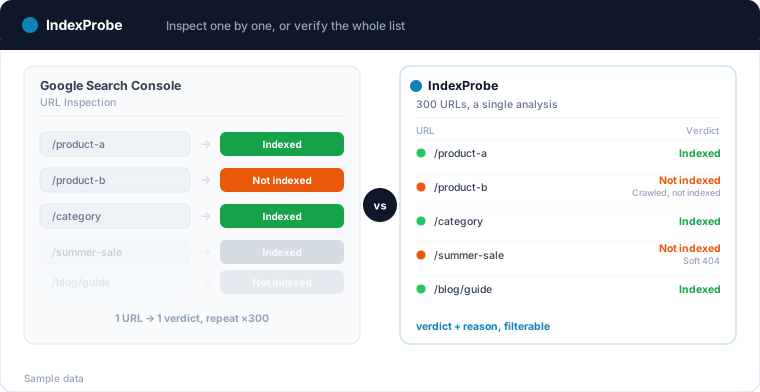
IndexProbe is not a crawler: it discovers no URLs by following links, it only inspects the list you give it or build from GSC. Confirming indexation stops being a grind and turns into reading a table: you see at a glance how many submitted pages made it, and which ones are missing.
Your Pages Aren't Indexed: The Official Reason Tells You What to Fix
A page you submitted that stayed out isn't a mystery. Google assigns it a specific reason, and that reason points to the fix. That's the whole value of the official verdict over a plain "indexed / not indexed": it tells you why.
The most common reasons after a submission are well identified. Discovered, currently not indexed: Google knows the URL but hasn't crawled it yet, often a matter of crawl budget or internal linking. Crawled, currently not indexed: the page was read, but Google didn't judge it worth keeping, usually a signal about quality or perceived value. Soft 404: the page returns 200 but looks empty or broken to Google. Duplicate without user-selected canonical and Duplicate, Google chose different canonical than user: the page is seen as a duplicate, and another version holds its spot in the index. And when the whole site stays missing, the full diagnostic for a website not showing up on Google helps locate the problem before fixing reason by reason.
One trap is worth flagging here: mass-submitting pages that are noindex, blocked by robots.txt, or canonicalized elsewhere will never get them indexed. Those are requests doomed to fail, burning your quota for nothing. Before you submit a batch, make sure those pages are genuinely indexable. On WordPress, two settings produce these doomed requests in bulk, the Settings > Reading checkbox and plugin noindex rules: our guide to WordPress indexing shows how to spot them. And if a 404 is hiding among your submitted URLs, the guide on how to fix 404 errors in Search Console walks you through it.
How Long It Takes, and What to Do While You Wait
There's no guaranteed timeline, but there is a documented ballpark. Google puts it this way: "crawling can take anywhere from a few days to a few weeks." A new or thinly linked site sits toward the high end. And, worth repeating, clicking "Request Indexing" again speeds up nothing: the quota goes down, the crawl doesn't.
What genuinely helps comes down to three things. Page quality and usefulness first, since Google "prioritize[s] the fast inclusion of high quality, useful content." Internal linking next: a page well linked from other solid pages on the site gets discovered and crawled faster than an orphan. And an honest, up-to-date sitemap, with reliable lastmod values. Everything else (pings, rapid-fire resubmissions, out-of-scope instant-indexing tools) is motion, not acceleration.
Confirming Your Submission Paid Off
The loop closes on a comparison over time. A fix or a fresh submission only counts once Google has registered it, and you measure that by putting two successive analyses side by side: the same list of URLs, before and after. You then see how many pages left a non-indexed status and joined the index.
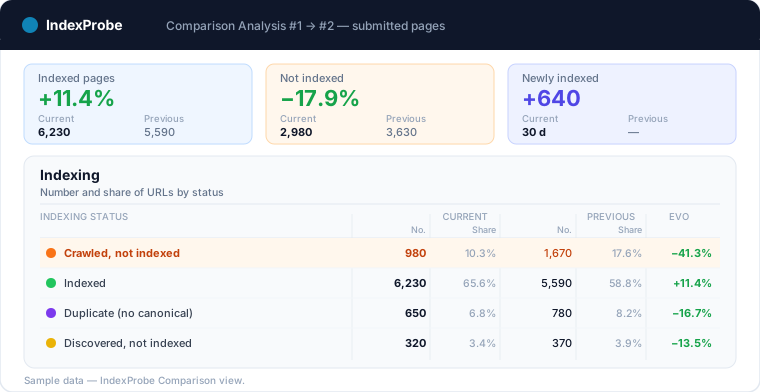
The same instinct pays off over the long run. A page indexed today can drop out tomorrow, with no visible alert, after a redesign, a canonical change, or a technical regression. Tracking your list of strategic pages on a regular basis turns a silent deindexing into a signal you can catch, before it turns into lost traffic.
💡 Submitting is asking. Verifying is knowing. For the whole list you provide or build from GSC, IndexProbe gives you Google's official indexing verdict per URL, with the reason for the pages left out, and stays repeatable so you can track every shift from one analysis to the next. Try IndexProbe in early access →
And if these checks are part of a migration, planned or already underway, lean on the SEO migration check: a reference state before the switch, then day-by-day tracking of the new URLs and the old ones, from official data.
One clarification while you are here: Rapid URL Indexer submits URLs for indexing, and its sister product Rapid Index Checker verifies visibility by querying the SERPs — neither reads Google's official verdict. Our line-by-line comparison sorts out which tool answers which question.
Frequently Asked Questions
Do you need to submit your website to Google to get indexed?
Not necessarily. Google finds sites by following links across the web and says so itself: "you usually don't even need to do anything except post your site on the web." Submitting (sitemap, indexing request) speeds up discovery and gives you control levers, but a properly linked site gets found without intervention.
How long does it take Google to index a page?
There's no guaranteed timeline. Google's documentation states that "crawling can take anywhere from a few days to a few weeks," and indexing itself is never assured. A new or thinly linked site sits toward the high end of that range.
Does requesting indexing guarantee you'll be indexed?
No. Google is explicit: requesting a crawl "does not guarantee that inclusion in search results will happen instantly or even at all." The request drops the URL into a crawl queue; the decision to crawl and then index stays entirely on Google's side.
How many times can you request indexing for a URL?
There's a quota for submitting individual URLs, and nagging doesn't help: per Google, "requesting a recrawl multiple times for the same URL won't get it crawled any faster." Re-clicking burns the quota without speeding up the crawl.
Does the sitemap ping still work?
No. Google deprecated the sitemap ping on June 26, 2023 and retired it that same year, on the grounds that "the vast majority of [these] submissions lead to spam." Only two valid ways to declare a sitemap remain: Search Console or the Sitemap: line in your robots.txt file.
Can Google's Indexing API index any page?
No. Its official scope is limited to pages carrying JobPosting markup or a BroadcastEvent embedded in a VideoObject. Bending it toward ordinary pages risks getting your access revoked, and even within its legitimate scope it only triggers a crawl: it doesn't guarantee indexing.
Sitemap or URL inspection: which should you use?
They're complementary. The sitemap is the bulk discovery channel, to maintain permanently for all your URLs. URL Inspection handles the one-off case: flagging a new or updated page without waiting for the next crawl. One doesn't replace the other.
How do you check whether a page is indexed by Google?
Three methods, in order of reliability: the site: query (indicative), the URL Inspection tool (official verdict, but one URL at a time), and the "Page indexing" report (big picture, not filterable to your URLs). To verify a whole list of submitted pages, a bulk inspection via the Search Console API saves you the manual work.
Why isn't my page indexed even though I submitted it?
Because submitting doesn't force indexing. Google assigns every non-indexed page a specific reason: "Discovered, currently not indexed," "Crawled, currently not indexed," "Soft 404," a duplicate, or a noindex tag that blocks indexing. It's that official reason that tells you what to fix.