Two statuses in Google Search Console's Page Indexing report look almost identical and get confused constantly: Discovered - currently not indexed and Crawled - currently not indexed. They don't share a cause or a fix.
"Discovered" means Google knows your URL (from your sitemap or a link) but hasn't crawled it yet: it's sitting in the crawl queue. So it isn't (yet) a content-quality problem, it's a crawl-priority problem. "Crawled," by contrast, means Google did crawl the page and then chose not to index it.
The confusion is expensive: it pushes you to apply the wrong fix, rewriting a page Google hasn't even read. We'll cover what "Discovered" really means, why Google defers the crawl, how to unblock it, and how to find the pages that are actually stuck without inspecting them one by one.
What "Discovered - currently not indexed" means
Google found out the URL exists, through your sitemap, an internal link, or an external link, and placed it in its crawl queue. But Googlebot hasn't visited yet. There's no last-crawl date, because no crawl has happened. The page is neither crawled nor indexed: it's waiting.
So this status marks the first milestone cleared: Google at least knows the URL exists. A page it has no record of falls under a different case, the URL is unknown to Google status, where the challenge is no longer getting the page crawled, but getting it discovered in the first place.
Why the wait? Because crawling has a cost, for Google and for your server. Google doesn't visit everything it knows about: it prioritizes. When your signals don't clearly say "this page matters," the URL stays at the back of the queue, sometimes for a long time. The status isn't a penalty, it's a hold for lack of priority.
That's exactly what sets it apart from its neighbor, and it's where almost everyone goes wrong.
Discovered vs Crawled: don't confuse the two levers
Two Search Console statuses are so alike that people mix them up constantly (the SERP itself blends the articles written about them). Yet they have neither the same cause nor the same fix. The whole difference comes down to one question: did Google crawl the page?
| GSC status | Did Google crawl the page? | Nature of the problem | Fix lever |
|---|---|---|---|
| Discovered - currently not indexed | No, not yet | Crawl priority | Give Google a reason to come: links, crawl budget, server |
| Crawled - currently not indexed | Yes | Indexing decision (often quality) | Improve the page itself |
That's the trap: applying the "quality" fix to a crawl problem. You can rewrite your page ten times and make it flawless, but if Google doesn't crawl it, nothing moves. As long as the status is "Discovered," the content isn't even in play, because Googlebot hasn't read it yet.
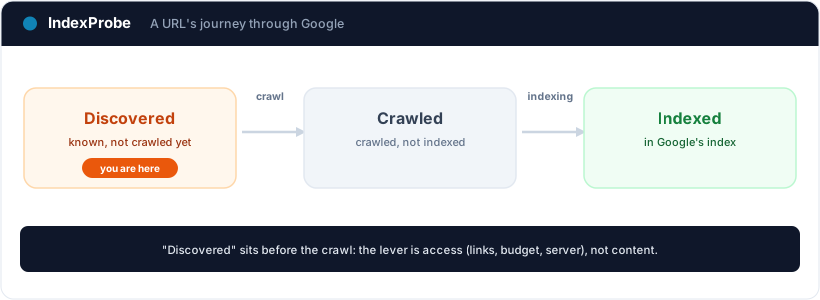
If your pages show "Crawled - currently not indexed" instead, that's a different problem: Google saw them and chose not to index them. We cover it in detail in the article on Crawled - currently not indexed.
Why Google defers the crawl: the causes
Every cause of this status comes back to one idea: Google sees no strong enough reason to prioritize crawling this URL. Here are the most common triggers.
- Weak internal linking, the number-one cause. An orphan or barely linked page sends a clear signal: even your own site doesn't feature it. Google concludes it's secondary and leaves it waiting. Internal links are the main path by which Googlebot discovers and then prioritizes your pages.
- Domain authority and popularity. On a young site or one with few external links, Google crawls cautiously: it spends fewer resources exploring pages whose value it doesn't yet know.
- Wasted crawl budget. If Googlebot spends its time on duplicate URLs, useless parameters (
?sort=,?utm_=), redirect chains, or worthless pages, it has less budget left for your important ones. On a large site, that's often the real culprit. Faceted navigation combinations are a frequent trigger: they swell the queue faster than Googlebot works through it. - Server speed and load. If your server is slow or strained, Google deliberately slows its crawl to avoid overloading it. Pages then stay in the queue.
- A missing, stale, or polluted sitemap. A sitemap listing non-indexable URLs (redirects, 404s, noindex) muddies the priorities. A clean sitemap helps Google know what to crawl.
- A new site. Sometimes it's simply a matter of time: Google found the URL and will eventually crawl it. Patience is a real answer, as long as the other signals follow.
One important point: Google publishes no numeric threshold for this status. A certain volume of "Discovered" pages is normal on most sites. What matters isn't the raw total, but whether pages you wanted indexed are stuck.
How to fix it: give Google a reason to crawl
The fix always follows the same logic: make the page worth prioritizing. In this order.
- Strengthen internal links to the stuck pages. This is the most effective lever. Add contextual links from pages that already get crawled often (homepage, category pages, popular articles). A page reachable in a few clicks, and genuinely linked, moves up the queue.
- Clean up your crawl budget. Keep out of the crawl what doesn't belong there: block worthless URLs via
robots.txt, remove redirect chains, fix duplicates and useless parameters. You free up budget for the pages that count. - Tidy your sitemap. It should contain only final, 200-OK URLs, kept up to date. One version per piece of content.
- Check server speed and stability. A decent response time and no 5xx errors encourage Google to crawl more.
- Request indexing, occasionally. For a few priority pages, URL Inspection in Search Console then "Request indexing" can speed up a visit. It isn't a bulk strategy: across hundreds of URLs it doesn't hold up, and re-submitting on a loop doesn't help.
- Give it time. Once the signals are fixed, the change isn't instant: it depends on how often your site is crawled. Expect anywhere from a few days to several weeks. No need to resubmit everything daily.
The rule to remember: on "Discovered," you act on access (links, budget, server), not on content. Content becomes the topic again only if the page later moves to "Crawled - currently not indexed."
The real problem: finding the stuck pages at scale
Understanding the status takes five minutes. Finding which of your pages are actually stuck, and which are just normal noise, is another matter, and this is where Search Console hits its limit. Its report groups the URLs without easily telling you, page by page, how long each has been waiting or whether it gets internal links. And the URL Inspection tool handles one URL at a time.
That's the wall IndexProbe breaks down. IndexProbe is the bulk version of Google's URL Inspection tool: it queries the official Search Console API to inspect, in a single analysis, the list of URLs you give it (CSV import, sitemap, paste). For every page, it shows its indexing status, its last-crawl date (never crawled or stale), the URL segment, and the internal links it receives.
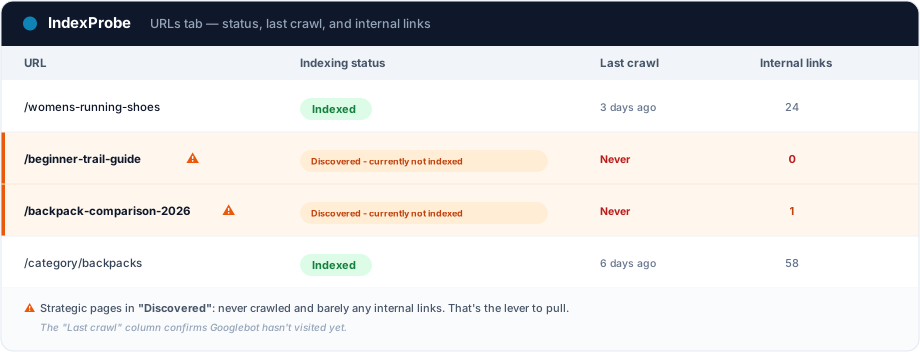
For this status, the last-crawl date is the key piece: a "Discovered" page is by definition never crawled. Seeing that in black and white, next to the number of internal links it receives, tells you immediately what to fix. What you get out of it depends on the list you bring in. IndexProbe doesn't crawl your site to discover URLs: it inspects the ones you give it, and only those.
- A selection of strategic pages (your key pages, your sitemap of pages meant to be indexed). Any important page stuck in "Discovered" and never crawled surfaces immediately, without assuming anything about the rest of the site.
- A full export of your URLs (your entire sitemap, a crawl export…). The segmentation by page type then shows which URL patterns concentrate the status (a template, a paginated family…), and the inbound internal links column reveals the under-linked pages, the ones Google has the least reason to come and crawl.
IndexProbe also opens a window onto Google's crawl, for all your URLs or segment by segment: crawl rate, recently crawled pages, stale pages, and never-crawled pages. That's exactly the reading this status calls for.
That's exactly the triage IndexProbe is built to make possible: telling the truly stuck pages from normal noise, and seeing at a glance which ones are under-linked.
💡 Want to know which of your pages are in "Discovered," never crawled, and how many internal links they get? IndexProbe inspects your URL list and gives you the answer in one analysis. Try IndexProbe in early access →
Confirm the fix worked
After strengthening internal links and cleaning the crawl, you need to confirm Google came. Re-inspect the affected URLs and compare two analyses over time: the pages you unblocked should first get crawled (a last-crawl date appears), then flip to the target state, Submitted and indexed.
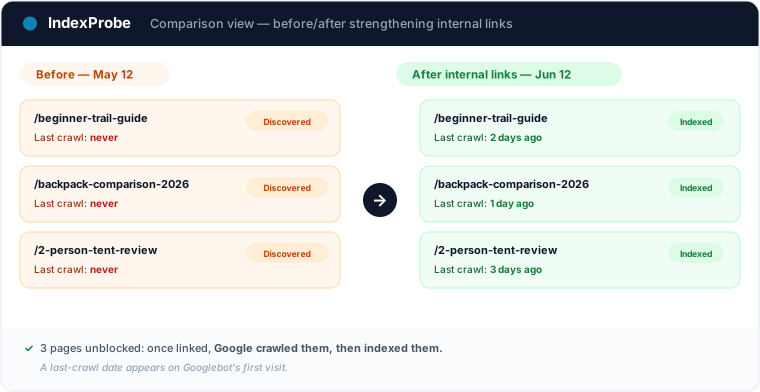
That's the full loop: spot the stuck pages, understand it's a crawl problem, act on access, confirm.
And rather than redoing this check by hand every week, put your strategic pages under index monitoring: IndexProbe re-runs the analysis on a schedule and emails you as soon as a page changes status.
In programmatic SEO, this status signals a pipeline stuck at discovery: Google knows the generated pages exist but doesn't come to fetch them. The programmatic SEO indexing page shows how to read that blockage template by template.
Frequently asked questions
Is "Discovered - currently not indexed" bad? Not in itself. It's a hold: Google knows the URL but hasn't crawled it yet. Some volume is normal. It only becomes a problem when pages you wanted indexed stay stuck for a long time.
How long before Google crawls the page? There's no guaranteed timeframe. Once your signals are fixed (internal links, crawl budget, server), expect anywhere from a few days to several weeks depending on how often your site is crawled. Resubmitting the page every day speeds up nothing.
What's the difference with "Crawled - currently not indexed"? In "Discovered," Google hasn't crawled the page yet: it's a crawl-priority problem. In Crawled - currently not indexed, it crawled the page and then chose not to index it, often for a quality reason. The two don't call for the same fix.
Is requesting indexing enough to clear the status? For a handful of priority pages, it can trigger a crawl sooner. But if the underlying cause (weak linking, crawl budget, server) isn't fixed, the page may fall back into the queue. Requesting indexing speeds things up; it doesn't replace the fix.
Should I rewrite the page's content? Not for this status. As long as the page is "Discovered," Google hasn't read it, so content isn't in play. Improving content matters only if the page later moves to "Crawled - currently not indexed."
How do I check this status across a large number of URLs? Search Console's URL Inspection tool handles one URL at a time. To triage at scale, a tool like IndexProbe inspects the URL list you provide (CSV, sitemap) and shows, for each one, the official status, the last-crawl date, and the internal links received.
Stop inspecting your pages one URL at a time. IndexProbe plugs into the official Search Console API and inspects your URL list in a single analysis: indexing status, last-crawl date (never crawled or stale), segment, internal links. Enough to spot in minutes the strategic pages stuck in "Discovered," understand which ones are under-linked, and confirm your fix landed.