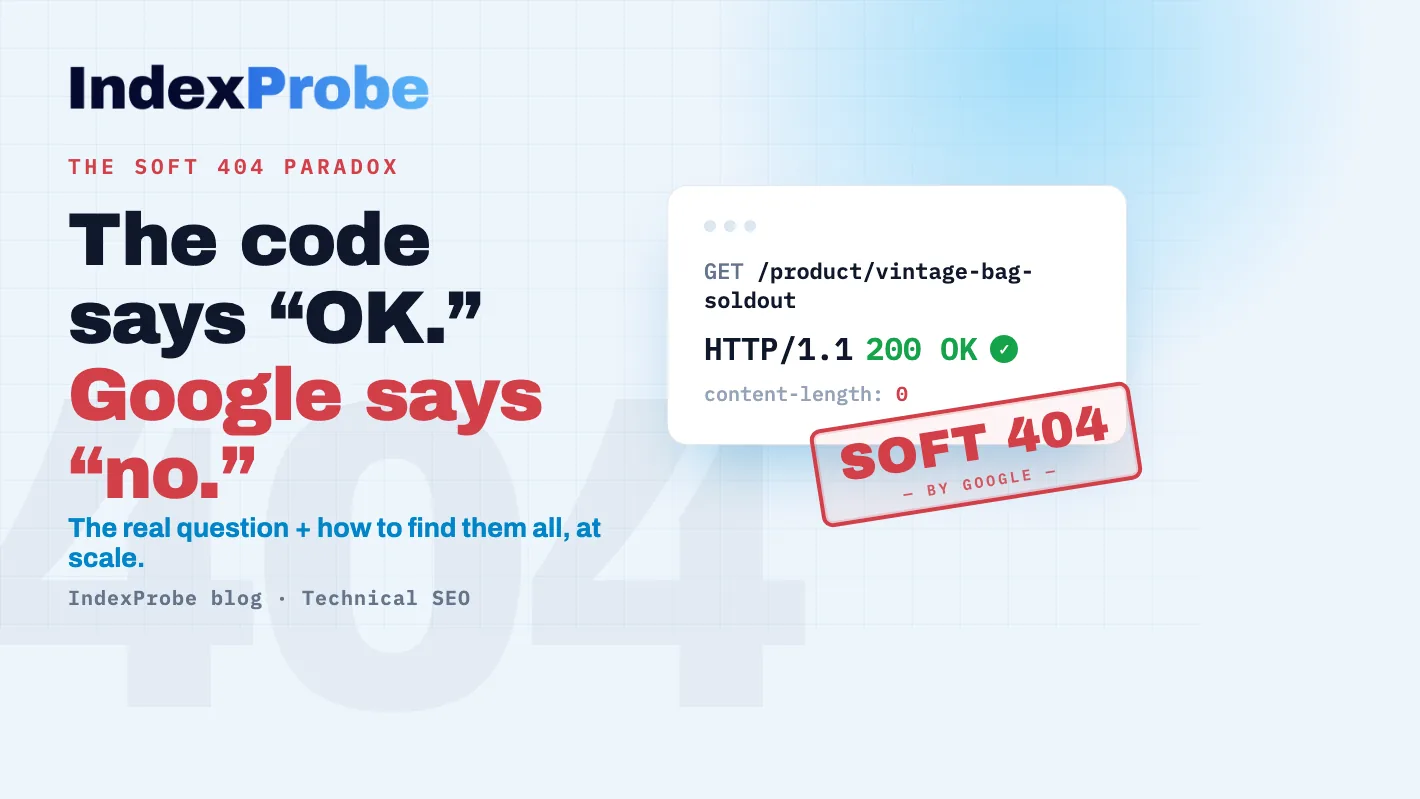
In Google Search Console's Page Indexing report, a Soft 404 isn't a 404 error page. It's the opposite: your server returns "200 OK," as if everything's fine, on a page that's empty or doesn't really exist. Google spots the mismatch, decides the page has nothing to offer, and treats it as a 404 without indexing it.
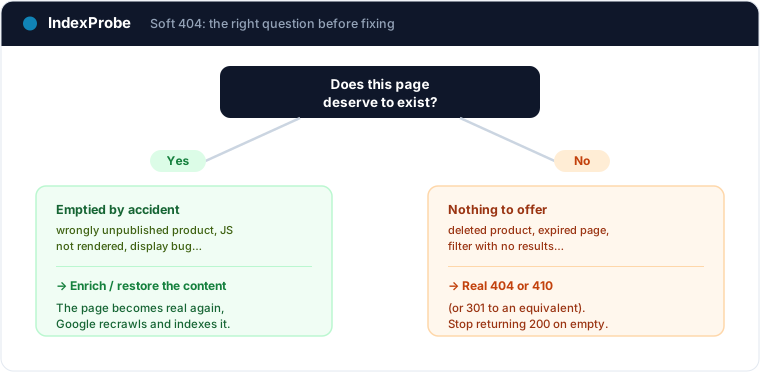
So the problem isn't that the page returns an error. It's that it lies: it says "success" while it's hollow. The real first question isn't "how do I make this status go away," but "does this page deserve to exist?" Depending on the answer, the fix is radically different, sometimes opposite.
We'll cover both cases, the most common causes (usually a whole template, not one page), and how to find all your soft 404s and their patterns without inspecting them one by one.
What is a "Soft 404"?
When a browser or Googlebot requests a page, the server replies with an HTTP status code. 200 means "all good, here's the page." 404 means "this page can't be found." The contract is simple: the code should reflect reality.
A soft 404 breaks that contract. The server returns 200 OK, but the page is empty, nearly empty, or shows a message like "no results" or "product unavailable." For the user and for Google alike, there's nothing there. So Google doesn't trust the code: it analyzes the content, judges that the page behaves like a not-found page, and labels it "Soft 404."
The consequence is twofold. The page is not indexed (Google won't index a page it considers empty). And every time Googlebot visits those URLs, it burns crawl budget for nothing, at the expense of your real pages. That's where "soft" comes from: there's no declared error, just a mismatch between what the server says and what the page contains.
Soft 404 vs 404 vs 410: the difference
These three cases get mixed up constantly. They don't share the same HTTP code or the same meaning.
| Status | HTTP code returned | What it means | Indexed? |
|---|---|---|---|
| Soft 404 | 200 (wrongly) | The page says "OK" but it's empty or not-found | No |
| Not found (404) | 404 | The page is missing, and the server says so correctly | No |
| Page removed (410) | 410 | The page was permanently deleted | No |
The nuance that matters: a soft 404 is a consistency problem, not a missing page. A real 404 or 410 is healthy, a missing page declared as such. A soft 404 misleads Google.
Watch out for a neighboring case: if your page has real content, just judged too thin or low-value (not empty), it isn't a soft 404. It's more likely Crawled - currently not indexed, which is about quality, not a technical mismatch.
Don't confuse it with a Server error (5xx) either: a soft 404 returns 200 on a hollow page, whereas a 5xx returns nothing at all. In one case the server lies by claiming success, in the other it stays silent — two opposite mismatches that Google doesn't handle the same way.
One last deceptive neighbor is Indexed without content: a soft 404 stays out of the index (Google reads the page, judges it empty, and treats it as a 404), whereas an "indexed without content" page is genuinely in the index, but Google found no usable content when it read it. One page is read and set aside; the other is indexed empty.
The real question: does this page deserve to exist?
Settle this before any fix. The answer points to two opposite corrections.
Case A: yes, the page should exist and rank
An important page ended up empty by accident: a product wrongly unpublished, content loaded in JavaScript that Googlebot didn't render, a display bug, a database briefly empty. Here the soft 404 is a false negative: the page belongs in the index, but it isn't serving its content properly.
The fix: make the page real. Restore or enrich the content, make sure it's served server-side (not only injected via JS), and check that no blocked resource prevents it from rendering. Once the page is substantial again, Google recrawls and indexes it.
Case B: no, the page shouldn't exist
A deleted product, a past-event page, an expired offer, a filter page with no results: these pages have nothing to show and aren't meant to be indexed. Here the soft 404 is a real signal, just handled badly on the technical side.
The fix: tell Google the truth. Return a real 404 if the page is simply missing, or 410 if it's permanently gone. If an equivalent exists (a replacement product, a parent category), a 301 redirect is better. The key: stop returning 200 on an empty page. For what comes next (deciding whether to ignore, switch to 410, redirect, or restore, once the hard 404 is back), see Fix 404 errors in Google Search Console.
The classic mistake, in both directions: leaving an important page empty (case A unaddressed), or returning 200 on a page that should be gone (case B unaddressed).
The most common causes (especially in e-commerce)
Soft 404s rarely come from a single page. They almost always come from a template that generates, in series, empty pages returning 200. The most common sources:
- Out-of-stock or discontinued products. The page stays online, empty or reduced to "unavailable." On a large catalog, that's the number-one source of soft 404s at scale.
- Empty facet or category pages. A filter that returns no results (
?color=burgundy&size=48) produces a page with no content, yet reachable and returning200. It's a classic trigger for this status, and the full filter triage is covered in the article on faceted navigation. - Internal search. Your site's search results pages, especially the empty ones, are textbook soft 404s if they're indexable.
- Expired pages. Past events, ended promotions, closed listings: the content is gone, the URL still returns
200. - JavaScript content that doesn't render. If the page only has content once JS runs and that render fails, Google sees an empty page.
- A misconfigured custom 404 page. The sneakiest trap: your nice "oops, not found" page returns a
200code instead of404. Every broken URL then becomes a soft 404.
The common thread: fixing one URL by hand solves nothing. It's the page template you need to address.
How to fix it, by template (not page by page)
The steps follow from the above:
- Identify the pattern. Which page type generates the soft 404s (out-of-stock products? facets? internal search?). This step unlocks everything else.
- Decide keep or remove for that pattern. The decision is made per URL family, not page by page.
- To keep → fix the template. Serve real content server-side. If the page is useful to users but shouldn't be indexed (internal search, for example), set it to
noindexrather than leaving it as a soft 404. - To remove → return the right code. Configure the server or CMS to reply
404or410on those URLs, or301to a relevant equivalent. - Check your custom 404 page. It must return the
404code, never200. That's a server setting, not a design question. - Give the recrawl time. Once the template is fixed, Google has to revisit the affected URLs. Expect anywhere from a few days to several weeks depending on how often your site is crawled.
The real problem: finding all your soft 404s and their patterns at scale
Understanding the status takes five minutes. Finding every affected URL, and above all grouping them by pattern, is another matter. Search Console flags some soft 404s, but its detection is heuristic and incomplete: it only covers what Google crawled and judged, and its report is inspected one URL at a time. You see there's a problem, rarely the scale or the page template behind it.
That's the wall IndexProbe breaks down. IndexProbe is the bulk version of Google's URL Inspection tool: it queries the official Search Console API to inspect, in a single analysis, the list of URLs you give it (CSV import, sitemap, paste). For each page, it shows its indexing status (including "Soft 404"), the HTTP code actually returned, the URL segment, and the last-crawl date.
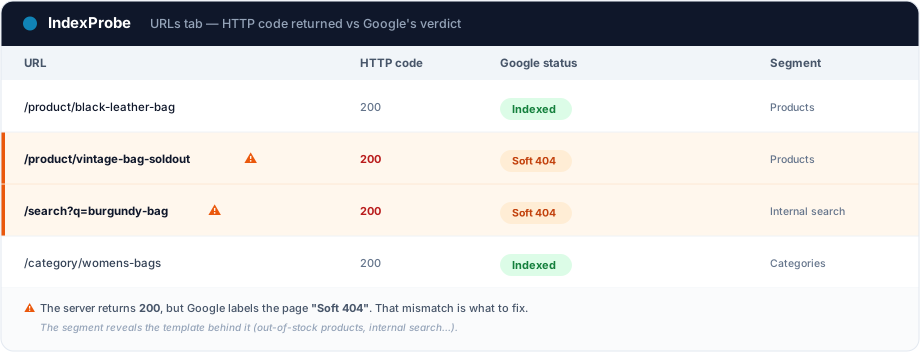
The cross-reference that matters here: seeing, side by side, the 200 your server returns and Google's "Soft 404" verdict. That's exactly the mismatch that defines the problem, made visible across all your URLs in one table. What you get out of it depends on the list you bring in. IndexProbe doesn't crawl your site to discover URLs: it inspects the ones you give it, and only those.
- A selection of strategic pages (your key pages, your sitemap of pages meant to be indexed). Any important page that has slipped into a soft 404 surfaces immediately, without assuming anything about the rest of the site.
- A full export of your URLs (your entire sitemap, a crawl export…). The segmentation by page type then shows which template concentrates the soft 404s (product pages, facets, internal search…). That's what makes you fix the template, not the URL.
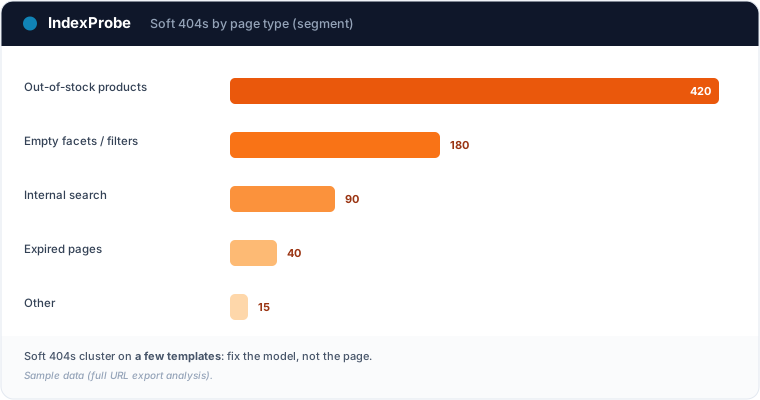
That's exactly the triage IndexProbe is built to make possible: seeing all your soft 404s at a glance, and which ones come from the same template.
💡 Want to see which of your pages are soft 404s, and which page type generates them? IndexProbe inspects your URL list and gives you the answer in one analysis. Try IndexProbe in early access →
Confirm the fix worked
After fixing the template (real content, or a real 404/410 code), you need to confirm. Re-inspect the affected URLs and compare two analyses over time: the pages you removed should flip to 404/410 and drop out of the report, and the ones you enriched should get crawled, then indexed. IndexProbe's Comparison view puts both analyses side by side: the soft 404 count should fall from one analysis to the next.
That's the full loop: spot the soft 404s, understand it's a technical mismatch, decide by template, fix, confirm.
A batch of pages flipping to Soft 404 is actually one of the silent causes of traffic drops: the organic traffic drop page details how to detect those regressions in bulk, date them, and prove the recovery after the fix.
Frequently asked questions
Is a soft 404 bad? It's not a penalty, but it isn't neutral. Soft 404 pages aren't indexed, and they waste crawl budget. On a site that accumulates them (often an e-commerce catalog), the cumulative effect weighs on the crawling of your real pages.
What's the difference between a soft 404 and a real 404?
A real 404 returns the 404 code: the page is declared missing, which is healthy. A soft 404 returns 200 on an empty page: the code lies, and that's what Google penalizes by treating it as a 404 anyway.
Should I delete every soft 404 page?
No. First, ask whether the page should exist. If yes (emptied by mistake), enrich its content. If no, return a real 404/410, or a 301 to an equivalent. Deletion is only one of the two answers.
How long before the status disappears? Once the template is fixed, the change isn't instant: it depends on when Googlebot revisits. Expect a few days to several weeks depending on crawl frequency. A reindexing request in Search Console can speed up a few priority pages.
How do I check soft 404s across a large number of URLs? Search Console's inspection tool handles one URL at a time, and its soft-404 detection is partial. To triage at scale, a tool like IndexProbe inspects the URL list you provide (CSV, sitemap) and shows, for each one, the official status, the HTTP code returned, and the segment, to surface the patterns behind it.
Stop inspecting your pages one URL at a time. IndexProbe plugs into the official Search Console API and inspects your URL list in a single analysis: indexing status (including Soft 404), HTTP code returned, segment, last-crawl date. Enough to spot in minutes all your soft 404s, see which template generates them, and confirm your fix landed.