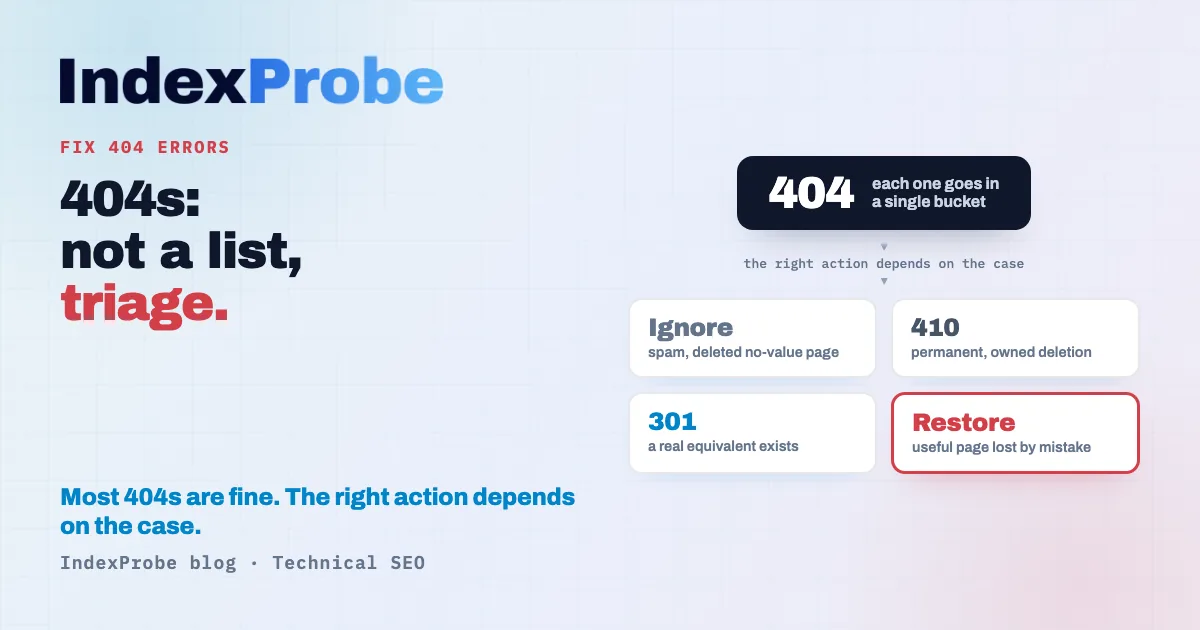
In Google Search Console, "Not found (404)" means Googlebot requested a URL and got a 404 code back. Not every one needs fixing: a 404 on a spam URL you never created is normal. The right move isn't to fix everything, it's to triage: ignore it, return a 410, redirect with a 301, or restore the page.
In Google Search Console's Page Indexing report, "Not found (404)" looks like a list of errors to clear. It rarely is. Most 404s are fine, and some are exactly what Google wants: a deleted page should return a 404. As many rows as there are errors to fix, the intuition goes. That intuition is wrong.
So the hard question shifts. Which of these URLs actually deserves action? And for that one, should you redirect it, let it die cleanly, or restore it? And, most of all, why isn't the 404 that costs you the most traffic even in the 404 report?
The job isn't the list, it's the triage. The hard part isn't fixing a 404, it's finding which one to fix.
"Not found (404)": what Google is actually reporting
"Not found (404)" means Googlebot requested a URL and your server answered with an HTTP 404 code. The page doesn't exist. Google won't index it, and drops it from the index if it was there. It's a raw technical fact, not a severity rating: the status describes a server response, it says nothing about how important the lost page was.
Set it apart right away from a case that looks similar: the Soft 404. There, the server returns a 200 code ("the page exists") while the page is empty or carries no real value. Google catches the mismatch and flags it under its own status. A "hard" 404 sends the right code; a Soft 404 lies about its own state. The two problems have neither the same cause nor the same fix. We come back to Soft 404 below, and the dedicated article on the Not found (404) status walks through reading the report itself.
Is a 404 always a problem?
No, and that's the point most audits miss. Google is explicit: "404 responses are not necessarily a problem, if the page has been removed without any replacement." A page you deliberately deleted returns a 404, and that's the expected behavior. Google's own John Mueller has said many times that 404s are part of how a normal site works: their mere presence in the report calls for no fix at all.
The useful distinction isn't "404 or not 404," it's "harmless 404" versus "costly 404."
A normal, zero-cost 404 is a URL no one important references anymore:
- a spam URL, or one invented by a scraper, that you never created;
- a typo in a link someone placed on another site;
- a page you deliberately deleted, with no equivalent, that has no reason to exist.
A costly 404 is the opposite: a page that had value and disappeared.
- A useful page lost by accident: an unintended deletion, a URL changed without a redirect, a failed deploy. It had traffic, links, rankings.
- A 404 your own site still points to: a live internal link, or an entry still sitting in your sitemap. You're sending visitors and Googlebot into a dead end.
That second group is exactly the one Google recommends you handle. Its guidance is blunt: "In general, we recommend fixing only 404 errors that you link to yourself or list in a sitemap." Everything else can stay as it is.
What causes a 404
A 404 always has a precise technical origin, and that origin dictates the fix. The causes sort best by how actionable they are: the ones that come from your own site, which you can fix, and the ones manufactured elsewhere, over which you have no control.
From your own site (worth fixing)
- Deletion without a redirect. You pull a page that had an equivalent, without pointing a redirect to it. The 404 becomes an avoidable dead end.
- Broken internal links. A link in your content points to a wrong URL (a typo, an old structure). The target doesn't exist, even though a good page may sit right next to it.
- Broken redirects. A redirect chain whose final destination has itself been deleted. The visitor hops through redirects only to land on a 404.
From the outside (often safe to ignore)
- Broken backlinks. Another site links you with a stale or mistyped URL. You don't control that link, but if it pointed to a useful page, you can recover its value with a redirect.
- URLs never created, spam, external typos. Invented addresses, variants generated by bots. The 404 is the correct answer here: nothing to fix.
One last case is worth naming without dwelling on it: some pages surface not under "Not found (404)" but under "Blocked due to other 4xx issue" (codes 401, 403, and so on). It's a neighboring status with its own rules, one we'll cover in a future article.
Soft 404: the 404 disguised as a valid page
A Soft 404 is a page that answers with a 200 code ("all good") while its content actually signals an absence. Google treats it as a 404 because it brings nothing, but it doesn't show up in the "Not found (404)" report: it has its own status.
The classic triggers:
- an empty category or results page ("no products in this section") that still returns a 200;
- an error-message page ("this listing no longer exists") served with a 200 code instead of a real 404;
- a client-side rendered page (JS/CSR) whose content never loads for Googlebot, so all it sees is an empty shell. Google's documentation notes that a SPA handling errors in JavaScript often "report a
200HTTP status code instead of the appropriate status code," which can get error pages indexed.
The principle is straightforward: pages that genuinely don't exist should return a real 404, not a 200. Serving a 200 on an empty page creates more confusion than an honest 404. The full mechanism, its causes and its fixes are covered in the Soft 404 article.
The decision tree: ignore, 410, 301, or restore
For every 404 that deserves your attention, only four outcomes. The right choice depends on what the page was and what replaces it, not on one rule applied uniformly to the whole list.
- Ignore it. The page has no equivalent and no residual value, and no one important points to it anymore. Leave the 404: it's the correct answer. Forcing it out of the report achieves nothing.
- Return a 410 (Gone). The page is permanently and deliberately deleted, and you want to say so without ambiguity. A 410 asserts the intent to delete.
- Redirect with a 301. The page has a genuine equivalent. A 301 redirect to that equivalent passes both visitors and signals to the right destination.
- Restore it. A useful page disappeared by mistake. Put it back online at the same URL.
On the 404-versus-410 choice, keep a sense of proportion. In practice, Google treats all 4xx errors the same way: in both cases the URL ends up deindexed and the content is no longer used. A 410 simply says "gone for good" more explicitly. Reserve it for deliberate, owned deletions (old promotions, items discontinued in batches). For everything else, a 404 by default is perfectly fine. There's no point in mass-migrating your dead pages to 410: the gain is marginal and the effort is real.
This tree is easy to run on five URLs. The difficulty starts when the report holds hundreds.
Triaging your 404s at scale
Triaging hundreds of 404s comes down to cross-referencing three pieces of information per URL: its past traffic, the internal links it still receives, and whether or not it sits in your sitemap. That cross-reference is what files each 404 into a branch of the tree. The catch is that Search Console's URL Inspection tool handles one URL at a time: you inspect, you read, you move to the next. On a handful of addresses, that's workable. Past that, manual triage becomes impractical.
That's the wall IndexProbe breaks: the bulk version of Google's URL Inspection tool. It queries the official Search Console API to inspect, in a single analysis, the list of URLs you give it (CSV import, sitemap, paste) or the one you build from your own Search Console. For each URL, it returns the official crawl code Google holds on record (404, 410, 200, redirect) and the date Googlebot last visited. At a glance, you tell apart the URLs genuinely returning 404, the ones answering 200 again after a fix, and the ones now pointing to a redirect.
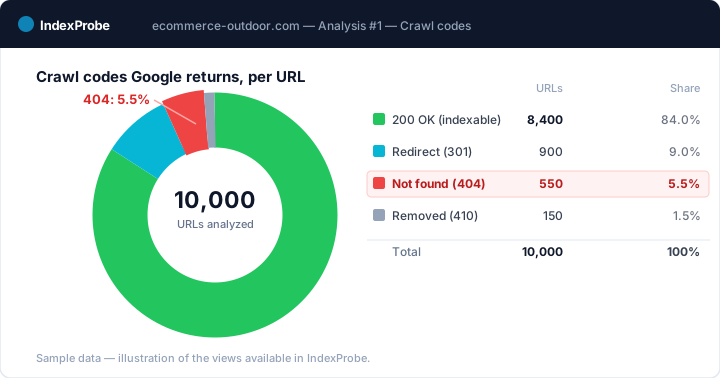
But triage doesn't stop at crawl codes. The 404 most dangerous to your traffic isn't in the 404 report at all. It's a page that still answers 200, that had clicks in Search Console, and that has no recent impressions. Technically, it never returned a 404: no error report flags it. Yet it has stopped ranking, which betrays a likely drop from the index, a silent regression. That's the kind of signal an HTTP-code sort never surfaces, and that cross-referencing past clicks against recent impressions brings to light.
What you get out of the analysis depends on the list you bring in. IndexProbe doesn't crawl your site to discover URLs: it inspects the ones you give it, and only those.
- A selection of strategic pages (your key pages, your sitemap of pages meant to be indexed). Any important page that comes back 404 is an immediate signal: a useful page gone, to restore or to redirect to its equivalent. No extrapolation needed, the verdict lands on pages whose value you already know.
- A full export of your URLs (entire sitemap, crawl export). The breakdown by page type shows where the 404s concentrate (an old blog, a removed product family) and steers a decision per segment rather than case by case.
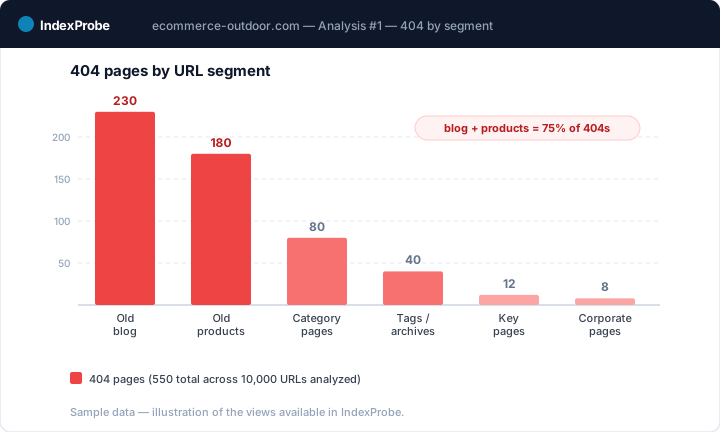
💡 Want to know which of your 404s actually matter, and spot the pages that dropped off without ever returning a 404? IndexProbe inspects your URL list through the Search Console API and gives you the answer in one analysis. Try IndexProbe in early access →
Fixing it: the right action per the tree's verdict
Once your 404s are triaged, apply the action that matches each case. Here are the four situations and their fix.
- Wrong internal link → fix the link's URL to the right page. The target already exists; only the link was wrong.
- Moved page → set a 301 redirect to the real equivalent, and check that no redirect chain sits in between. A redirect pointing to another redirect dilutes the signal and slows the crawl; aim for the final destination in a single hop. The related status is covered in Page with redirect.
- Permanently deleted page → leave the 404, or return a 410, then remove the URL from your sitemap and your internal links. As long as an internal link or a sitemap entry points to the dead page, you keep sending Googlebot to it.
- Useful page lost → restore it at the same URL. Bringing the original address back recovers the links and rankings the page had earned.
One trap to call out without appeal: never redirect a deleted page to the homepage "to recover the link juice." Google treats a redirect to an unrelated page as a Soft 404: you swap an honest 404 for another problem, and the hoped-for benefit never materializes. A redirect is only justified to a real equivalent.
On the CMS side, the mechanics vary but the logic holds. On WordPress, a redirect plugin (or the .htaccess file) handles the 301s, and you still need to clean up the internal links inside your posts. On Shopify, the built-in URL redirect tool covers deleted products and collections. On Magento, the URL rewrite rules and the handling of disabled products drive the 404 behavior and the redirects. In every case, the decision tree comes before the tool: you pick the action first, then apply it with whatever the CMS provides.
Confirming the fix held
Fixing isn't enough; you have to confirm Google took note. After your changes, request a re-crawl of the URLs you handled in Search Console, then track how things move over time: moved pages should answer with a 301 to their equivalent, restored pages should return to 200 and rejoin the index, and still-linked 404s should leave your sitemap and your links. A single analysis won't tell you that; it's the comparison between a before state and an after state that proves it.
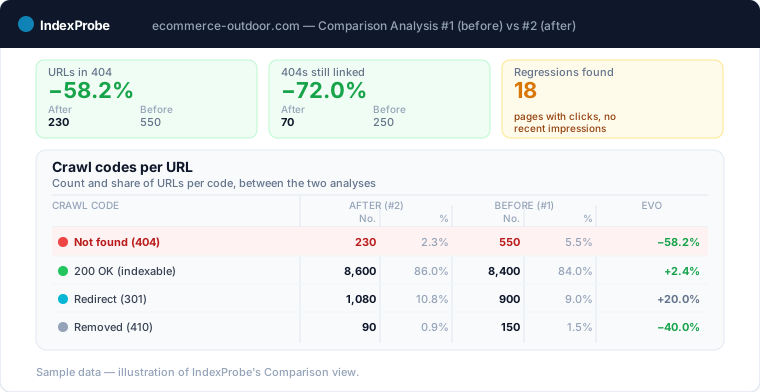
IndexProbe's COMPARISON view answers exactly that need: it sets two analyses side by side and quantifies the per-URL code changes, how many 404s moved back to 200 or 301, and how many new regressions appeared between the two passes. One point to watch: a page restored at the same URL doesn't rejoin the index instantly. While Google re-crawls it and decides to re-index it, it may pass through the Crawled, currently not indexed status. A 404 that's fixed but not yet re-indexed is therefore not a failure: it's a stage to monitor over time, not a final verdict.
If your 404s show up by the hundreds at once, look for the migration or redesign: that is when old URLs fall off. The SEO migration check page covers that follow-up end to end, reference state included.
Frequently asked questions
Do I need to fix all 404 errors? No. According to Google, a 404 on a page removed without a replacement is normal and calls for no action. Only fix the 404s you still link internally or that appear in your sitemap, and restore useful pages that disappeared by mistake. The rest can stay as it is.
404 or 410: which should I choose? Both tell Google the page is gone, and the URL ends up deindexed in either case. A 410 ("Gone") asserts a permanent deletion more explicitly. Reserve it for deliberate, owned deletions (old promotions, items discontinued in batches). For everything else, a 404 by default is enough; there's no point in mass-migrating to 410.
Should I redirect a 404 to the homepage? No. Redirecting a deleted page to an unrelated page, like the homepage, is treated by Google as a Soft 404: you replace one problem with another. Only redirect to a real equivalent; otherwise, leave the 404 and remove the internal links that point to the page.
How do I find all my 404s? Search Console lists them in the Page Indexing report, but its URL Inspection tool handles one URL at a time to check each in detail. To triage at scale, a tool like IndexProbe inspects the list of URLs you give it through the official API and returns, per URL, the crawl code and the date Googlebot last visited.
What's the difference between a 404 and a Soft 404? A "Not found (404)" actually returns a 404 code: the page doesn't exist, and that's the right answer. A Soft 404 returns a 200 code ("the page exists") while its content is empty or low-value. Google files them under two distinct statuses and fixes them differently.
Does a 404 hurt SEO? A 404 on a page you deliberately deleted does no harm: it's the expected behavior. The damage comes from two specific cases. A useful page lost by mistake takes its traffic and rankings with it, and a 404 you still link wastes crawl budget and sends your visitors into a dead end. Those are the 404s to handle, not the report's raw counter.
How do I check this across a large number of URLs? Search Console's URL Inspection handles one URL at a time, which makes checking at scale impractical. IndexProbe inspects your URL list in a single analysis through the Search Console API and shows, for each one, the official crawl code and the date Googlebot last visited. The COMPARISON view sets two analyses side by side to measure the effect of your fixes.
Stop treating your 404s like a list of errors to clear. IndexProbe plugs into the official Search Console API and inspects your URL list in a single analysis: crawl code per URL (404, 410, 200, redirect), the date Googlebot last visited, and 404s triaged by inbound links, sitemap presence, and past traffic. In minutes you isolate the few 404s that matter, you spot the pages that dropped off without ever returning a 404, and you verify your fixes from one analysis to the next with the COMPARISON view.