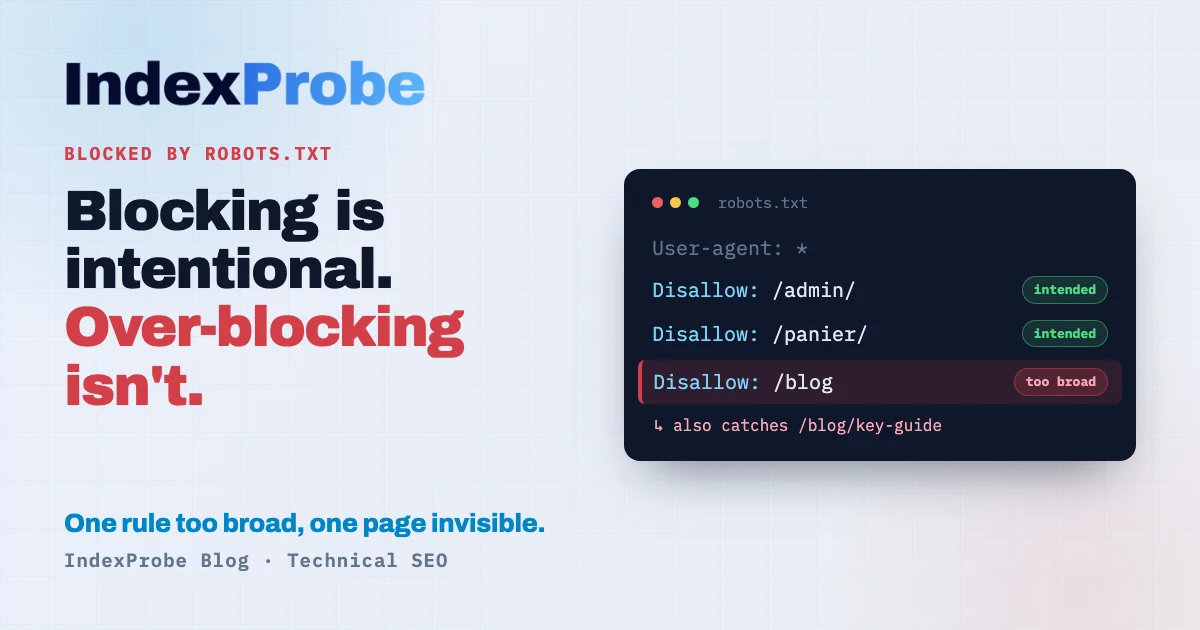
In Google Search Console's Page Indexing report, "Blocked by robots.txt" rarely sets off alarms. Most of these URLs were kept out of crawling on purpose — admin, cart, faceted filters — and the report shows you exactly which ones. The block is doing its job.
It gets less obvious on a closer look. How do you spot, inside a list of hundreds of legitimate blocks, the one strategic page caught by an overly broad Disallow rule? Why does a URL that's blocked from crawling sometimes get indexed anyway? And is blocking a page in robots.txt actually enough to keep it out of Google?
Three questions that look simple — and whose answers separate the healthy blocks from the real problems.
What does "Blocked by robots.txt" mean?
It means Google skipped crawling the URL because a Disallow rule in your robots.txt told it to. The page is therefore neither crawled nor indexed: the block did exactly what it was set up to do. In most cases, that's not an error.
Mechanically, Googlebot saw the URL — usually via a link or your sitemap — but never downloaded it: it stopped at the matching Disallow directive. The report lists the affected URLs, and the URL Inspection tool tells you which line of your robots.txt applies. So you already know what is blocked. What's left is deciding whether it should be.
The question is never "how do I make this status disappear," but "were these pages meant to be blocked?"
A blocked crawl says nothing about the page
First thing to clear up: this status tells you nothing about page quality. Google never read the page. It didn't weigh the content, didn't judge relevance, didn't decide the page wasn't worth indexing. It stopped at the door, because your robots.txt asked it to.
That's what sets this status apart from quality-based ones like Crawled - currently not indexed, where Google did read the page before setting it aside. Here there's no verdict — there's an instruction Google followed.
The practical takeaway: if an important page lands in this status, its content is never the thing to fix. The block is.
Is it a problem? It depends on what you intended
There's no single answer. It depends on what you wanted the page to do. Two cases, two opposite decisions — and until you tell them apart, you can't apply the right fix.
Case A: the block is intentional, all is well. Admin pages, cart, checkout, customer accounts, internal search results, endless filter and sort URLs, staging environments… You blocked them to save crawl budget and keep those URLs out of Google. Seeing them listed under "Blocked by robots.txt" is exactly the expected outcome. Filter and sort pages from a faceted navigation are the most common example of this deliberate blocking. Nothing to fix.
Case B: a useful page is blocked by mistake. A page you wanted in Google gets caught by an overly broad Disallow rule, or by a block inherited from staging that was never removed. As long as it's blocked, Google can't crawl it, so it will never rank properly. Here the goal is the opposite of case A: remove the block so Google can finally read the page.
Telling A from B is the whole job. Before tackling it, one confusion is worth clearing up — it wastes a lot of people's time.
"Blocked" vs "Indexed, though blocked": don't confuse them
Two Search Console statuses mention robots.txt and get confused constantly. The difference comes down to one question: did Google end up indexing the URL despite the block?
| GSC status | Crawled? | Indexed? | What it means |
|---|---|---|---|
| Blocked by robots.txt | No | No | Google respects the block. The page doesn't appear in results. The block worked. |
| Indexed, though blocked by robots.txt | No | Yes | Google found the URL elsewhere (links, sitemap) and indexed it without reading it. It appears, often with no description. |
This article's status is the "clean" one of the two: the block holds, the page stays out of the index. If, instead, your blocked pages still show up in Google, you're looking at the other status, which calls for a very different fix — covered in Indexed, though blocked by robots.txt.
This distinction exposes a classic trap: robots.txt is not a deindexing tool. Blocking the crawl stops Google from reading the page, not necessarily from listing it if it hears about it elsewhere. Google states it plainly: robots.txt "is not a mechanism for keeping a web page out of Google." To remove a page from the index, the tool is the noindex tag — and for Google to see that noindex, the page must not be blocked from crawling in the first place. See Excluded by 'noindex' tag.
Why a useful page ends up blocked (case B)
When a page you wanted indexed falls into this status, the cause is almost always a robots.txt rule that's too broad or forgotten. The most common triggers:
- An overly general
Disallowrule.Disallow: /blogblocks not just/blogbut everything starting with that path, including/blog/my-key-article. A loosely scoped prefix sweeps up pages you meant to keep. - A mishandled wildcard. Patterns with
*(e.g.Disallow: /*?) block whole families of URLs. Handy for parameters, dangerous when the pattern catches legitimate pages. - A block inherited from staging. During development, sites are often protected by a global
Disallow: /. If that line ships to production unremoved, the entire site gets blocked. - A misconfigured CMS or plugin. On WordPress, the "Discourage search engines from indexing this site" option (Settings → Reading) adds a global block. Some themes and plugins generate their own rules too.
- A bad resource path. Blocking
/wp-content/or an assets folder can stop Google from loading the CSS and JavaScript it needs to render the page. On a site whose content depends on JavaScript, that block can tip the page into Indexed without content: indexed, but seen as empty by Google because it couldn't run the render.
The common thread: somewhere in your robots.txt, a line says "don't crawl this" when you wanted the opposite. The whole task is finding which line, and which URLs it hits.
Now that you know the causes, pinpoint exactly which pages are affected — before deciding what to unblock.
Identify the affected pages across the list you analyze
This is where Search Console hits its limit: its URL Inspection tool handles one URL at a time. To know, page by page, which is blocked and by which rule, you inspect, read, move to the next. Fine for a handful of pages. Across hundreds, confirming that no strategic page is trapped becomes impractical.
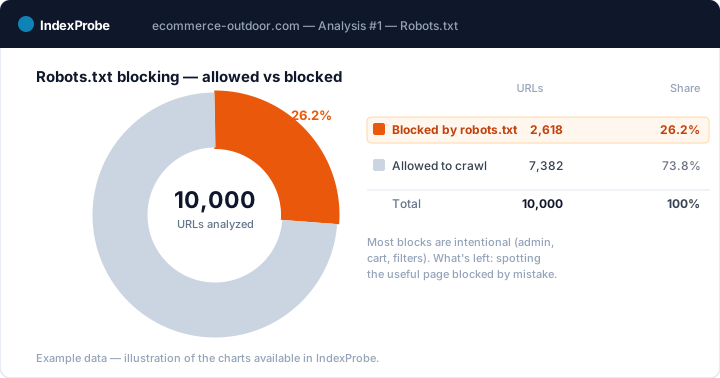
That's the wall IndexProbe breaks. IndexProbe is the bulk version of Google's URL Inspection tool: it queries the official Search Console API to inspect, in a single analysis, the list of URLs you give it (CSV import, sitemap, paste). For each page, it shows the indexing status, its robots.txt status (allowed or blocked), the URL segment, and the internal links it receives.
What you get out of it depends on the list you bring in. IndexProbe doesn't crawl your site to discover URLs: it inspects the ones you give it, and only those.
- A selection of strategic pages (your key pages, your sitemap of pages meant to be indexed). Any important page that comes back "Blocked by robots.txt" is an immediate case B: a page you wanted indexed, closed off to crawling by mistake. You spot it without assuming anything about the rest of the site.
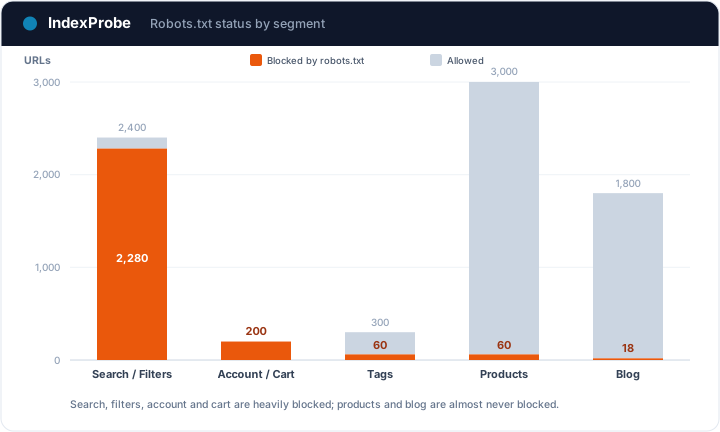
- A full export of your URLs (entire sitemap, crawl export…). The breakdown by page type then shows where blocking concentrates — one glance is enough to see that admin, cart and filters are heavily blocked (healthy), while products and the blog almost never should be.
That's exactly the triage IndexProbe is built to make possible: separating the intentional block from the trapped useful page, across all your URLs at a glance.
💡 Want to know which of your URLs are blocked by robots.txt, and whether a strategic page is trapped? IndexProbe inspects your URL list and gives you the answer in one analysis. Try IndexProbe in early access →
How to fix it, by case
Once your pages are triaged, the fix depends on the case. Don't mix them up: the right move for a useful page is the exact opposite of "leave it alone."
Get a useful page crawled (case B)
The goal is to remove the block stopping Google from reading the page.
- Find the exact rule blocking the URL. In Search Console, URL Inspection shows which
robots.txtline applies. Identify the responsibleDisallowdirective. - Narrow or remove that rule. If it's too broad (
Disallow: /blog), tighten it to what you actually meant to block, or add anAllow:exception for the page to free. If it's a staging leftover (Disallow: /), delete it. - Check that no
noindexlingers on the page: once unblocked, it must be allowed to be indexed. - Request a re-inspection in Search Console, then give Google time to recrawl. The status only changes on Googlebot's next visit.
Leave or refine an intentional block (case A)
For pages you genuinely meant to block, there's nothing to fix: the status is the expected result. Just take the chance to confirm your rules aren't too broad (catching a useful page) or too narrow (letting through URLs you wanted blocked). And remember: if one of these pages also needs to leave the index because it leaked into it, robots.txt isn't enough — you need a noindex, which means unblocking first (see Indexed, though blocked).
By CMS
- WordPress. First check Settings → Reading: the "Discourage search engines from indexing this site" box adds a global block, to uncheck in production. To edit the rules, use the virtual
robots.txtmanaged by Yoast SEO or Rank Math, or a physical file at the root. - Shopify. Default rules block
/cart,/checkout,/account(pages you genuinely don't want indexed). To adjust, edit the theme'srobots.txt.liquidfile — carefully, freeing only what should be freed.
"Blocked" vs "Indexed, though blocked" vs "Excluded by noindex"
Three Search Console statuses look alike and are fixed very differently. The cheat sheet:
| GSC status | Where the block comes from | Indexed? | Action |
|---|---|---|---|
| Blocked by robots.txt | robots.txt (crawl disallowed) |
No | Nothing if intended; unblock if a useful page is trapped |
| Indexed, though blocked by robots.txt | robots.txt, but URL found elsewhere |
Yes | Unblock, then noindex to deindex |
| Excluded by 'noindex' tag | noindex tag in the page |
No | Nothing if intended; remove the noindex if it's a useful page |
Each has its own logic: the first blocks the crawl, the second reveals the block wasn't enough to keep the page out of the index, the third is a deliberate page-level exclusion. Confusing them means applying the wrong fix. See Excluded by 'noindex' tag.
Don't confuse any of these with an active server refusal either: robots.txt is an instruction you give Googlebot, whereas a page returning a 403 code shuts the door server-side, regardless of any robots file. That's a separate status, Blocked due to access forbidden (403), diagnosed differently.
Confirm the fix worked
After unblocking your case B pages, confirm at scale that Google came back. Re-inspect your URLs and compare two analyses over time: the pages you freed should leave the "Blocked by robots.txt" status, get crawled, then flip to indexed.
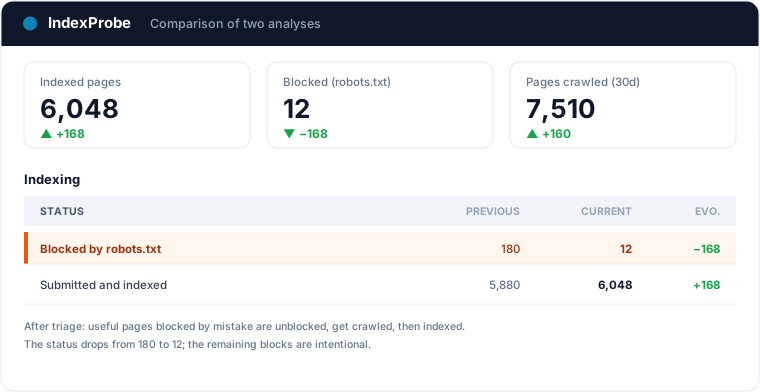
That's the full loop: understanding the block is usually normal, triaging A/B, unblocking without falling into the noindex trap, verifying.
What about the crawl-delay directive?
You can't talk about robots.txt without running into this line: Crawl-delay: 10. It still sits in countless files, meant to force a pause between two robot requests. One thing needs saying clearly, because it fuels endless confusion: Google doesn't read it. The directive was never part of the robots.txt standard, and Google Search Central's documentation lists it among the rules its crawlers ignore. Leaving it in your file breaks nothing, but it has zero effect on Googlebot.
It isn't dead, though: Bing still honors it, and other crawlers comply. If it's in your robots.txt to spare your server from those engines, it can stay; just don't expect anything from it on Google's side.
For Googlebot, crawl pacing works differently: Google adjusts it on its own based on server health (response times, errors), and the old crawl rate limiter setting was removed from Search Console in January 2024. In an emergency (overloaded server), temporarily returning 503 or 429 codes remains the one signal guaranteed to slow Googlebot down. And if your real question is "how does Googlebot spread its visits across my pages," that's a crawl budget matter.
The massive use case for this block is e-commerce: tens of thousands of facets closed to crawling so Googlebot concentrates on product pages. The e-commerce indexing page shows how to measure that cleanup segment by segment, before and after.
Frequently asked questions
Is "Blocked by robots.txt" bad? Not in itself. In most cases it's an intentional block doing its job: admin, cart, filters you don't want in Google. It only becomes a problem when a page you wanted indexed gets blocked by mistake.
Why is one of my important pages blocked?
Almost always because of an overly broad Disallow rule, a mishandled wildcard, or a block inherited from staging. Inspect the URL in Search Console to see which robots.txt line applies, then narrow or remove that rule.
How do I fix "Blocked by robots.txt"?
Find the Disallow rule responsible in your robots.txt, remove or tighten it (add an Allow directive if needed), check that no noindex lingers on the page, then request a re-inspection in Search Console.
robots.txt or noindex — which should I use?
It depends on the goal. robots.txt blocks crawling (useful to save crawl budget on low-value pages). noindex blocks indexing (useful so a page doesn't appear in results). To deindex a page, you need a noindex Google can see, which means a page that isn't blocked from crawling.
What's the difference from "Indexed, though blocked by robots.txt"? "Blocked" means the page is neither crawled nor indexed: the block holds. "Indexed, though blocked" means Google indexed the URL despite the rule, because it found it elsewhere. The second needs action; the first usually doesn't.
How do I check this status across a large number of URLs?
Search Console's URL Inspection handles one URL at a time. To triage at scale, a tool like IndexProbe inspects the list of URLs you give it (CSV, sitemap) and shows, for each, the indexing status, the robots.txt status, and the internal links it receives.
Does Google honor the crawl-delay directive in robots.txt? No: Google's crawlers ignore it, and the crawl rate limiter setting was removed from Search Console in January 2024. Bing, on the other hand, still respects it. To slow Googlebot down urgently, temporarily return 503 or 429 codes; beyond that, how visits are spread across your pages is a crawl budget matter.
Stop guessing which pages are blocked for good. IndexProbe plugs into the official Search Console API and inspects your URL list in a single analysis: indexing status, robots.txt status and noindex status side by side. In minutes you separate intentional blocks from trapped useful pages, and verify your fixes from one analysis to the next.