In Google Search Console's Page Indexing report, "Not found (404)" looks like a list of errors to clear one by one. Google says the opposite: most of these 404s are perfectly normal.
A deleted page should return a 404 — that's expected behavior, not a defect. So the real work isn't emptying the list, but spotting the few URLs that matter. Which one was a useful page, gone by mistake? Which one is still linked from your site or your sitemap? And for those, should you redirect, restore, or let it die cleanly?
Three questions that turn a long, intimidating list into a handful of useful actions.
What does "Not found (404)" mean?
It means the URL returns an HTTP 404 code: the server reports the page doesn't exist. So Google doesn't index it, or drops it from the index if it was there. In most cases that's normal — a deleted page must return a 404.
Google is explicit: a 404 response isn't necessarily a problem if the page was removed without a replacement. The report lists these URLs for your information, not as a batch of errors to fix. The only 404s worth acting on are the ones you still link to or list in your sitemap, plus useful pages that vanished by accident.
So the useful question isn't "how do I clear all these 404s," but "which of them deserve action?"
When it's normal: nothing to do
A large share of these URLs needs no action. These 404s are healthy:
- A permanently deleted page, with no equivalent, that has no reason to exist anymore.
- A product pulled from the catalog with no replacement, that won't come back.
- An old campaign or test URL, never meant to last.
- A wrong URL built elsewhere: another site linking you with a typo, a scraper inventing addresses. The 404 is the correct answer.
The common thread: the page is intentionally gone, and no one important points to it. Leaving a clean 404 is then the best call — forcing it out of the report achieves nothing.
When a 404 deserves your attention
Only two cases justify action. They're the ones to isolate in the list.
- A useful page gone 404 by mistake. An accidental deletion, a URL changed without a redirect, a failed deploy. The page had traffic, links, rankings — and it's gone. This is the most costly case.
- A 404 still linked or in the sitemap. This is exactly the subset Google asks you to fix: if your own site keeps linking a dead page, or submits it in the sitemap, you send visitors and Googlebot into a dead end and waste crawl budget. Either the target exists elsewhere (redirect), or it doesn't (remove the link and the sitemap entry).
Everything else — the 404s no one references anymore — can stay as is.
404 vs 410 (Gone): the "deleted for good" signal
Two codes tell Google a page is gone, with a useful nuance. Direct answer: a 404 means "not found" (maybe temporarily); a 410 means "permanently deleted," a more explicit signal.
In practice, Google treats the two very similarly and eventually deindexes in both cases. The difference: a 410 asserts the intent to delete, which can slightly speed up removal from the index. If you deliberately remove a batch of pages (old promos, discontinued items) and want to signal it clearly, 410 is the cleanest code. For everything else, a 404 is perfectly fine — no need to migrate all your dead pages to 410.
Don't confuse a 404 with another 4xx code that looks similar at first glance: the 403. A 404 says "this page doesn't exist"; a 403 says "this page exists, but you're denied access." The latter points to a page that is genuinely there but shielded by the server (authentication, firewall), so Googlebot can't index it — a completely different diagnosis and fix, covered in Blocked due to access forbidden (403). As for the rarer 4xx codes (400, 411…) that Google files as neither a 404 nor a 403, they fall under the Blocked due to other 4xx issue status.
There's another distinction worth drawing, on the 5xx side this time: a 404 stays confined to its own page, doing no harm to the rest of the site. A Server error (5xx), by contrast, signals that the server itself is faltering — Googlebot then slows its crawl across the whole site, not just the offending URL. Where a 404 is often normal, a 5xx never is.
Redirect, restore, or leave it as a 404?
For each 404 that deserves action, three possible outcomes. The right choice depends on what the page was and what replaces it.
- Fix the link. If the 404 comes from a wrong URL (a typo in an internal link, a bad entry), fix the link: the right page already exists.
- Redirect with a 301. If the page has a true equivalent (a product replacing another, a merged article), 301-redirect to that equivalent, not to the homepage.
- Restore. If a useful page vanished by mistake, put it back at the same URL.
- Leave it as a 404 (or 410). If the page has no equivalent and no reason to return, leave the 404 — and remove it from your sitemap and internal links.
One trap to avoid at all costs: don't redirect a deleted page to the homepage "to recover the link juice." Google treats a redirect to an unrelated page as a Soft 404 — you trade an honest 404 for another problem. A redirect only makes sense to a real equivalent.
That's also what sets this status apart from a Soft 404: a "Not found (404)" actually returns a 404 code, whereas a Soft 404 returns a 200 code on an empty or low-value page. The two are fixed differently.
Now that you know which 404 deserves what, you still have to tell them apart in a list that can run into the thousands.
Identify the affected pages across the list you analyze
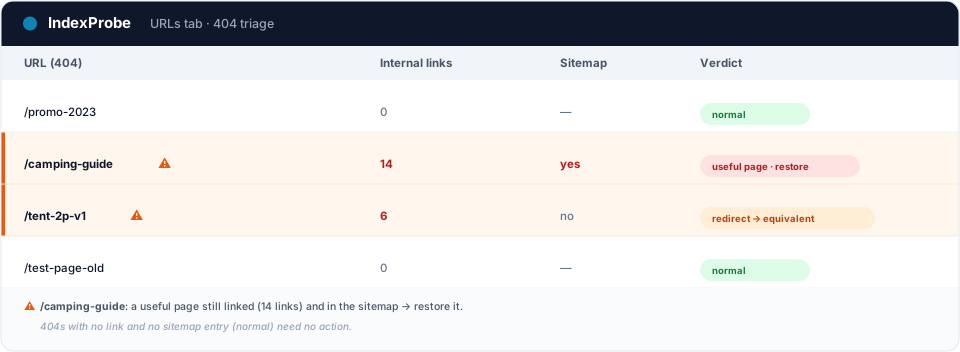
This is where Search Console hits its limit: its URL Inspection tool handles one URL at a time. To know, page by page, whether a 404 was a useful page, whether it still receives internal links or sits in the sitemap, you inspect, read, move to the next. Fine for a handful of URLs. Across hundreds, telling the few 404s that matter from the normal noise becomes impractical.
That's the wall IndexProbe breaks. IndexProbe is the bulk version of Google's URL Inspection tool: it queries the official Search Console API to inspect, in a single analysis, the list of URLs you give it (CSV import, sitemap, paste). For each page, it shows its status, the URL segment, and the internal links it still receives.
Seeing, among hundreds of 404s, which ones are still linked and on which segments is exactly what separates the normal noise from the 404s to fix.
What you get out of it depends on the list you bring in. IndexProbe doesn't crawl your site to discover URLs: it inspects the ones you give it, and only those.
- A selection of strategic pages (your key pages, your sitemap of pages meant to be indexed). Any important page that comes back "Not found (404)" is an immediate signal: a useful page gone, to restore or to redirect to its equivalent.
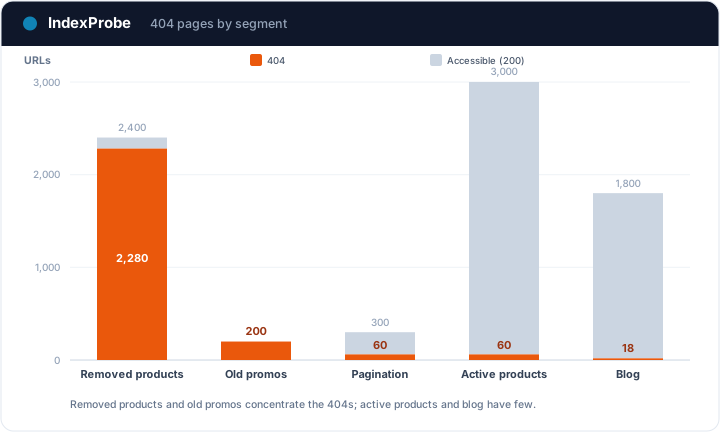
- A full export of your URLs (entire sitemap, crawl export…). The breakdown by page type shows where 404s concentrate (a template, a removed product family), and cross-referencing with internal links isolates the 404s your linking still points to.
💡 Want to know which of your 404s are still linked, in the sitemap, or were strategic pages? IndexProbe inspects your URL list and gives you the answer in one analysis. Try IndexProbe in early access →
How to fix it, by case
Once your 404s are triaged, apply the matching action — and systematically clean up the signals still pointing to dead pages. For the full walkthrough (the ignore / 410 / 301 / restore decision tree and triaging at scale), follow the step-by-step guide Fix 404 errors in Google Search Console.
- Wrong internal link → fix the link's URL to the right page.
- Moved page → 301-redirect to the real equivalent (never to the homepage).
- Permanently deleted page → leave the 404 (or switch to 410), then remove it from the sitemap and your internal links.
- Useful page gone by mistake → restore it at the same URL.
In every case where the page doesn't come back, the final reflex is the same: no internal link or sitemap entry should point to a 404 anymore. It's that cleanup, not the status disappearing, that matters to Google and your visitors.
Confirm the fix worked
After your fixes, confirm at scale. Re-inspect your URLs and compare two analyses over time: the 404s you still linked should leave your linking and your sitemap, restored useful pages should return to indexed, and moved pages should point to their equivalent.
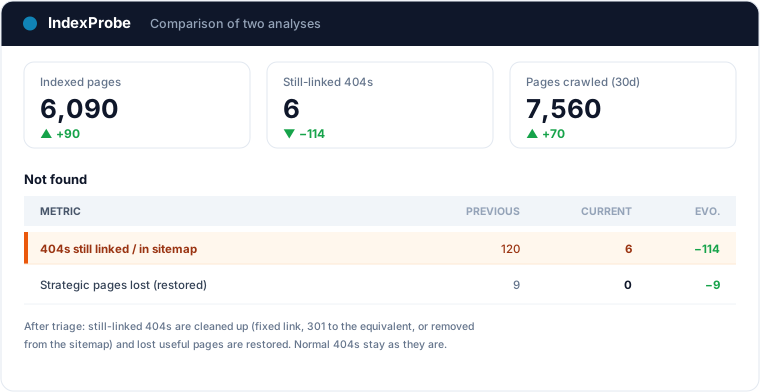
That's the full loop: understanding most 404s are normal, isolating the ones that matter, acting, cleaning up the linking, verifying.
Mass 404s almost always share the same origin: a migration whose old URLs were never redirected. The SEO migration check page shows how to track old and new URLs through the switch, day after day.
Frequently asked questions
Is "Not found (404)" bad? Not in itself. A deleted page should return a 404, and Google doesn't ask you to fix them all. It only becomes a problem if a useful page vanished by mistake, or if you still link a 404 / list it in your sitemap.
Do I need to fix all 404 errors? No. Per Google, a 404 on a page removed without a replacement is normal. Only fix the 404s you still link internally or that appear in your sitemap, and restore useful pages gone by mistake.
Should I use a 404 or a 410? Both tell Google the page is gone, and it eventually deindexes in both cases. A 410 ("Gone") is a more explicit signal of permanent deletion, slightly faster. For a deliberate, owned deletion, prefer 410; otherwise a 404 is enough.
Should I redirect a 404 page to the homepage? No. Redirecting a deleted page to an unrelated page (like the homepage) is treated by Google as a Soft 404. Only redirect to a real equivalent; otherwise leave the 404 and remove the internal links.
What's the difference between "Not found (404)" and "Soft 404"? A "Not found (404)" actually returns a 404 code: the page doesn't exist. A Soft 404 returns a 200 code (the page "exists") but its content is empty or low-value, and Google treats it as a 404. The two are fixed differently.
How do I check this status across a large number of URLs? Search Console's URL Inspection handles one URL at a time. To triage at scale, a tool like IndexProbe inspects the list of URLs you give it (CSV, sitemap) and shows, for each, the status, the segment and the internal links it receives.
Stop treating your 404s like a list of errors. IndexProbe plugs into the official Search Console API and inspects your URL list in a single analysis: indexing status, segment, internal links received. In minutes you isolate the few 404s that matter — lost useful pages, still-linked 404s — and verify your fixes from one analysis to the next.