Page with Redirect: Error or Normal? (Search Console)
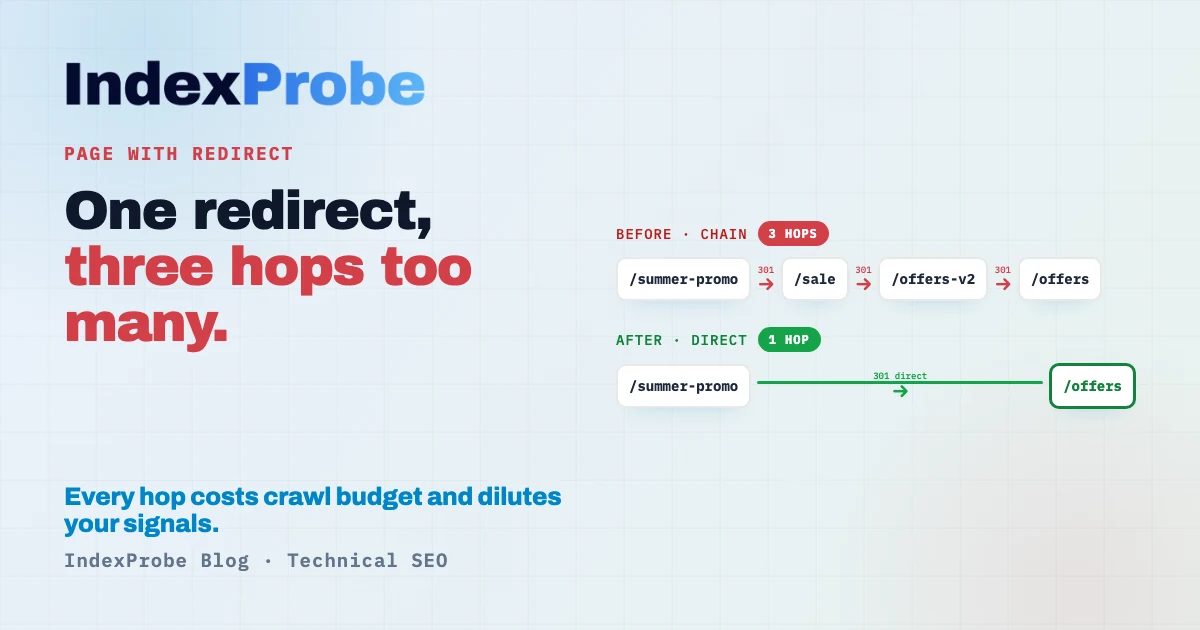
In Google Search Console's Page Indexing report, "Page with redirect" isn't a defect to fix. It's the opposite: the listed URL points to another one, and Google indexes the destination — exactly what a redirect is supposed to do.
The status only gets interesting when the redirect doesn't do what you think. What if the chain keeps growing, A to B to C? What if a strategic page redirects to the homepage instead of its real equivalent? What if your internal links still point, by the hundreds, to old redirected URLs?
Three cases where a redirect that looks perfectly normal quietly costs you crawl budget and rankings.
What does "Page with redirect" mean?
It means the listed URL points to another address (an HTTP 3xx response). Google therefore doesn't index it under that URL: it follows the redirect and indexes the destination page. In the vast majority of cases, that's expected behavior, not an anomaly.
It's actually a sign your redirect works. When you move a page, consolidate it into another, or switch to HTTPS, the old URL should point to the new one. Google sees it, marks it "Page with redirect," and indexes the target instead.
So the only useful question isn't "how do I make this status disappear," but "does the redirect lead where it should, and cleanly?"
When it's normal: nothing to do
Most URLs in this report are there for good reasons. These redirects are healthy and need no action:
- HTTP to HTTPS.
http://your-site.compoints tohttps://your-site.com. Essential, and every old URL will show up here. - With or without
www. You picked a canonical domain version; the other redirects to it. - Trailing slash.
/productand/product/should exist in one version only; the other redirects. - Migration or redesign. After a URL change, old addresses redirect to the new ones. They'll stay listed for a while — that's normal.
- Duplicate consolidation. Two near-identical pages merged into one, with a redirect from the old to the kept version.
The common thread: the redirect leads to the right page, in a single hop. As long as that holds, there's nothing to fix.
When the redirect is a problem
The status deserves attention in four situations. None is visible from the "Page with redirect" label alone: you have to look at where the redirect leads, and how.
- The redirect chain. URL A redirects to B, which redirects to C, which redirects to D. Each hop slows loading, burns crawl budget, and slightly dilutes the signals passed along. Google eventually follows, but explicitly prefers direct redirects.
- The redirect loop. A points to B, which points back to A. The page becomes unreachable, for Googlebot and your visitors alike. That's a real error, to fix first.
- The irrelevant target. A strategic page redirects to the homepage or a parent category instead of its real equivalent. You lose the page and its potential: Google indexes a destination that doesn't answer the same intent. It's the most costly and most discreet case.
- The accidental redirect. A page that should have stayed live redirects because of an overly broad rule or a migration leftover. It drops out of the index without your meaning to.
Understanding redirect codes: 301, 302, 303, 307, 308
Not all 3xx statuses are equal, and the code you choose changes how Google treats the page. Direct answer: signal a permanent move with a 301 (or 308); a temporary move with a 302 (or 307).
- 301 — Permanent. The target becomes the canonical version and inherits the signals. The default for a permanent move.
- 302 — Temporary. Google keeps the original URL as canonical, useful if you plan to restore the page. Google notes that a 302 kept in place long enough is eventually treated as a 301.
- 308 — Permanent, little known. Equivalent to a 301, with one difference: it preserves the HTTP method (a
POSTstays aPOST, whereas a 301 may turn it into aGET). For SEO, Google treats it like a 301. - 307 — Temporary, little known. Equivalent to a 302 that also preserves the method. Google treats it like a 302 for canonicalization.
- 303 — See Other. Forces a
GETafter a form submission. Rare in SEO, but worth recognizing.
One case often causes confusion: the "internal 307" tied to HSTS. When your site enforces HTTPS via HSTS, the browser itself forces http:// to https:// through a locally generated 307 — it's not a real server redirect. It shows up in developer tools, but there's nothing to fix: don't confuse it with a redirect to clean up.
The hidden cost: redirected URLs still linked
Here's the point almost no one covers, and it weighs on large sites. A redirect can be perfectly clean and still cost you, if you keep pointing to the old URL.
Every internal link to a redirected address forces Google and your visitors through a needless hop. On crawling, that's budget spent reaching a page that only exists to redirect. And a sitemap still listing old redirected URLs sends Google a contradictory signal: you're submitting pages you're also asking it to leave.
The rule is simple: once a redirect is in place, update your internal links and sitemap to point straight to the final URL. The redirect stays as a safety net for external links you don't control, but your own site should no longer route through it.
Now that you can tell a healthy redirect from a real problem, you still have to spot the latter among the former — across all your URLs.
Identify the affected pages across the list you analyze
This is where Search Console hits its limit: its URL Inspection tool handles one URL at a time. To know, page by page, which target it redirects to, whether it forms a chain, and whether you still link it, you inspect, read, move to the next. Fine for a handful of pages. Across hundreds, spotting the growing chain or the misredirected strategic page becomes impractical.
That's the wall IndexProbe breaks. IndexProbe is the bulk version of Google's URL Inspection tool: it queries the official Search Console API to inspect, in a single analysis, the list of URLs you give it (CSV import, sitemap, paste). For each page, it shows the indexing status, the redirect's destination URL, the segment, and the internal links it receives.
Seeing each URL's redirect target and the chains that form, across your whole list, is something no native GSC report gives you.
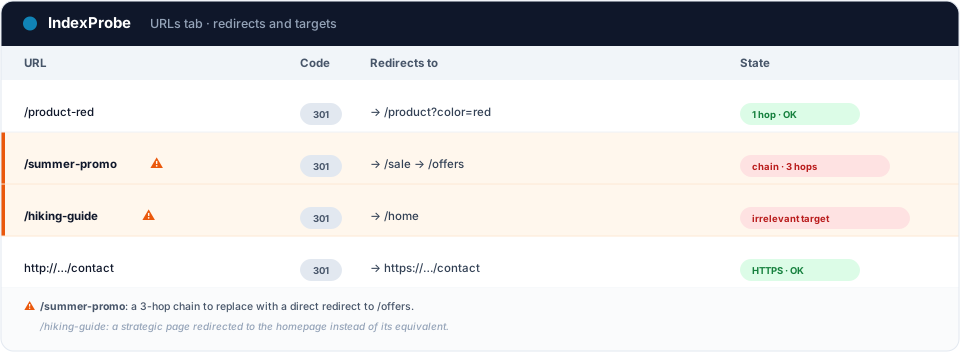
What you get out of it depends on the list you bring in. IndexProbe doesn't crawl your site to discover URLs: it inspects the ones you give it, and only those.
- A selection of strategic pages (your key pages, your sitemap of pages meant to be indexed). Any important page that comes back "Page with redirect" when it was supposed to be indexed is an immediate signal: an accidental redirect, or a target that isn't the right one.
- A full export of your URLs (entire sitemap, crawl export…). The breakdown by page type shows where redirects concentrate, and cross-referencing with internal links reveals the old redirected URLs your linking still points to.
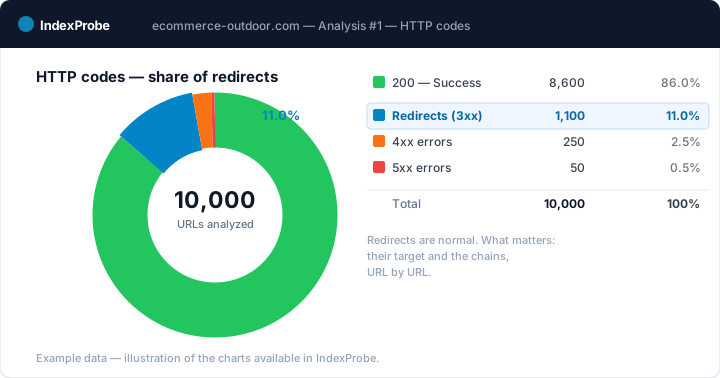
💡 Want to know where your URLs redirect, which ones form chains, and which are still linked? IndexProbe inspects your URL list and gives you the answer in one analysis. Try IndexProbe in early access →
How to fix it, by case
Once your pages are triaged, the fix depends on the problem. Most redirects need none; focus on the four cases below.
- Redirect chain. Replace the cascade with a direct redirect from the starting URL to the final one. A should no longer go through B and C: A points straight to D.
- Redirect loop. Identify the two rules pointing at each other and fix the redundant one, so the chain ends on a real 200 page.
- Irrelevant target. Point the redirect to the page's real equivalent (the replacing product, the closest category), not to the homepage by default.
- Linking and sitemap. Update your internal links and sitemap to target the final URL, without routing through the redirect. And check the code: a permanent move should be a 301 (or 308), not a 302/307.
Confirm the fix worked
After your fixes, confirm at scale. Re-inspect your URLs and compare two analyses over time: chains should be resolved (a single hop), misredirected strategic pages should now point to the right target — or be reindexed if they shouldn't have redirected at all.
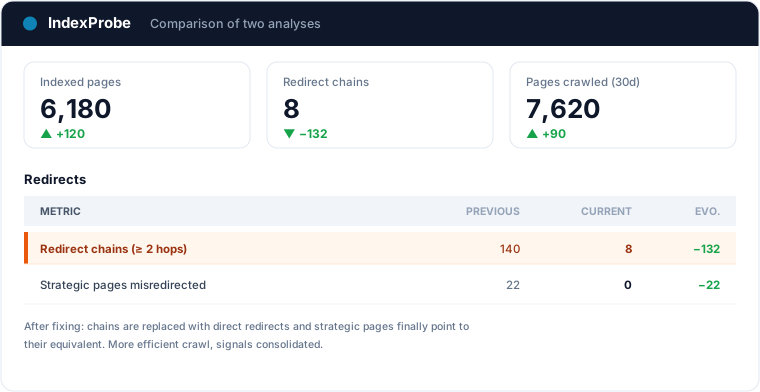
That's the full loop: understanding the redirect is usually normal, spotting chains, loops and irrelevant targets, fixing them directly, verifying.
Frequently asked questions
Is "Page with redirect" bad? Not in itself. In most cases it's a normal redirect (HTTPS, www, slash, migration) and Google indexes the target correctly. It becomes a problem with a chain, a loop, an irrelevant target, or a page redirected by mistake.
Why does my page show as "Page with redirect"? Because that URL points to another address. Google doesn't index the source URL, but its destination. Check which page it redirects to and in how many hops: if the target is right and the hop is single, there's nothing to do.
Should I use a 301 or 302 redirect? For a permanent move, use a 301 (or a 308, which preserves the HTTP method): the target becomes canonical. For a temporary move, a 302 (or 307): Google keeps the original URL. A 302 left in place for a long time is eventually treated as a 301.
What is a redirect chain and why fix it? It's a series of redirects (A to B to C). Each hop slows loading, burns crawl budget, and dilutes signals. The fix is to redirect the starting URL straight to the final one, in a single hop.
Is the "307" I see a problem? Not necessarily. If your site uses HSTS, the browser itself forces HTTP to HTTPS via a locally generated 307: it's not a real server redirect and there's nothing to fix. A 307 returned by the server, however, is a standard temporary redirect.
How do I check this status across a large number of URLs? Search Console's URL Inspection handles one URL at a time. To triage at scale, a tool like IndexProbe inspects the list of URLs you give it (CSV, sitemap) and shows, for each, the status, the redirect target and the internal links it receives.
Stop tracking your redirects one URL at a time. IndexProbe plugs into the official Search Console API and inspects your URL list in a single analysis: indexing status, redirect target, segment, internal links. In minutes you spot chains, loops and irrelevant targets, and verify your fixes from one analysis to the next.