"I blocked my filters in robots.txt two months ago. Why are they still in Google's index?" It's a question SEOs ask all the time, and the answer comes down to a mechanism most guides skip over: a URL you've blocked from crawling can no longer have its noindex read. Faceted navigation is where this misunderstanding shows up most, and in Search Console's "Page indexing" report, its URLs don't sit under a single label. They land in different statuses depending on what Google actually did with each one.
So which of your facets actually deserve a spot in the index? How do you tell, family by family, which verdict Google filed them under? And once the fix is live, how do you confirm it worked?
All three answers live in the same place, the indexing report, as long as you read it one facet family at a time.
What Is Faceted Navigation?
Faceted navigation, also called faceted search, is the filtering system that lets visitors narrow a listing page by the attributes of its items: color, size, price, brand. Google defines it as "a common feature of websites that allows its visitors to change how items (for example, products, articles, or events) are displayed on a page."
In practice, a shopper lands on the "T-shirts" category, ticks the color "red" and the size "M," and the address becomes shop.com/t-shirts?color=red&size=m. Every selection, and every combination of selections, produces a distinct URL that Google can discover and treat as a page in its own right. That's a real convenience for shoppers, and e-commerce platforms (WooCommerce, Shopify, Magento) turn it on by default. So the platform isn't the culprit: the number of URLs that convenience generates is.
Why Faceted URLs Overflow: The Combinatorics
Faceted URLs pile up because their combinations multiply. Each extra filter multiplies the number of possible URLs, and Google has to crawl them all before it can tell they add nothing. Google's own documentation is blunt about it: crawlers burn their time on useless addresses instead of finding the pages that matter.
Crawlers "will typically access a very large number of faceted navigation URLs before the crawlers' processes determine the URLs are in fact useless," Google Search Central notes. With a direct consequence: "If crawling is spent on useless URLs, the crawlers have less time to spend on new, useful URLs." That's the direct line to crawl budget, and to the broader crawling and indexing problems that facets quietly drain.
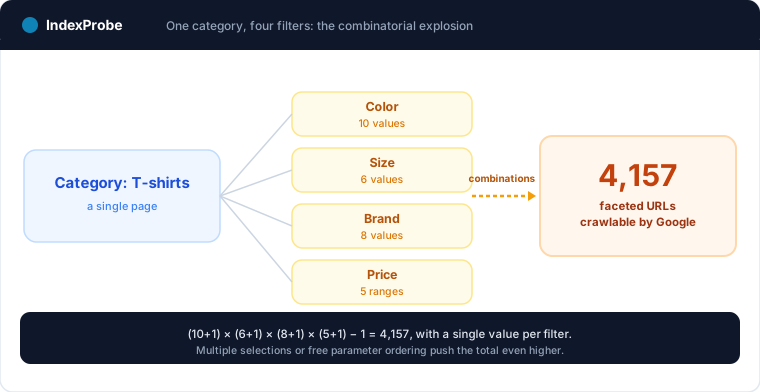
The scale of it comes down to simple arithmetic. Take a single category page with four filters: color (10 values), size (6), brand (8), and price (5 ranges). Each filter is either ignored or set to one value, which gives (10 + 1) × (6 + 1) × (8 + 1) × (5 + 1) possible combinations. That's 4,158, minus the bare unfiltered page: 4,157 faceted URLs from one category, assuming you only ever tick one value per filter. Allow multiple selections or free ordering of parameters, and the total climbs further.
Facets aren't the only pattern that multiplies URLs, either: pagination does something similar. But where pagination follows a linear logic, facets combine with one another.
Where Your Facets Land: The Four Problem Verdicts You'll See Most
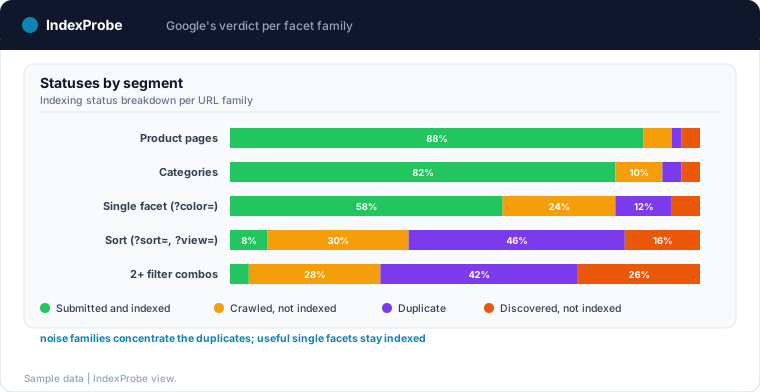
A faceted URL can carry any status in the indexing report. A legitimate facet ends up as "Submitted and indexed"; a treated one moves to "Blocked by robots.txt." But on facets left without a rule, four problem verdicts come up more than the rest. And it's precisely because they scatter across the whole spectrum that you have to read each family's real verdict rather than guess at it.
| What happens to the facet | Search Console status | What Google did |
|---|---|---|
| Crawled, judged not distinct enough | Crawled, currently not indexed | Crawled and rendered, not kept |
| Discovered, never crawled | Discovered, currently not indexed | Known, queued, not processed |
| Near-duplicate with no declared canonical | Duplicate without user-selected canonical | Grouped, no canonical supplied |
| Declared canonical ignored | Duplicate, Google chose different canonical than user | Canonical replaced with another |
Crawled, Currently Not Indexed
"Crawled, currently not indexed" is the verdict for facets Google did crawl, but didn't find distinct enough to keep. Two combinations that sit too close, "red dress" and "burgundy dress" over the same stock? Google keeps one and drops the other, because the second gave it nothing it didn't already have.
Discovered, Currently Not Indexed
"Discovered, currently not indexed" flags the facets Google knows about but hasn't crawled yet. On a catalog that generates thousands of combinations, Googlebot finds the URLs, queues them, and never reaches the bottom of the pile. The crawl budget runs out before they do.
Duplicate Without User-Selected Canonical
"Duplicate without user-selected canonical" covers the facets Google treats as near-copies of another page, with no clear canonical telling it which one to favor. It groups the variants and picks the reference version itself, usually the parent category.
Duplicate, Google Chose Different Canonical Than User
"Duplicate, Google chose different canonical than user" goes one step further: you declared a canonical on the facet, but Google ignored it and kept another. The signal was there; Google didn't follow it, because a canonical stays a hint, not a directive.
As for the question we opened with, a facet blocked in robots.txt but still showing in the results lands under "Indexed, though blocked by robots.txt". That status confirms a Disallow stops crawling, not indexing.
💡 The open question is which of these verdicts your own facets land under, family by family. Explore IndexProbe in early access →
The Honest Triage: Which Facets Deserve to Be Indexed?
Not all facets are equal. Some answer real search demand and deserve the index; others are just combinatorial noise. The sorting rests on one question: do people actually search for this combination on Google? If they do, the page has a place. If they don't, it dilutes the site without giving anything back.
A single-filter facet often maps to a real query. "Red dress," "red dress size 8," "Nike sneakers size 9": those searches exist, with volume, and a well-optimized filtered page can capture them. Closing them off would mean giving up a slice of perfectly legitimate long-tail traffic.
Stack the filters, though (?color=red&size=8&brand=x&sort=price), and the URL matches no human search. Nobody types four criteria in a row into Google. Those combinations exist only to make browsing smoother, and they have no place in the index.
To decide, lean on concrete data rather than instinct: the queries Search Console already reports, the search volumes of your filters, the intent behind each combination. Keep an eye on cannibalization too, since a facet you index that targets the same keyword as its parent category ends up competing with it. The goal isn't to index as many facets as possible, but the right ones, the facets that reach "Submitted and indexed" because they earned it.
The Matrix: One Treatment per Facet Family
Each facet family calls for a treatment, and each treatment for an expected verdict in Search Console. A useful facet stays indexable; a sort facet gets blocked from crawling; a noise combination is canonicalized to its parent category. The matrix below ties every decision to the status it should produce. Facets are one of the main sources of duplicate content on an online store.
| Facet family | Search demand | Recommended treatment | Expected verdict |
|---|---|---|---|
Useful single facet (?color=red) |
Yes | Leave indexable, self-referencing canonical | Submitted and indexed |
Sort and display (?sort=price, ?view=grid) |
No | Disallow in robots.txt | Blocked by robots.txt |
| Combination of two or more filters | No | Canonical to the parent category | Duplicate, Google chose different canonical than user |
| Deep facet never linked internally | No | Disallow in robots.txt, remove the links | "Discovered, not indexed," slowly emptying |
| Facet with no results (out of stock) | No | Return a 404, or noindex if crawlable | Not found (404), or Excluded by noindex |
The method you pick isn't neutral, and Google has a clear preference.
robots.txt first. "Use robots.txt to disallow crawling of faceted navigation URLs," the documentation says. It's the most effective way to protect crawl budget, because it stops Googlebot before it even loads the page. Facets treated this way move to "Blocked by robots.txt".
Canonical and nofollow, second. Google is explicit about their reach: "these methods are generally less effective in the long term than the previously mentioned methods." They steer Google's choice; they don't lock it in.
noindex, missing from the recommendation. Worth noting: Google's documentation on facets never once mentions noindex. Not because it's forbidden, but because it answers a different need, and because it runs into a trap.
The robots.txt versus noindex trap. This is the misunderstanding we started with. A Disallow in robots.txt stops Google from crawling the page. But to read a noindex tag, Google has to crawl the page first. Blocking and de-indexing at the same time is therefore self-defeating, since a noindex on a URL you've blocked from crawling will never be read. These are two different goals, and each calls for its own method. To keep URLs that aren't indexed yet from being crawled, robots.txt does the job. To pull an already-indexed page out of the index, leave it crawlable and add a noindex, then wait for Google to come back and read it.
Two URL details that carry weight. If your filtering runs on fragments (the part of the address after the #), know that "Google Search generally doesn't support URL fragments in crawling and indexing": those facets then create no crawlable URL at all, which solves the problem at the root, at the cost of rendering handled entirely client-side (see JavaScript app SEO). And when your filters use parameters, keep the standard separator. Google is specific: "Use the industry standard URL parameter separator '&'. Characters like comma, semicolon, and brackets are hard for crawlers to detect as parameter separators."
Diagnosing Your Facets by URL Pattern, at Scale
To know which verdict each facet family lands under, you need Google's official judgment, URL by URL. Search Console's URL Inspection tool gives it, but one address at a time. On a catalog with thousands of facets, auditing it that way is out of reach.
IndexProbe is the bulk version of that URL Inspection tool. You hand it the list of facets to watch, or you build it straight from your Search Console by URL pattern: a regular expression on ?color=, ?sort=, or any parameter is enough to gather a whole family. For each URL, you get the detailed indexing status, the reason it isn't indexed, the canonical Google kept, the date of Googlebot's last visit, and its robots.txt status.
URL segmentation, generated automatically or defined by hand, groups your facets by family: products, categories, ?sort=, combinations of several filters. When one family concentrates the "Duplicate without user-selected canonical" verdicts while another reaches "Submitted and indexed," the contrast is immediate, and you can see which families waste crawl and which ones do their job, with nothing left to guess.
All of it without log analysis or a third-party crawler. IndexProbe doesn't explore your site by following links: it queries the official Search Console API on the list you provide or build from GSC (Google Search Console). Where the inspector forces you through one URL at a time, you get the same official, dated verdict across your whole list, in a filterable table you re-run whenever you want. It's also the starting point for diagnosing the indexing pitfalls specific to e-commerce platforms.
Confirming the Fix Took Hold
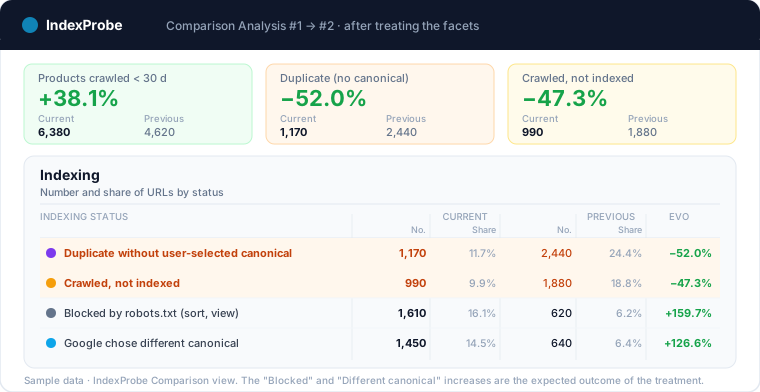
A fix isn't confirmed the day you ship it, but the day Google comes back. You verify it over time, by comparing two analyses of the same list of facets, before and after. What you're looking for in that comparison isn't a single number but a movement of statuses, family by family.
Once you've disallowed the sort facets in robots.txt and canonicalized the combinations to their parent category, you expect a specific shift. The sort URLs leave the index and join "Blocked by robots.txt"; the noise combinations move to "Duplicate, Google chose different canonical than user"; and the crawl, freed up, returns to your product pages. The Comparison view makes that shift plain, status by status, between two re-runs of the same list.
This habit also works as a safeguard. A redesign, a new filter module, or a build regression can reopen thousands of combinations to crawling overnight. Re-running the same list at regular intervals turns a silent drift into a signal you can catch, before it weighs on crawl budget again.
💡 To find out what Google really does with your facets, the most reliable move is to read its verdict, family by family. For the whole list you provide or build from GSC, IndexProbe gives you Google's official, dated verdict per URL, and stays repeatable so you can measure the effect of every fix. Try IndexProbe in early access →
Facets are rarely an isolated problem: they read at the scale of the whole catalog, next to product pages and categories. The e-commerce indexing page shows how to segment the entire catalog and measure, cleanup after cleanup, how the crawl shifts to the pages that matter.
Frequently Asked Questions
Is faceted navigation bad for SEO?
No. It's a feature that helps shoppers, not a mistake. The risk only shows up when its URL combinations are left without a rule: they waste crawl budget and dilute signals. Sorted well, faceted navigation can even capture long-tail traffic.
Should you block filters with robots.txt or with noindex?
It depends on the goal. robots.txt stops URLs that aren't indexed yet from being crawled and protects crawl budget; it's the method Google recommends first. noindex, on the other hand, removes an already-indexed page, but it needs the page to stay crawlable. Put both on the same URL and they cancel each other out.
How do you stop faceted pages from being indexed?
Disallow the facet families with no search value in robots.txt (sort, display, multi-filter combinations), canonicalize the near-duplicates to their parent category, and remove internal links to deep facets. Then check, in Search Console, that each family reaches the verdict you expected.
Which facets should you let get indexed?
The ones that answer real search demand. A single-filter facet like "red dress" or "sneakers size 9" maps to real queries and deserves the index. A combination of several filters matches no human search and doesn't belong there.
Do facets waste crawl budget?
Yes, that's their main risk. A single category with four filters can generate several thousand crawlable URLs. Google spends its time on those value-less addresses instead of finding your useful pages. Disallowing the useless families in robots.txt hands that budget back to your key pages.
Faceted navigation vs faceted search: what's the difference?
None, really: both terms describe the same system of filters applied to a listing page. "Faceted search" emphasizes the act of filtering, "faceted navigation" the browsing path it creates. For SEO, the indexing challenges are identical.