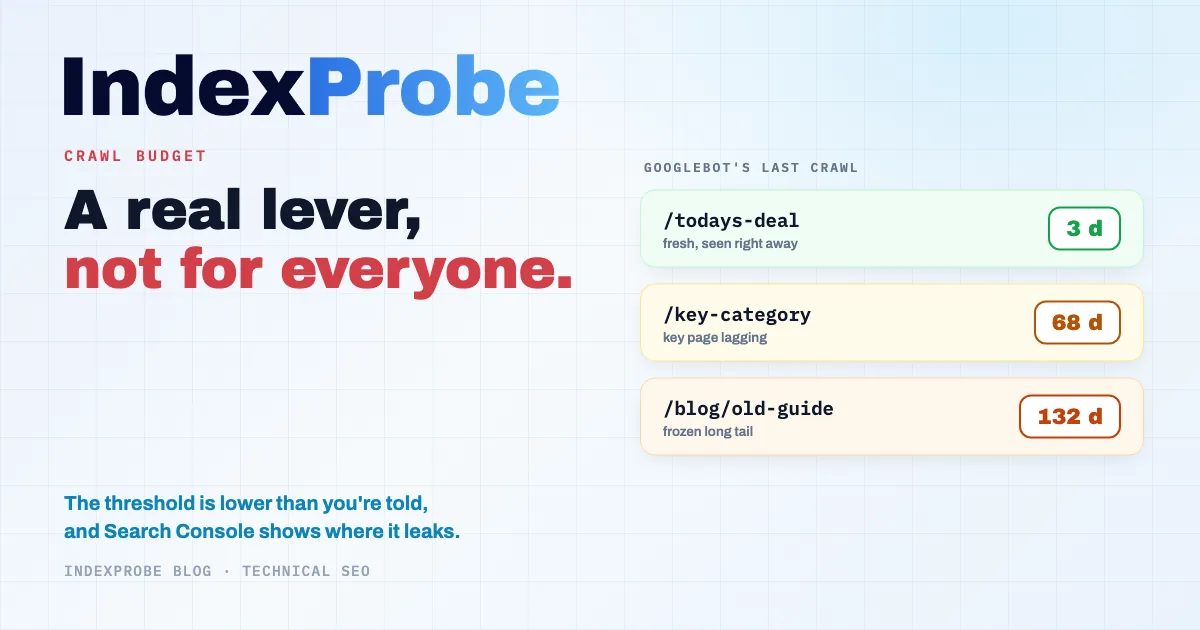
Few technical SEO levers are as important, and as widely misunderstood, as crawl budget. On one side, guides that treat it as an emergency for any site, warning you'll lose rankings if you ignore it. On the other, Google Search Central's documentation, which files the whole topic under sites with a million-plus pages. Neither the blanket alarm nor Google's reassuring threshold does the subject justice.
At what point does crawl budget actually become a problem? How does Google Search Console's "Page indexing" report flag it in plain terms, without leaving you to guess? And once the doubt is settled, how do you pinpoint, URL by URL, where the budget is draining away?
The real threshold sits far lower than a million pages, and Search Console already points to it.
What Crawl Budget Actually Is
Crawl budget is the set of URLs Google can and wants to crawl on a site over a given period. It isn't a fixed number: it emerges from two forces meeting, what your server can take as load, and what Google judges worth crawling.
Google Search Central draws a clean line between these two components. The first, the crawl capacity limit, is the number of parallel connections Googlebot can open without overloading the server, plus the delay between fetches. A fast, stable site sees that limit rise; a slow site, or one throwing errors, sees it fall. The second, crawl demand, tracks how popular your pages are, how fresh they stay, and the perceived size of your inventory: Google recrawls more often what moves and what matters.
One point is worth setting down right away, because the whole topic hangs on it: crawling isn't indexing. A page can be crawled and never make it into the index. Crawl budget decides the first step, not the second.
Why Regular Crawling Matters, Even for Your Old Pages
Crawl budget isn't only about getting new pages into the index. It also governs how fast Google registers the changes you make to pages already live. Google only sees your edits when it comes back around: between two crawls, a page stays frozen, in its eyes, in its earlier version.
Two consequences follow, both routinely underestimated.
The first is about content. You rework a page to answer a query better, you add a section, you refresh the numbers: until Googlebot returns, none of that exists for ranking purposes. A rarely crawled page takes that much longer to see its improvements pay off.
The second is about internal links. When an older page points, through a new link, to a strategic page that's often more recent, that link only passes its PageRank once the source page is recrawled. A high-authority old page that's seldom crawled holds back the momentum it should be handing to your priority pages: the internal links are in place, but Google hasn't seen them yet.
This is where crawl budget stops being a matter of brand-new pages. When it tightens, the pages Googlebot visits last are precisely your older, long-tail ones, the easy-to-forget corners of the site. Yet those are the pages carrying up-to-date content and feeding PageRank into the rest of the site. Letting them slip into rare crawling starves your strategic pages of both their updates and their authority.
Is It Actually Your Problem?
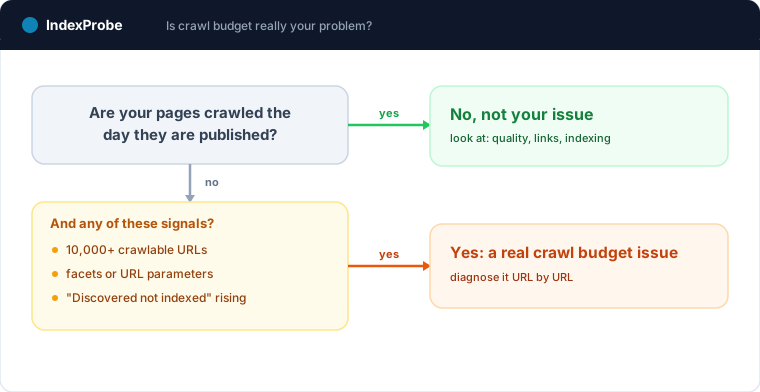
For the vast majority of sites, the answer is no. Google Search Central offers a simple test: "if your pages seem to be crawled the same day that they are published, you don't need to read this guide." A few-hundred-page site that's technically clean, whose new content shows up in the index within hours, has no reason to fret over crawl budget. If your pages are slow to get indexed, the problem almost always lies elsewhere: quality, internal linking, value signals. Not crawl budget.
Google's Official Line
The documentation explicitly reserves the topic for three profiles: sites with more than a million pages whose content changes at least weekly, sites with more than ten thousand pages whose content changes daily, and sites where a large share of URLs falls under Search Console's "Discovered, currently not indexed" status.
Why That Threshold Is Misleading
Treating "a million pages" as the dividing line would be a mistake. That figure describes the worst case; it isn't the tipping point. In practice, crawl budget becomes a live concern much earlier, around ten thousand URLs, and sometimes well below that once a site's structure starts generating URLs in bulk.
That's the blind spot. The trigger isn't the number of pages you've written, it's the number of URLs your site makes crawlable. A store with three thousand products looks modest. But if every combination of filters, sorts, and facets spawns its own URL, that same store can expose a hundred thousand crawlable URLs. Googlebot doesn't see three thousand pages: it sees a hundred thousand addresses to crawl, the overwhelming majority of which don't deserve a visit.
The Real Warning Sign
The best indicator isn't your page count; it's a number in Search Console. When the share of your URLs sitting in "Discovered, currently not indexed" starts climbing, that's the direct symptom of a strained budget: Google knows these addresses but can no longer find the time to crawl them. This third profile, named by Google itself, hits sites far smaller than a million pages. That's the signal to watch, not a theoretical counter.
What Wastes Your Crawl Budget
When crawl budget is a genuine problem, it's rarely from a lack of capacity. It's because a slice of the budget drains into worthless URLs. Google Search Central names the major sources of waste precisely.
Duplicate content and duplicate URLs top the list: several addresses serving the same page scatter the crawl instead of concentrating it. Faceted navigation is the most common source on e-commerce sites, each filter minting one more URL. Add to that infinite scroll that duplicates already-linked content, Soft 404 pages that return 200 while looking empty to Google, redirect chains that stretch out every fetch, and unimportant or removed pages Googlebot keeps requesting.
The common thread is simple: every request Googlebot spends on a pointless URL is a request it doesn't spend on a page that counts.
The Noindex Trap
The instinct looks sound: to stop Google wasting time on secondary pages, you set them to noindex. That's exactly the trap. The noindex tag saves no crawl budget at all.
Google Search Central is explicit here: don't use noindex for this, because Google will still request the page, then drop it once it sees the tag, wasting crawling time. In other words, the page is crawled before it's excluded. On a handful of URLs, that's painless; across tens of thousands, noindex merely relocates the waste.
The same logic applies to another false shortcut: using robots.txt to "temporarily reallocate" budget toward other pages. Google explicitly advises against it. robots.txt is for durably blocking the crawl of URLs you don't want crawled at all, not for shuffling budget from one day to the next. To keep these mechanisms straight, the articles on the "Excluded by 'noindex' tag" status and on pages "Blocked by robots.txt" each cover their own case.
The Bridge to Your Search Console Statuses
Crawl budget stays an abstract notion until you tie it to what Search Console actually shows. And two statuses in the "Page indexing" report are its most direct translations, so those are the ones to read first (without ruling out the others: pages under crawl pressure can surface elsewhere in the report too).
"Discovered, currently not indexed" means Google knows the URL but hasn't crawled it yet. The budget hasn't been spent on it: the address is waiting its turn in the queue, a turn that never comes when the budget goes elsewhere. It's the clearest symptom of a saturated crawl budget.
"Crawled, currently not indexed" tells the opposite story. Here the budget was spent: Google read the page but didn't find it worth keeping. That's budget burned for nothing, usually on pages deemed too thin or too close to others already indexed. Spotting these two statuses and weighing how much of your inventory they cover is what turns a fuzzy concept into a concrete diagnosis.
Diagnosing at Scale: Where the Budget Leaks, URL by URL
Reading those statuses at the right level is the catch. Search Console's "Crawl stats" report gives a valuable aggregate view: requests per day, average response time, HTTP codes. But it stops there. It doesn't tell you which URLs Googlebot is neglecting, nor since when, nor which ones are swallowing the budget. For that, you have to drop down to the URL level, and the URL Inspection tool handles only one page at a time.
IndexProbe is the bulk version of that URL Inspection tool. You hand it the list of URLs to watch, via sitemap, CSV, paste, or by building it straight from your Search Console (by clicks, impressions, or URL pattern), and it queries the official Search Console API for each one. Three data points make the budget leak readable page by page: the date of Googlebot's last visit, the robots.txt status, and the detailed indexing status. One filter isolates the URLs not crawled in over thirty days, the ones stuck in "Discovered, currently not indexed," or the facet patterns hogging the crawl.
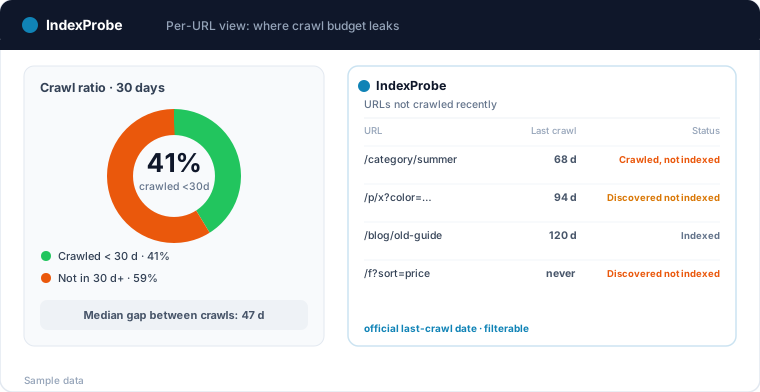
IndexProbe is not a crawler: it discovers no URLs by following links, it only inspects the list you provide or build from GSC. Where Search Console's inspector forces you through one URL at a time, you get the same official, dated verdict across your whole list, in a filterable table you re-run whenever you like.
💡 Crawl budget isn't diagnosed inside an aggregate: it's read URL by URL. Which pages Googlebot ignores, since when, and which ones are wasting the crawl. Explore IndexProbe in early access →
What Actually Helps (and What Does Nothing)
Once the leaks are located, the list of effective actions is short and well documented. Google Search Central recommends consolidating duplicate content, blocking valueless URLs from crawling via robots.txt, returning a clean 404 or 410 on permanently removed pages, keeping a current sitemap with reliable lastmod values, avoiding redirect chains, and keeping pages fast to load. A site that's lighter to crawl lets Googlebot reach more useful pages in the same window.
On the flip side, several widespread reflexes do nothing. The robots.txt crawl-delay directive, often cited to "spare" the server, is flatly ignored by Google, which doesn't read it. Using robots.txt to reallocate budget from one day to the next is advised against, as noted above. And a noindex set to save crawl produces the opposite effect. The sorting rule is simple: what cuts the volume of useless URLs helps; what claims to "negotiate" with Googlebot does not. The "Indexed, though blocked by robots.txt" status is a reminder, in passing, that blocking a crawl isn't the same as blocking indexing.
What About AI Crawlers in 2026?
A new factor is muscling into the equation: the bots behind generative engines. GPTBot, ClaudeBot, PerplexityBot and their peers now crawl the web on their own account, and that traffic weighs on servers just as Googlebot's does.
The nuance to hold onto: the pressure is real, but it doesn't merge with Google's crawl budget. These bots are steered separately, through robots.txt, depending on whether you want to grant them access. Folding them into a line of reasoning about Googlebot's crawl budget only muddies the diagnosis. Treat it as a separate question, off your own server logs.
Confirming the Fix Paid Off
A crawl budget fix isn't confirmed the day you ship it, but the day Google acts on it. You measure that over time, by setting two analyses of the same URL list side by side: before and after. The right indicator isn't a single number, it's a movement. Is the share of "Discovered, currently not indexed" receding? Is the share of pages crawled within thirty days climbing back up?
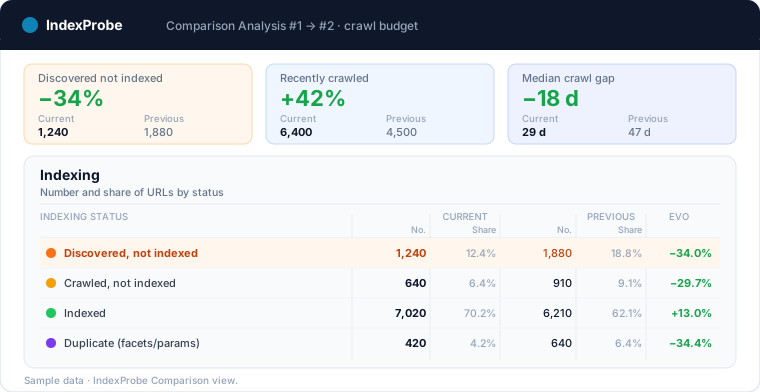
The same habit pays off as a safeguard. A healthy crawl budget can deteriorate again after a redesign, a new set of facets, or a technical regression. Tracking the same list on a regular basis turns a silent drift into a signal you can catch, before it shows up as pages dropping out of the index. And if the discovery of your new pages is still the sticking point, the guide on how to submit your website to Google rounds out the picture on the indexing side.
💡 Crawl budget is a real lever, but not every site's concern, and it bites far lower than a million pages. For the sites it does touch, Search Console already shows where it leaks. For the whole list you provide or build from GSC, IndexProbe gives you the last crawl date and the official indexing status per URL, and stays repeatable so you can track every shift from one analysis to the next. Try IndexProbe in early access →
And if your crawl budget is spent on pages generated at scale, start by measuring what Google keeps: the programmatic SEO page shows the acceptance rate per template, and which templates consume crawl without ever entering the index.
Frequently Asked Questions
At how many pages should you start worrying about crawl budget?
There's no absolute threshold, but a useful heuristic: crawl budget becomes a real concern around ten thousand URLs, and sometimes earlier once facets, parameters, or filters inflate the number of crawlable URLs. The "million pages" figure Google cites describes the worst case, not the tipping point. The best indicator remains the share of your URLs sitting in "Discovered, currently not indexed."
Does crawl budget affect SEO?
Indirectly. Crawling isn't a ranking signal in itself: Google doesn't rank a page higher because it's crawled often. But a page Googlebot doesn't crawl can't be indexed, and a page that isn't indexed ranks for nothing. A poorly distributed crawl budget therefore keeps your useful pages off that first rung.
How do you check your crawl budget?
Search Console's "Crawl stats" report gives the aggregate view: requests per day, response time, HTTP codes. To find out which specific URLs are being crawled, and when, you have to drop to the level of each URL, either with the URL Inspection tool (one page at a time) or with a bulk inspection through the Search Console API.
Does noindex save crawl budget?
No. Google requests the page anyway, then drops it once it sees the noindex tag. The page is therefore crawled before it's excluded, which spends crawl budget instead of preserving it. To genuinely stop a URL from being crawled, use robots.txt, not noindex.
Can robots.txt reallocate crawl budget toward other pages?
No, and Google advises against it. robots.txt is for durably blocking the crawl of URLs you don't want crawled, not for redistributing budget from one day to the next. Blocking a URL removes it from the crawl queue, but doesn't mechanically "transfer" its budget to other pages.
Does the crawl-delay directive work with Google?
No. Googlebot doesn't read the robots.txt crawl-delay directive and ignores it entirely. To pace its crawling, Google relies on server health (response time, errors), not on a declared value. The directive is still honored by some other engines, but not by Google. For the directive itself (who still reads it, what to do instead), see "Blocked by robots.txt".
Does my small site need to worry about crawl budget?
No, in nearly every case. A few-hundred-page site that's technically clean, whose new content shows up in the index within hours, has no reason to worry about it. If pages are slow to get indexed, the problem almost always lies elsewhere: content quality, internal linking, or value signals.