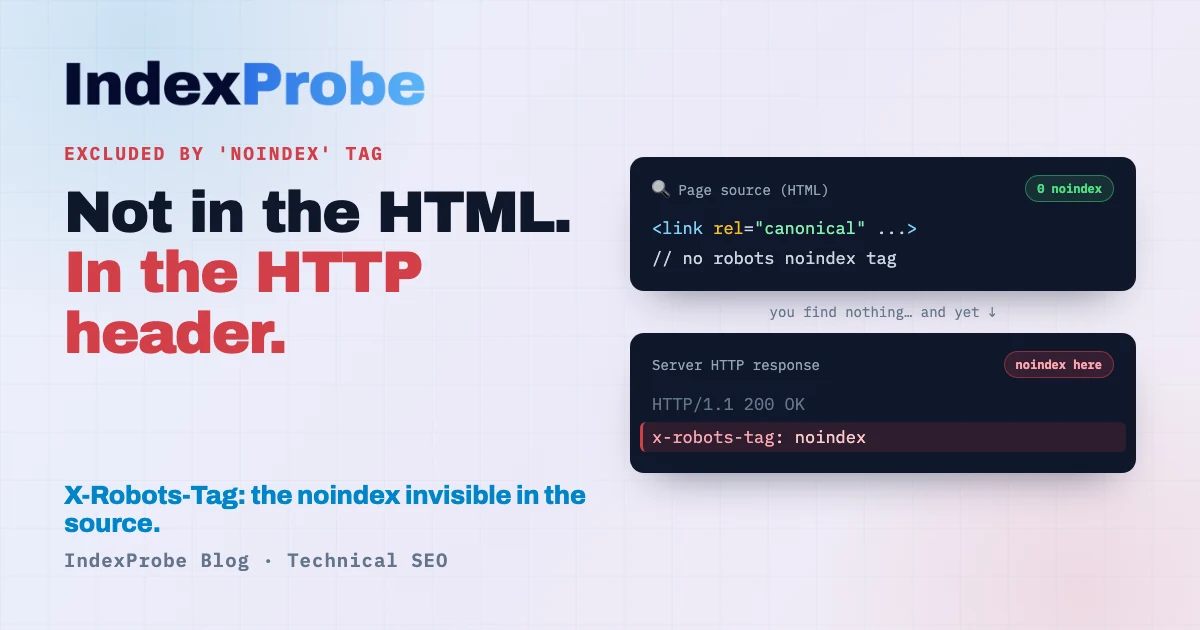
In Google Search Console's Page Indexing report, "Excluded by 'noindex' tag" is one of the clearest statuses there is: Google found an instruction not to index the page, and it followed it. Most of the time, that's exactly what you wanted — login pages, cart pages, tag archives.
The problem starts when the instruction wasn't yours. How do you spot, among hundreds of legitimate noindex tags, the one strategic page deindexed by mistake? Why does a noindex stay active when you can't find it anywhere in the page's code? And what do you do when Google can't even see the noindex you just removed?
Three questions where this seemingly trivial status gets a lot less simple.
What does "Excluded by 'noindex' tag" mean?
It means the page carries a noindex directive — in a meta tag or an HTTP header — and Google respected it: it crawled the page but didn't add it to the index. It's a deliberate, page-level exclusion, and in most cases it's intentional.
Unlike a robots.txt block, which prevents crawling, a noindex lets Google crawl the page: it reads the content, sees the instruction not to index, and complies. It's actually the method Google recommends for keeping a page out of the index.
So the page isn't "broken." It's obeying an instruction. The whole question is whether that instruction is really yours.
Intentional or accidental? It depends on what you intended
There's no single answer: it depends on what you expected from the page. Two cases, two opposite decisions. Until you tell them apart, you can't apply the right fix.
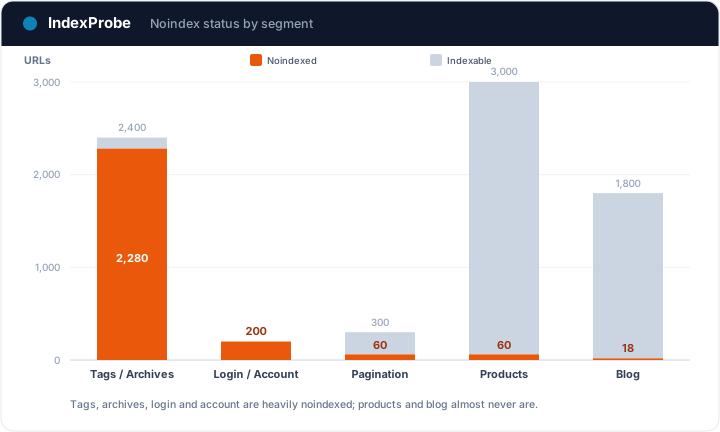
Case A: the noindex is intentional, all is well. Login and account pages, cart and order-confirmation pages, internal search results, low-value tag or date archives, RSS feeds, thank-you pages… You set them to noindex on purpose so they don't show up in Google. Seeing them listed under "Excluded by 'noindex' tag" is the expected result. Nothing to fix.
Case B: a useful page is noindexed by mistake. A page you wanted indexed carries a noindex you didn't intend: a setting left over from staging, a noindex applied to a whole template, a misconfigured plugin. As long as it's there, the page will never be indexed. Here the goal is to remove the noindex — if you can find it.
Telling A from B is the whole job. And before fixing case B, you need to know where the noindex actually comes from.
Where the noindex comes from: meta tag or HTTP header
A noindex can live in two places, and that's the source of the most stubborn mistake on this status. The first is the meta tag, in the page's <head>:
<meta name="robots" content="noindex">
The second is an HTTP X-Robots-Tag header, returned by the server with the page:
X-Robots-Tag: noindex
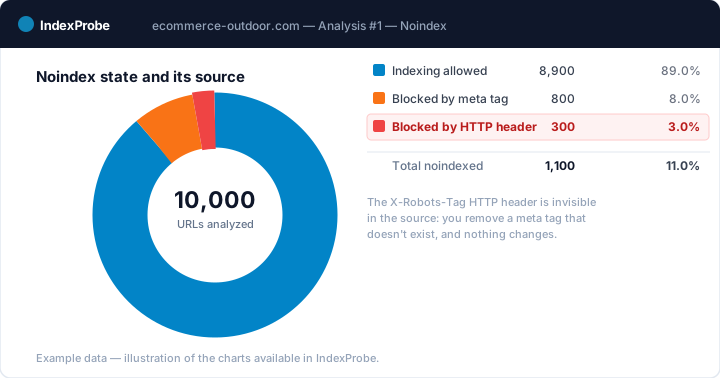
Both have the same effect for Google. But the second is invisible in the page's source code: you open the HTML, find no noindex tag, and conclude there isn't one. Wrong. The instruction is in the server's response, not in the HTML.
That's the classic trap: you remove a meta tag that doesn't exist, you wait, and nothing changes. To beat it, you have to inspect the page's HTTP response (the headers), not just its source. Search Console's URL Inspection does tell you whether Google saw a noindex — but one URL at a time.
Why a useful page ends up noindexed (case B)
When a page you wanted indexed carries a noindex, it's almost always an unintended setting. The most common causes:
- A staging leftover. During development, the whole site is often set to
noindex. If the setting isn't lifted at launch, useful pages stay excluded. On WordPress, it's the "Discourage search engines from indexing this site" checkbox. - A noindex applied to a whole template. A per-content-type setting (categories, author pages, a page template) can deindex an entire family of URLs at once, including some you wanted to keep.
- A plugin or theme. A misconfigured SEO plugin, or a theme injecting its own tags, can add a
noindexwithout your knowledge. - A server or CDN header. An
X-Robots-Tagrule at the server, reverse-proxy or CDN level, invisible in the HTML (see the previous section). - A migration. During a CMS or domain change,
noindexdirectives get carried over or recreated on pages that weren't supposed to have them.
The common thread: a noindex instruction is active where you didn't want one. What's left is finding where, and on which pages.
The trap: robots.txt and noindex don't combine
Before fixing, one edge case deserves attention, because it silently blocks half of all fix attempts: if a page is blocked by robots.txt, Google will never see its noindex.
The logic is airtight: the noindex is in the page (or its HTTP response); but robots.txt stops Google from crawling the page. No crawl, no reading of the instruction. Google states it explicitly: for a noindex to be honored, the page must not be blocked by robots.txt.
This cuts both ways: if you want to deindex a page, don't block it from crawling at the same time — let Google read it to see the noindex. And if you want to index a page carrying an unintended noindex, also check it isn't additionally blocked by robots.txt. The combination often turns up on faceted pages, where filters are blocked in robots.txt while a noindex that Google will never read is supposed to get them out of the index. The topic is covered in Blocked by robots.txt.
Now that you know the causes and possible sources, pinpoint exactly which pages are affected — before deciding what to fix.
Identify the affected pages across the list you analyze
This is where Search Console hits its limit: its URL Inspection tool handles one URL at a time. To know, page by page, which carries a noindex, where it comes from (meta or HTTP header) and whether the page mattered to you, you inspect, read, move to the next. Fine for a handful of pages. Across hundreds, spotting the strategic page deindexed by mistake becomes impractical.
That's the wall IndexProbe breaks. IndexProbe is the bulk version of Google's URL Inspection tool: it queries the official Search Console API to inspect, in a single analysis, the list of URLs you give it (CSV import, sitemap, paste). For each page, it shows the indexing status, its noindex status and its source — meta tag or X-Robots-Tag HTTP header, the URL segment, and the internal links it receives.
What you get out of it depends on the list you bring in. IndexProbe doesn't crawl your site to discover URLs: it inspects the ones you give it, and only those.
- A selection of strategic pages (your key pages, your sitemap of pages meant to be indexed). Any important page that comes back
noindexis an immediate case B: a page you wanted indexed, excluded by mistake. You spot it without assuming anything about the rest of the site. - A full export of your URLs (entire sitemap, crawl export…). The breakdown by page type then shows where the noindex concentrates — a whole template excluded in one block stands out immediately — and the source (meta vs HTTP header) tells you where to go fix it.
Seeing the noindex source — meta tag or HTTP header — at scale is something no other tool gives you.
💡 Want to know which of your URLs are noindexed, where the instruction comes from, and whether a strategic page is affected? IndexProbe inspects your URL list and gives you the answer in one analysis. Try IndexProbe in early access →
How to fix it, by case
Once your pages are triaged, the fix depends on the case. Don't mix them up: the right move for a useful page is the opposite of "leave it alone."
Remove an unintended noindex (case B)
The goal is to delete the noindex directive wherever it actually lives.
- Find the source. Inspect the URL and check whether the
noindexcomes from the meta tag (visible in the HTML) or theX-Robots-TagHTTP header (visible only in the server response). - Remove it in the right place. A meta tag is removed in the content, template, or page SEO setting; an
X-Robots-Tagheader is removed in the server, proxy, or CDN configuration. - Check there's no
robots.txtblock on the page: otherwise Google will never recrawl the page you freed from the noindex. - Request a re-inspection in Search Console, then give Google time to recrawl and reindex.
Leave an intentional noindex (case A)
For pages you meant to exclude, there's nothing to fix: the status is the expected result. Take the chance to check that a per-template setting isn't catching a page you wanted to keep along the way.
By CMS
- WordPress. First check Settings → Reading: the "Discourage search engines from indexing this site" box sets a global
noindex, to uncheck in production. For per-page or per-content-type control, use Yoast SEO, Rank Math or All in One SEO. The full WordPress case (the checkbox, plugin settings, generated archives and their statuses) is covered in our guide to WordPress indexing. - Shopify. Cart and account pages are
noindexby default. To adjust anoindexon a template, go through the theme tags (theme.liquid/ templates); avoid deindexing a whole page type by accident.
"Excluded by noindex" vs "Blocked by robots.txt" vs "Indexed, though blocked"
Three Search Console statuses look alike and are fixed very differently. The cheat sheet:
| GSC status | Where the exclusion comes from | Indexed? | Action |
|---|---|---|---|
| Excluded by 'noindex' tag | noindex directive (meta or HTTP header) |
No | Nothing if intended; remove the noindex if it's a useful page |
| Blocked by robots.txt | robots.txt (crawl disallowed) |
No | Nothing if intended; unblock if a useful page is trapped |
| Indexed, though blocked by robots.txt | robots.txt, but URL found elsewhere |
Yes | Unblock, then noindex to deindex |
Each has its own logic: the first excludes at the page level (Google read the instruction), the second prevents crawling, the third reveals the block wasn't enough. Confusing them means applying the wrong fix. See Blocked by robots.txt and Indexed, though blocked.
Confirm the fix worked
After removing the noindex from your case B pages, confirm at scale that Google recrawled. Re-inspect your URLs and compare two analyses over time: the pages you fixed should leave the "Excluded by 'noindex' tag" status, then flip to indexed.
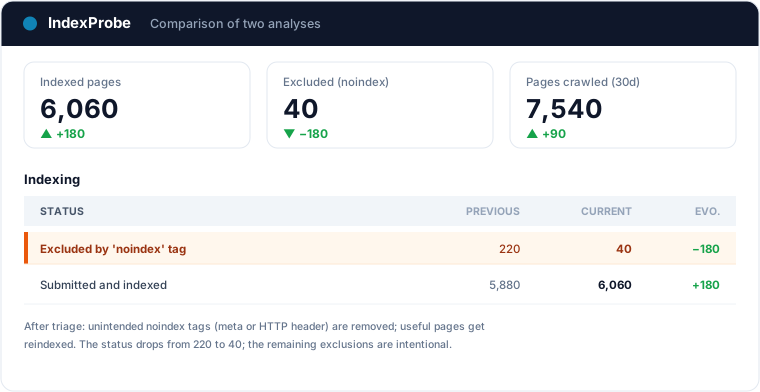
That's the full loop: understanding the noindex is usually intentional, triaging A/B, finding the real source (meta or header), fixing, verifying.
A noindex inherited from a release is the archetypal silent regression: no error message, just pages leaving the index one by one. The organic traffic drop page details how to detect those exits in bulk, date them and prove the recovery.
Frequently asked questions
Is "Excluded by 'noindex' tag" bad?
Not in itself. In most cases it's an intentional noindex doing its job: login, cart, tag archives. It only becomes a problem when a page you wanted indexed carries a noindex by mistake.
Why is my page noindexed when I didn't add anything?
The noindex can come from a CMS setting applied to a whole template, a plugin, a staging leftover, or an X-Robots-Tag HTTP header set at the server level — invisible in the page's source code. Inspect the HTTP response, not just the HTML.
How do I remove a noindex?
First find its source: meta tag in the <head>, or X-Robots-Tag HTTP header. Remove it in the right place (content/template/SEO setting for the meta tag; server/CDN config for the header), check that no robots.txt block prevents the recrawl, then request a re-inspection.
Why won't my noindex go away after I removed it?
Two common causes: either the noindex actually came from an HTTP header you didn't change (you removed a meta tag that didn't exist), or the page is blocked by robots.txt and Google can't recrawl it to see the change.
Should I use noindex or robots.txt?
noindex prevents indexing (the page can be crawled but won't appear in results): it's the tool for removing a page from the index. robots.txt prevents crawling (useful to save crawl budget). The two don't combine: a noindex on a page blocked from crawling will never be seen.
How do I check this status across a large number of URLs? Search Console's URL Inspection handles one URL at a time. To triage at scale, a tool like IndexProbe inspects the list of URLs you give it (CSV, sitemap) and shows, for each, the indexing status, the noindex status and its source (meta or HTTP header).
Stop hunting for a noindex you can't see. IndexProbe plugs into the official Search Console API and inspects your URL list in a single analysis: indexing status, noindex status and its source (meta tag or HTTP header), by segment. In minutes you separate intentional exclusions from useful pages deindexed by mistake, and verify your fixes from one analysis to the next.