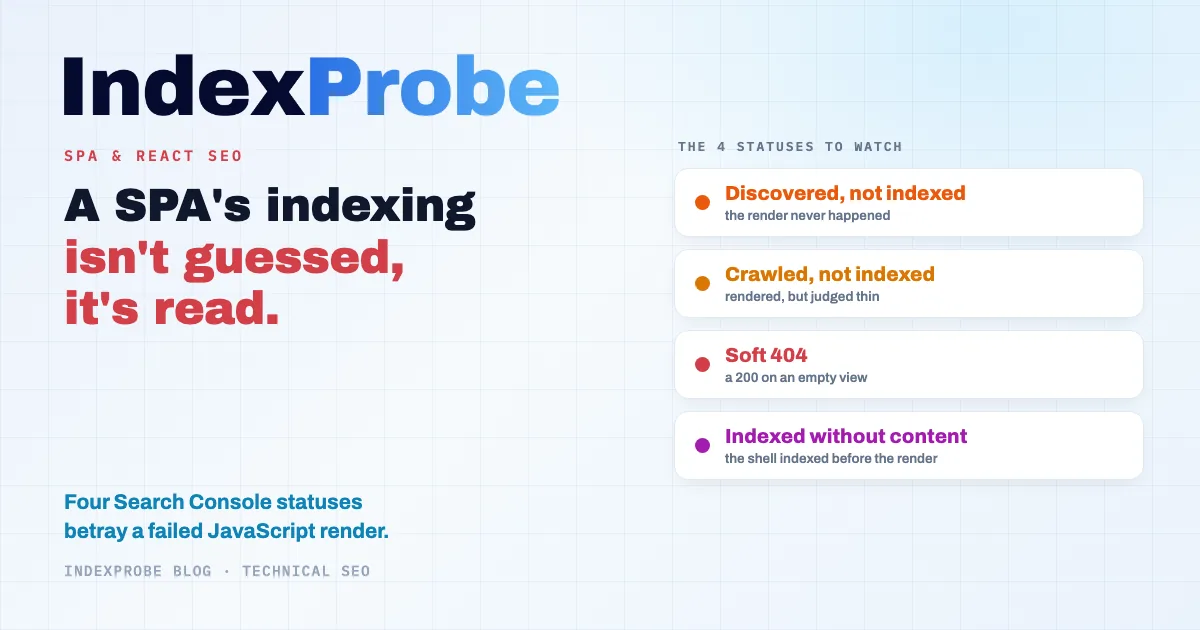
React, Vue, and Angular let you build single-page applications (SPAs): one HTML page, navigation with no reload, a smooth experience for the user. For SEO, though, that architecture carries a catch: the content only exists once the JavaScript runs, and under certain conditions it never reaches Google's index. This isn't something you can judge by eye. Google records it in Search Console's "Page indexing" report, through four statuses that keep coming up on this kind of site.
Which ones? What does each one reveal about what Googlebot actually saw of the page? And how do you find out, across a whole site, which views Google ended up indexing and which it set aside?
No error shows up. The verdict, though, is already written.
What a Single-Page App Looks Like to Googlebot
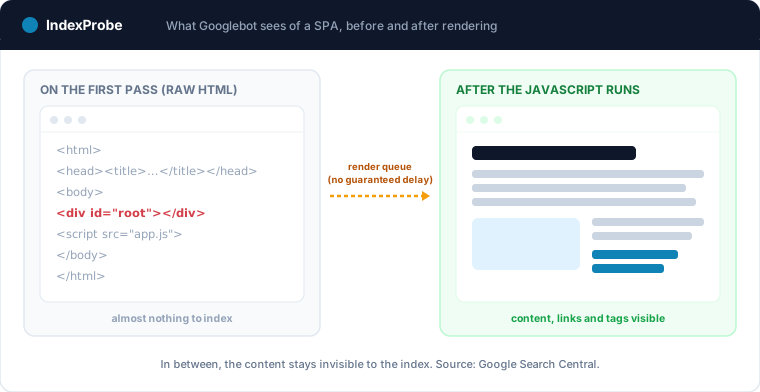
To Googlebot, a single-page application first shows up as an almost empty HTML shell. The content, the links, and the metadata only exist once the JavaScript runs and injects them into the page on the browser side. So Googlebot has to render the page before it can reach what a user sees on screen.
That render doesn't follow the crawl right away. Google first crawls the raw HTML, puts the page in a render queue, then runs the JavaScript with a version of Chromium before indexing the result. Google Search Central describes that queue without promising a timeframe: "The page may stay on this queue for a few seconds, but it can take longer than that." Between the crawl and the render, your content stays invisible to the index.
That gap between crawling and rendering sits at the heart of the crawling and indexing challenges specific to JavaScript. How that rendering engine works in detail, how Google runs the JavaScript and which statuses each rendering failure triggers, is covered in our JavaScript SEO guide. What matters here is the consequence: until the render completes, a SPA exposes almost nothing to index.
Google Reads JavaScript, and Still Recommends Server-Side Rendering
Two opposing beliefs circulate, and both are wrong. On one side, the idea that Google "doesn't read JavaScript": false, Googlebot has rendered pages for years with an up-to-date version of Chromium. On the other, the idea that it "renders everything effortlessly": false too, because the render is deferred, costly, and the rendering environment keeps nothing from one page to the next.
That's why Google Search Central doesn't stop at saying JavaScript is handled. The documentation recommends routing around it: "Keep in mind that server-side or pre-rendering is still a great idea because it makes your website faster for users and crawlers, and not all bots can run JavaScript." In other words, the company that renders JavaScript best still advises handing it the HTML directly.
So JavaScript rendering is a genuine lever, neither a death sentence nor a disaster. It works, but it adds one more step where things can fail without a sound. And when they fail, they leave a precise trace.
The 4 Search Console Statuses That Betray a Badly Indexed SPA
When a SPA's render fails, Google shows no error message. It simply files the page under an indexing status. Four statuses in particular are the signature of a rendering problem. Each one maps to a specific moment where the process went off the rails. They aren't the only possible verdicts (a healthy view ends up as "Submitted and indexed," a deliberately closed one as "Excluded by 'noindex' tag"), but these four are the ones that should make you think about rendering.
| SPA failure mode | Search Console status | What Google did |
|---|---|---|
| The render never happened | Discovered, currently not indexed | URL known, neither crawled nor rendered |
| Render ran, but the view judged thin | Crawled, currently not indexed | Crawled and rendered, value not kept |
| A 200 returned on an empty view | Soft 404 | Served 200 but seen as empty |
| The shell indexed before the render finished | Indexed without content | Indexed, but without the expected content |
Discovered, Currently Not Indexed
"Discovered, currently not indexed" is the status for pages Google knows about but hasn't crawled yet, and therefore hasn't rendered. On a SPA, it climbs fast when the site exposes thousands of views through client-side routing: Google discovers the URLs, queues them, but can't find the time to process them all. The render isn't the culprit here; it simply never happened. It's often a sign of a strained crawl budget.
Crawled, Currently Not Indexed
"Crawled, currently not indexed" tells the opposite story: Google did crawl and render the page, but didn't find it worth keeping. On a SPA, two causes recur. Either the render produced too thin a view, content still loading or an API call that failed at render time; or several views look too much alike, lacking a title and description of their own. Google saw the page. It just wasn't convinced.
Soft 404
A Soft 404 happens when a view returns a 200 HTTP status code while it's actually empty or in error. It's the classic client-side routing trap: with no server to return a real 404, a non-existent URL displays a "page not found" shell, in 200. Google Search Central spells it out: single-page applications often return "a 200 HTTP status code instead of the appropriate status code." Google detects it, and files the page as a Soft 404.
Indexed Without Content
"Indexed without content" is the most insidious of the four. Google indexed the URL, but at the shell stage, before the render finished. The page exists in the index, empty or nearly so. For a SPA, it's the scenario where Googlebot fetched the initial HTML, kept it, but where the content the JavaScript injected never made it into the indexed version.
The Structural SPA Traps Google Documents
Beyond the render itself, a SPA's architecture stacks up traps that Google documents precisely. They share one thing: they deprive Googlebot of a cue that traditional sites hand it for free, a clean URL, a followable link, a stable tag.
The first is about URLs. Historically, SPAs switched views by changing the part of the address after the #. Google no longer follows that mechanism: "The AJAX-crawling scheme has been deprecated since 2015, so you can't rely on URL fragments to work with Googlebot. We recommend using the History API." Every view you want indexed needs its own real URL (facet filters served as fragments are covered in the article on faceted navigation).
Next come the links. A link fired by an onClick on a <div> isn't a link to Googlebot. Without an <a href> tag, it never discovers the destination view and passes it no signal. Same logic for content that only appears after an interaction, a click on a tab or an accordion opening: Googlebot doesn't click. What matters has to be in the initial render, not behind a user action.
Then there are the tags. Injecting the canonical in JavaScript is risky: "you shouldn't use JavaScript to change the canonical URL to something else," Google Search Central warns. Same caution for the robots meta tag: "using JavaScript to change or remove the robots meta tag from noindex may not work as expected." A page left on noindex in the initial HTML can stay that way in Google's eyes, whatever the script does next. Finally, the rendering environment keeps no memory from one page to the next: "Local Storage and Session Storage data are cleared across page loads. HTTP Cookies are cleared across page loads." A view whose content depends on client-side stored state can therefore come up empty at render time.
💡 Before you fix anything, you first need to know which of your views Google actually indexed, and under which status. Explore IndexProbe in early access →
Do You Really Need SSR?
Not every view in a SPA needs to be indexed. Before switching everything to server-side rendering, the right question isn't technical but editorial: is this view meant to attract traffic from search? The answer decides the effort, not the other way around.
Split your views into two families. On one side, the ones that need to rank: homepage, product pages, articles, category pages. They need Google to see their content without depending on the render, so they need server-side rendering (SSR), static site generation (SSG), or pre-rendering. On the other, the purely application views: dashboard, cart, screens behind authentication. They have no business in the index; an intentional noindex beats a pointless SSR.
Between SSR, SSG, and pre-rendering, the choice depends on how fresh the content is and on your technical constraints, not on a vendor to favor. A page that changes constantly leans toward SSR; a stable catalog suits static generation; pre-rendering can rescue an existing site without rewriting it. The point stays the same: the views that matter have to reach Googlebot already filled in.
Checking at Scale Which Views Google Actually Indexes
Fixing the render isn't enough: you have to check, view by view, what Google made of it. Search Console's URL Inspection tool gives that official verdict, but one URL at a time. On a SPA exposing thousands of views, auditing it page by page becomes impractical.
IndexProbe is the bulk version of that URL Inspection tool. You hand it the list of views to watch, via sitemap, CSV, paste, or by building it straight from your Search Console (by clicks, impressions, or URL pattern), and it queries the official Search Console API for each one. For every view, you get the detailed indexing status, the reason it isn't indexed, the canonical Google kept, and the date of Googlebot's last visit. One filter isolates the views stuck in "Crawled, currently not indexed" or "Indexed without content," the very ones a failed render betrays. URL segmentation, generated automatically or defined by hand, groups your views by family (product pages, categories, app screens…): if one type of view concentrates the rendering failures, it stands out immediately.
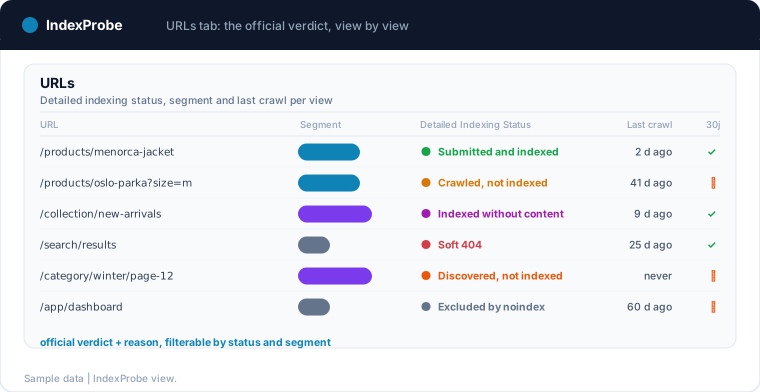
IndexProbe is not a crawler: it discovers no views by following links, it only inspects the list you provide or build from GSC (Google Search Console). Where Search Console's inspector forces you through one URL at a time, you get the same official, dated verdict across your whole list, in a filterable table you re-run whenever you like.
Confirming the Fix Paid Off
A rendering fix isn't confirmed the day you ship it, but the day Google comes back and re-evaluates the page. You measure that over time, by setting two analyses of the same list of views side by side, before and after. The right signal isn't a single number, it's a movement of statuses.
After a switch to SSR or pre-rendering, the views that leave "Crawled, currently not indexed" and "Indexed without content" shift, little by little, toward "Submitted and indexed." The Comparison view makes that shift plain, status by status, between two re-runs of the same list.
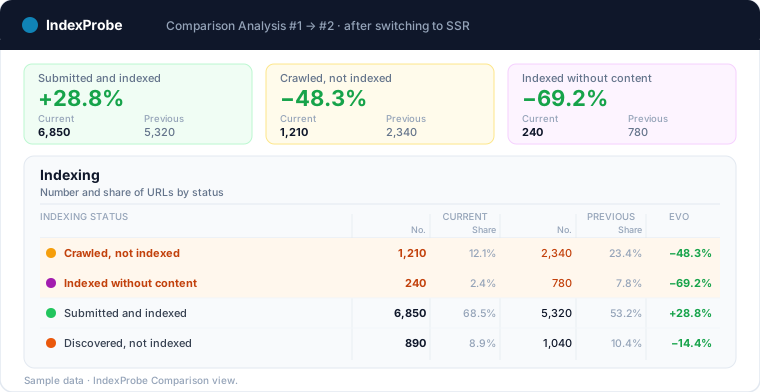
This habit doubles as a safeguard. A SPA that's well indexed today can degrade after a redesign, a new module, or a build regression that breaks the render. Re-running the same list on a regular basis turns a silent drift into a signal you can catch, before the views drop out of the index.
💡 A SPA's render isn't guessed: it's read in Search Console's indexing statuses, status by status, view by view. For the whole list you provide or build from GSC, IndexProbe gives you Google's official, dated verdict per URL, and stays repeatable so you can track every shift from one analysis to the next. Try IndexProbe in early access →
Frequently Asked Questions
Is React bad for SEO?
No. React doesn't prevent indexing; it's client-side rendering that causes problems, when the content only exists after the JavaScript runs. A React site rendered server-side, with Next.js for instance, or pre-rendered ranks as well as a traditional site. The framework isn't the issue, the rendering strategy is.
Does Google index single-page applications (SPAs)?
Yes. Google crawls and renders single-page applications with an up-to-date version of Chromium, then indexes the result. But that render is deferred and can fail with no error message. A SPA does get indexed, provided its views expose a clean URL and content reachable without user interaction.
Does Google read JavaScript?
Yes. Googlebot runs JavaScript to render pages before indexing them. Google Search Central still recommends server-side rendering or pre-rendering, because JavaScript rendering adds a costly, failure-prone step, and not all bots run it.
Do you need SSR for a SPA's SEO?
Not always. Only the views meant to attract organic traffic, homepage, product pages, articles, categories, need server-side, static, or pre-rendering. Private application views, like a dashboard or cart, don't need to be indexed and can stay on client-side rendering.
Why isn't my React page getting indexed?
Look at its status in Search Console. "Discovered, currently not indexed" signals the page hasn't been crawled yet; "Crawled, currently not indexed" that Google rendered it but judged it too thin; "Soft 404" that it returns a 200 on an empty view; "Indexed without content" that Google indexed the shell before the render finished. Each status points to a different cause.
What is a single-page application (SPA)?
A single-page application (SPA) is a site that loads a single HTML page, then updates its content with JavaScript as the user navigates, without reloading the page. React, Vue, and Angular are commonly used to build them. The approach feels smooth for the user, but it takes particular care with rendering to stay indexable.