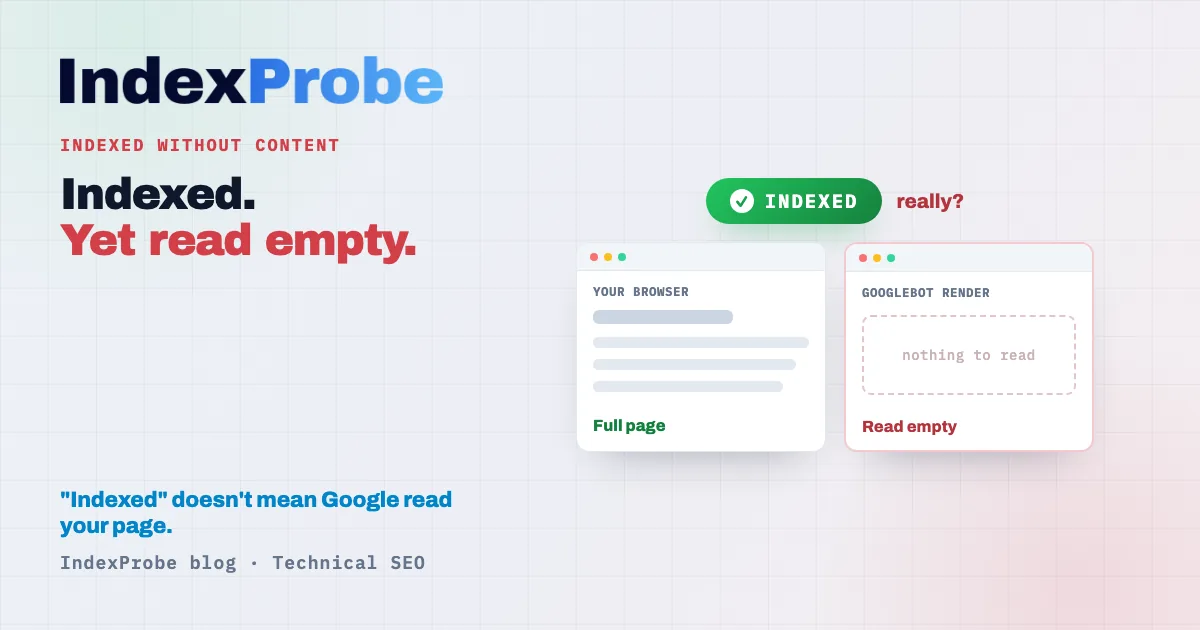
In Google Search Console's "Page indexing" report, watching a URL flip to "indexed" feels like a win. "Indexed without content" files that win under false alarms: the page sits in the index, and it will rank for nothing, because Google read it empty.
The status is also the only one where Google admits it doesn't know: the page appears in the index, but its content stays unreadable "for some reason." That leaves three questions that decide everything. Why does Google receive a blank where a browser shows a full page? Why does adding text change nothing when the problem isn't quantity? And how do you tell this status apart from a Soft 404, which shuts the door before the index even opens?
Three questions that separate a page that really is empty from one Google simply can't read.
What "Indexed without content" means
"Indexed without content" means your URL is in Google's index, but Googlebot extracted nothing usable from its content during the crawl. The page exists for Google, with no workable substance behind it. The result: it's indexed, and unable to rank for a single query.
"This page appears in the index, but for some reason Google could not read the content. Possible reasons are that the page might be cloaked to Google or the page might be in a format that Google can't index." — Google, "Page indexing" report, "Other" category.
What makes this status singular is the admission of not knowing. Google doesn't point to a precise cause the way it does for a Soft 404 or a robots.txt block. It records a gap: the URL responded, it was kept, but the render delivered no usable content. The ball is back in your court, with no diagnosis attached. That very fog is what makes the status hard to handle, and what follows is here to clear it.
Why it's a false win, not a display glitch
A page "indexed without content" holds a line in the index, but with no relevance signal to offer. Google indexed nothing but a shell. With no readable text, no query can trigger it: technically present, commercially absent.
The trap lies in the word "indexed." In the report, it reassures, when here it guarantees nothing. A page can sit in this state for months, counted among your indexed URLs, without ever earning a single impression. You believe the area is covered, and the traffic you expected never arrives.
On top of that, there's the crawl spent for nothing. Googlebot keeps coming back to check a page it still gets nothing from. Across a handful of URLs, the effect is negligible. Across an entire template that systematically serves a blank, it's crawl budget wasted on dead pages, at the expense of the ones you actually want indexed. Understanding why Google receives a blank starts with identifying which of the four possible causes is hitting you.
The four causes: from truly empty to invisibly blocked
Four families of causes lead to this status, and they have almost nothing in common. Three are reading problems, where Google receives a blank even though the page exists. Only one corresponds to a page that really is empty. Pinning down the right family conditions everything else: a fix applied to the wrong cause produces no effect.
"I see the text, Googlebot doesn't": JS rendering and blocked resources
This is the most common case on the code side. Your content doesn't exist in the initial HTML: it's injected by JavaScript after load. If execution fails, times out, or depends on resources Googlebot doesn't fetch, the render freezes on a blank page. Same mechanism when your CSS and JS files are blocked by robots.txt: Google crawls the HTML, can't load what builds the page, and gets only a carcass. You see a full page in your browser; Googlebot sees the skeleton from before the injection. The complete mechanics of Google's JavaScript rendering, and the other statuses a failed render can trigger, are covered in our JavaScript SEO guide.
"Google gets nothing": server, CDN or firewall
Here the problem isn't in your code, it's on the path between Googlebot and your server. A web application firewall (WAF), an anti-bot protection, or an overly aggressive CDN rule can serve a blank response to Googlebot while delivering the full page to a human visitor. According to a reported clarification from John Mueller in early 2026, JavaScript rendering is rarely the sole culprit behind this status: very often it's the server, the CDN, or a filtering layer returning a blank to Google. Take it as a useful course correction, not an absolute truth: both families of causes coexist, and it's the symptom-by-symptom diagnosis that settles it. When the server response degrades completely, you actually shift into a different status, covered in Server error (5xx).
The page really is empty or too thin
The simplest case, and the only one "add content" genuinely fixes. The page responds, its HTML is readable, but there's almost nothing inside: a template with no body, a listing never filled, a category with no products, a container waiting for data that never arrived. Google reads what's there, and what's there isn't enough to count as content.
Cloaking, intentional or accidental
Cloaking means serving Googlebot a different version from the one a visitor sees. Done on purpose, it's a violation of Google's rules. Accidental, it's far more common: a misconfigured user-agent check, a conditional redirect, a variant served by IP or geolocation that strips Googlebot of the real content. The result is the same, a blank version on Google's side.
| Observed symptom | Likely cause | What to check |
|---|---|---|
| Content visible in the browser, absent from the source HTML | JS rendering or blocked resources | Source HTML vs rendered HTML, robots.txt on CSS/JS files |
| Full page for you, blank for Googlebot | Server, CDN or firewall | Response served to the Googlebot user-agent, WAF and CDN rules |
| Readable HTML but almost nothing inside | Page really empty or too thin | Presence of a real content body in the template |
| Google's version differs from the visitor's version | Cloaking, often accidental | User-agent detection, conditional redirects, IP-based rules |
The false fix: no, adding 600 words won't help
Adding content fixes only one of the four cases: the page that really is empty. In the other three, the problem is reading, not quantity. If Google receives a blank because of rendering or the server, 600 more words stay just as unreadable: you're enriching a page Googlebot still can't see.
It's the most stubborn reflex this status triggers, and the most counterproductive. The word "content" in the label naturally steers you toward the idea of a text shortfall. But the status doesn't say "insufficient content," it says Google can't read the content that already exists. The distinction is decisive. Until you've checked what Googlebot actually receives, adding text is like filling a leaky bucket.
The right approach reverses the order: first confirm whether Google receives content at all, only then decide whether to add any. Everything starts with the diagnosis, never with blind enrichment.
Sizing the problem: how many of your URLs are affected
Before fixing, know how many pages are affected and which ones. The "Page indexing" report does list the status, but it won't filter against your own list of strategic URLs: there's no easy way to isolate, among the pages that matter to you, the ones served blank to Google. That's exactly the gap bulk inspection fills.
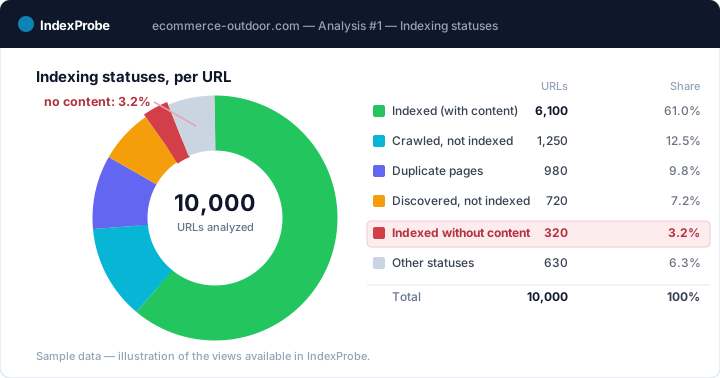
Search Console's URL Inspector gives that official verdict, but one URL at a time: auditing an entire list by hand is impractical. IndexProbe takes the same official Google data and applies it to the URL list you provide, or build from your GSC, to isolate in a single analysis the pages with the "Indexed without content" status. You then talk about precise pages, dated to Googlebot's last visit, among the URLs you analyze, without extrapolating to the whole site.
💡 How many of your pages are indexed without content, and which ones? IndexProbe inspects your URL list via the Search Console API and returns, per page, Google's official indexing verdict, dated to its last visit. Try IndexProbe in early access →
Seeing what Googlebot actually gets: the "Rendered HTML" tab
To decide between an empty page and a misread one, look at what Google actually received. In Search Console's URL Inspection, open the indexing result, then "Rendered HTML" and the screenshot: that's the render Googlebot obtained. If it's blank while your browser displays everything, you've got a reading problem.
One crucial caveat: the Live Test does not reproduce this status. The Live Test replays a crawl in real time, with rendering behavior and network conditions that can differ from those at the moment Google indexed the empty page. A page can display perfectly in a Live Test and still stay "indexed without content" in the index.
The data that matters, then, is the indexed version, not the Live Test. Always compare the source HTML (what the server sends out first) to the rendered HTML (what Google obtains after rendering). If the text appears in the source but disappears in the render, suspect a blocked resource. If it's missing from the source itself, JavaScript rendering or the server is at fault. This diagnosis decides which fix to apply.
Fix by cause, not blindly
There's no single fix, but one fix per cause, mirroring the symptom grid. The rendered-HTML diagnosis has already pointed you: apply the repair that matches the family you identified, and only that one. Fixing at random risks enriching a page Google doesn't read, or rewriting a server when the problem is JavaScript.
If the cause is JS rendering or blocked resources, make the main content present in the initial HTML (server-side rendering or pre-rendering), and unblock the CSS and JS files the page needs to display. While you're at it, check that no decisive resource is barred from crawling: the topic overlaps directly with Blocked by robots.txt.
If the cause is the server, the CDN or the firewall, identify the rule serving a blank to Googlebot and allow its user-agent to receive the full version. It's often an anti-bot protection or an overly broad WAF rule.
If the page is really empty or too thin, then, and only then, produce substantial, unique content, or remove the page from the index if it isn't meant to rank.
If the cause is accidental cloaking, remove the logic serving a different version by user-agent, IP, or geolocation, so Google receives what the visitor sees.
Don't confuse it with Soft 404 or "Indexed, though blocked by robots.txt"
Three close statuses trip up even seasoned SEOs, because they all touch on content reading. The difference comes down to a single question: is the page in the index, and if so, was its content read? "Indexed without content" is in the index with unreadable content. A Soft 404 isn't in it at all. A page indexed despite a robots.txt block is in it without ever having been read.
| Indexed without content | Soft 404 | Indexed, though blocked by robots.txt | |
|---|---|---|---|
| In the index? | Yes | No | Yes |
| Content read? | No, unreadable at render | No, treated as not found | No, crawl blocked |
| Cause | Rendering, server, empty page or cloaking | Page seen as nonexistent despite a 200 code | Crawl barred by robots.txt |
| Fix | Make the content readable to Googlebot | Return real content or a clean 404 | Unblock the URL in robots.txt |
To dig into each, see Soft 404 and Indexed, though blocked by robots.txt. Hold on to the boundary: here, Google kept the page but could read nothing of it at render, where the Soft 404 judges it nonexistent and the robots.txt block indexes it without ever having crawled it.
Confirming the fix worked
A fix is only confirmed once Google has re-crawled the page and changed its verdict. The status doesn't flip the moment you deploy the fix: you have to wait for Googlebot's next visit. The right indicator isn't your browser, it's the change in status between two inspections of the same URL.
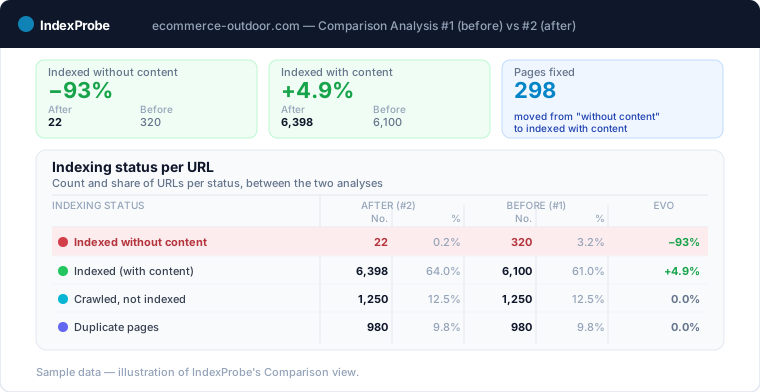
Tracking that shift on a single page is manual work in the URL Inspector. Tracking it across ten, a hundred, or a thousand pages fixed at once means comparing two states over time. That's the role of the Comparison view: rerun the analysis on the same list after the fix, and read how many URLs moved from "indexed without content" to the fully healthy state, Submitted and indexed, page by page and dated to Googlebot's last visit.
💡 Confirm your fixes are landing on Google's side. IndexProbe returns, for the URL list you provide or build from your GSC, the official indexing verdict dated to Googlebot's last visit, and the Comparison view puts two analyses side by side to track the status shift, page by page, without extrapolating to the whole site. Try IndexProbe in early access →
Frequently asked questions
What does "Indexed without content" mean in Search Console?
This status means your URL is in Google's index, but Googlebot couldn't read any usable content at render. The page exists for Google with no substance behind it, so it ranks for no query despite being indexed. The label is a false win, not a green light.
Why can't Google read a page my browser displays fine?
Because Googlebot doesn't receive the same thing you do. A failing JavaScript render, blocked CSS or JS resources, a firewall serving a blank to the bot, or accidental cloaking can deliver an empty page to Google while your browser shows everything in full.
What's the difference between "Indexed without content" and a Soft 404?
"Indexed without content" is in the index, with content Google couldn't read. A Soft 404 isn't in the index: Google treats the page as not found despite its 200 code. One is indexed and unreadable, the other is excluded entirely.
Does adding text fix this status?
Only if the page really was empty. In the other three cases, rendering, server, or cloaking, the problem is reading, not quantity: Google receives a blank, and any text you add stays unreadable to it. Diagnose first, enrich second.
Is JavaScript rendering always to blame?
No. JavaScript rendering is a frequent cause, but according to a reported clarification from John Mueller in early 2026, it's often the server, the CDN, or a firewall returning a blank to Googlebot. Both families coexist: only the rendered-HTML diagnosis can settle which one applies.