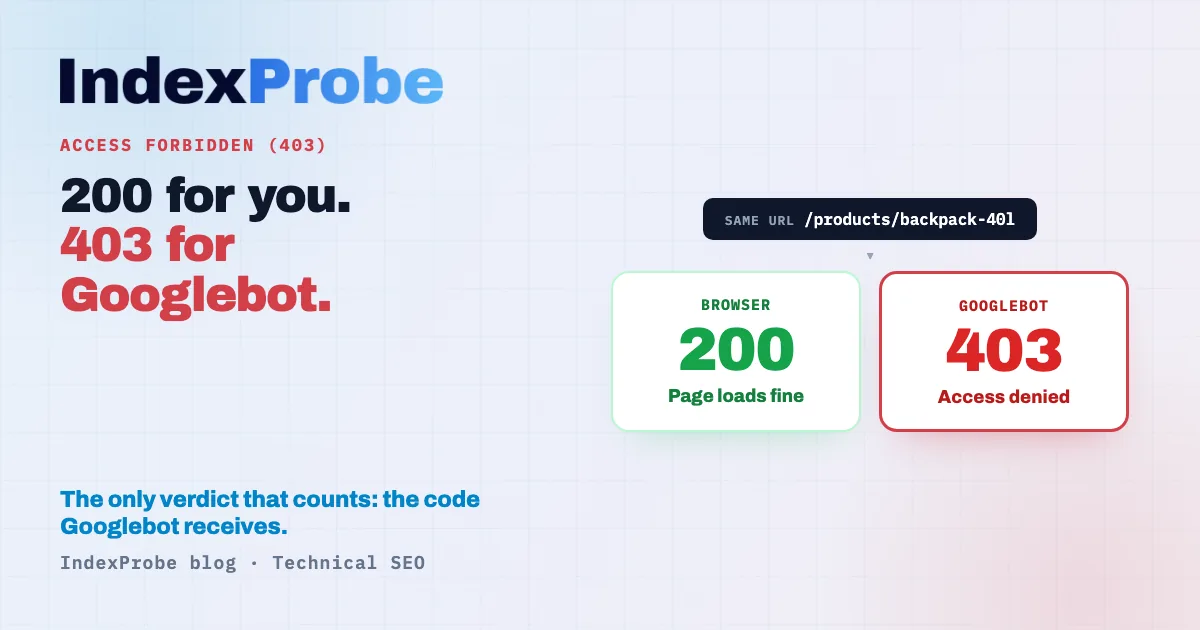
A 403 is unambiguous: access denied, the server shut the door. That's exactly what makes the "Blocked due to access forbidden (403)" status, in Google Search Console's Page Indexing report, so misleading. The natural reflex, opening the URL in a browser, shows a perfectly normal page. It looks like a false alarm.
It isn't. The 403 isn't aimed at the visitor, it's aimed at Googlebot: the server serves the page to a human and refuses it to the crawler. No browser shows that gap.
Which raises the real questions. Is this 403 deliberate or unwanted? What's slamming the door on Googlebot? And how does anyone find out what the crawler actually receives, when the screen displays everything without a hitch? The answer isn't on the screen. It's in the code served to Googlebot.
"Blocked due to access forbidden (403)": what Google means
This status means Googlebot requested the URL and the server replied with an HTTP 403 (access forbidden). Google concludes the content doesn't exist and removes the URL from the index if it had been indexed. It isn't a directive you set, the way robots.txt is: it's the server actively refusing Googlebot.
That's the core difference with a robots.txt block. A robots.txt rule is an instruction you write and Google honors willingly: "don't crawl these URLs." A 403 is a response from the server at the moment Googlebot knocks. Google decides nothing here: it takes the refusal at face value, draws the logical conclusion ("content unreachable, therefore nonexistent"), and deindexes.
Google's documentation adds a nuance that reframes the whole problem. To Google, a 403 served to Googlebot is almost always a misconfiguration. The 403 code is meant to say "you provided credentials, but access is denied." Yet Googlebot never provides credentials. Google's own wording is blunt: "Googlebot never provides credentials, so your server is returning this error incorrectly." In other words, even a 403 you think you "meant" is, from Google's standpoint, the wrong tool for the job. Google treats every 4xx code (except 429) the same way: the content doesn't exist. The rarer 4xx codes (400, 411…) that it files under no specific label land in the Blocked due to other 4xx issue status.
403 intentional or accidental: sort that first
Before any fix, one question settles everything: is this URL meant to appear in Google? If yes, the 403 is an accident to repair urgently. If no, the 403 is doing its job (even if it isn't the cleanest tool for it). The technical diagnosis comes after that intent check, never before.
Case A: the 403 is intentional. The URL is an admin page, a back office, a staging environment, a members-only area. It's been closed off to anything unauthenticated, Googlebot included. Seeing it listed under "Blocked due to access forbidden (403)" matches the intent: this page has no business in Google. There's no fire to put out, at most a cleanup to schedule (more on that below, since a 403 isn't the ideal tool here).
Case B: the 403 is accidental. The URL is a public page, meant to rank and pull in traffic: a product page, an article, a category page. Yet the server hands Googlebot a 403. This is urgent: as long as the refusal holds, the page can't be indexed, and if it already was, it drops out. Traffic is leaking on a page that was supposed to be in Google.
The whole job is separating A from B. An admin page returning a 403 is healthy. A product page returning a 403 is a traffic leak. And Case B is all the more insidious because it's usually invisible from your own machine.
The insidious case: 200 for you, 403 for Googlebot
This is the trickiest version of Case B: the page opens perfectly in a browser (a 200), but Googlebot gets a 403. A web application firewall (WAF), an anti-bot protection mode, or an anti-DDoS service serves the content to a human visitor and refuses what it reads as an unwanted bot. A browser test will never catch it.
The reason is simple: these systems decide to allow or block based on who's knocking. A human on a standard browser, with a residential IP and "normal" behavior, gets through. A request flagged as a bot can be filtered out, and that's the catch, because Googlebot is a bot. Anti-bot systems don't always tell Googlebot apart from a malicious scraper, and lump them together. The browser shows a 200; Googlebot gets a 403.
That's why opening the URL in a browser proves nothing: it tests human access, not Googlebot access. The only verdict that counts is the HTTP code Google's crawler actually receives. This mechanism is a cousin of another trap where a page "opens" without satisfying Google: see Soft 404, where the server returns a 200 on an empty or error page.
💡 Suspect a 403 served to Googlebot but invisible on your end? IndexProbe inspects your URL list through the Search Console API and returns, per page, the HTTP code Google actually received. Try IndexProbe in early access →
What causes it, server-side
When the 403 is accidental (Case B), the cause almost always sits in a security or configuration layer that mistakes Googlebot for a threat. Here are the most common mechanisms, grouped by origin.
- WAF and anti-bot false positives. Cloudflare (Bot Fight Mode, WAF rules), Sucuri, Imperva, AWS WAF and the like block requests judged suspicious. An overly aggressive rule catches Googlebot alongside the scrapers and hands it a 403.
- Rate limiting. The server caps the number of requests per IP over a given window. When Googlebot crawls actively, it can cross the threshold and get a 403. Google explicitly advises against using a 403 to throttle crawling: the code has no effect on crawl rate, unlike 429.
- IP or geo blocking. A rule that bans certain address ranges, or all traffic outside one country, can cut off Googlebot's IPs.
- User-agent filtering. A configuration that blocks requests by their signature can target the
Googlebotagent, by mistake or by overzealous design. - File permissions and
.htaccess. A misset directory permission, or aDeny fromdirective in an.htaccess, returns a 403 across everything it covers. - Shared hosting. On shared hosting, provider-side protections (resource limits, built-in anti-bot rules) can block Googlebot without you having any control over them.
- Anti-crawl plugins and modules. Some security extensions (WordPress in particular) add their own blocking rules, sometimes on by default.
The common thread: a layer of your infrastructure has decided Googlebot isn't allowed in. What's left is finding out which one, and which URLs it hits.
403 vs 401 vs 404 vs 5xx vs robots.txt: the grid
Five ways to "block" a page get confused constantly, even though they send Google completely different signals. The distinction comes down to who returns what, and what Google concludes from it. Here's the read.
| Code / status | Who returns what | What Google concludes | Indexable? | When it's legitimate |
|---|---|---|---|---|
| 403 (access forbidden) | The server refuses Googlebot access | Content unreachable → nonexistent, dropped from the index | No | Never ideal against Googlebot (Google reads it as an error); reserve it for a genuine server-side refusal |
| 401 (authentication required) | The server demands credentials | Protected content → treated as nonexistent, dropped from the index | No | Real content behind authentication (members, intranet) |
| 404 (not found) | The server signals the page doesn't exist | Page nonexistent, dropped from the index | No | Page genuinely removed, with no replacement |
| 5xx (server error) | The server crashes or is unavailable | Temporary problem, Google retries before deindexing | No (while the error lasts) | Never intended: to be fixed (see Server error (5xx)) |
| Blocked by robots.txt | You forbid crawling via a directive | Instruction honored: page not crawled | Possible without a crawl (indexed via external links) | Keep low-value pages from being crawled (admin, filters) |
The decisive difference: a 403 and a 401 are active refusals from the server, which Google treats as a "this page doesn't exist" signal. A robots.txt rule, by contrast, is an instruction Google honors without ever concluding the page is gone. Confusing the two leads to the wrong fix, and for a 5xx, to panicking where Google is still being patient.
Identifying 403s at scale
Search Console's URL Inspection tool gives the HTTP code Googlebot saw, but one URL at a time: you inspect, you read the verdict, you move on. To spot, across hundreds of URLs, which ones return a 403 to Google and which fall into Case B, manual inspection doesn't hold up.
That's the wall IndexProbe breaks: the bulk version of Google's URL Inspection tool. It queries the official Search Console API to inspect, in a single analysis, the list of URLs you give it (CSV import, sitemap, paste) or the one you build from your own Search Console. For each page, it returns the "Google crawl status": the HTTP code Googlebot actually received, 403 included. IndexProbe doesn't crawl your site to discover URLs: it inspects the ones you give it, and only those.
The decisive payoff: cross-referencing the code Googlebot saw against the code your browser sees. A 403 on Googlebot's side for a URL that returns a 200 in your browser is the exact signature of the targeted 403, the one a WAF hands the crawler while serving the page to humans, and that no browser test ever reveals.
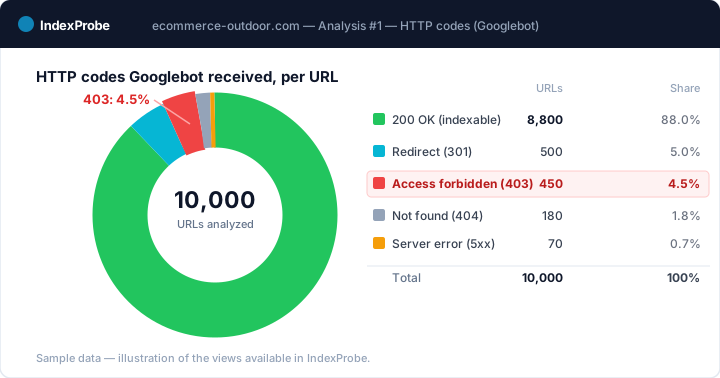
What you get out of the analysis depends on the list you bring in.
- A selection of strategic pages (your key pages, your sitemap of pages meant to be indexed). Any important page that comes back as a 403 is an immediate Case B: a page you wanted in Google, closed off to Googlebot by accident. You spot it without assuming anything about the rest of the site.
- A full export of your URLs (entire sitemap, crawl export). The breakdown by page type shows where the 403s concentrate: a spike on a public segment (your products, your blog) betrays an accidental block, whereas heavy 403s on admin or staging are consistent.
Fixing an accidental 403
For a Case B page, the goal is to reopen access to Googlebot without lowering the site's overall guard. The steps:
- Read your WAF or CDN logs. Cloudflare, Sucuri, Imperva and most firewalls log blocked requests. Look for the refusals served to Googlebot and pinpoint the rule responsible.
- Create a targeted exception for Googlebot. Rather than disabling the whole protection, add a rule that lets Googlebot through. That's the surgical fix: you reopen access to Google's crawler without opening the door to everyone.
- Verify Googlebot's real identity, this is the critical step. Never allow on user-agent alone: anyone can claim to be "Googlebot." Naive filtering by agent name opens a gaping security hole. Google's official method is reverse DNS (the IP's
hostmust resolve togooglebot.com,google.com, orgoogleusercontent.com, and a forward DNS lookup must lead back to the same IP) or matching against the official IP ranges Google publishes in JSON. Many WAFs ship a "verified bots" check already wired to those ranges, prefer it over any homemade allowlist. - Unblock CSS and JavaScript too. A page can return a 200 while its resources (stylesheets, scripts) sit at a 403. Google then renders the page only partially. Make sure the files needed to render the page are reachable by Googlebot too.
- Request reindexing. Once access is restored, use URL Inspection to confirm the move back to a 200, then request indexing to signal to Google that the page is reachable again.
Handling an intentional 403 cleanly
For a Case A page, the "leave it alone" reflex has a limit: a 403 served to Googlebot is still, in Google's eyes, the wrong use of the code. Clean handling means confirming the intent, then cutting the signals that lead Googlebot to the page, and finally picking the right tool for your actual goal.
- Confirm the intent. This page genuinely has no reason to appear in Google (admin, staging, members area). If there's the slightest doubt, treat it as a Case B.
- Remove it from the sitemap. A 403 URL listed in your sitemap sends a contradictory signal: you're asking Google to index a page your server refuses it.
- Cut the internal links. As long as internal links point to the URL, Googlebot keeps requesting it and hitting the 403. Remove those links.
- Pick the right tool for the goal:
- Real authenticated content (intranet, members area) → a 401 is more honest than a 403, but the index outcome is identical: Google treats the page as nonexistent.
- Stop a low-value area from being crawled → robots.txt is the tool built for that. Careful: it stops crawling, not necessarily indexing if the URL is known elsewhere, see Indexed, though blocked by robots.txt.
- Allow crawling but keep it out of the index → the
noindextag. Google has to be able to crawl the page to see the tag: it must be neither at a 403 nor blocked inrobots.txt.
Confirming the fix held
Once the 403 is lifted, confirm Google has taken note. Re-inspect the handled URLs through URL Inspection: the Live Test should show a 200 where there was a 403. Then track the move over time, because reindexing isn't instant. Google has to recrawl the page, see that it's reachable again, and fold it back into the index. That delay usually runs in days.
A single analysis proves nothing: it's the comparison between a before state and an after state that shows the movement. The pages you unblocked should leave the "Blocked due to access forbidden (403)" status, return to a 200, get crawled, then flip to indexed.
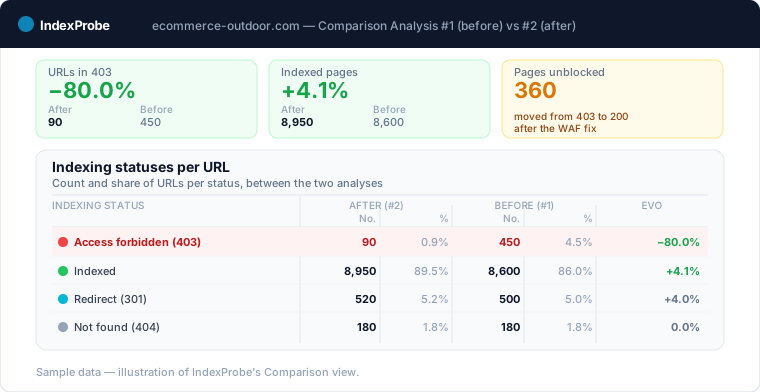
IndexProbe's COMPARISON view is built for this tracking: it sets two analyses side by side and quantifies, per URL, the move from a 403 to indexing. That's the confirmation your WAF exception really did reopen access to Googlebot, and not just to your browser.
A 403 served to Googlebot (firewall, CDN, misconfigured bot protection) can deindex whole sections without affecting visitors: the site works, traffic collapses. The organic traffic drop page shows how to triage that cause in one analysis, before blaming the algorithm.
Frequently asked questions
What does "Blocked due to access forbidden (403)" mean in Search Console? It means Googlebot requested the URL and your server replied with an HTTP 403 (access forbidden). Google concludes the content is unreachable, treats it as nonexistent, and drops the URL from the index if it had been indexed. It isn't a directive you set, it's an active refusal from the server.
Why a 403 for Googlebot when the page opens fine for me? Because a web application firewall (WAF), an anti-bot mode, or an anti-DDoS service serves the page to human visitors while handing a 403 to what it reads as an unwanted bot, Googlebot included. Your browser tests human access; the only verdict that counts is the HTTP code Googlebot actually receives.
How do I fix a 403 blocking Googlebot? Read your WAF or CDN logs to find the offending rule, create a targeted exception that lets Googlebot through, and verify its real identity by reverse DNS or official IP ranges (never on user-agent alone). Unblock CSS and JavaScript too, then request reindexing through URL Inspection.
Does a 403 prevent indexing? Yes. Google doesn't use the content from URLs returning a 403 (like all 4xx codes except 429): it treats the page as nonexistent. A never-indexed page won't be indexed while the 403 holds; an already-indexed page drops out.
What's the difference between 403, 401, and 404? A 403 is an access refusal, a 401 a demand for authentication, a 404 a page not found. From the index's standpoint, Google treats all three as "nonexistent content" and removes the URL. The difference is in the signal sent at the server, not in the indexing outcome.
Can Cloudflare block Googlebot? Yes. Cloudflare's Bot Fight Mode and certain WAF rules can return a 403 to Googlebot if it's classed as an unwanted bot. The fix is to enable Cloudflare's "verified bots" check (which relies on Google's official IP ranges) or to create a targeted exception rule for a duly verified Googlebot.
Stop basing your diagnosis on what your browser shows. IndexProbe plugs into the official Search Console API and inspects your URL list in a single analysis: the HTTP code Googlebot actually received, the indexing status, and the date the crawler last visited, side by side. You spot the 403s served to Google but invisible on your end, you separate the intentional 403 from the accidental block, and you verify from one analysis to the next, with the COMPARISON view, that your pages move from a 403 back to indexed.