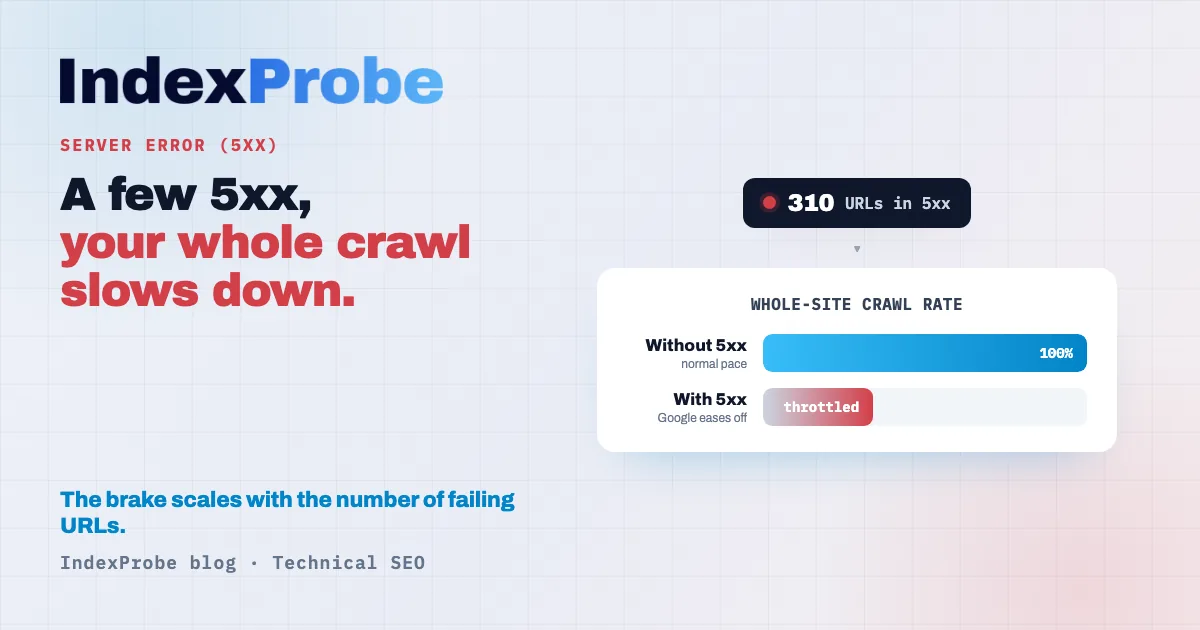
In Google Search Console, "Server error (5xx)" is the only error status whose effect spills beyond the URL it concerns. A 404 stays confined to its own page; a 5xx pushes Google to ease off crawling across the entire site, more sharply as the number of failing URLs climbs.
That throttling mechanism changes how the report should be read. What does a server that couldn't answer really signal, when the code says nothing about the page's content? Why does a handful of 5xx errors not weigh the same as a wave that comes back at every load spike? And how long does Google wait before pulling a URL that has been indexed for ages?
Three questions that mark the line between a one-off hiccup and a brake bolted onto your whole crawl.
Server Error (5xx): What Search Console Is Telling You
The status means that when Googlebot came by, your server returned a 5xx code (anywhere from 500 to 599) instead of serving the page. The code reveals nothing about the content: it only says the server couldn't respond at that moment. Search Console's Page Indexing report bundles these cases under the "Server error (5xx)" label.
That's the nuance that separates a 5xx from a 4xx. A 4xx is a response about the page: a 404 says "this URL doesn't exist," a 403 says "access is forbidden." A 5xx says nothing about the page, because the server never got far enough to process it. It went silent. To Googlebot, that silence is a different signal from an explicit refusal, and it's exactly what triggers the behavior that sets 5xx errors apart on the crawl.
That silence also tells a 5xx apart from a Soft 404, where the server does return a clean 200 "OK" yet serves an empty page or an error message. With a 5xx, the server doesn't lie about the page's state: it admits it can't respond. The Soft 404, by contrast, claims all is well while the page has nothing to offer. Two opposite problems, two different fixes.
The codes behind "5xx": 500, 502, 503, 504
| Code | Name | What it means on the infra side |
|---|---|---|
| 500 | Internal Server Error | Generic application bug: an unhandled exception, a script that crashes, a dependency that's down. |
| 502 | Bad Gateway | A gateway (reverse proxy, CDN, load balancer) received an invalid response from the upstream server. |
| 503 | Service Unavailable | Service temporarily unavailable: overload, restart, or planned maintenance. |
| 504 | Gateway Timeout | A gateway waited too long for an upstream response: the deadline was exceeded. |
Search Console rolls all of these up under a single "5xx" label. To know which precise code occurred, you have to retrieve it elsewhere: in the server logs, or through an inspection that surfaces the response Googlebot actually received.
5xx vs 4xx vs robots.txt: three very different blocks
| 5xx | 4xx | robots.txt (disallow) | |
|---|---|---|---|
| Does the code say anything about the page? | No: the server couldn't respond. | Yes: the page doesn't exist (404) or access is forbidden (403). | No: deliberate exclusion, the page isn't read. |
| Effect on crawl rate? | Slows crawling across the whole site, in proportion to the number of failing URLs. | No effect on the pace (except for 429). | No effect. |
| Deindexing | Reprieve, then dropped if the error persists. | Gradual removal (Google retries before giving up). | The URL can stay indexed without its content being read. |
This grid brings out the trait specific to 5xx errors: it's the only one of the three whose effect doesn't stop at the offending URL. A 4xx and a robots.txt block concern only the targeted page; a 5xx, by contrast, reverberates across the crawl rate of the entire site. On the 4xx side, the unusual codes (400, 411…) that Google ties to no specific label fall under a status of their own, Blocked due to other 4xx issue.
Why a 5xx slows the crawl across your whole site
A 5xx error (and the 429 code) pushes Googlebot to temporarily slow the crawl of your entire site, in proportion to the number of failing URLs. A 4xx, by contrast, has no effect on the crawl pace. Google's reasoning is simple: a server replying with 5xx errors is probably in trouble, and keeping up the same request pace might finish it off.
So Googlebot falls back on a protective reflex. The higher the volume of 5xx errors climbs, the more it dials down its pace to avoid making things worse. Google documents this behavior on its page about HTTP and network errors, which explicitly groups 5xx and 429 among the responses that make the crawler ease off.
The SEO consequence is indirect but real. During that slowdown, your perfectly healthy pages get crawled less often. A content update, a new page, a fix on a product listing: Google sees all of it later. The brake doesn't penalize only the failing URLs, it penalizes the pace at which Google discovers every change you make. That's what makes a 5xx fundamentally different from a Not found (404) error, which stays confined to its own page without touching the rest.
One-off or recurring: calibrating the urgency
Not all 5xx errors are equal. An isolated spike tied to a deployment or a restart is a hiccup: the server stumbled for a fraction of a second, then recovered. A recurring wave, triggered at every load spike, is a structural brake that's now in place. The distinction directly dictates how high to set the fix's priority.
One-off 5xx errors (deployment, restart, network blip)
A one-off 5xx happens at the precise moment Googlebot knocks while the server is unavailable for a fraction of a second. A deployment that restarts the application, a recycled container, a brief network spike: the unavailability window is narrow, and most of your visitors never even notice it.
These errors show up in the report, but they often clear up on their own at Googlebot's next pass. The right reflex isn't to panic at the first 5xx line, but to check whether the pattern repeats from one analysis to the next. A 5xx that appears once then vanishes doesn't carry the same weight as a 5xx that comes back at every reading.
Recurring or load-induced 5xx errors
This is the case that genuinely deserves attention. Here the server saturates, either under the load of real traffic or under the load of the crawl itself when Googlebot explores many URLs in a short span. The errors are then intermittent: they surface at the peaks, then fade as the load drops back.
The trap is how invisible they are. You open the URL in your browser during a quiet moment, it answers a clean 200, and you write it off as a Search Console false positive. In reality, the page was indeed at a 5xx when Googlebot requested it, at the height of a spike. It's also an HTTP error you run into, on a different track, with the Blocked due to access forbidden (403) status: what you see at a given instant doesn't always reflect what Googlebot received on its last pass.
Spotting 5xx pages at scale
Search Console's URL Inspection tool gives the 5xx verdict one page at a time, which makes it impractical the moment you want to gauge the scale of the phenomenon. And 5xx errors are often intermittent: a URL that answers correctly when you test it may well have returned a 5xx on Googlebot's last pass. Hence the value of a verdict dated to Google's visit, rather than a test you run yourself during a quiet stretch.
That's the whole difficulty of diagnosing 5xx errors. A homegrown crawl tells you the server's state right now, under your own load. Google's verdict tells you the server's state at the moment Googlebot knocked, under the load of that moment, which is often the very load that pushes the server into saturation. These two snapshots don't always line up, and it's the second one that determines what Google keeps.
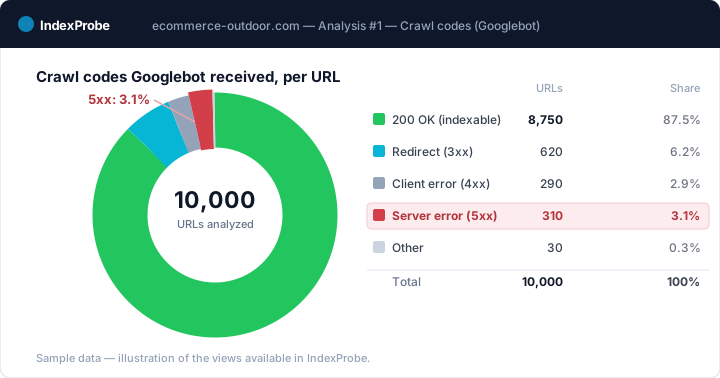
💡 Need to see how many of your URLs return a 5xx, and which ones? IndexProbe inspects your URL list through the Search Console API and surfaces, per page, the code Googlebot actually received, dated to its last pass. Try IndexProbe in early access →
From "code per URL" to error rate: what GSC doesn't show
Search Console gives you the status of a URL, but it doesn't give you, across the list of pages you care about, the exact share that returns a 5xx, nor the precise list of URLs involved. You know there's a problem, without being able to size it. And since the inspector works one URL at a time, rebuilding that rate by hand across thousands of pages is effectively impossible.
That's exactly the step IndexProbe automates. The tool is the bulk version of Search Console's URL Inspection tool: where GSC has you inspect your pages one by one, IndexProbe runs through the URL list you provide, or build from your own GSC, and surfaces for each one the code Googlebot received. You get, in one shot, the share of 5xx among the analyzed pages and the exact list of URLs to handle, where the one-URL-at-a-time inspector would leave you cross-referencing the results by hand.
Fixing a server (5xx) error
Fixing a 5xx means making the server capable of returning a 200 code again. Depending on the cause, that runs through easing the load (cache, CDN, scaling up), fixing the application bug responsible, or optimizing the slow queries that make deadlines expire. For Google, the only end-of-problem signal is the return of a 2xx code on Googlebot's next pass.
Reflexes by code (500, 502, 503, 504)
Each code points to a family of causes, and therefore to a starting point for the diagnosis.
- 500 (Internal Server Error) — Head for the application logs. An unhandled exception, an external dependency that's down, an environment variable missing after a deployment: a 500 is a bug on the code side, and the answer is in the error trace.
- 502 (Bad Gateway) — The problem sits between the gateway and the upstream server. Check that the application service is running, that the reverse proxy or CDN points at the right target, and that the upstream isn't returning a malformed response.
- 503 (Service Unavailable) — Often a sign of saturation or a restart. If it's load, you need to add capacity or caching. If it's maintenance, a 503 is in fact the right answer, provided you pair it correctly (see below).
- 504 (Gateway Timeout) — A request takes too long to complete. Hunt for the slow operations: unoptimized database queries, calls to third-party services with no timeout, heavy computations on the critical path.
Planned maintenance: the right answer is 503 + Retry-After
⚙️ Shutting down cleanly for maintenance
For a one- or two-day outage, the right answer is a 503 code paired with the
Retry-Afterheader, which tells Googlebot when to come back. Google then waits without penalizing the site, understanding that the unavailability is deliberate and temporary.What to avoid at all costs: returning a 200 code with a "Site under maintenance" message. To Google, that's a valid page with empty content, so a Soft 404 in the making.
Mind the duration, finally: beyond a few days, a prolonged 503 eventually drops the pages from the index. The method is documented by Google in its Pause an online business guide.
Confirming the fix worked
Three measurable moves confirm the fix took hold: the number of 5xx pages drops, the 5xx error rate over the tracked scope recedes, and the pages crawled over 30 days head back up, a sign that Google is releasing the brake. The method is to compare two analyses of the same scope, before and after the intervention.
One thing to keep in mind: the crawl picks back up gradually, not instantly. Once the 5xx errors clear, Googlebot doesn't reaccelerate all at once. It retests cautiously, checks that the server holds, then lifts its pace bit by bit. The pages crawled over 30 days therefore climb back across several readings, not overnight.
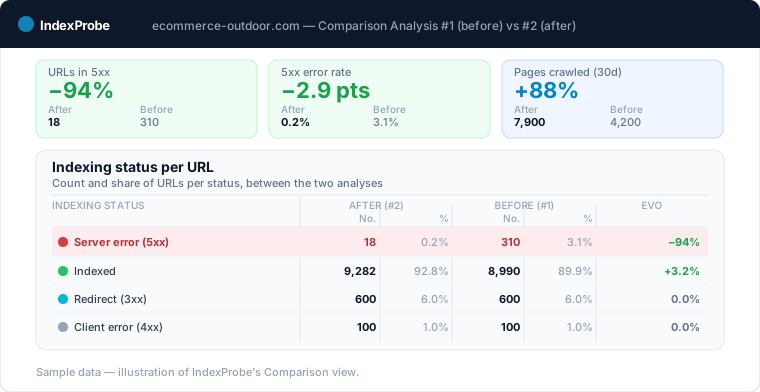
💡 Track the crawl recovery, analysis after analysis. IndexProbe gives you Google's official 5xx verdict, dated to its last pass, across the URL list you provide or build from GSC. By rerunning the same analysis, you compare two readings of the same scope and measure the real drop in errors and the crawl picking back up, without re-running the one-page-at-a-time URL inspector. Try IndexProbe in early access →
A run of 5xx errors right when Googlebot visits is enough to push pages out of the index, with your visitors none the wiser. Index monitoring catches those exits on the next analysis and alerts you before traffic feels it.
Frequently asked questions
Does a 5xx error deindex my page? Not right away. As long as the error stays one-off, Google grants the page a reprieve and keeps treating it as indexed. It's only if the 5xx persists over time that the URL eventually drops out of the index. The return of a 200 code on Googlebot's next pass puts the page back in the running.
What's the difference between a 5xx and a 404 for SEO? A 404 stays confined to its own page and has no effect on the crawl pace of the rest of the site. A 5xx says nothing about the page's content but slows the crawl of the whole site, in proportion to the number of failing URLs. The 404 is a local problem, the 5xx a problem that spills over.
How long does Google wait before pulling a URL with a 5xx?
Google doesn't publish a precise duration. Its documentation talks about "persistent" errors without setting a numeric threshold. The only bounded case is maintenance with a 503 and a Retry-After header: Google then waits a few days, but beyond that, a prolonged 503 also ends up dropping the pages.
Should I return a 503 or a 500 during maintenance?
A 503 paired with the Retry-After header. A 503 signals deliberate, temporary unavailability that Google understands and tolerates. A 500, by contrast, is an unintended bug, and a 200 with a "Site under maintenance" message is a false signal that will be read as an empty page, so a potential Soft 404.
Is a 429 treated like a 5xx? From the crawl's standpoint, yes. A 429 ("Too Many Requests") is the only error in the 4xx family that, like a 5xx, makes Google slow the crawl of the whole site. Google groups it with the server errors precisely because it signals an overload, and so adopts the same protective reflex.