When a WordPress site doesn't show up on Google, the standard playbook kicks in: regenerate the sitemap, install an SEO plugin, request indexing. Sometimes that works. When it doesn't, most people run the same plays again, because they don't know where else to look. That's the trap: piling up actions while Google Search Console has already delivered its verdict. The Page indexing report attaches a precise reason to every URL left out, and on WordPress those reasons almost always trace back to a handful of identifiable settings: a checkbox in Settings > Reading that leaves the whole site "Excluded by 'noindex' tag", a plugin toggle that decides the fate of entire page families, archives generated in bulk that Google crawls and then discards. Which setting produces which status? Which ones are normal, and which ones signal a mistake? And how do you check what Google decided for the whole site, beyond a few URLs inspected by hand?
Why Your WordPress Pages Aren't Showing Up on Google
A WordPress page missing from Google is either unknown to Google or known but excluded from the index. Search Console's Page indexing report tells you which case you're in, along with the exact reason: a noindex tag, a robots.txt block, a page judged to add nothing, a duplicate. That reason is where the diagnosis starts. Tag, author, and date archives are a classic source of duplicate content.
That changes the order of operations. WordPress indexing guides almost all walk through the same checklist: create a Search Console account, submit the sitemap, check robots.txt, install Yoast or Rank Math. Those steps are useful, but they describe a healthy site waiting its turn. They say nothing about the site whose pages Google already knows and keeps rejecting, reason attached. And that reason points straight at the setting to examine: there is no point rebuilding your sitemap when the report says a noindex tag is in the way.
WordPress adds a twist that generic advice ignores: the platform creates pages in bulk that you never wrote. Every tag you add to a post spawns an archive page, every author gets one, every month of publication too, and every media upload can have its own attachment page. Google crawls all of it, returns one verdict per URL, and its own documentation warns against expecting full coverage: "Don't expect every URL on your site to be indexed." The goal is not 100% of pages indexed; it's making sure the line between indexed and not indexed sits exactly where you decided to put it. And if the entire site is missing, the diagnostic goes beyond WordPress: our decision tree for a website not showing up on Google starts by separating never indexed, deindexed and ranking too low.
Crawling vs Indexing: What the Page Indexing Report Shows
Google processes every URL in two steps. Crawling first: Googlebot fetches the page and reads its content. Indexing second: Google decides whether the page deserves an entry in its index. A page can be crawled and never indexed, and each step has its own statuses in the Page indexing report (Indexing > Pages in Search Console).
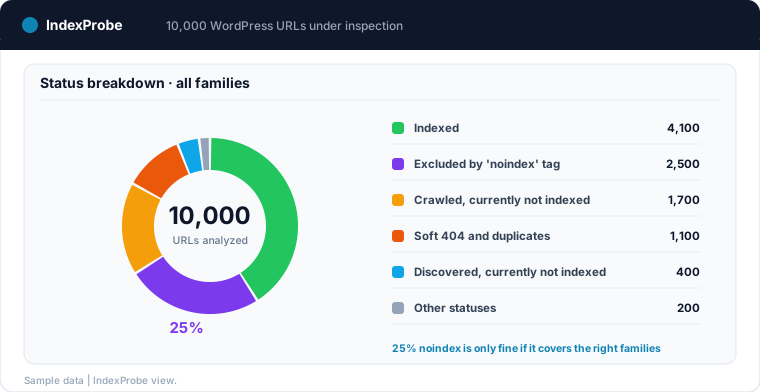
On a WordPress site, a few statuses come up more often than the rest. "Discovered - currently not indexed": Google knows the URL but hasn't crawled it yet. "Crawled - currently not indexed": Google read the page and didn't keep it. "Excluded by 'noindex' tag": the page carries an explicit do-not-index instruction, and Google obeyed it. Add the robots.txt blocks and the duplicate statuses, when several URLs serve the same content, and you have most of the landscape on a typical WordPress site. Other reasons exist; these are the ones that shape the report.
For any single URL, Search Console's URL Inspection tool gives you the full detail: the status, the canonical Google actually selected, and the date of Googlebot's last visit. It's the ground truth for this diagnosis, with one well-known limit: it handles one URL at a time.
Every WordPress Pitfall Has Its Status: The Reading Grid
WordPress settings and automatic behaviors each leave a recognizable footprint in the indexing report. Here are the most frequent matches; any page family can receive other statuses depending on configuration.
| WordPress pitfall | Most frequent status | How to read it |
|---|---|---|
| "Discourage search engines from indexing this site" left checked | "Excluded by 'noindex' tag" site-wide | Almost certainly a mistake |
| SEO plugin noindex on tags or archives | "Excluded by 'noindex' tag" on those families | Fine if intentional |
| Tags and archives left indexable but thin | "Crawled - currently not indexed", duplicates | A call to make |
| Attachment pages | "Soft 404", duplicates | Legacy to redirect |
Archive pagination (/page/2/) |
"Crawled - currently not indexed" | Usually normal |
| New or large site | "Discovered - currently not indexed" | Crawl backlog |
| Security plugin, staging, inherited robots.txt rules | "Blocked by robots.txt" | Worth checking |
The "Discourage search engines from indexing this site" checkbox
It lives in Settings > Reading, under "Search engine visibility". Since WordPress 5.3, checking it inserts a <meta name="robots" content="noindex,nofollow"> tag on every page of the site (earlier versions served a Disallow: / rule through the virtual robots.txt instead). In Search Console, the outcome is unambiguous: pages flip to "Excluded by 'noindex' tag", URL after URL, as Googlebot comes back around.
Every practitioner knows the classic scenario: the box was checked, quite reasonably, during development or a redesign, and the site went live without anyone unchecking it. The site works, direct visitors notice nothing, and the index quietly empties out over weeks. The WordPress documentation is also clear that the box is a request, not a lock ("it is up to search engines to honor your request"): pages stay accessible, they just drop out of results as recrawls discover the tag. That slowness is exactly what makes the problem so hard to spot.
Tags, categories and archives: the pages WordPress creates for you
Publish one post with five tags and you've created five archive pages, some of which will never list more than a single entry. Author and date archives follow the same mechanics. These pages aren't defects; they're navigation features. But every one of them is a URL Google discovers and judges.
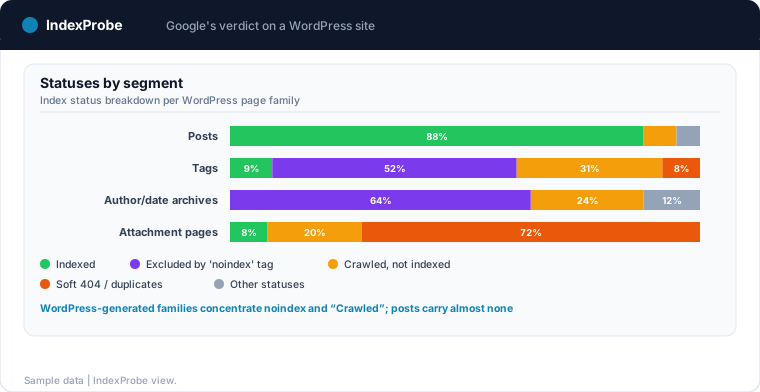
Two outcomes dominate. If your SEO plugin sets them to noindex, they line up under "Excluded by 'noindex' tag": a common and perfectly healthy choice, as long as it's deliberate. If they stay indexable, Google decides for itself: thin archives end up "Crawled - currently not indexed", and the ones that repeat the same excerpts can drift into duplicate statuses such as "Duplicate without user-selected canonical". Audit a blog in bulk and you'll see these generated families concentrate nearly all of both statuses; the posts themselves carry almost none.
It's a call worth making family by family. A well-built category page, with an introduction and a real search demand behind it, belongs in the index. A tag used once brings nothing. The goal isn't to index everything or exclude everything; it's to decide, then verify that the report reflects the decision.
Attachment pages and pagination: the legacy of default settings
Historically, WordPress created a dedicated page for every uploaded media file: the attachment page, a near-empty URL wrapped around an image. Google treats them as what they are: empty shells. The usual verdict: "Soft 404" or a duplicate status. WordPress 6.4 disabled these pages on new installations, and both Yoast and Rank Math can redirect attachment URLs to the file itself. On an older site, though, hundreds of them can still clutter the report.
Archive pagination (/page/2/, /page/3/) follows a different logic: these pages act as intermediate tables of contents, and their most frequent status, "Crawled - currently not indexed", is usually normal. The full grid of pagination verdicts, red flags included, has its own dedicated article.
New or large site: the crawl backlog
"Discovered - currently not indexed" means Google knows the URL but hasn't crawled it yet. On a site launched two weeks ago, that's the norm, not an anomaly: Google's own documentation says "It can take a week or so for Google to start crawling and indexing a new page or site", and filling the index stretches out well beyond that.
The same status means something different on an established, high-volume site. When recent posts pile up in "Discovered" for weeks, Googlebot is probably spending its crawl budget elsewhere, often on the generated families: tags, archives, URL variants created by the theme. The diagnosis then shifts to internal linking and the sheer volume of URLs the site exposes to crawling.
Robots.txt: security plugins, staging and inherited blocks
"Blocked by robots.txt" on pages that should be indexed almost always has a mechanical cause: a security or maintenance plugin that rewrote the file, a staging robots.txt (Disallow: /) copied to production, or a historical rule nobody ever revisited.
The trap is sneakier than it looks, because robots.txt blocks crawling, not indexing. Google's documentation is explicit: for a noindex tag to work, the page must not be blocked by robots.txt ("For the noindex rule to be effective, the page or resource must not be blocked by a robots.txt file"), otherwise Googlebot never sees the instruction and the URL can remain in search results. Blocking a page you wanted deindexed thus produces the opposite effect, up to the paradoxical status "Indexed, though blocked by robots.txt". The legitimate uses of the file are covered in our article on the "Blocked by robots.txt" status.
Yoast and Rank Math: What Their Settings Produce on Google's Side
On most WordPress sites, indexing isn't steered by the CMS core but by the SEO plugin. Yoast and Rank Math work on the same principle: in their search appearance settings, every content type and every taxonomy has a toggle along the lines of "Show tags in search results?". Answer no and a noindex tag lands on the whole family, whose pages will file into "Excluded by 'noindex' tag" in the report.
That architecture is both the strength and the risk of these plugins. One toggle governs hundreds of URLs: noindexing a blog's tags in a single action is a real convenience. But the same toggle, flipped on the wrong family, pulls traffic-earning pages out of the index. The classic circumstances: a settings import, a theme or SEO plugin migration, a redesign where options were reproduced from memory. The difference between an intended noindex and an accidental one is invisible in the plugin's interface; it shows in the report, when an entire family changes status.
Three nuances that plugin tutorials skip. First, the plugin writes the tag, but it doesn't deliver the verdict: Search Console remains the only place that tells you what Google did with the instruction. Second, the tag actually served can differ from the one the plugin thinks it set: a theme or another extension inserting its own robots meta can conflict with the SEO plugin's. The rendered HTML and the indexing report are authoritative, not the settings screen. Third, the sitemaps these plugins generate normally exclude noindexed families: a sitemap listing noindexed URLs sends Google contradictory signals, and that kind of inconsistency is precisely what you catch by crossing the sitemap list with the statuses.
💡 A plugin toggle applies to entire families of URLs, but the verdict lands one URL at a time. Nobody checks 2,000 tag pages by hand in the inspector. Discover IndexProbe in early access →
Finding the Affected Pages Across All Your WordPress URLs
URL Inspection gives you the exact verdict for one page; the Page indexing report gives you volumes per reason. Between the two, the essential view for a WordPress site is missing: the view by family. The report can't be filtered by your URL patterns, so there is no way to isolate "all my /tag/ pages" or "all my author archives" and see how their statuses break down.
The method that works is to bulk-inspect a list of URLs you control. That list already exists: it's the sitemap your SEO plugin generates, an export of your content, or a selection built from Search Console with a URL pattern (a regex on /tag/, /author/, /page/). That's exactly what IndexProbe does: you hand it that list, or build it from your GSC, and it queries the official inspection API for every URL. You get the indexing status, the canonical Google selected and the last crawl date, for each page, in a filterable table.
With segmentation by family (AI-generated or defined by hand: posts, pages, categories, tags, archives, attachments), the reading becomes immediate. A healthy WordPress site shows a characteristic profile: an indexed block carried by posts and pages, and a "Excluded by 'noindex' tag" plus "Crawled - currently not indexed" block carried by the generated families. That balance is nothing to worry about. What should alert you is the line moving: strategic categories showing up in the noindex block, posts drifting toward "Crawled - currently not indexed", an entire site collapsing into a single status.
Fixing by Status
Once the breakdown is known, each verdict calls for its own fix, and some situations call for none.
The whole site in "Excluded by 'noindex' tag": uncheck the box in Settings > Reading, then speed up the return of your key pages by requesting indexing, as detailed in our guide to submitting your website to Google. The rest of the site will come back at recrawl pace, frequently crawled pages first.
A useful family in "Excluded by 'noindex' tag": flip the corresponding toggle back in Yoast or Rank Math, then check the tag actually rendered in the HTML, caches purged. If the family was also missing from the sitemap, putting it back gives Google one more reason to revisit.
Archives in "Crawled - currently not indexed": decide before you fix. A category targeting a real query deserves investment (an introduction, internal links from posts); a tag with no search demand is better off with a deliberate noindex. This status on pages with no ambition isn't a problem to solve; it's normal operation.
Attachment pages in "Soft 404" or duplicates: enable the attachment URL redirect in your SEO plugin. The statuses will fade as Google registers the redirects.
Recent posts in "Discovered - currently not indexed": on a young site, give it time. On an established one, cut what wastes the crawl (pointless generated families, URL variants) and strengthen internal links to the content stuck in line.
Useful pages in "Blocked by robots.txt": remove the offending rule, keeping the order of operations in mind. If the end goal is deindexing, the noindex has to be readable, so the robots.txt block must be lifted first.
Verifying That the Fix Worked
A corrected setting changes nothing in Search Console until Googlebot revisits the affected pages. That delay runs to days for active pages and weeks for rarely crawled archives. Verification therefore happens in two stages: check the rendered HTML tag immediately, then confirm later that Google's verdict has flipped.
For the second stage, the method is the same as for the diagnosis: rerun the analysis on the same URL list and compare. After fixing an accidental noindex, the affected family should drain out of "Excluded by 'noindex' tag" and into the index over the following weeks; after redirecting attachment pages, the "Soft 404" entries should fade. IndexProbe's Comparison view puts the two analyses side by side, status by status, and scheduled reruns with an email digest turn that check into monitoring: a toggle flipped back by a plugin update shows up as a changed verdict, before the traffic drop.
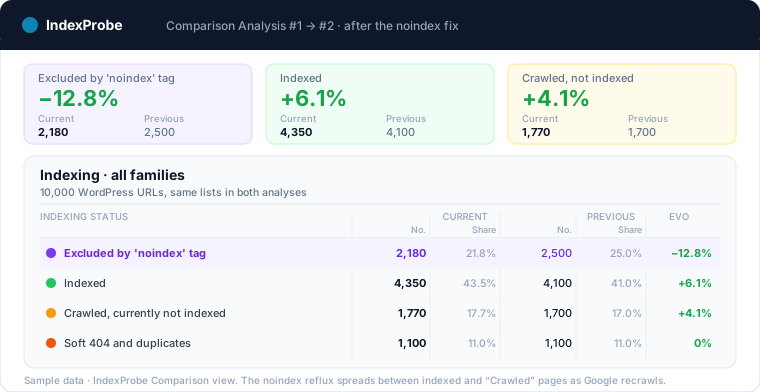
The complete loop: read Google's current verdict on every WordPress page family, fix the setting that verdict points at, then verify it changed. Try IndexProbe in early access and read those verdicts across all your WordPress URLs, in a single analysis.
Two situations deserve one more word: the SEO plugin that sets a site-wide noindex during an update — the classic WordPress regression, detailed on the organic traffic drop page — and WordPress portfolios managed by agencies, covered on the IndexProbe for agencies page: one project per client, alerts included.
Frequently Asked Questions
How long does it take Google to index a WordPress site?
Google's documentation mentions a week or so before crawling starts on a new site, and indexing then stretches over weeks. No setting guarantees a timeline: submitting a sitemap and requesting indexing for key pages speeds up discovery, not the decision.
Should WordPress tags and categories be indexed?
Decide family by family, based on search demand. A well-built category targeting a real query belongs in the index; a tag added in passing usually contributes nothing and can be noindexed without regret. What matters is that the indexing report reflects your decision rather than a default setting.
Does the "Discourage search engines from indexing this site" checkbox block the whole site immediately?
No. It's a request, not a lock: the site stays accessible, and already-indexed pages drop out of results gradually, as Googlebot's visits discover the noindex tag. That slowness is exactly why a forgotten checkbox is so hard to catch without reading the statuses.
Is an SEO plugin enough to get my WordPress site indexed?
No. Yoast, Rank Math and their peers make Google's work easier (sitemaps, clean tags, canonicals) and give you family-level control over noindex. But the indexing decision remains Google's, and a misconfigured plugin can just as easily pull useful pages out of the index. The Page indexing report is still the only place where the outcome can be read.
Why are my WordPress pages stuck in "Crawled - currently not indexed"?
Google read them and found nothing worth an index entry of its own. On archives, tags and pagination, that's expected behavior. On posts or crafted pages, the status invites a look at quality, internal redundancy and linking. Priorities become clear once you see which families concentrate the status.
How do I check what Google has actually indexed on my WordPress site?
For one URL: Search Console's URL Inspection tool, which returns the official status, the selected canonical and the last crawl. For the whole site: bulk-inspect your URL list (sitemap, export, or a pattern-based selection from GSC) and read the status breakdown by family. That overview is what exposes the settings whose real effect no longer matches the intent.