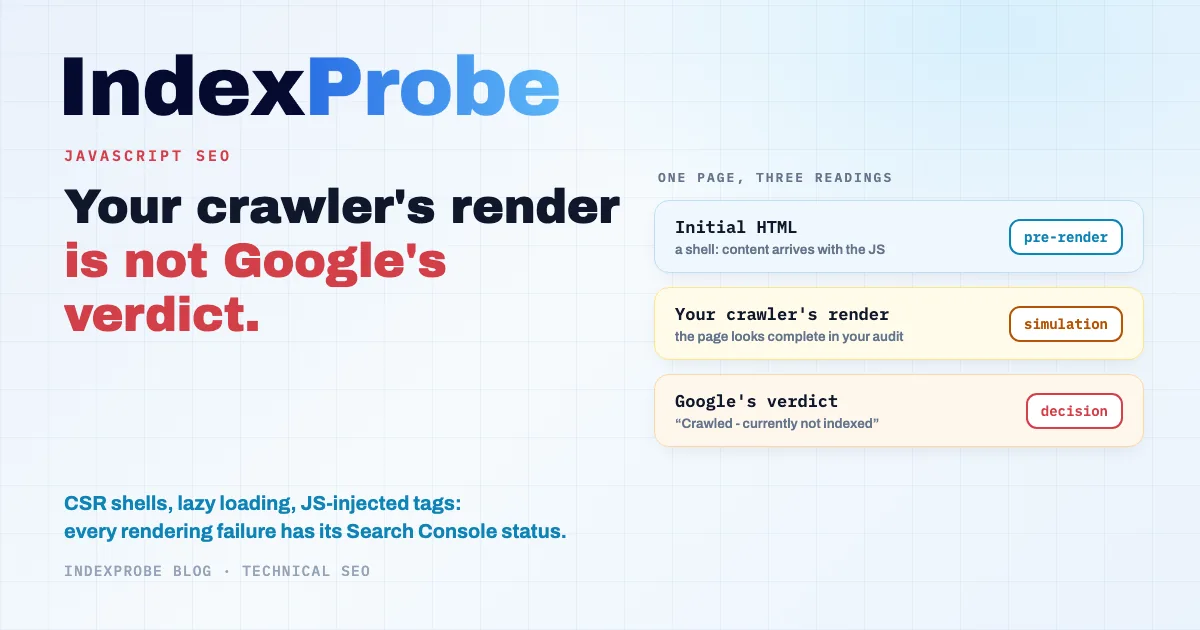
JavaScript SEO still carries a stubborn piece of received wisdom: Google supposedly processes pages in "two waves of indexing", with days or weeks between reading the HTML and executing the JavaScript. That model, presented by Google in 2018, no longer appears in its documentation. Rendering now works as an asynchronous queue, and the documentation says a page usually waits there a few seconds, sometimes longer. The useful question is therefore no longer when Google will execute your JavaScript, but what it actually kept once rendering was done. That information exists: Search Console's URL Inspection tool and its Page indexing report record, for every URL, the verdict issued after the JavaScript ran. Two questions organize the diagnostic: which statuses point to failed rendering, and how to check what Google indexed without trusting your own crawler's render.
How Google Processes JavaScript Today
Google processes JavaScript pages in three phases: crawling, rendering, and indexing ("Google processes JavaScript web apps in three main phases: Crawling, Rendering, Indexing"). Googlebot first reads the HTML your server returns, then places the page in a rendering queue; a headless Chromium executes the JavaScript ("Once Google's resources allow, a headless Chromium renders the page and executes the JavaScript"), and indexing operates on the result of that render.
Two points from the current documentation correct widespread beliefs. First, the wait in the render queue is usually measured in seconds: "The page may stay on this queue for a few seconds, but it can take longer than that". The multi-day delays between a "first wave" and a "second wave" belong to a model Google no longer uses in its documentation, and the often-cited "5-second execution limit" doesn't appear there either. Second, rendering is still not guaranteed: it depends on Google's resources, and some instructions short-circuit it. The documentation states, for example, that when Google encounters a noindex tag it may skip rendering entirely ("When Google encounters the noindex tag, it may skip rendering and JavaScript execution"): a script that removes a noindex set in the initial HTML will probably never run.
Google's renderer also plays by its own rules, different from a browser's. It declines permission requests ("Expect Googlebot to decline user permission requests"), doesn't open WebSocket or WebRTC connections, and keeps no state between page loads: "Local Storage and Session Storage data are cleared across page loads. HTTP Cookies are cleared across page loads". Content that depends on a cookie, a session or a user interaction is therefore very likely to never appear in the rendered version.
Your Crawler's Render Is Not Google's Verdict
To check a JavaScript page, the common reflex is to run a crawler in rendering mode (Screaming Frog, Sitebulb, or a SEO suite's audit) and compare the initial HTML with the rendered DOM. That comparison is useful, but it has a structural limit: it shows what your tool rendered, with its engine, its delays and its settings. It doesn't tell you what Google rendered, and above all it doesn't tell you what Google decided to index.
The two results can diverge for ordinary reasons: a script blocked for Googlebot but reachable by your crawler, a network call that times out on Google's side, a resource cached in an old version, content conditioned on state Google's renderer wipes (cookies, localStorage), or simply a partial execution. A page can look complete in your audit and be indexed incomplete by Google, with no error showing anywhere.
The source that settles it exists: the official verdict. Search Console's URL Inspection shows the HTML rendered by Google itself, the resources it loaded, and the JavaScript exceptions it hit. And the Page indexing report records the final decision, URL by URL. In other words, to know whether your JavaScript is hurting your SEO, polishing your own render isn't enough: you have to read what Google concluded from its own.
The Grid: Rendering Symptom, Status, Cause, Fix
Every rendering failure leaves a recognizable footprint in the indexing report. The table summarizes the most frequent matches on JavaScript-heavy sites; other statuses remain possible depending on configuration.
| Symptom | Most frequent status | Likely cause |
|---|---|---|
| The initial HTML is a shell, content comes from JS | "Crawled - currently not indexed", or page indexed empty | Incomplete render, or judged low-value |
| Client-side routing, URLs that render an empty state | "Soft 404" | No real error code, "not found" page served as 200 |
| Large site, heavy JS, recent pages waiting | "Discovered - currently not indexed" | Render queue and crawl budget |
| Tags injected or changed via JS (canonical, title, robots) | Duplicate/canonical statuses | Conflicting directives between initial HTML and render |
| Injected content, lazy loading, broken hydration | Case by case: crawled without the content, duplicates | The content doesn't exist in the rendered version |
The CSR Shell: Rendered, Read, Set Aside
On a client-side rendered page, the initial HTML contains almost nothing; everything arrives with the JavaScript. When rendering succeeds and the content convinces, the page indexes normally. When rendering fails or the result looks thin, two verdicts come up most often: "Crawled - currently not indexed", when Google read the rendered page and didn't keep it, and the more misleading case of the page indexed without content, when Google indexes the empty rendered shell: the page is in the index, but surfaces for no useful query. That second case is the most emblematic of JavaScript, because nothing looks wrong until you compare what got indexed with what was supposed to.
Client-Side Routing and Empty States: "Soft 404"
In an application with JavaScript routing, a non-existent URL doesn't return a 404: the server answers 200 and the JavaScript displays "no results". Google recognizes that pattern and files these pages under "Soft 404". Its documentation devotes a whole section to avoiding it with client-side rendering, by returning a real error code server-side or by signaling the error state in the rendered page. Sold-out product pages, empty search results and misconfigured fallback routes can feed this status at scale.
Heavy JavaScript on Large Sites: The Wait That Stretches
Rendering consumes resources, on Google's side as on yours. On a large site where every page requires a full JavaScript execution, crawling and rendering slow down, and recent pages pile up in "Discovered - currently not indexed": Google knows the URL and hasn't gotten to it yet. This mechanism connects to crawl budget: the less each page costs to process, the more pages Google processes. Serving the essential content in the initial HTML remains the documentation's recommendation, which notes that server-side or pre-rendering "makes your website faster for users and crawlers".
Tags Injected via JavaScript: Diverging Directives
A title, a canonical or a robots tag that only exists in the rendered version creates an ambiguous situation: the initial HTML says one thing, the rendered DOM says another. Depending on the timing and the directive, Google may keep either version, and when directives conflict, it applies the most restrictive one. The resulting verdicts are the duplicate statuses: "Duplicate without user-selected canonical" when the injected canonical wasn't taken into account, or "Duplicate, Google chose different canonical than user" when it ruled against your declaration. The safest rule is to keep indexing directives (canonical, robots, title) in the initial HTML rather than in JavaScript.
The Pitfalls Beyond SPAs: Injected Content, Lazy Loading, Hydration
This subject isn't limited to single-page applications. A classic site can inject entire blocks via JavaScript: customer reviews, product specs, FAQs, recommended content. If the script fails on Google's side, the page gets indexed without those blocks, and nothing flags it. Misconfigured lazy loading produces the same effect: content loaded only on scroll doesn't exist for a renderer that doesn't scroll like a user, and the documentation points to its dedicated guidelines for loading it detectably. Infinite scroll lists get the same treatment, covered in our article on pagination. Finally, on hybrid frameworks, broken hydration can replace a correct server-rendered HTML with a degraded client state. In all these cases the mechanism is identical: the rendered version doesn't contain what you think you published, and only Google's verdict shows it.
The SPA Case
A single-page application (React, Vue, Angular) concentrates these pitfalls in their most acute form: all content depends on rendering, routing is fully client-side, and failure produces no visible error. That case has its own article, with the four statuses that betray a poorly indexed SPA and the triage to run before moving everything to SSR: SPA & React SEO.
Diagnosing at Scale: Google's Verdicts on Your JavaScript-Heavy URLs
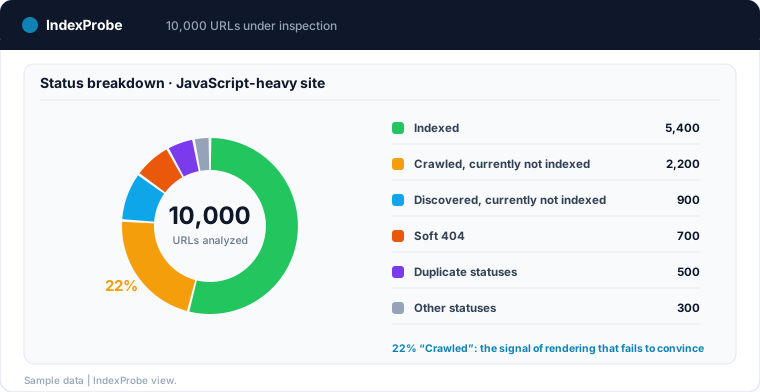
URL Inspection shows Google's render for one page. It's the tool of proof, not of the overall diagnostic: on a site where thousands of pages depend on JavaScript, the question isn't "is this URL rendered correctly?" but "what share of my JavaScript-heavy pages is actually indexed, and with which exclusion reasons?".
The method is to bulk-inspect a list of URLs you control: your sitemap, an export, or a selection built from Search Console with a URL pattern. That's exactly what IndexProbe does: it doesn't render your JavaScript locally, it queries the official inspection API and reads the verdict Google issued after its own render, URL by URL. Against JavaScript, that difference with a crawler is decisive: the result isn't one more simulation, it's Google's decision itself.
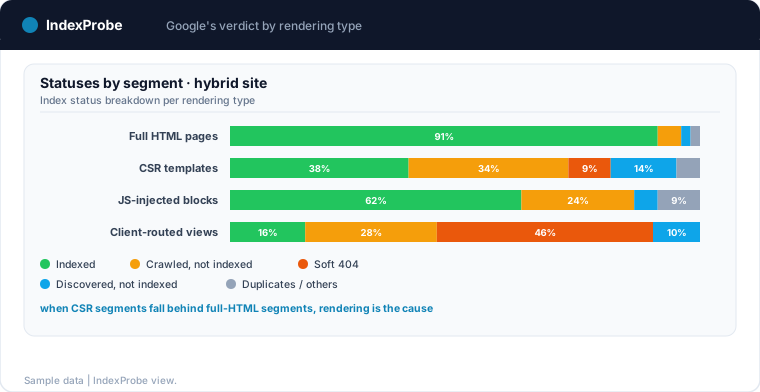
With segmentation by rendering type (AI-generated or defined by hand: pages served as full HTML, client-side rendered templates, JS-injected blocks, client-routed views), the reading becomes direct: do the JavaScript-heavy segments concentrate the rendering-failure statuses, or do they behave like the HTML-served pages? A clear gap between the two families points at rendering as the cause, before you open a single page.
💡 Your crawler can render 10,000 pages perfectly; that doesn't say how many Google indexed after its own render. Discover IndexProbe in early access →
Verifying After the Fix: Rendering Is Asynchronous
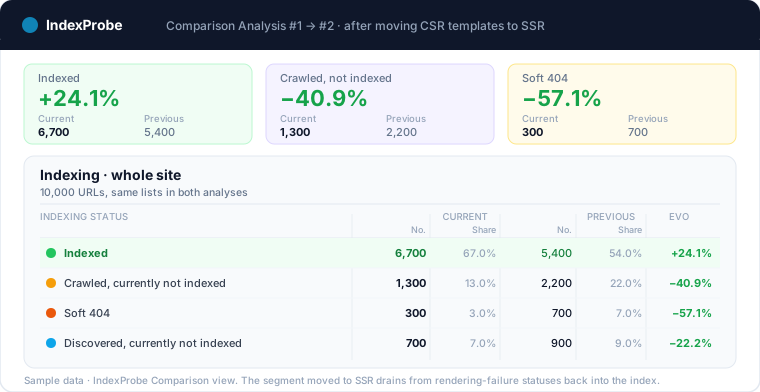
Fixing a rendering problem (moving a template to SSR, serving the essential content in the initial HTML, repairing lazy loading) doesn't change the indexing report immediately. Google has to revisit each URL, re-render it and re-decide, and that cycle depends on its render queue and on each page's crawl frequency. Verification therefore requires a dated follow-up: rerun the same analysis on the same URL list a few weeks after the deployment, and compare.
After a move to SSR, the corrected segment's pages should drain from "Crawled - currently not indexed" back into the index; routing "Soft 404" entries should fade as real error codes get seen; duplicates tied to injected tags should resolve. IndexProbe's Comparison view puts the two analyses side by side, status by status, and scheduled reruns turn that check into monitoring: a rendering regression introduced by a framework update shows up as a changed verdict, before the traffic drop.
The complete loop: understand what Google does with your JavaScript, read the verdicts it issued after its render, fix what they point at, then confirm the shift over time. Try IndexProbe in early access and read those verdicts across all your JavaScript-heavy URLs, in a single analysis.
Frequently Asked Questions
Does Google index JavaScript content?
Yes. Google executes JavaScript with a headless Chromium and indexes the result of the render. The point of attention isn't Google's ability to render, but the outcome of the render for each page: a blocked script, a timed-out call or content that depends on an interaction can produce an incomplete rendered version, and that's the version that gets indexed.
Is client-side rendering bad for SEO?
Not in itself: a correctly rendered CSR page gets indexed. CSR does add a fallible step between publishing and indexing, and its failures are silent. Google's documentation recommends server-side rendering or pre-rendering, faster for users and crawlers alike; the choice is made template by template, based on what the indexing verdicts show.
How do I know what Google actually rendered on my page?
With Search Console's URL Inspection tool: it displays the HTML rendered by Google, the resources loaded and the JavaScript exceptions encountered. It's the only source that shows Google's render rather than a simulation. For a whole site, the reading happens through the Page indexing report's statuses, in bulk.
Do the "two waves of indexing" still exist?
That model no longer appears in Google's documentation. Rendering works as an asynchronous queue, where a page usually waits a few seconds, sometimes longer. Systematic long delays between reading the HTML and executing the JavaScript describe the state of 2018, not how it works today.
Is SSR mandatory for good rankings?
No. Client-side rendered pages get indexed correctly every day. SSR or pre-rendering become relevant when the verdicts show a problem: CSR segments concentrating "Crawled - currently not indexed", pages indexed empty, a queue that stretches on a large site. The decision follows those observations, not a principle.
How long does Google take to render a JavaScript page?
The documentation mentions a render-queue wait of a few seconds, sometimes longer, with no guaranteed timeline. In practice, the total delay depends mostly on the page's crawl frequency and on the resources the site consumes: on a large site with expensive JavaScript, the wait shows up as an accumulation of "Discovered - currently not indexed" pages.