Every SEO knows the Search Console interface: you type a URL into the inspection bar, or you export a performance report, one property at a time. The Search Console API promises to lift that ceiling, the same official data, for thousands of URLs, across every site you manage, on your own schedule.
The hard part isn't getting the data. It's what Google hands you per day, and how that limit behaves the moment you go past a single property. How many URLs can you actually inspect before Google throttles you? Is the quota counted per account, or per site? And why does a script that works for one property fall apart across twenty? That is where the API stops being a simple pipe and turns into an engineering problem.
What the Search Console API Actually Gives You
The Search Console API is the programmatic door to the same official data the Google Search Console interface shows: your search performance and Google's indexing verdicts, returned as structured data instead of screens. It lets you pull that data in volume, across every property you have verified, on a schedule you control, without ever scraping a search result. It is free to use, capped by quota rather than billed.
That last point is the whole reason it matters for SEO work. The interface answers one question at a time: one URL in the inspection bar, one report open for one property. The API answers the same questions for a list, a site, or a portfolio of clients. Everything below is about what you can ask it, what it costs you in quota, and where handling that quota yourself becomes the real job.
The Two APIs SEOs Actually Use: Search Analytics vs URL Inspection
Two methods carry almost all the day-to-day value, and they answer opposite questions. The Search Analytics API returns your performance data: clicks, impressions, click-through rate and average position. The URL Inspection API returns Google's indexing verdict for a given URL: its coverage state, the canonical Google selected, the last crawl date. Performance on one side, indexing on the other.
Confusing the two, or covering only one, is the most common gap in the guides that rank for this topic.
The Search Analytics API returns your performance data: clicks, impressions, click-through rate and average position, broken down by query, page, country, device and date. It reaches well past the interface's export limits, which is what makes it the backbone of most SEO reporting and analysis pipelines. It answers questions about how you already perform in search.
The URL Inspection API answers a different question entirely: how Google indexes a given URL right now. For any URL of a property you own, it returns the verdict ("URL is on Google" or not), the coverage state in Google's own words ("Crawled - currently not indexed", "Discovered - currently not indexed", "Excluded by 'noindex' tag", and the rest), the canonical you declared alongside the one Google selected, the last crawl date and user agent, the robots.txt and fetch states, whether a noindex was found in a meta tag or an HTTP header, and the sitemaps and referring pages Google associates with the URL. It is the machine-readable version of the inspection tool, and we cover that tool field by field in our complete guide to the URL Inspection Tool.
Two more methods round out the family: the Sitemaps API (submit, delete and read the status of your sitemaps) and the Sites API (add, remove and list your properties). They matter for automation, but the two above are where SEO decisions get made. The simplest way to keep them straight: Search Analytics is about performance, URL Inspection is about indexing, and only the second one carries the coverage states from our full directory of Search Console indexing statuses.
What the Quota Tables Leave Out
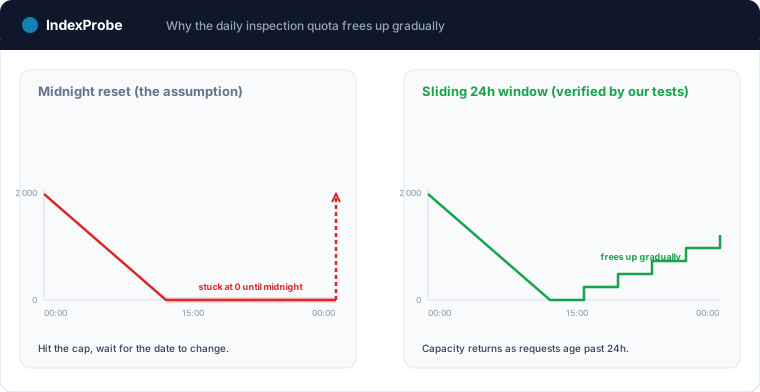
Google documents 2,000 URL inspections per day per property, and 600 per minute. What the documentation does not spell out is how that allowance behaves in practice: it is a rolling 24-hour window rather than a midnight counter, it is shared by every account inspecting the property, and prefix properties each carry their own.
The figures themselves are well documented, by Google and by the more thorough third-party guides. What none of them settles is the behaviour behind the figures, and getting that wrong is how you waste a day of quota. Four properties of that quota, which we have verified through our own testing, decide how much you can really do.
First, the daily quota is a sliding 24-hour window, not a midnight reset. Capacity does not appear all at once when the date changes; it frees up progressively as individual requests age past the 24-hour mark. A run that stalls at the limit at 3 p.m. does not wait for midnight to resume, it resumes gradually as the morning's requests expire.
Second, the quota is attached to the property and shared by every account that inspects it. It is not a per-user allowance. Two people, or two tools, inspecting the same property draw from the same 2,000, and connecting more Google accounts to that property multiplies nothing. Two separate analyses running against the same site quietly starve each other.
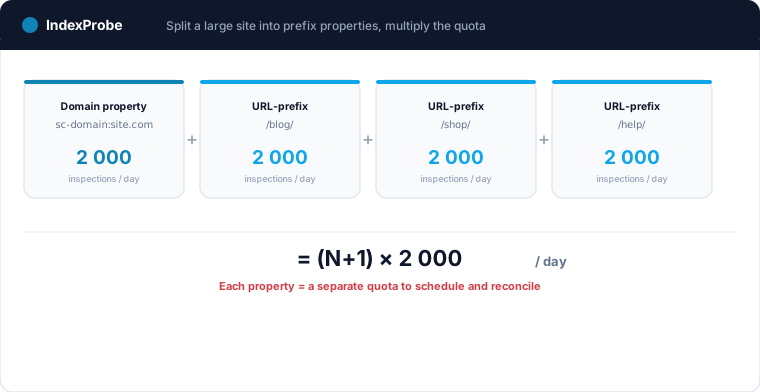
Third, a domain property and the URL-prefix properties of the same site carry independent quotas. A verified prefix property gets its own 2,000 daily inspections, so splitting a large site across a domain property plus N prefix properties turns the ceiling into roughly (N+1) × 2,000 per day. This lever is known to advanced users, but it is rarely spelled out as arithmetic, and it comes with its own management cost, which the next sections get to.
Fourth, the Search Analytics API runs on a separate quota from URL Inspection: Google documents it at 1,200 queries per minute per site, on its own meter. Pulling performance data does not eat into your inspection budget, and the reverse holds too. They are two taps on two meters.
One honest caveat runs through all of this: none of it makes the ceiling disappear. You can spend the quota more cleverly, spread it across properties, and avoid wasting it on pages you have already confirmed, but the gains are proportional to how much of your list is already settled. There is no unlimited, and no instant.
💡 On a single site of a few thousand URLs, the daily quota already spreads a full inspection over days. Across a portfolio of client sites, it becomes a scheduling problem. See how our bulk Google index checker handles it →
What You Can Build With It (Without Writing a Scraper)
Four jobs the interface cannot do at scale: auditing indexing across your whole URL list, tracking crawl freshness through last crawl dates, detecting regressions by re-inspecting the same list on a schedule, and reconciling performance with indexing to separate "not ranking" from "not indexed". None of them involves scraping Google.
You can run a bulk indexing audit: push your whole URL list through the inspection method and read the distribution of coverage states, instead of checking pages one by one. You can track crawl freshness by watching the last crawl date across the site, which tells you where Googlebot has gone stale and why a fix might still be invisible. You can do regression detection: re-inspect the same list on a schedule and catch the pages that dropped out of the index between runs, which is often the earliest signal that something broke. And you can reconcile performance with indexing, joining Search Analytics data to inspection results to separate "not ranking" from "not indexed", the distinction at the heart of our guide on why a site doesn't show up on Google.
For a small site inspected once, a short script does all of this. The catch is that indexing is not a one-time question, and few sites are small.
When Doing It by Hand Stops Scaling
A script that inspects one property once is straightforward. It stops scaling on two fronts: when a full pass takes days, because it then has to persist state, resume inside the rolling window and skip already-confirmed URLs, and when several client properties each bring their own quota, authorization, schedule and history to orchestrate.
The developer tutorials that rank for this topic solve the first case well. The trouble starts the moment the work looks like real SEO work.
On a large site of tens of thousands of URLs, 2,000 inspections a day means a single full pass takes days. Now the script has to persist its state between runs, resume inside the sliding window as capacity frees up rather than firing blindly and burning quota on rejections, and, to be worth running at all, skip the URLs it has already confirmed indexed so the budget goes to pages that still teach you something. That filtering step alone means keeping a record of what every URL returned last time.
It gets harder for an agency. Managing several client sites, large or not, means several properties, each with its own quota, its own OAuth authorization, its own schedule. Squeezing more capacity out of a big client by splitting it into prefix properties, as the quota section showed, multiplies the quota and the number of separate budgets you now have to orchestrate. Keeping a per-client history so you can show what changed month to month means a database, not a spreadsheet. What began as a fifty-line script is now a small piece of infrastructure: a scheduler that respects a sliding window, a store of past results, a deduplication rule, and a multi-property, multi-client model on top.
This is the point of the whole article, and it is where a tool earns its place. IndexProbe is that orchestration built once, on the official API: you bring your URL list, it runs the inspections at quota pace across the sliding window, carries over the pages already proven indexed instead of re-inspecting them, and keeps every result so you can filter, segment, compare runs and export, across multiple properties and multiple clients in one place. It does not lift Google's ceiling, nothing can, but it spends the 2,000-per-day budget only where it yields new information, and it hides the scheduling, the deduplication and the multi-property bookkeeping that a hand-rolled script leaves on your desk.
Try IndexProbe in early access to turn the Search Console API into an indexing audit across all your URLs, and all your sites, at once.
A detail that changes everything for service providers: the 2,000 inspections/day quota applies per property — hence per client. The IndexProbe for agencies page shows how a whole portfolio benefits, project by project. And to compare the tools built on this same API, see our line-by-line review of Indexing Insight.
Frequently Asked Questions
How many URLs can I inspect per day with the API?
The URL Inspection API is documented at 2,000 queries per day per property and 600 per minute. In practice the daily allowance behaves as a sliding 24-hour window rather than a midnight reset, so capacity frees up progressively rather than all at once.
Is the quota per Google account or per site?
Per property, and shared by every account that inspects it. Connecting more Google accounts to the same property does not add quota. What does add quota is verifying URL-prefix properties of the same site, since each verified property carries its own independent 2,000 per day.
Are Search Analytics and URL Inspection the same API?
They are two methods of the same Search Console API, with separate quotas and opposite purposes. Search Analytics returns your performance data (clicks, impressions, position); URL Inspection returns Google's indexing verdict and coverage state for a given URL. Most SEO work uses both, for different questions.
Do I need to know how to code to use it?
To call the API directly, yes: it is a developer interface, reached with a language like Python or Node and an authorized Google account. If you want the same official data without writing and maintaining a script, a tool built on the API gives you the results, the history and the multi-property handling without the code.
Why not just run a local script?
For one property inspected once, a script is fine. It stops scaling when a full pass takes days (persisting state, resuming inside the sliding window, skipping already-indexed URLs) or when you manage several properties or clients at once, each with its own quota and history. At that point you are maintaining infrastructure, not a script.
Does the API let me check sites I don't own?
No. Like the interface, every method requires a verified property. The API industrializes the work on sites you control; it does not open access to anyone else's Search Console data.