Catalog under control · Official GSC API
E-commerce indexing: your catalog as Google keeps it
On a catalog of several thousand references, a few deindexed product pages go unnoticed, and a whole family of categories dropping out of the index reads in the sales figures. IndexProbe shows what Google keeps of your catalog, segment by segment, reference by reference.
The problem
Too many pages to watch, too important not to
An e-commerce site has to watch its product pages, categories, brands, seasonal pages, often tens of thousands of URLs, while any of them can leave the index without an alert. And the problem cuts both ways: money pages missing from the index, while useless pages sit in it.
On the missing side: deep product pages hidden by pagination, out-of-stock products reclassified as Soft 404, variants whose canonical Google assigns elsewhere, categories crawled and then discarded. On the present side: indexed facets and parameters that add nothing and dilute the rest — Google's documentation warns that crawling them “tends to cost sites large amounts of computing resources.”
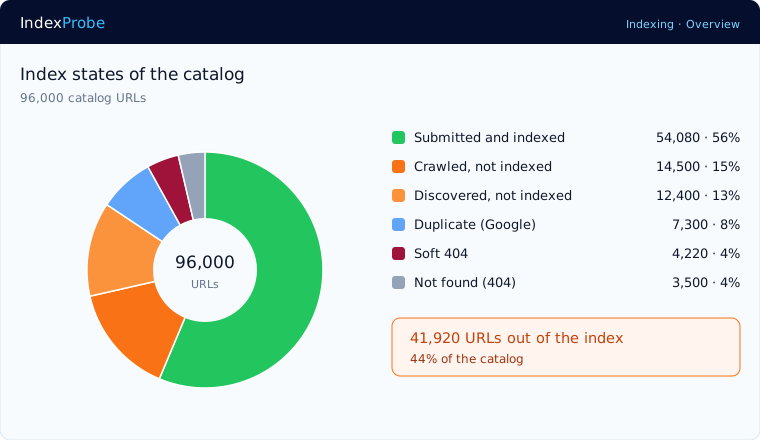
At this scale, an overall index rate says nothing: 90% can hide an entire department out of the index and thousands of filter pages inside it. The useful question is not “how many pages are indexed,” but is Google indexing the right pages?
The tooling gap
What your crawler doesn't see of your catalog
Your crawler explores the catalog as your site exposes it: it validates tags, declared canonicals, internal linking. But the final decision escapes it: which product pages Google actually kept, under which canonical, and which facets it indexed despite you. That verdict is only readable, in Search Console, one URL at a time.
Google's e-commerce documentation actually describes the traps with precision: the “load more” buttons and infinite scroll that “crawlers don't click,” the ignored URL fragments, the empty filter combinations to serve as 404s. You still need to see which of your products pay the price, reference by reference.
IndexProbe extends Search Console: the same official verdicts, fetched through the API, applied to your whole catalog and aggregated by segment, from money categories to facets.
The solution
How IndexProbe puts your catalog under control
IndexProbe inspects your list, categories, product pages, facets, brands, segments it by URL pattern, and shows for each family what Google keeps: the missing money pages, the useless pages present, and the measured effect of every fix.
The catalog segmented, family by family
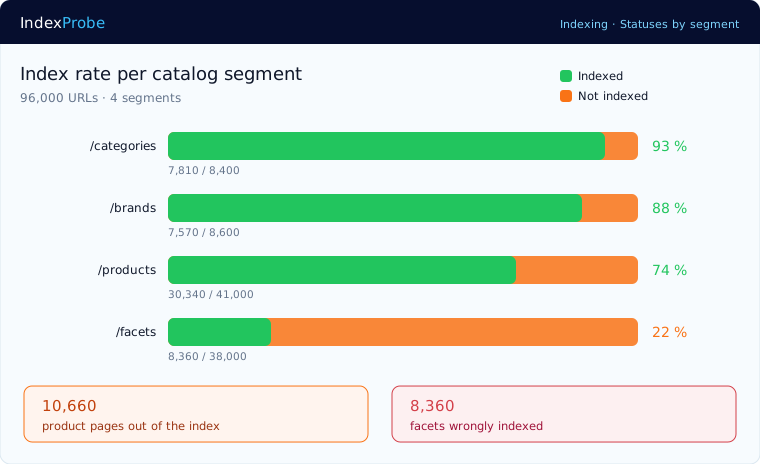
Segmentation splits the catalog by URL patterns, AI-generated or hand-defined, with editable regex rules. Each family gets its rate: categories at 93%, product pages at 74%, facets at 22%. Both problems read on the same screen: the product pages that are missing, and the facets that shouldn't be there.
The product pages Google has never seen
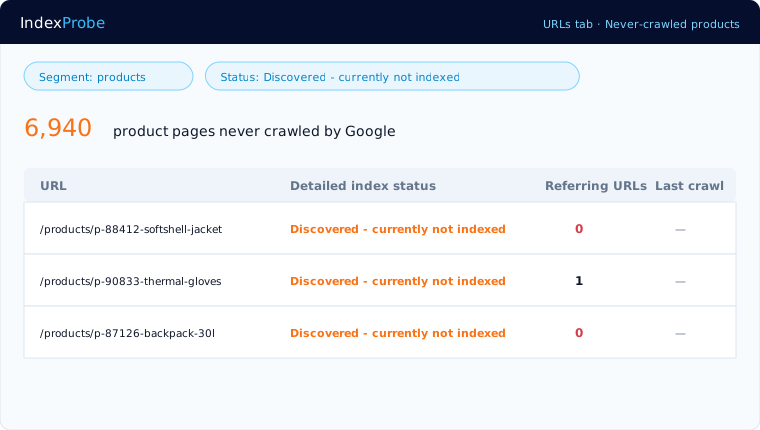
The “Discovered - currently not indexed” and “URL is unknown to Google” statuses concentrate on deep products: the ones pagination or infinite scroll hide from crawlers, and internal linking doesn't reach. The Referring URLs column shows under-linked product pages, at zero or one incoming link: the cause is often right there.
Out-of-stock and variants, the false friends of the 200
An out-of-stock product whose page stays online but emptied answers 200 on the server side and ends up a Soft 404 on Google's side. A size or color variant can see Google select a different canonical than the one you declared. Both read column by column: official status, selected canonical, declared canonical.
Over-indexing, controlled and measured
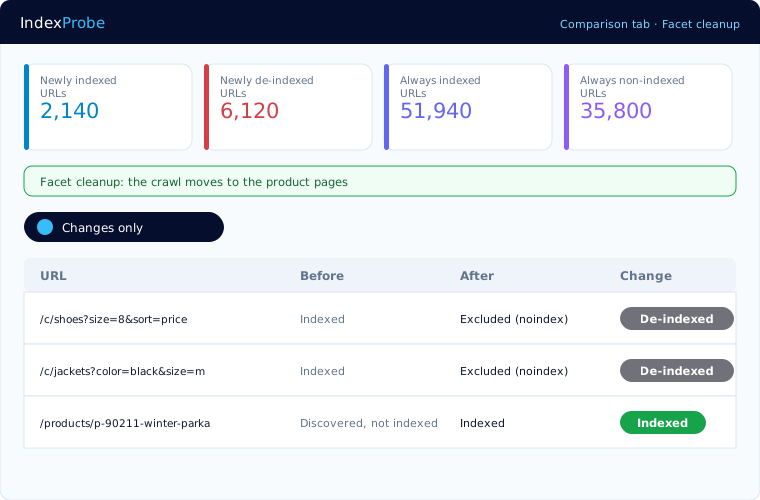
Thousands of indexed facets are not a sign of health: they dilute the crawl and clutter the index. Spot them by segment, set your noindex or robots.txt rules, then re-run the analysis: the Comparison view quantifies the shift, facets out, crawl redirected to the product pages.
Who it serves
Who this control serves
Catalog control serves from the daily grind to the boardroom, with the same question at every level: what is the catalog worth in the index, today?
E-commerce SEO managers
Arbitrate internal linking, facet cleanup, and product page enrichment on per-segment measurements, not intuitions. Every project gets its before/after.
E-commerce agencies
Official data makes reports indisputable, client by client: here is what is indexed, here is what is missing, here is why.
E-commerce executives
A department out of the index is revenue that won't happen. The acceptance rate per page family reads without being an SEO expert.
Honest framing
What IndexProbe does, and does not do
IndexProbe reads the official verdicts of the Search Console API and aggregates them by catalog segment. It tests neither your filters nor your stock, and does not crawl your site: it shows what Google kept of your catalog, reference by reference.
100% official data
The same verdicts as Search Console's URL inspector, non-indexation reason included, with no scraping and no estimates.
Your lists, not a crawl
Product sitemap, CSV, paste, or import straight from Search Console, up to 100,000 URLs per analysis. IndexProbe does not discover URLs by following links.
Google's quota, handled for you
Official inspection is capped at 2,000 URLs per day per property, but IndexProbe gets you past that limit. First through the accelerated inspection mode: pages with recent impressions or whose indexing was recently confirmed are counted without consuming that quota, through an API with a separate quota. Then through multi-property aggregation: the quota applies per property, and IndexProbe aggregates the projects of a single domain — with 10 prefix properties created in your Search Console, at least 20,000 URLs are processed every day — more than 140,000 distinct URLs in a week — and often far more thanks to the accelerated mode. At Agency-plan scale, 30 projects × 2,000 URLs per day open up to 60,000 daily inspections — potentially 1.8 million distinct URLs a month, before the accelerated mode even kicks in. Whatever remains spreads automatically over the following days.
Not every exclusion is a problem
A variant properly canonicalized to its main product page is a legitimate exclusion. IndexProbe helps you tell normal consolidations from real losses, instead of alarming you with a raw list.
FAQ
Frequently asked questions
Why are some of my product pages not indexed?
The most frequent causes read in the official reason: never crawled (depth, insufficient internal linking, crawl priority), crawled then discarded (similarity between pages, content judged too thin), or canonicalized to a variant. Each product page carries its reason, which points the fix.
Filter pages are indexed instead of my product pages, is that serious?
It is the sign of over-indexing: these pages dilute the crawl and can capture indexing in place of the pages you want. Google's documentation recommends blocking their crawling. Spot them by segment, fix, then measure the shift with the Comparison view.
What happens to my out-of-stock products in Google?
A page emptied of its content but still online often ends up a Soft 404: excluded from the index despite its 200 code. Three deliberate choices: a clean 404 or 410, a redirect to a replacement product, or enriching the page. The per-page status shows what Google decided for each one.
How does Google handle my product variants?
Google picks one canonical per group of variants, and it is not always the one you declared. The declared-canonical and selected-canonical columns, with the difference badge, show in one filter the variants where Google did not follow your instruction.
My catalog has 80,000 references and the quota is 2,000 per day?
Analyses spread automatically over several days, the accelerated inspection mode spares the quota for pages with recent impressions or whose indexing was recently confirmed, and prefix properties multiply the capacity: with 10 properties created in your Search Console, at least 20,000 URLs are processed every day.
How do I track my seasonal pages?
Put them under watch before the season: a recurring analysis on the list of pages involved, and the Comparison view shows their rise into the index, then their behavior over successive runs. You know before the peak whether Google is ready.
Resources
Go further
Your catalog, reference by reference
Connect your Search Console, import your catalog, segment it. You will know what Google keeps, and what it discards.
Start the free 10-day trial