Migration verification · Official GSC API
SEO migration: verify what Google actually reindexed
Your redirects can be flawless on the server side while the migration fails on Google's side. IndexProbe reads, URL by URL, what Google actually recrawled, reindexed, and selected as canonical, during the weeks when the migration is decided.
The problem
A migration is not validated by redirects, but in the index
A migration that succeeds on the server side can still fail on Google's side: redirects that respond correctly guarantee neither the reindexation of the new URLs, nor the removal of the old ones, nor the transfer of canonicals. Google's documentation talks about several weeks of rediscovery, with no fixed schedule. Everything is decided during those weeks.
The most common migration failures are silent. New URLs that Google has discovered but is not crawling yet. Old URLs still sitting in the index months after the switch. A canonical that Google keeps on the old address because a redirect was served as temporary instead of permanent. A staging noindex or robots.txt shipped to production, the mistake Google's documentation lists first. A spike of 404s on URLs the redirect plan missed.
Google warns that visibility “may fluctuate temporarily during the move” and that this is normal. But the line between normal fluctuation and real loss cannot be seen in an aggregate traffic curve: it is read page by page, in the index. Traffic, for its part, gives its verdict weeks late.
The tooling gap
What your migration tools don't show
Every reference checklist recommends watching crawl and indexing after the switch. Their tooling, however, looks elsewhere: crawlers test your redirects as your server sends them, position tracking and analytics measure effects that arrive late. What Googlebot actually does with your URLs is normally only readable in server logs.
It is Google's literal instruction for monitoring an infrastructure move: check “the server logs of both infrastructures.” In the middle of a migration, few teams have clean log collection on both the old and the new platform at once.
IndexProbe takes the problem from the other end: it extends Search Console. For every URL in your lists, the official API returns the index verdict, the reason, the canonical Google selected, and the date of its last visit. In bulk, comparable from one analysis to the next, without collecting a single log.
The solution
How IndexProbe secures your migration
IndexProbe freezes a reference state before the switch, then tracks day after day what Google recrawls and reindexes: the new URLs coming up, the old ones that must drop out, the canonicals actually selected, and the recrawl wave. All from the official API, with no log analysis.
The reference point, before the switch
Run an analysis of the old URLs before switching: import the list via sitemap, CSV, or paste, and freeze which pages are indexed, under which canonical, with which last crawl date. That is the reference state every later comparison will use. After the switch, the list re-imports in one click for each new checkpoint.
The new URLs, day after day
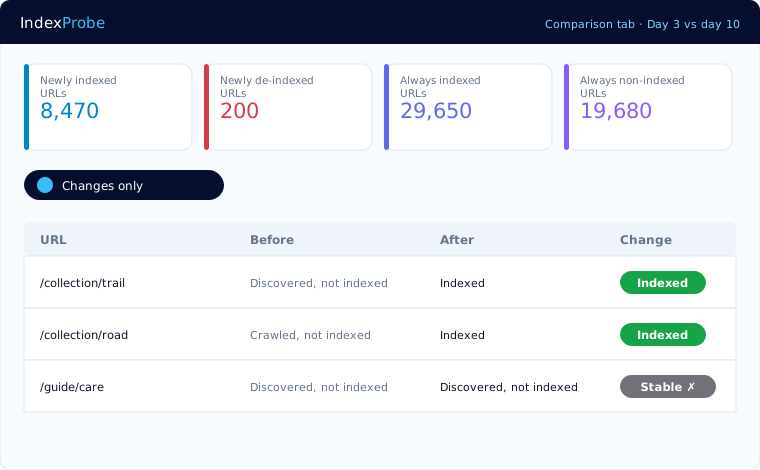
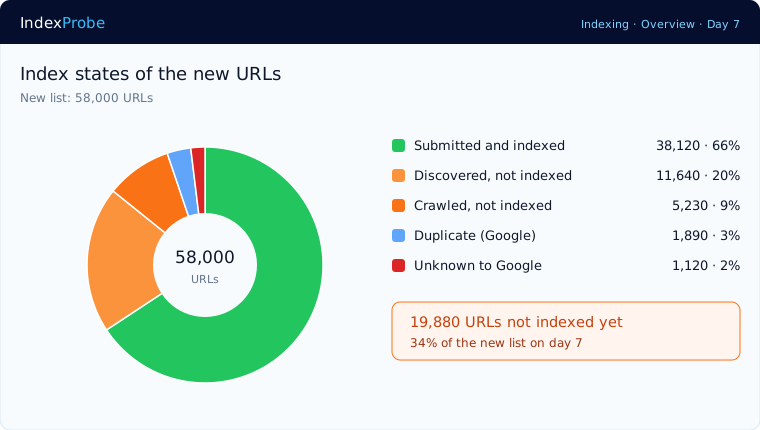
Analyze the new list on day 3, day 7, day 30, the pace the reference sources recommend. You watch every URL move through Google's pipeline: discovered, then crawled, then indexed, with the selected canonical at every step. Forgotten staging blocks, noindex or robots.txt, show up immediately in their dedicated columns.
The recrawl wave, without a single log
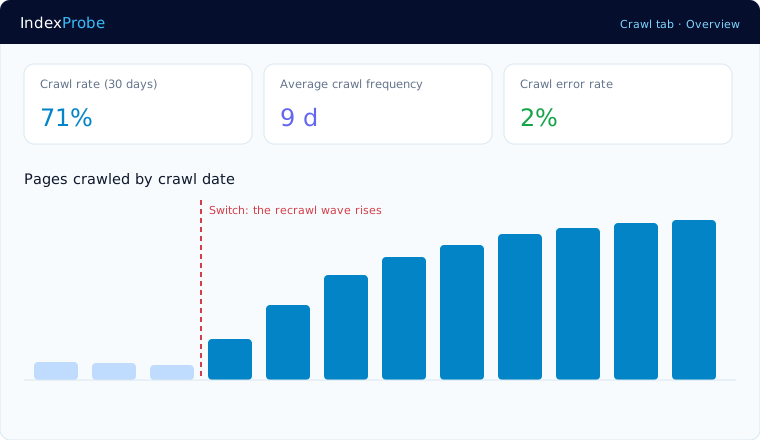
The official documentation describes a precise behavior: after a migration, Google crawls the new site “more heavily than usual”; after an infrastructure change, the crawl rate first dips, then climbs back. The pages-crawled-by-date curve makes the recrawl wave visible on your own URLs. The 30-day crawl rate, the average frequency, and the HTTP codes served to Googlebot complete the picture, overall and by segment.
The old URLs under control
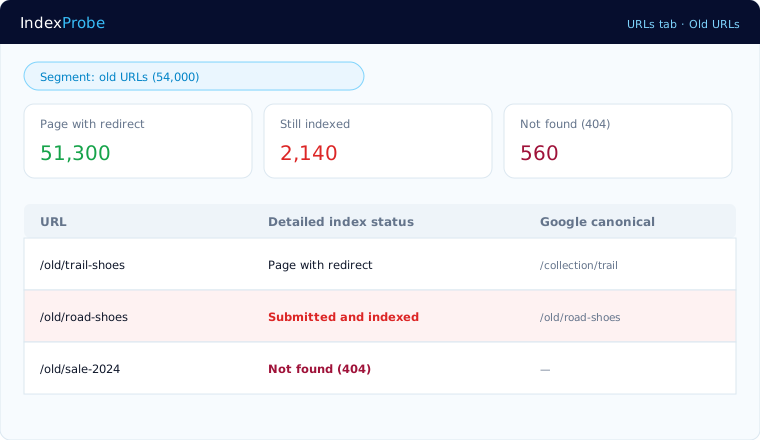
The expected status of an old URL is “Page with redirect,” and Google's success signal is unambiguous: the number of old URLs still indexed must trend to zero. The table filters them in one click. And the selected canonical reveals the most treacherous trap: a permanent redirect transfers the canonical to the target, while a redirect read as temporary keeps the old URL in the results. If an old address stays canonical, you see it here, not in your server logs. Keep your redirects for at least a year, as Google recommends.
Who it serves
Who this verification serves
Migration verification serves everyone whose name is on the switch: the consultant steering it, the agency answering for it to the client, the in-house team rebuilding its platform. In all three cases the daily question is the same: what is Google doing with the switch, today?
SEO consultant on a migration project
The reference state, dated checkpoints, and official statuses document every step of the engagement. You catch the misread redirect before it costs rankings.
Agencies
Official API data makes reports indisputable: here is what Google had indexed before, here is where reindexation stands today, here is what is stuck and why.
In-house teams
Redesign, CMS change, or new hosting: follow the switch from a single table instead of inspecting URLs one by one between crisis meetings.
Honest framing
What IndexProbe does, and does not do
IndexProbe reads the official verdicts of the Search Console API: index status, reason, the canonical Google selected, the date of Googlebot's last visit, HTTP codes served. It does not test your redirects on the server side and does not replace your migration plan: it shows you what Google concluded from it.
100% official data
The same verdicts as Search Console's URL inspector, applied to your whole list, with no scraping and no estimates.
Your lists, not a crawl
The old list and the new one, imported via sitemap, CSV, paste, or straight from Search Console. IndexProbe does not discover URLs by following links: it verifies the ones you hand it.
Google's quota, handled for you
Official inspection is capped at 2,000 URLs per day per property, but IndexProbe gets you past that limit. First through the accelerated inspection mode: pages with recent impressions or whose indexing was recently confirmed are counted without consuming that quota, through an API with a separate quota. Then through multi-property aggregation: the quota applies per property, and IndexProbe aggregates the projects of a single domain — with 10 prefix properties created in your Search Console, at least 20,000 URLs are processed every day — more than 140,000 distinct URLs in a week — and often far more thanks to the accelerated mode. At Agency-plan scale, 30 projects × 2,000 URLs per day open up to 60,000 daily inspections — potentially 1.8 million distinct URLs a month, before the accelerated mode even kicks in. Whatever remains spreads automatically over the following days.
Domain change: two properties
The old and the new Search Console properties each have their own quota. One IndexProbe project on each tracks both sides of the switch in parallel.
FAQ
Frequently asked questions
When should I run the first analysis?
Before the switch. The reference analysis freezes the starting state: which URLs are indexed, under which canonical, with which last crawl date. Without that starting point, there is no way to measure what the migration actually changed.
Does IndexProbe test my redirects?
Not on the server side: that job belongs to your crawler before the switch. IndexProbe shows the result that matters: the “Page with redirect” status and the canonical Google selected, meaning your redirects as Google interpreted them. A redirect read as temporary keeps the old URL in the results, and that shows up immediately.
How long does Google take to reindex after a migration?
Google announces no schedule: its documentation mentions a few weeks for a small or medium site, more for large ones. Rather than guessing, measure: checkpoints on day 3, day 7, and day 30 show the real progression, URL by URL.
How do I know whether Googlebot has visited my new URLs?
Every URL carries the date of its last visit, and the pages-crawled-by-date curve shows the recrawl wave rising. A dip in crawl rate right after the switch, followed by a climb, matches the behavior Google describes as normal.
I'm changing domains: how should I set things up?
Declare the move with Search Console's Change of Address tool, and keep both properties: the old and the new each have their own inspection quota. One IndexProbe project on each tracks the old URLs dropping out on one side and the new ones rising on the other.
What about old URLs still indexed?
At first, it is normal: Google replaces progressively. If they persist, check three things: that the redirect is truly permanent (301 or 308, not 302), that it reaches its target in three hops at most, and that the canonical Google selected points to the new address. And keep your redirects for at least a year.
Resources
Go further
Secure your next migration
Connect your Search Console, freeze the reference state, and follow reindexation day after day. You will know what Google kept, page by page.
Start the free 10-day trial