Drop diagnosis · Official GSC API
Organic traffic drop: rule out the indexing cause first
When traffic drops, the list of suspects is long: core update, competitors, seasonality, technical issues. Only one cause is binary: a page that left the index cannot receive a single click. IndexProbe checks that one in bulk, in a single analysis.
The problem
A traffic drop has many suspects, only one is binary
Google sorts traffic drops into four curve shapes: steep drop, seasonal wave, gradual erosion, reporting anomaly. Behind the steep drop, its documentation cites algorithm updates, but also errors that “prevent Google from crawling, indexing, or serving your pages.” The former get debated for weeks; the latter can be established in a single analysis.
The dominant reflex is to blame the latest core update and wait. Meanwhile, the simplest hypothesis goes unchecked: strategic pages may have left the index. That exit is silent: Search Console sends no alert when a page moves from “Submitted and indexed” to “Crawled - currently not indexed,” nor when a batch of pages turns into Soft 404s.
The stake is triage. A ranking loss takes weeks of work: content, links, search intent. A deindexation is often fixed in days, once the reason is known. Before opening the ranking project, one question to settle: are the pages that were losing traffic still in the index?
The tooling gap
What Search Console shows, and what it doesn't
The official diagnostic method starts from the Performance report: compare periods, filter by search type, device, country, page. That report shows where traffic is dropping. It doesn't say why: for a page's index verdict, the documentation points to the URL inspection tool, one URL at a time.
The Pages report, for its part, aggregates: it counts indexed and non-indexed pages site-wide, without telling you whether the forty pages that carried your traffic are among them. Between the global aggregate and the one-by-one inspection, the intermediate scale is missing: the official verdict, page by page, on the precise list of pages that fell off.
IndexProbe fills that scale: import the list of declining pages (Search Console export, CSV, sitemap), and get each one's official API verdict: status, reason, selected canonical, date of Googlebot's last visit.
The solution
How IndexProbe triages your traffic drop
The analysis answers three questions, in order: which pages left the index, why, and since when. Then it watches what comes next.
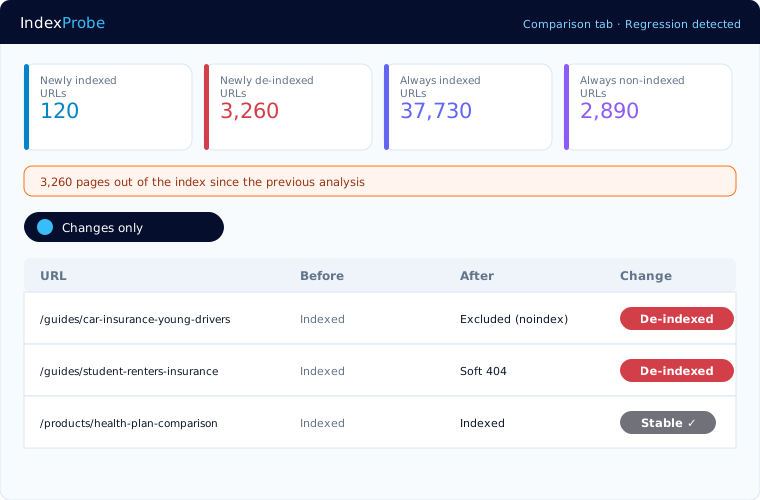
Regression detection, at the head of the analysis
The accelerated inspection mode crosses your Search Analytics data: a page that used to receive clicks but no longer records any recent impression is a probable index exit. Those suspects are inspected first: the verdict lands within the first hours of the analysis, not on the last day.
The reason, which decides the action plan
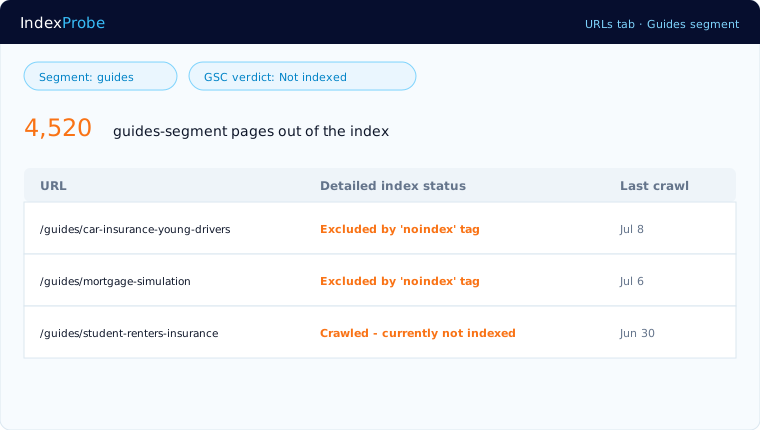
“Crawled - currently not indexed,” Soft 404, canonical assigned to another page, a noindex tag inherited from a release: among the most frequent exit reasons, each calls for a different fix. The page-by-page verdict keeps you from treating a canonical problem as a content problem.
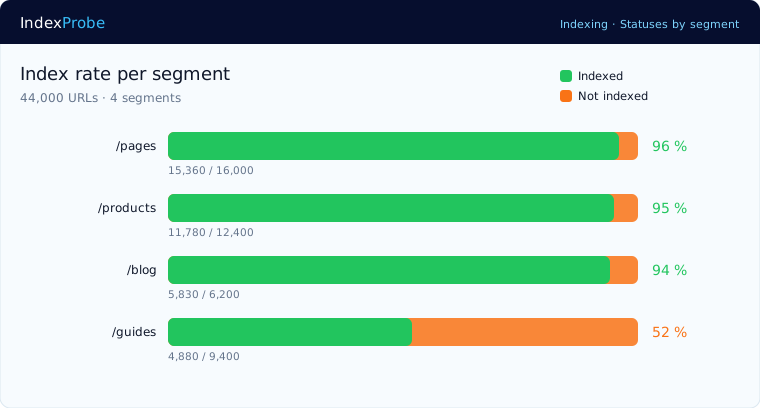
The drop, located by segment
Segmentation by URL pattern shows whether the damage is diffuse or concentrated: a template that slipped, an entire category, a directory inherited from a migration. A drop concentrated on one family of pages immediately points the investigation.
The regression dated, the recovery proven
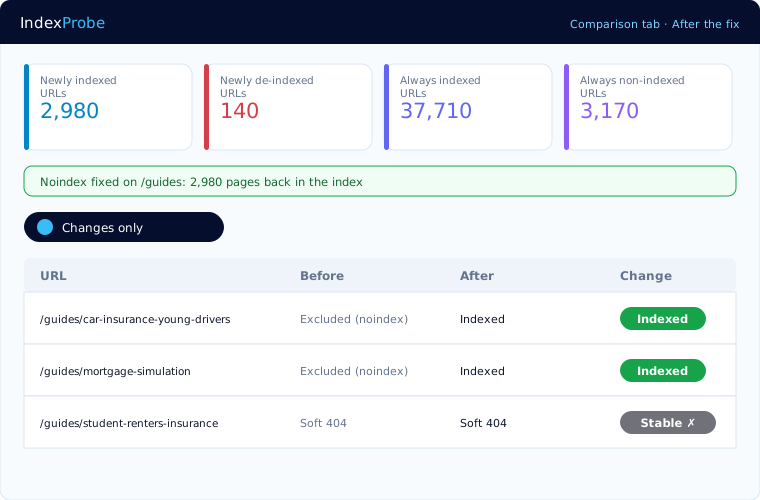
The Comparison view quantifies the damage between two analyses and bounds it in time: pages out, pages back, pages stable. After the fix, the same view proves the recovery, page by page. And recurring monitoring alerts you at the next regression, before the drop shows in your traffic.
Who it serves
Who this triage saves weeks for
The same question presses everyone: where does the drop come from, and what should be fixed first?
In-house SEOs
Under pressure from management, rule out the indexing hypothesis in one analysis and point the project the right way, official data in hand.
SEO consultants
The first reflex of a diagnostic mission: the real index state of the pages that were losing traffic, before the content or link audit.
Agencies
The emergency audit for the client calling in a panic: official verdicts, reasons and dates, in an exportable, indisputable report.
Honest framing
What IndexProbe does, and does not do
IndexProbe reads the official verdicts of the Search Console API on the URL lists you provide. It triages what belongs to indexing; it measures neither your rankings nor your content.
100% official data
The same verdicts as Search Console's URL inspector, non-indexation reason included, with no scraping and no estimates.
Your lists, not a crawl
Search Console export, CSV, sitemap, or paste, up to 100,000 URLs per analysis. IndexProbe does not discover URLs by following links.
Google's quota, handled for you
Official inspection is capped at 2,000 URLs per day per property, but IndexProbe gets you past that limit. First through the accelerated inspection mode: pages with recent impressions or whose indexing was recently confirmed are counted without consuming that quota, through an API with a separate quota. Then through multi-property aggregation: the quota applies per property, and IndexProbe aggregates the projects of a single domain — with 10 prefix properties created in your Search Console, at least 20,000 URLs are processed every day — more than 140,000 distinct URLs in a week — and often far more thanks to the accelerated mode. At Agency-plan scale, 30 projects × 2,000 URLs per day open up to 60,000 daily inspections — potentially 1.8 million distinct URLs a month, before the accelerated mode even kicks in. Whatever remains spreads automatically over the following days.
Not every drop comes from indexing
If the analysis shows your pages indexed and recently crawled, the cause lies elsewhere: rankings, demand, new result formats. IndexProbe won't diagnose those; but the hypothesis that costs the most to check by hand will have been ruled out in one analysis, not in three weeks.
FAQ
Frequently asked questions
My traffic is dropping and I haven't changed anything, where do I start?
With triage. First check that no Google update is rolling out, then rule out the indexing cause: import the pages that were losing traffic into an analysis and read their official verdict. If they are indexed and recently crawled, point the investigation toward rankings and demand.
How do I know if pages have left the index?
The most reliable signal crosses two data points: a page that used to receive clicks but no longer records impressions is a probable exit, and the URL Inspection API verdict confirms it, reason included. That is exactly the cross-check IndexProbe automates, on the whole list.
My traffic dropped after a core update, is indexing involved?
Both can coincide. Google recommends waiting for the rollout to finish, then comparing periods in Search Console. As a rule, a core update demotes, it does not deindex: if your pages also left the index, look for a technical or quality cause, page by page, reason by reason.
Googlebot no longer visits my pages, is that a drop signal?
A wider crawl interval is not a deindexation, but a crawl that stopped months ago on strategic pages often precedes the exit. The date of Googlebot's last visit, page by page, shows where the crawl stopped; crawl frequency by segment confirms it.
My impressions are falling while my positions look stable, what should I check?
A drop in impressions concentrated on a batch of pages, while positions hold elsewhere, suggests pages removed from the index rather than a demotion: fewer pages served, fewer impressions. The list of pages with no recent impression is the analysis's starting point.
How long does it take to settle between indexing and ranking?
The time of one analysis. The accelerated mode first confirms the pages still visible in impression data, and suspected regressions are inspected first: the verdicts that decide the diagnosis land within the first hours, even on tens of thousands of URLs.
Resources
Go further
Your traffic drop, triaged in one analysis
Connect your Search Console, import the pages that fell off. You'll know which ones left the index, why, and since when.
Start the free 10-day trial