Continuous monitoring · Official GSC API
Index monitoring: know when Google drops your pages
IndexProbe re-reads the official Search Console verdict for each of your strategic pages on a regular schedule, then emails you when one of them changes status, before the drop shows up in your traffic charts.
The problem
A page can drop out of the index without warning
An indexed page can lose its place in Google's index without any clear alert reaching you: Search Console does not notify you of deindexations page by page. The problem usually surfaces in your traffic charts, days or weeks after the status actually changed.
The possible causes are many, and the most common ones share one trait: they are silent. A noindex tag shipped by mistake in a release. A canonical that Google suddenly decides to assign to another URL. A page reclassified as a Soft 404 after its content was thinned out. A run of server errors right when Googlebot came by. None of this triggers a notification: the site keeps working normally for your visitors while the page disappears from search results.
When the page in question is a category that drives revenue, a service page that generates leads, or a guide that builds your visibility, every day between the deindexation and its discovery is paid for in lost traffic.
The limits of manual checks
What Search Console cannot watch for you
Search Console's URL Inspection tool gives you Google's official verdict, but one URL at a time, on demand. The Page indexing report, for its part, cannot be filtered down to your list of pages and sends no per-URL alert. Keeping watch over your strategic pages there means re-checking everything by hand, again and again.
In practice, nobody keeps that up: inspecting fifty pages one by one every week, writing down the statuses, comparing them with last week's, starting over. The checks grow further apart, then stop, and the first alert becomes the traffic drop again.
IndexProbe does not replace Search Console: it extends it. The data is exactly what its URL inspector returns, fetched through the official API, but applied to your whole list of pages, compared from one analysis to the next, and watched over time.
The solution
How IndexProbe keeps watch
IndexProbe automatically re-runs the analysis of your URL list at the frequency you choose, compares each new result with the previous one, then sends you an email flagging indexation changes and crawl drops. You can also single out the pages whose impressions have gone quiet.
Analyses that re-run on their own
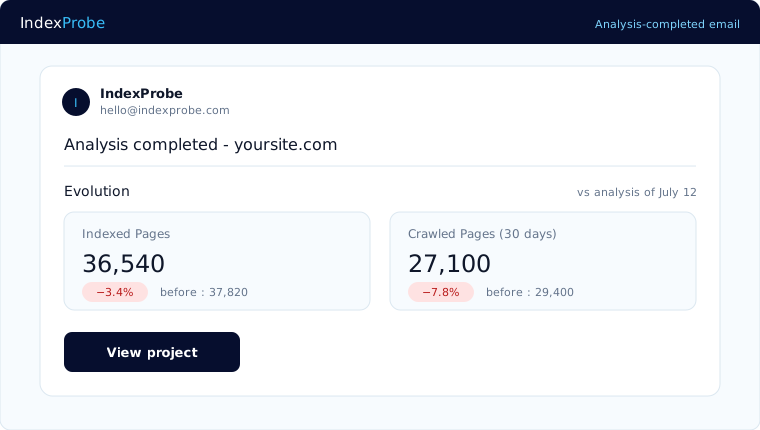
Turn on recurring analysis for a project and IndexProbe relaunches the audit one day, one week, or one month after the previous one finishes, depending on your setting. Every completed analysis sends you a summary email; every Monday, a weekly recap covers all your monitored projects. Nothing to relaunch, nothing to check manually: the information comes to you.
A before/after comparison you can read at a glance
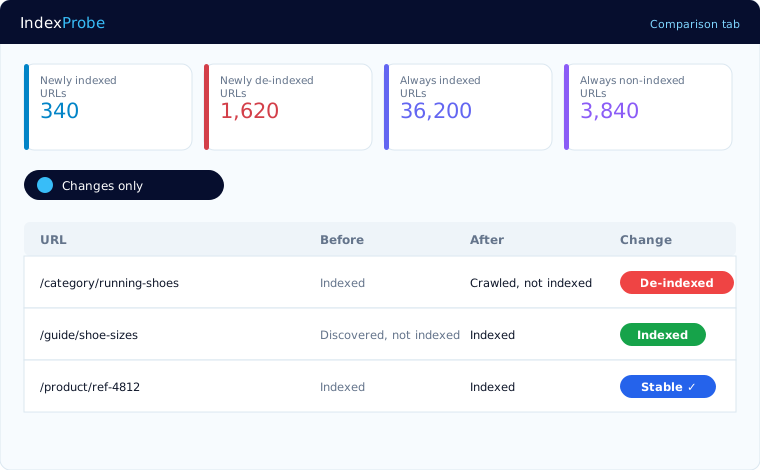
The Comparison view lines up two analyses of the same list: how many newly indexed pages, how many newly deindexed, how many stable. Every URL carries an evolution badge, and a “changes only” filter isolates what moved. You measure the effect of your fixes and the appearance of regressions in the same place.
Likely regressions inspected first
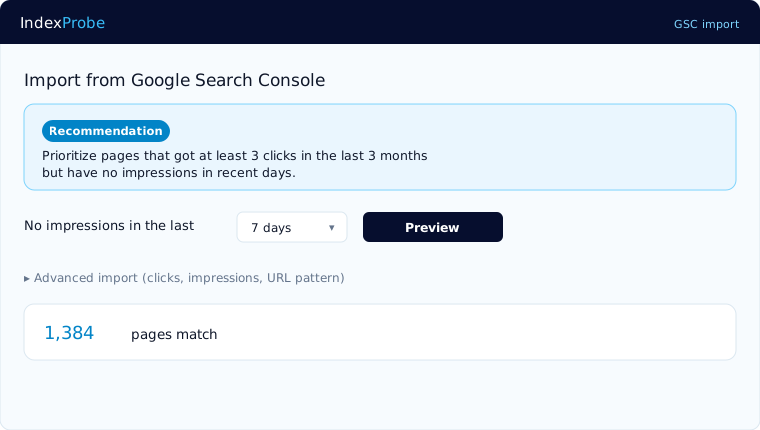
You can build your list straight from Search Console, filtered by clicks, impressions, or URL pattern. IndexProbe recommends starting with the pages that used to earn clicks but have recorded no impression for several days: that silence is often the first sign a page has left the index. The accelerated inspection mode, on by default, focuses the daily inspection quota precisely on the pages whose status is uncertain, suspected regressions first.
Who it serves
Who this monitoring serves
Index monitoring serves, first of all, anyone whose pages carry revenue or leads directly: in-house SEO teams, e-commerce managers, consultants and agencies tracking several sites. In all three cases the question is the same: are these pages still in Google's index today?
In-house SEO teams
Your business pages, landing pages, and strategic guides deserve better than a check whenever someone happens to think of it. Put them under watch and let the email tell you when to look.
E-commerce
On a catalog of several thousand references, a few deindexed product pages go unnoticed; a whole family of categories dropping out of the index shows up in sales. Monitoring by segment shows where the problem concentrates.
Consultants and agencies
IndexProbe tracks several sites and several clients in parallel, each with its own recurring analyses and its own emails. You catch the regression before the client finds it in their numbers.
Honest framing
What IndexProbe does, and does not do
IndexProbe reads the official verdicts of the Search Console API: index status, the reason a page is not indexed, the canonical Google selected, and the date of Googlebot's last visit. It does not crawl your site the way a crawler would, and it does not audit third-party sites: it analyzes the list of URLs you provide, on your own properties.
100% official data
No scraping, no estimates: the same verdicts as Search Console's URL inspector, non-indexation reason included.
Your list, not a crawl
You provide the URLs via sitemap, CSV file, or paste, or select them straight from your Search Console. From a handful of strategic pages up to your entire site.
Google's quota, handled for you
Official inspection is capped at 2,000 URLs per day per property, but IndexProbe gets you past that limit. First through the accelerated inspection mode: pages with recent impressions or whose indexing was recently confirmed are counted without consuming that quota, through an API with a separate quota. Then through multi-property aggregation: the quota applies per property, and IndexProbe aggregates the projects of a single domain — with 10 prefix properties created in your Search Console, at least 20,000 URLs are processed every day — more than 140,000 distinct URLs in a week — and often far more thanks to the accelerated mode. At Agency-plan scale, 30 projects × 2,000 URLs per day open up to 60,000 daily inspections — potentially 1.8 million distinct URLs a month, before the accelerated mode even kicks in. Whatever remains spreads automatically over the following days.
Your property, your data
IndexProbe analyzes the sites you own, manage, or are authorized to work on in Search Console.
FAQ
Frequently asked questions
How often does IndexProbe re-check my pages?
At the frequency you choose per project: the analysis re-runs automatically one day, one week, or one month after the previous one finishes. Every completed analysis sends you a summary email, and a weekly recap covers all your monitored projects every Monday.
Does IndexProbe tell me why a page dropped out of the index?
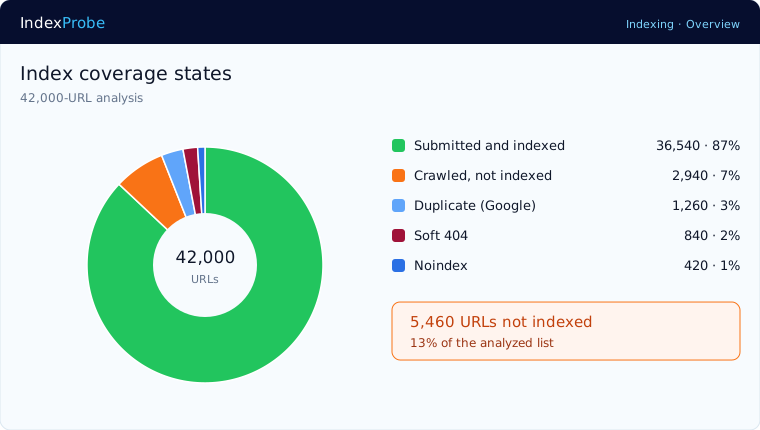
Yes. For every page you get the official reason Google recorded, whatever it is: crawled but not indexed, Soft 404, page treated as a duplicate, blocked by noindex or robots.txt, among others. You also see the canonical Google selected and the date of its last visit, which points the fix in the right direction.
How many URLs can I monitor?
Up to 100,000 URLs per analysis depending on your plan. Large lists are automatically spread over several days to respect Google's inspection quota, and the accelerated inspection mode shortens that delay considerably for pages with recent impressions or whose indexing was recently confirmed.
Does this replace Google Search Console?
No, and that is not the goal: IndexProbe requires access to your Search Console property and extends its URL inspector. Search Console remains your source for queries, clicks, and impressions; IndexProbe takes over what it does not do: bulk inspection, comparison over time, and alerts on regressions.
What should I do when a page drops out of the index?
The official reason points the way: a noindex tag gets removed, a canonical gets corrected, content judged too thin gets strengthened. Once the fix is live, run a new analysis: the Comparison view will show the page returning to the index, with the date of Googlebot's new visit.
Resources
Go further
Put your strategic pages under watch
Connect your Search Console, import your list of URLs, and let the recurring analyses keep watch. You will know before your traffic charts do.
Start the free 10-day trial