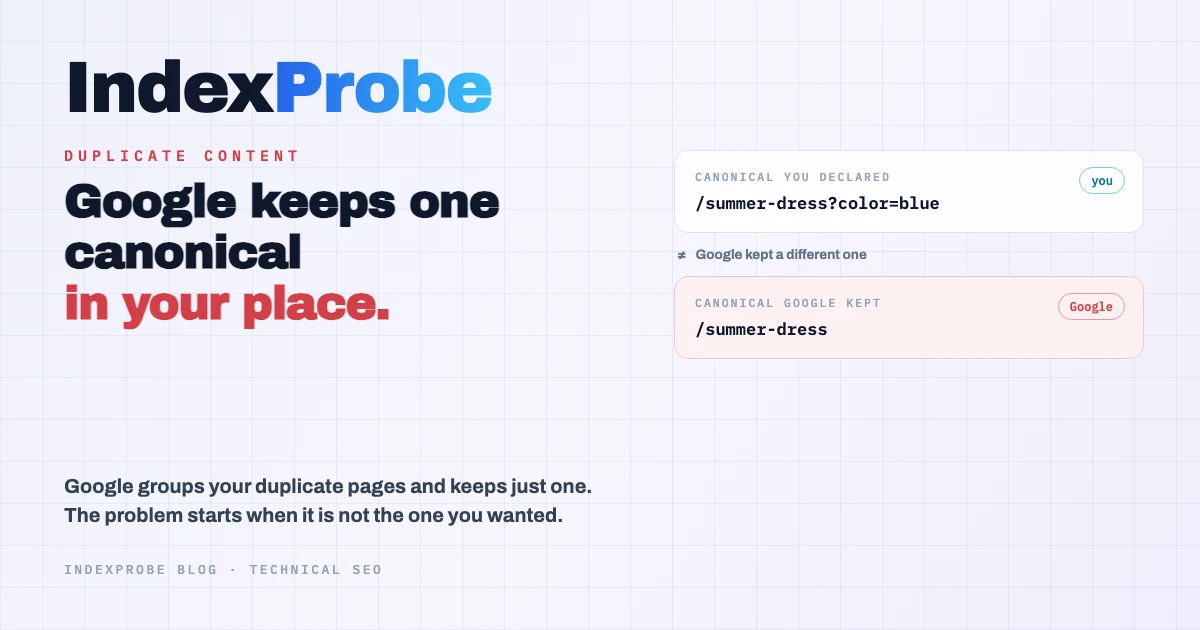
Plenty of people still believe that duplicate content triggers a Google penalty. It is a common worry, but if you open the Page Indexing report in Search Console, you will not find any penalty there. What you will find are pages Google has grouped together because they look alike, and for each group, a single page kept as the reference: the canonical.
So Google does not punish duplicate pages. It picks one as the reference and sets the others aside. That choice is where the real issue lives, because when several versions of the same page exist, nothing guarantees that the one Google keeps is the one you would have picked.
What Duplicate Content Is, and What Google Actually Does With It
Duplicate content is the same or very similar text reachable from more than one URL, whether on a single site or across sites. Google does not penalize it. It groups those pages and keeps only one in its index, the canonical. The trouble starts only when the page it keeps is not the one you meant to rank.
This behaviour has a name in Google's documentation: canonicalization. When several URLs serve the same content, Google does not pit them against each other; instead, it works to consolidate their signals into a single preferred URL. The links a page has earned, how often Googlebot visits it, how old it is: all of that is transferred to the version Google treats as primary. The others stay known to Google, but they are not indexed on their own.
Two consequences follow, and they are the ones that matter for SEO. First, your duplicate pages do not compete against each other in the results, since only one of them appears. Second, the choice of that page is Google's to make, based on the signals you send. When those signals are weak or contradict each other, its decision can easily differ from yours.
No, There Is No Duplicate Content Penalty
There is no Google penalty for duplicate content. In Google's spam policies, updated on May 15, 2026, duplicate content is not one of the penalized categories. What Google acts on is copying other sites to manipulate rankings, or producing content at scale for the same purpose, not the simple fact of two URLs showing the same page.
This distinction has held for years, yet it keeps getting lost. Most articles on the topic still write that Google "penalizes" sites that duplicate, or that some threshold triggers a sanction. You will read that past 10 percent duplicate content, or at 30 percent, a site gets penalized. Those numbers come from no official source, and for good reason: Google does not count a duplication percentage before deciding to punish a site.
Another claim comes up a lot and deserves correcting, because it describes the opposite of what happens. People often say duplicate content "dilutes" link value across the copies. Google actually does the reverse: it consolidates the signals from the different versions rather than scattering them. The risk is not that your value spreads thin, but that Google concentrates it on a page you did not choose.
So Why Is It an Issue? The Canonical Google Keeps
Duplicate content becomes an SEO issue at the exact point where Google keeps a canonical other than the one you intended. Your internal links, the ranking you have already earned, and the page's history all transfer to a URL you did not choose, while yours stays out of the index. The traffic does not land where you expected.
There is one place to see that decision: Search Console's URL Inspection tool. For each address, it shows two fields side by side: the canonical you declared in the page's code, and the canonical Google actually kept. When the two do not match, Google judged your signals too weak and made the call for you. This gap is invisible on the site itself, yet it explains most cases where an important page refuses to show up. We covered how this tool works in our guide to the URL Inspection tool.
Google's documentation also notes that canonicalization signals do not all carry the same weight. A redirect or a rel="canonical" tag counts for a lot, while a mere presence in the sitemap counts for little. When two versions of a page send contradictory signals, Google ends up deciding on its own. The canonical you think you have set is only honoured if nothing elsewhere on the site contradicts it.
💡 URL Inspection shows the canonical Google kept, but one address at a time. Across a full catalog, checking by hand which pages Google set aside in favour of another is simply not realistic. See how to check your canonicals in bulk with our Google index checker
The Duplicate-Family Statuses in Search Console
In the Page Indexing report, duplicate pages fall under several coverage statuses. The most common ones in this family each describe a different situation, with its own cause and its own fix. Confusing them usually leads to fixing the wrong problem.
Three of these statuses come up far more often than the rest. The first, "Duplicate without user-selected canonical", means you declared no canonical, so Google chose one itself. The second, "Duplicate, Google chose different canonical than user", is the most confusing, because you did declare a canonical, but Google kept a different one. The third, "Alternate page with proper canonical tag", describes a page that points correctly to its canonical and, most of the time, needs no action.
Reading the right label changes how you respond straight away. The first tells you to declare a canonical where there was none. The second tells you to strengthen the signals of the page you want to win, since the competing version's signals currently prevail. The third asks for nothing. These three are not the only statuses in the duplicate family, but they cover the large majority of cases you meet on a real site. Our directory of indexing statuses covers each of the others in depth.
Where Duplicates Come From, and What They Cost
Duplicates rarely come from actual copy-pasting. They come mostly from how a site builds its addresses: tracking parameters appended to URLs, versions with and without a trailing slash, http and https living side by side, pagination, and the sorting and filtering that create an address for every combination.
On an online store, one product reachable from several collections, or a faceted navigation that multiplies addresses, is enough to generate hundreds of duplicates without a single sentence being copied. The content stays unique; only the addresses multiply.
These duplicates cost you on two fronts. They take up part of your crawl budget, since Googlebot spends time exploring variants that will add nothing to the index instead of spending it on your useful pages. And they blur your signals before Google even consolidates: when internal links split across five versions of the same product page rather than pointing to one, Google gets a muddled message about which page to keep.
At this point, the question is no longer whether to worry, but which of your pages are affected and, for each of them, which canonical Google kept. And that cannot be checked page by page.
Spotting the Affected Pages at Scale
Spotting duplicates across a whole site means reading Google's verdict for each URL, not comparing texts two by two. A content comparison tool tells you two pages look alike, but it does not tell you which canonical Google kept, or which pages it set aside in favour of another. That information lives only in the official coverage statuses.
This is exactly what Search Console makes awkward once you leave single-URL inspection behind. The indexing report exists, but you cannot filter it down to the list of addresses you care about, and the inspection tool handles one address at a time. For a full catalog, checking every page by hand is out of reach.
This is the problem IndexProbe solves: it inspects the list of URLs you provide, through the official Search Console API, and returns for each one its coverage status, the canonical you declared, and the canonical Google kept. In a single analysis, you get the distribution of duplicate-family statuses across your whole scope, along with the exact list of pages where Google preferred a canonical other than yours. Where URL Inspection answers one address at a time, the reading here covers the whole set, and stays filterable and segmentable by page type.
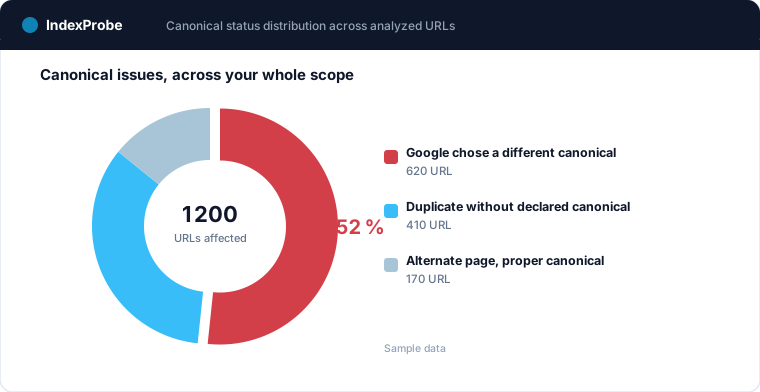
Segmenting that reading by page type usually surfaces where the problem comes from. Product pages split into variants concentrate the cases where Google chose another canonical, while filter pages concentrate the ones with no declared canonical. The imbalance then reads as a template flaw you fix once, rather than a string of isolated incidents.
Fix It, Then Confirm Google Followed
Fixing a duplicate means giving Google a clear signal about which page to keep: a consistent rel="canonical" tag across every variant, a 301 redirect when a version should disappear, and internal links that all point to the same address. The documentation ranks these signals by weight, but overall consistency is what works best: everything, from the sitemap to internal links, should point to the same canonical.
Then comes a step most guides skip: making sure Google actually took the fix into account. A canonical change has no immediate effect. Google first has to recrawl the page, reread your signals, and update its decision, which can take from a few days to several weeks. Throughout that time, the indexing report keeps showing the old status, and you have no way to know whether your fix registered.
The only way to confirm it is to re-inspect the same URLs later and compare the two readings. That is exactly what a comparison view between two analyses provides: it highlights the pages whose status changed, the ones where the canonical Google keeps finally matches yours, and the ones still holding out.
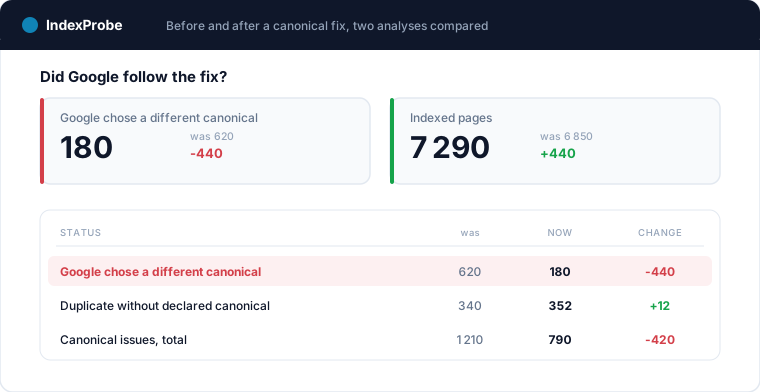
Check across all your URLs which canonical Google kept with IndexProbe, then measure the effect of your fixes from one analysis to the next.
The biggest deposit of duplicate content is the catalog: variants, facets, sort parameters. The e-commerce indexing page shows how to measure what Google actually keeps of it, segment by segment, canonicals included.
Frequently Asked Questions
Does duplicate content lead to a Google penalty?
No. Duplicate content is not one of the categories in Google's spam policies. What gets penalized is copying other sites or producing content at scale to manipulate rankings. The same content reachable from two URLs is not a violation: Google simply groups those pages and indexes only one.
Is there a duplicate content percentage threshold to stay under?
No. The numbers that circulate, such as "past 10 percent" or "at 30 percent", rest on no official source. Google does not compute a duplication ratio before deciding on an action. It handles each group of duplicate pages by consolidating their signals toward one canonical.
Are e-commerce product variants risky duplicate content?
Often yes, when each variant (size, color) has its own URL with nearly identical text. The risk is not a penalty, but that Google keeps a variant as the canonical instead of the main product page. A rel="canonical" tag from each variant to the parent page usually settles it.
Does syndicated or republished content penalize me?
No, syndication is a legitimate practice that Google explicitly recognizes. The risk is not a sanction, but that the version which ranks is the republishing site's rather than yours. A cross-domain canonical, or a clear link to the original, reduces that risk.
How long does Google take to change the canonical it keeps?
From a few days to several weeks. After a fix, Google has to recrawl the page, reread your signals, and update its decision. Until that cycle finishes, the indexing report still shows the old status. Re-inspecting the corrected URLs is the only way to confirm the change registered.
How do I check which canonical Google kept in bulk?
Search Console's URL Inspection gives the declared canonical and the kept canonical, but one address at a time. To check it across a set of URLs, you have to use the official API: that is what IndexProbe does, returning for each URL in your list its coverage status and both canonicals, filterable and comparable over time.